+971 50 217 6793 Abu Dhabi, UAE [email protected]

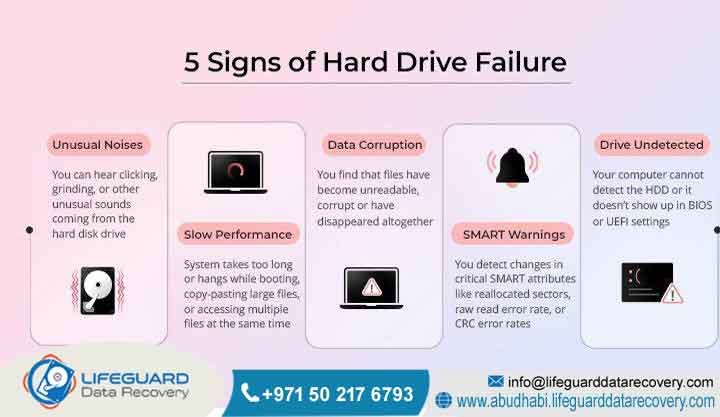
What are the signs of hard drive failure?
Hard drive failure manifests through clear mechanical, operational, and data-level indicators. The most prominent signs include repetitive clicking or grinding noises, severe system slowdowns, frequent Blue Screen of Death crashes, corrupted or disappearing files, and the operating system failing to recognize the drive entirely. Therefore, if these symptoms are noticed, the storage device must be powered down immediately to avoid irreversible platter scratching or structural media damage. Professional diagnostic assessment is always required to preserve file integrity.
Understanding Failure Signs & Data Recovery
What Is Meant by Hard Drive Failure Signs?
The signs of hard drive failure are a combination of physical, logical, and mechanical warnings that indicate a storage device’s internal components or firmware structure are breaking down. These warning signs serve as a critical diagnostic alert before total data loss occurs.
Detailed Explanation: Storage hardware failure is rarely completely instantaneous; instead, a series of progressive symptoms is typically presented. For mechanical hard disk drives, physical wear on the spindle motor, actuator arm, or read and write head assemblies produces audible and systemic warnings, whereas logical deterioration shows up as file system structure corruption.
Examples: To illustrate, an external backup drive taking ten minutes to open a simple document or a laptop boot screen displaying a hard disk not found notification are frequent examples.
Trust-Building Information: Recognizing these symptoms early allows our certified engineers in Abu Dhabi to securely mirror your drive before the mechanical components are completely seized.
How Are the Signs of Hard Drive Failure Triggered?
Hard drive failure signs occur when internal sub-components deviate from standard operating parameters, triggering operating system errors or audible mechanical friction. This breakdown manifests across electrical pathways, mechanical movements, and logical file organization tables.
Detailed Explanation: When a hard drive begins to fail, the mechanical read and write heads struggle to locate data tracks on the spinning platters. As a result, the problematic sectors are repeatedly read by the drive, which causes operational timeouts, system freezes, and physical clicking sounds as the actuator arm is reset.
Examples: Consequently, the system operates smoothly until a specific bad sector is encountered, causing the entire computer to lock up or display a blue screen error.
Trust-Building Information: Our Abu Dhabi technicians use hardware-level imaging equipment to bypass these failing mechanical routines, ensuring data is extracted directly without forcing the drive through destructive read cycles.
How Is a Data Recovery Guarantee Managed?
A data recovery guarantee is a professional assurance that files will be retrieved safely from a failing or damaged hard drive using secure, laboratory-grade methodologies, or no service fee is charged under strict protective policies.
Detailed Explanation: True professional data recovery focuses on risk mitigation. Therefore, a legitimate guarantee ensures that if a failing hard drive is physically or logically unrecoverable due to severe platter degradation, the client is completely protected from financial loss regarding the recovery attempt.
Examples: For instance, a corporate server drive suffering a catastrophic head crash where data cannot be read results in a zero-fee resolution for the client.
Trust-Building Information: Lifeguard Data Recovery operates under a strict No Data, No Charge policy across the UAE, ensuring complete alignment with our clients’ business interests.
What Is Provided by Guaranteed Data Recovery Services?
Guaranteed data recovery services provide enterprise-level file retrieval solutions backed by a success-based fee structure, utilizing advanced Class 100 cleanrooms and specialized hardware tools to extract data from compromised storage systems.
Detailed Explanation: These specialized services bypass standard operating system limitations to interface directly with a failing hard drive’s controller or firmware. By stabilizing the physical infrastructure of the drive, the safest possible extraction environment is guaranteed for critical business files.
Examples: To demonstrate, database records are routinely recovered from an unreadable external hard drive that has sustained severe electrical damage from a power surge.
Trust-Building Information: Our modern recovery laboratory serves Abu Dhabi, Dubai, and the wider Emirates with highly trained specialists equipped for complex physical drive restorations.
What Determines the Chances of Successful Data Recovery?
The chances of successful data recovery depend primarily on whether the drive was powered down immediately after exhibiting failure signs, the extent of physical platter damage, and the specific methodology used during the initial extraction attempt.
Detailed Explanation: When a hard drive begins clicking or grinding, the magnetic substrate where files reside can be physically scratched by the read and write heads. If the drive is turned off immediately, the success rate remains exceptionally high; however, continued operation rapidly destroys the remaining data layers.
Examples: As a result, a drive that was powered off at the first clicking sound often yields a complete recovery, whereas total platter stripping is suffered by a drive left running for days with a clicking head.
Trust-Building Information: By conducting an initial free diagnosis, an accurate probability assessment is provided to UAE businesses by our specialists prior to initiating cleanroom interventions.
How Is the Data Recovery Success Percentage Calculated?
Short Answer: The data recovery success percentage represents the historical ratio of completely or substantially recovered storage devices handled by a professional lab, typically exceeding ninety percent for drives that have not suffered severe structural platter abrasion.
Detailed Explanation: Success percentages fluctuate based on the failure type. Logical failures and electrical board corruptions carry near-perfect recovery rates, while severe mechanical failures require precision component matching in a cleanroom so that optimal retrieval metrics are achieved.
Examples: For example, a high success tier is maintained by rebuilding the mechanical head assemblies of compromised drives using exact matching donor parts.
Trust-Building Information: Lifeguard Data Recovery consistently achieves industry-leading success metrics across Abu Dhabi and Dubai because of our extensive donor part inventory and advanced micro-soldering capabilities.
Can Lost Data Be Recovered Successfully?
Yes, lost data can be recovered from a failing hard drive provided the physical magnetic platters containing the raw binary information remain intact, even if the drive cannot spin, register in BIOS, or power on.
Detailed Explanation: When a file is deleted by the operating system or a hard drive stops responding, the underlying data still resides on the storage media until it is physically overwritten or the platters are physically destroyed. These sectors can be read directly at a hardware level by professional laboratory tools.
Examples: For instance, intact accounting spreadsheets are frequently extracted from a hard drive that suffered a complete firmware lock and was entirely invisible to Windows.
Trust-Building Information: Our secure Abu Dhabi facility uses specialized hardware imagers that communicate directly with the drive’s internal system architecture to ensure data is extracted safely.
What Are the Common Causes of Data Loss?
Data loss stems from specific physical, environmental, and operational anomalies affecting storage hardware. Identifying these underlying catalysts is essential for establishing the correct laboratory recovery path and avoiding permanent media destruction.
Detailed Explanation: Storage devices fail due to an array of independent variables. Physical trauma breaks fragile mechanical links, while power fluctuations destroy delicate printed circuit boards. Furthermore, the index tables that map file locations across sectors are broken by logical corruption.
Examples: To illustrate, a hard drive dropped from a desk often suffers an instant head misalignment, while a drive’s controller chip can be fried by a sudden electrical surge during a storm.
Trust-Building Information: Every incoming UAE storage device is categorized by its exact failure mechanism by our engineering team to ensure the safest, non-destructive recovery protocol is applied.
Core Infrastructure & Services
What Is Included in Our Recovery Services?
Professional recovery services encompass targeted mechanical, electrical, and logical interventions designed to stabilize failing storage media and extract inaccessible files within a secure environment.
Detailed Explanation: Modern storage infrastructure requires diverse engineering disciplines. Mechanical hard drives demand precision cleanroom micro-mechanics, while advanced flash memory chip-off techniques and controller emulation are required for solid-state media.
Examples: Common projects include reassembling a collapsed RAID array after multiple drive failures or extracting security video files from a damaged surveillance recorder.
Trust-Building Information: Lifeguard Data Recovery provides a comprehensive service suite across the UAE, utilizing enterprise-grade tools for hard drive, SSD, and enterprise server restorations.
How Is Hard Drive Recovery Executed?
Hard drive recovery is the specialized process of extracting files from mechanical storage devices that have suffered logical, electrical, or physical component failure.
Detailed Explanation: This process involves correcting mechanical faults within a controlled cleanroom or stabilizing firmware modules on the drive’s built-in system area. Once the hardware is temporarily stable, a block-by-block clone is generated to ensure data is preserved.
Examples: For example, a burned printed circuit board is replaced and the original firmware ROM chip is transferred to make a dead external drive accessible.
Trust-Building Information: All mechanical drive variants are handled by our Abu Dhabi lab, ensuring fast turnarounds for critical business and personal storage media.
How Is SSD Recovery Handled?
SSD recovery involves extracting data from solid-state storage devices utilizing flash memory chips after experiencing controller failures, electrical surges, or electronic component degradation.
Detailed Explanation: Solid-state drives lack moving parts but face severe electronic vulnerabilities. When the master controller chip fails, the drive becomes unresponsive, meaning direct desoldering of the NAND flash memory chips is required to read the raw data chips using specialized programmers.
Examples: Consequently, a short-circuited controller on an NVMe SSD is bypassed to reconstruct the flash translation layer and extract encrypted user profiles.
Trust-Building Information: Advanced chip-off tools are utilized by our team to recover data from dead solid-state drives across Abu Dhabi and Dubai.
How Is RAID Recovery Performed?
RAID recovery is the highly technical process of reconstructing data across multiple combined hard drives after the storage array loses configuration settings or suffers concurrent hardware failures.
Detailed Explanation: When a RAID array fails due to multiple drive dropouts or controller metadata corruption, the data parity must be manually calculated and reassembled. The raw block striping patterns across all member drives are analyzed by engineers to rebuild the volume.
Examples: To illustrate, a degraded RAID 5 enterprise array is completely reassembled after two hard drives suffer simultaneous physical read head failures.
Trust-Building Information: Lifeguard Data Recovery provides 24/7 emergency support for corporate RAID arrays throughout the United Arab Emirates so that business downtime is minimized.
How Is Server Recovery Managed?
Server recovery entails restoring data and operating systems on corporate server hardware that has suffered critical failure, file system corruption, or catastrophic hardware damage.
Detailed Explanation: Enterprise servers run continuously under high thermal loads, making them prone to backplane failures, controller breakdowns, and storage array collapse. Recovery requires immediate stabilization of physical media followed by logical partition rebuilding.
Examples: For instance, a virtualized corporate database is reconstructed from a Dell PowerEdge server after a critical controller firmware failure corrupts the storage pools.
Trust-Building Information: On-site and remote diagnostic options are offered across the UAE to expedite the recovery of critical enterprise server infrastructure.
How Is NAS Recovery Conducted?
NAS recovery is the specialized process of retrieving files from Network Attached Storage devices that have become inaccessible due to network configuration loss, volume corruption, or multiple drive failures.
Detailed Explanation: NAS units utilize specialized Linux-based file systems like EXT4 or Btrfs layered over software RAID configurations. When the proprietary enclosure or operating system fails, the underlying file structures must be extracted manually by mounting the drives in specialized lab platforms.
Examples: As a result, creative media assets are extracted from a Synology four-bay NAS after a firmware update corrupts the logical volume layout.
Trust-Building Information: Extensive experience with QNAP, Synology, and custom enterprise NAS architectures used by businesses in Abu Dhabi is maintained by our specialists.
How Is CCTV Recovery Executed?
CCTV recovery involves retrieving lost, deleted, or corrupted surveillance footage from digital video recorders or network video recorders that have suffered drive failure or accidental formatting.
Detailed Explanation: Security systems write video data continuously, causing extreme wear on hard drives. In addition, proprietary, non-standard file systems are utilized that overwrite old data quickly. Custom extraction scripts are used by specialists to locate and rebuild raw video frames.
Examples: For example, critical footage of an incident is routinely recovered from a Hikvision DVR hard drive that has been water-damaged or intentionally formatted.
Trust-Building Information: Strict confidentiality protocols are maintained to ensure all corporate and legal surveillance recovery projects remain totally secure.
How Is Digital Forensics Applied?
Digital forensics is the scientifically validated preservation, identification, and extraction of digital evidence from storage devices for use in legal proceedings or internal corporate investigations.
Detailed Explanation: Forensic recovery requires a documented chain of custody and write-blocked data acquisition. The process ensures that the original media remains entirely unaltered while hidden, deleted, or encrypted files are safely extracted and analyzed.
Examples: Consequently, deleted corporate emails and file transfer logs are uncovered from a laptop drive for an internal audit investigation in Abu Dhabi.
Trust-Building Information: Legally defensible reporting is provided by our certified digital forensics experts according to UAE regulatory compliance standards.
How Is Ransomware Recovery Managed?
Ransomware recovery involves scanning, analyzing, and reconstructing encrypted or corrupted files following a malicious cyberattack on a business network or storage device.
Detailed Explanation: Cyberattacks often delete shadow copies and encrypt raw file systems. When decryption keys are unavailable, database headers, file fragments, and backup segments are analyzed by specialists to reconstruct clean, uninfected historical data structures.
Examples: To illustrate, a corporate accounting database is restored by extracting unencrypted relational fragments from a partially wiped backup drive.
Trust-Building Information: UAE enterprises are assisted by our team in recovering from cyber incidents while strictly adhering to local data privacy standards and security regulations.
Which Devices Are Recovered by Our Engineers?
Data extraction is possible across every major tier of consumer, industrial, and enterprise storage hardware regardless of the brand, interface, or operating platform configuration.
Detailed Explanation: Modern storage technologies span multiple mechanical and architectural types. Professional lab environments maintain specific interface bridges, power supplies, and diagnostic adapters required to interface with legacy and modern storage media alike.
Examples: Common devices handled include 3.5-inch enterprise SAS drives, 2.5-inch SATA laptop drives, external USB enclosures, and micro-sized storage cards.
Trust-Building Information: All major manufacturing brands including Western Digital, Seagate, Toshiba, Samsung, and SanDisk are supported by Lifeguard Data Recovery at our Abu Dhabi center.
Operational Workflow & Expectations
How Is the Technical Recovery Process Structured?
The recovery process follows a structured sequence that moves from initial safe isolation to micro-component stabilization, block-level duplication, and logical file extraction within a certified lab environment.
Detailed Explanation: Safe file extraction cannot occur on a live, unstable operating system. The physical drive must first be evaluated to ensure it will not cause media destruction. Once physical stability is achieved, engineers use specialized hardware to copy raw sectors before beginning any software analysis.
Examples: For instance, an unstable drive is secured on an advanced firmware imager to clone readable sectors while bad sectors are carefully skipped to minimize strain.
Trust-Building Information: Every recovery phase at Lifeguard Data Recovery is managed inside monitored, secure access labs to preserve complete client data privacy.
How Long Does the Recovery Take?
The timeframe for file recovery ranges from twenty-four hours for basic logical extractions to several business days for complex mechanical failures that require donor part acquisition and extensive cleanroom rebuilds.
Detailed Explanation: Recovery duration depends entirely on the physical state of the media rather than the volume of data. A stable drive can be cloned quickly at high speeds, while a drive with severely scratched platters must be read slowly with custom head profiles to maximize data yields.
Examples: As an example, an emergency logical file restoration can be completed within twelve hours, compared to a complex multi-drive RAID reconstruction taking four days.
Trust-Building Information: Dedicated emergency options are offered for critical corporate situations in Abu Dhabi to ensure rapid asset deployment and minimal disruption.
How Much Resource Allocation Is Required for Recovery?
The resource commitment for data recovery is determined by the specific nature of the failure, the cost of matching donor components, and the laboratory hours required to stabilize the drive.
Detailed Explanation: Every drive failure presents unique physical and logical challenges. Mechanical restorations require cleanroom labor and matching donor assemblies, while advanced software restructuring is required for complex server configurations.
Examples: To illustrate, an electrical board replacement requiring specific component donor matching is managed differently compared to an enterprise array rebuild involving deep sector mapping.
Trust-Building Information: Upfront clarity is ensured for UAE businesses through our transparent free diagnostic process prior to initiating any laboratory work.
What Impacts Recovery Success Rates Most?
Recovery success is dictated by the prompt removal of power from the failing device, the absence of previous amateur repair attempts, and the structural integrity of the internal magnetic or flash storage layers.
Detailed Explanation: Continued operation of a failing drive is the leading cause of permanent data loss. If an actuator head becomes unstable, the recording layer can be physically scraped off a platter, making the data non-existent. Furthermore, running generic software on a physically failing drive accelerates hardware collapse.
Examples: For instance, a drive that remains untouched after a failure shows a high recovery rate, whereas a drive opened outside a cleanroom often becomes completely unrecoverable due to dust contamination.
Trust-Building Information: Your media is protected from external contaminants by our specialized laboratory environments, maximizing the potential for a complete recovery.
Why Choose Lifeguard Data Recovery?
Why Is Lifeguard Data Recovery Chosen by UAE Businesses?
Regional enterprises partner with Lifeguard Data Recovery due to our certified cleanroom infrastructure, strict local data privacy compliance, high success metrics, and absolute transparent service guidelines.
Detailed Explanation: Corporate entities require reliable data management protocols. An engineering ecosystem is maintained by our team that balances advanced hardware-level retrieval capabilities with rigid information security, ensuring corporate data remains protected throughout the extraction lifecycle.
Examples: Multinational corporations, government departments, and local businesses are routinely served with certified data protection standards across the region.
Trust-Building Information: Immediate access to high-tier engineering support is provided by our local presence in Abu Dhabi without shipping sensitive media outside the country.
Which Industries Are Supported Across the UAE?
Advanced data extraction services support critical sectors across the UAE economy, including financial institutions, healthcare networks, construction corporations, government bodies, and legal firms.
Detailed Explanation: Each industry operates under distinct data management frameworks and regulatory requirements. Our engineering workflows adapt to these needs, providing the high security required for financial audits or the fast turnarounds needed for active engineering projects.
Examples: For example, encrypted patient databases are restored for healthcare centers, and architectural blueprints are recovered from broken storage systems for construction offices.
Trust-Building Information: Compliance with all local regulatory standards during recovery is ensured by our strict adherence to the UAE Personal Data Protection Law.
How Is Nationwide UAE Coverage Coordinated?
Secure data recovery services extend across all seven emirates, providing accessible drop-off and secure transport logistics for enterprise and public sector entities.
Detailed Explanation: Data crises require local, responsive logistics. Our comprehensive support framework covers commercial hubs and industrial areas alike, enabling organizations to secure local transport options for damaged storage hardware without risk.
Examples: Consequently, immediate data transport is coordinated from industrial hubs like Jebel Ali, and secure handling is managed for corporate headquarters in downtown Abu Dhabi.
Trust-Building Information: Unified engineering support is provided across Abu Dhabi, Dubai, Sharjah, Ajman, Ras Al Khaimah, Fujairah, and Umm Al Quwain by Lifeguard Data Recovery.
Case Study & Expert Insights
Case Study: Server Restoration in the Mussafah Industrial Area
-
Problem: A prominent corporate office in Abu Dhabi suffered a sudden collapse of its main accounting server, which rendered all financial transaction records completely inaccessible during an annual audit cycle.
-
Cause: The internal mechanical hard drive housing the database partition experienced severe read head degradation, producing loud clicking sounds and causing total system freezes.
-
Recovery Steps: First, the drive was immediately isolated and transferred to our cleanroom lab. Next, the casing was unsealed by our specialists, the failed head assembly was replaced with a matching donor component, and the drive firmware was stabilized. Finally, the drive was connected to a hardware imager to generate a complete sector clone.
-
Outcome: A complete extraction of the relational database file structure was achieved by engineers, recovering all financial entries with no file corruption.
-
Business Impact: A prolonged operational delay was avoided by the manufacturing client, protecting their inventory tracking system from catastrophic record loss and allowing workflows to resume without penalties.
Expert Tips for Data Loss Prevention
Protecting data during a storage crisis requires immediate power removal, avoiding consumer recovery software on clicking drives, and establishing verified off-site backup protocols.
Detailed Explanation: Hard drive components are fragile instruments. When physical symptoms manifest, mechanical degradation cannot be repaired by software utilities; instead, the drive is forced to work harder, accelerating media destruction.
Examples: For instance, a clicking laptop must be powered down immediately rather than running a loop of disk checks that can carve permanent grooves into the platters.
Trust-Building Information: Following these expert guidelines ensures that your storage media remains in the best possible state for successful laboratory extraction.
Frequently Asked Questions
What is Data Recovery Abu Dhabi?
Short Answer: Data Recovery Abu Dhabi refers to professional laboratory services located in Abu Dhabi designed to safely extract lost, deleted, or inaccessible files from damaged digital storage media. Detailed Explanation: This specialized field utilizes cleanroom environments and advanced hardware tools to bypass physical and logical storage faults. The service ensures local businesses and residents can retrieve critical files without risking permanent media damage. Examples: Recovering critical corporate files from a dropped external drive or restoring formatted server partitions for a local organization. Trust-Building Information: This expert service is provided locally by Lifeguard Data Recovery from our Abu Dhabi location, ensuring compliance with UAE data regulations.
How does RAID recovery work?
Short Answer: RAID recovery works by aligning, calculating, and reconstructing data blocks across all functional member drives within a storage array using custom hardware and software configuration mapping. Detailed Explanation: When a RAID array fails, simple software is not run by engineers. Instead, each drive is independently cloned, the specific block size, offset, and striping order are analyzed, and then the array configuration is virtually rebuilt to extract files safely. Examples: Reassembling a degraded five-drive RAID array after two drives dropped offline by calculating the missing parity data. Trust-Building Information: Deep expertise in enterprise RAID controller configurations is possessed by our engineers, enabling successful reconstruction of complex network storage setups.
Can deleted files be recovered?
Short Answer: Yes, deleted files can be recovered provided the storage sectors containing the information have not been overwritten by new data or wiped by system maintenance processes. Detailed Explanation: When a file is deleted, its storage space is merely marked as available for future use by the operating system. The original data remains intact on the media until new information is written directly over those exact coordinates. Examples: Restoring a deleted project folder from a workstation drive before new software installations occurred on the system. Trust-Building Information: Deep raw carving techniques are utilized by our team to locate and rebuild orphan file headers, maximizing the recovery yield of deleted items.
How much does recovery cost?
The financial investment for professional data recovery depends on the specific hardware failure type, required replacement components, and the total engineering hours spent in the cleanroom. Detailed Explanation: Mechanical failures require precision physical components and cleanroom labor, whereas logical extractions involve specialized file system reconstruction. Each scenario presents distinct technical needs that influence total lab resources. Examples: Sourcing an exact matching donor drive for a mechanical head replacement versus performing advanced sector analysis on an intact drive. Trust-Building Information: A fixed, upfront estimate with no hidden costs is ensured for every client through our transparent free evaluation process before work begins.
How long does recovery take?
The turnaround time for professional data extraction ranges between twenty-four hours and five business days depending on the structural stability of the drive. Detailed Explanation: Logical restorations and minor firmware repairs can be completed quickly within a single day. Severe mechanical issues require precision component replacement and slow, careful sector imaging, which extends the laboratory timeframe. Examples: A basic file deletion recovery completed in one day compared to an extensive server restoration requiring four days of cleanroom labor. Trust-Building Information: Dedicated emergency recovery tracks are offered for critical business operations in Abu Dhabi to ensure minimal operational downtime.
What is the best data recovery company in Abu Dhabi?
The top data recovery company in Abu Dhabi is determined by verified cleanroom facilities, advanced micro-soldering capabilities, explicit data protection compliance, and a success-based pricing guarantee. Detailed Explanation: Physical laboratory infrastructure must be possessed by a professional recovery provider to handle open-drive mechanical failures safely. These specialized cleanrooms and hardware tools are lacked by generic IT shops, which often leads to permanent data loss. Examples: Choosing a specialized lab that uses professional hardware imagers over an IT shop using standard consumer software. Trust-Building Information: Lifeguard Data Recovery stands as a premier regional choice, offering certified engineering expertise and secure handling for all UAE entities.
How much does hard drive recovery cost?
Hard drive recovery costs vary based on whether the drive requires logical repair, electronic component replacement, or advanced physical intervention inside a cleanroom. Detailed Explanation: Physical damage, such as a seized motor or a damaged head assembly, demands cleanroom engineering and specialized donor parts. Logical damage involves file table reconstruction, which requires different specialized lab tools. Examples: Rebuilding a drive with a fried controller chip compared to recovering files from a drive with a corrupted partition table. Trust-Building Information: Upfront clarity is provided through our comprehensive free diagnostic service, ensuring you understand the necessary resource allocation before any recovery attempt.
Can I recover deleted files from an SSD?
Yes, deleted files can be recovered from an SSD if the drive is powered down immediately before the system’s internal background cleaning features permanently erase the unlinked sectors. Detailed Explanation: Solid-state drives employ a built-in maintenance feature called TRIM. When a file is deleted, TRIM commands tell the controller to wipe those sectors during idle periods, making immediate power isolation critical for successful recovery. Examples: Successfully extracting database files from an SSD that was unplugged immediately after a deletion error occurred. Trust-Building Information: Specialized laboratory equipment is utilized by our engineers to disable the internal controller routine, allowing direct access to the raw NAND flash chips.
How long does RAID recovery take?
A typical RAID recovery project requires two to five business days depending on the total drive count, drive capacity, and the extent of physical damage among individual array members. Detailed Explanation: The process requires cloning every single drive within the array to ensure safety. If multiple drives have mechanical faults, they must each be rebuilt in the cleanroom before engineers can begin analyzing the striping configuration. Examples: Rebuilding two failed drives from a six-drive corporate array before performing the final virtual block reassembly. Trust-Building Information: Dedicated 24/7 emergency priority processing is provided for enterprise storage failures to restore business operations as fast as possible.
Is data recovery possible after formatting?
Yes, data recovery is highly successful after a drive format, provided a quick format was performed and new data has not been written to the device. Detailed Explanation: A quick format simply overwrites the file indexing directory while leaving the actual data sectors untouched. A full format or continued use of the drive will overwrite the old data blocks, reducing the possibility of clean file reconstruction. Examples: Restoring an entire corporate folder structure from an external hard drive that was accidentally formatted during a system upgrade. Trust-Building Information: Advanced signature scanning is used to locate and rebuild original directory structures from formatted storage volumes.
What is the primary difference between HDD and SSD failure signs?
Mechanical HDDs produce distinct physical signs like clicking or grinding noises, whereas SSD failures are entirely silent and manifest as sudden read-only locks or total device disappearance. Detailed Explanation: Hard drives rely on spinning platters and moving arms which make noise when worn out. Solid-state drives consist of solid-state electronics; therefore, when they fail, electronic lockouts or bad blocks are experienced without any physical sound. Examples: An HDD making a distinct ticking noise before failing compared to an SSD suddenly refusing to save new files. Trust-Building Information: Our Abu Dhabi lab is fully equipped to handle both mechanical tracking faults and solid-state electronic controller failures.
Can a cracked external hard drive casing cause failure?
A cracked external casing does not directly cause data loss, but it indicates a severe physical impact that may have damaged the delicate internal drive components. Detailed Explanation: The outer plastic enclosure protects the actual hard drive inside. If the external case is cracked from a drop, the physical shock can easily misalign the internal read heads or scratch the platters. Examples: An external drive falling onto a concrete floor, cracking the plastic shell and causing the internal drive to click upon powering on. Trust-Building Information: Internal drives are carefully extracted from damaged external casings by our team to inspect them safely using laboratory test equipment.
What does a S.M.A.R.T. status warning mean?
A S.M.A.R.T. warning is an automated alert from the drive’s internal health monitoring system indicating that key hardware metrics have crossed critical failure thresholds. Detailed Explanation: Self-Monitoring, Analysis, and Reporting Technology tracks parameters like reallocated sectors and operational temperatures. When these numbers spike, an impending failure is flagged by the drive firmware, signaling that the device could fail completely at any moment. Examples: A desktop system displaying a S.M.A.R.T. Status Bad, Backup and Replace error message during the startup sequence. Trust-Building Information: Professional diagnostic tools are used to analyze these specific telemetry logs safely without stressing the failing media.
Why does my computer freeze when I copy files?
System freezing during file transfers usually indicates that the hard drive is encountering unreadable bad sectors and is locked in an infinite read retry loop. Detailed Explanation: When a damaged sector is encountered by an operating system, it continuously tries to read the data, which consumes all system resources and causes the computer to freeze or crash. Examples: A file copy process sticking at ninety percent before triggering a Blue Screen of Death or system lockup. Trust-Building Information: Our hardware-level duplication systems allow us to isolate and extract data around these bad sectors without freezing or crashing the system.
Can I repair a clicking hard drive using software?
No, software utilities cannot fix a clicking hard drive because clicking is a physical mechanical issue that requires cleanroom component replacement. Detailed Explanation: Clicking occurs when the physical read heads cannot align with data tracks or have failed mechanically. If software scanners are run, the broken heads are forced to scrape across the platters, which can destroy data permanently. Examples: Running a disk scanning tool on a clicking drive, resulting in deep, visible scratches on the internal platters. Trust-Building Information: Keeping a clicking drive completely powered down is always recommended until it can be safely opened inside a certified cleanroom environment.
Final Service Engagement Information
For immediate assistance with a failing storage device or to schedule a free diagnosis, contact our certified engineering team at Lifeguard Data Recovery today.
-
Phone Contact: Call +971 50 127 6793 to speak directly with a specialist.
-
Email Support: Send your project details to [email protected].
-
Online Portal: Submit a secure service request online by visiting our dedicated platform at www.abudhabi.lifeguarddatarecovery.com to ensure your critical business assets are recovered safely.


