+971 50 217 6793 Abu Dhabi, UAE [email protected]

How much does RAID recovery cost?
The investment required for professional data extraction from a multi-drive server depends heavily on the specific mechanical and logical failure modes present. Because enterprise server configurations vary wildly, defining a flat fee without a laboratory evaluation is impossible.
Understanding how much does RAID recovery cost begins with analyzing the complexity of the array layout, the total drive count, and whether physical or logical damage caused the system dropout. When an IT department asks how much does RAID recovery cost, they must account for the specialized engineering hours required to safely clone, stabilize, and virtually reconstruct the distributed data blocks.
RAID Storage Recovery Overview
For most corporate instances, calculating how much does RAID recovery cost involves analyzing variables such as array type (e.g., RAID 5, 6, 10), physical drive integrity, and engineering emergency timelines. A standard diagnostic assessment by a certified laboratory provides the exact metric for how much does RAID recovery cost for your specific server crash.
Understanding RAID Configurations & Complexities
What is a RAID System and How Does it Store Information?
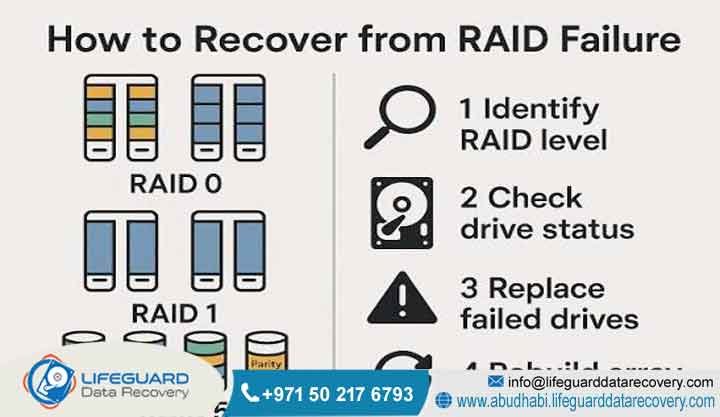
A Redundant Array of Independent Disks distributes information across multiple hard drives to increase performance or provide fault tolerance. Because this architecture splits data into blocks via striping, mirroring, or parity, it operates differently than single storage units. Therefore, losing access requires specialized structural rebuilding rather than basic scanning.
Modern businesses rely heavily on these setups to maintain continuous uptime and ensure file availability. When configuration layouts fail, determining how much does RAID recovery cost relates directly to how data distribution works across the affected disks. The physical data layout directly influences the path technicians take during structural reconstruction.
Striping writes data segments across multiple disks sequentially, increasing read and write operations significantly. Mirroring duplicates identical information onto secondary drives to provide instantaneous data safety copies. Parity blocks add a layer of mathematical redundancy, allowing missing information to be recalculated dynamically if a drive fails.
Understanding these structural variations helps clarify why single-disk software utilities cannot fix multi-disk crashes. When an array drops offline, internal striping boundaries must be precisely matched in the lab. Improper structural alignment can permanently destroy file metadata beyond any possibility of repair.
How Does RAID Retrieval Engineering Work?
Engineers begin by creating exact sector-by-sector virtual copies of every individual mechanical or solid-state disk in the array. Afterward, they analyze raw metadata structures to determine block size, rotation sequences, and parity distribution patterns. This careful laboratory synthesis allows professionals to bypass failed physical controllers and extract files securely.
Working on original physical components during diagnostics poses an immense risk to remaining data structures. Therefore, creating forensic clones ensures that physical media is preserved in its original state. Lab specialists utilize advanced hardware imagers that isolate read heads to bypass damaged disk sectors.
Once clones are complete, the structural state directly impacts the calculation of how much does RAID recovery cost. Engineers assemble the system inside a virtual environment using custom software platforms. They test various file system offsets and rotation schedules to reconstruct the original logical block address parameters. This step bypasses the native hardware controller entirely, eliminating any risks associated with hardware incompatibilities.
After establishing correct parameters, the virtual file system structure is carefully reassembled and checked for internal integrity. Technicians inspect critical enterprise application files, such as SQL databases, virtual machines, and backup archives. This technical process ensures that recovered structures match the required corporate specifications exactly.
Critical Diagnostic Factors & Causes of Failure
Common Causes of Multi-Drive Server Failures
-
Simultaneous Mechanical Dropouts: Two or more disks crashing concurrently within a parity-based system.
-
Controller Infrastructure Spikes: Severe electrical surges corrupting the metadata layer across the backplane.
-
Logical Partition Damage: Accidental array initialization or ransomware execution locking database sectors.
Physical component wear remains a leading cause of array dropouts in high-availability enterprise environments. Because drives in an array are often from the same manufacturing batch, they share similar lifespans. Consequently, when one drive drops out, the stress of a rebuild can quickly trigger a second mechanical failure.
Power distribution anomalies can cause immediate, widespread damage across entire server backplanes. These spikes frequently bypass standard power supplies, damaging controller chips and disk logic boards simultaneously. Reconstructing these systems requires resolving multiple physical and logical failures across several drives at once.
Logical partition damage presents a different set of challenges, often stemming from human error or malicious software attacks. Accidental formatting or partition initialization can overwrite the vital configuration headers that point to file locations. Similarly, ransomware attacks encrypt target files while leaving the underlying array structure structurally intact but inaccessible.
Environmental factors, such as cooling system failures in server rooms, can cause rapid thermal expansion inside drives. This heat warp alters the alignment of physical read heads, resulting in widespread read errors and drive dropouts. Recognizing these distinct failure modes is essential for implementing the correct laboratory response strategy.
Can Damaged Enterprise Hard Drives Be Safely Repaired?
Physical platter damage or burnt logic boards require a certified Class 100 cleanroom environment for temporary mechanical stabilization. For example, replacing a damaged head assembly requires identical donor components to ensure the drive spins long enough for safe imaging. Uncertified, manual attempts outside controlled laboratories can permanently destroy the delicate magnetic layers.
Mechanical repair procedures require absolute precision and contamination-free workspaces to prevent dust or debris from settling on platters. Even a single microscopic particle can cause a head crash, scraping the magnetic layer away completely. Cleanroom work benches use laminar flow filtration systems to maintain clean air during mechanical rebuild work.
Donor drive sourcing is another complex part of physical hard drive recovery engineering. Component matches must extend beyond basic model numbers to include identical firmware revisions, head maps, and manufacturing sites. Finding these precise matching matches often requires maintaining large internal inventories of legacy storage hardware.
Once stabilized with donor parts, the drive is connected to advanced diagnostic imaging systems. These tools allow engineers to adjust reading parameters, modify firmware registers, and disable problematic read heads. This targeted control maximizes data extraction from healthy sectors while minimizing stress on unstable components.
Can Deleted Array Files Be Fully Recovered?
Sanitized partitions or accidentally removed folders are highly recoverable if the underlying storage sectors remain untouched. However, continued server operation forces incoming system logs to overwrite these free blocks. For this reason, turning off the server immediately maximizes the likelihood of a successful, complete file extraction.
When a file is deleted, the operating system removes its pointer index while leaving the actual data blocks intact. The storage system marks these sectors as available for future write operations. Consequently, any new data written to the system risks replacing the deleted files permanently.
In multi-drive configurations, file deletion recovery requires specialized parsing of the entire distributed file system. Engineers analyze raw data patterns across the array to find missing file headers and structural footprints. This carving technique reconstructs files based on their internal signatures, bypassing corrupted or missing index entries.
The file system format used (such as NTFS, REFS, EXT4, or XFS) also significantly impacts deletion recovery success. Some modern enterprise file systems actively clear unallocated space through automated optimization cycles. Therefore, isolating the storage media quickly remains the most effective way to safeguard recoverable blocks.
Professional Server & Storage Retrieval Services
Enterprise Multi-Drive Array Reconfiguration Services
Specialized technicians engineer custom recovery pathways for high-capacity database systems and virtualized environments. Because corporate networks demand continuous uptime, modern labs offer around-the-clock emergency processing options. This technical oversight restores system continuity while preserving intact database files.
Corporate infrastructures often combine different storage protocols and technologies, including physical local arrays and hybrid cloud setups. When these systems experience complex structural dropouts, determining how much does RAID recovery cost depends on the specific engineering tools required. Specialized labs utilize custom emulation environments to replicate specific enterprise hardware behaviors.
These emulation spaces allow engineers to mount raw storage volumes without relying on the original server hardware. This capability is critical when host systems are physically damaged or inaccessible. Technicians can reconstruct logical unit numbers (LUNs) and export virtual disk containers safely.
Additionally, lab engineers verify the internal consistency of recovered database files before final extraction. This process includes parsing database tables and testing structural components for corruption. This verification stage ensures that delivered files are immediately ready for deployment back into production environments.
High-Performance SSD Storage Array Retrieval
Solid-state arrays present unique challenges due to automated wear-leveling routines and background controller garbage collection operations. When flash components fail, specialists use micro-soldering tools to read the NAND chips directly. Consequently, reconstructing these complex configurations requires advanced algorithm mapping.
Unlike mechanical drives, solid-state drives distribute data across flash cells using proprietary controller algorithms. When a controller chip fails, the data on the NAND chips remains encrypted or scrambled. Engineers must unsolder individual flash packages and extract raw hexadecimal data dumps using specialized chip-reading hardware.
Reversing these controller algorithms requires specialized knowledge of chip layouts, interleaving patterns, and bad-block management rules. Technicians use custom layout software to reorder the extracted hex blocks back into a readable file structure. This process requires significant engineering expertise to successfully rebuild solid-state storage volumes.
Furthermore, internal solid-state optimization commands like TRIM can overwrite unallocated blocks automatically following data deletion. This makes immediate isolation of solid-state systems vital after data loss occurs. Specialized laboratory equipment can block these automated optimization processes, preserving remaining data blocks for recovery.
Supported Infrastructure: NAS, SAN, and CCTV Arrays
Professional laboratory setups support various network attachments and storage area network file systems, including ZFS, Btrfs, and EXT4. Whether dealing with a compact network storage enclosure or a massive enterprise rack server, engineers adapt to proprietary vendor configurations. This comprehensive capability ensures that surveillance, database, and archive structures remain accessible.
Network-Attached Storage (NAS) units often use specialized Linux-based configurations, such as custom logical volume managers. When these enclosures fail, the underlying drives cannot be mounted directly by standard corporate operating systems. Lab specialists read these custom volume layers to locate the underlying shares and user directories.
Storage Area Networks (SANs) add another layer of complexity by serving block-level data over high-speed fiber networks. These setups frequently distribute large virtual machine volumes across hundreds of physical disks simultaneously. Reconstructing these configurations requires specialized, high-capacity hardware setups to manage massive storage images effectively.
Digital surveillance setups (CCTV) frequently write data continuously using custom, proprietary streaming file structures. When these recording systems fail or are damaged, standard file tools cannot locate the raw video streams. Technicians must parse these specialized structures to isolate and extract video frames sequentially, preserving important timeline metadata.
The Step-by-Step Recovery Process
Step 1: Lab Diagnostic and Virtual Mirroring
Engineers inspect every physical unit to identify underlying mechanical or electrical failures. They never work directly on the original media; instead, they generate sector-level virtual clones using specialized hardware imagers. This process protects the original data blocks from further physical degradation.
The initial inspection uses diagnostic tools to measure electrical currents across drive logic boards. If short circuits are found, engineers repair or replace the damaged components before applying power. This step prevents electrical damage from spreading to internal drive components or the slider assembly.
Once stabilized, drives are connected to high-performance disk imaging channels that isolate reading processes. These write-blocking tools prevent host computers from making unauthorized changes to the disk sectors. This preservation process ensures that every sector-level clone is a true forensic duplicate of the source media.
If a drive has weak or failing read heads, technicians adjust timeout settings and head reading orders dynamically. This targeted control allows the imaging system to skip damaged sections and extract data from healthy sectors first. This optimization maximizes data recovery before the drive components fail completely.
Step 2: Array Parameters Identification and Assembly
Once individual drive images are secured, technicians analyze the raw hex sectors to discover the exact configuration parameters. They manually align stripe sizes, drive order, and parity cycles within a virtual emulator. This step reconstructs the array environment safely without risk to the physical components.
Determining configuration parameters requires analyzing file system structures across all drive images. Technicians look for specific master boot records and volume boot sectors to find structural alignment points. This analysis reveals the precise layout sequence used by the original controller.
Stripe size identification requires analyzing data patterns within major files, such as database tables or system headers. If the stripe sizes are misaligned by even a single sector, the file data will become scrambled. Engineers carefully test and verify layout variations to ensure seamless file reassembly.
Once the correct drive order and parity rules are determined, the configuration is assembled within a virtualizer. This environment mimics the physical storage system, allowing technicians to verify structural continuity across boundaries. This validation ensures that large, fragmented files span across disks correctly.
Step 3: Extracted File Verification and Secure Transfer
After the file system is virtually mounted, engineers perform file integrity checks on critical target directories. Clients review a detailed file listing to confirm that the required folders are functional. Finally, the recovered data is written onto a secure, encrypted external drive for delivery.
File verification goes beyond checking directory names to testing the internal health of target files. Technicians use automated parsing scripts to open large files and check their internal hex headers for consistency. This process verifies that the recovered files are complete and functional.
For major database systems like SQL or Oracle, engineers run diagnostic consistency checks to identify any internal allocation errors. If minor corruption is found, custom repair scripts are used to fix the damaged structural tables. This stabilization step ensures that critical business databases can be mounted successfully upon delivery.
Once validation is complete, the recovered files are moved to a fresh, hardware-encrypted storage drive. The destination drive is formatted according to the client’s operating requirements to ensure easy deployment. This secure transfer process maintains data confidentiality until the files are safely returned to the client.
How Long Does the Extraction Process Take?
Standard enterprise evaluations typically require 24 to 72 hours to complete depth-level drive cloning. However, severe physical degradation or extensive drive capacities can lengthen this timeline. Emergency response options allocate dedicated cleanroom resources to process media continuously around the clock.
The overall timeline depends significantly on the physical condition of the incoming hard drives. If platters are clean and the electronics are stable, a 10-terabyte drive can be imaged relatively quickly. Conversely, a drive with damaged mechanical heads requires multiple component swaps, extending the required engineering time.
Logical complexities, such as intricate file systems or custom partition schemes, also influence overall processing times. Rebuilding a massive virtual storage pool with nested file layers requires systematic verification at each level. Engineers must validate each layer to ensure the final file output remains stable.
When business downtime is critical, emergency service tiers bypass standard lab queues entirely. Dedicated workstations and engineering teams work continuously on the case until the recovery is complete. This expedited workflow minimizes production downtime, helping restore business continuity as quickly as possible.
Cost Analysis & Estimation Variables
How Much Does Professional Array Retrieval Cost?
Local specialized laboratories determine final investments through engineering hours, donor component availability, and cleanroom requirements. Because every case involves a unique combination of logical or mechanical faults, pricing scales according to technical complexity. Upfront diagnostic evaluations provide transparent cost assessments tailored to your specific hardware condition, answering explicitly how much does RAID recovery cost for your business.
Every storage recovery scenario presents unique challenges, making standard flat fees impractical for complex business arrays. For example, a system with a simple controller failure requires a different technical approach than one with widespread mechanical damage. Upfront diagnostic testing allows labs to inspect the hardware thoroughly and define the necessary scope of work before recovery begins, shedding light on how much does RAID recovery cost.
Regional availability of specialized engineering tools and cleanroom facilities also plays a role in defining operational costs. Maintaining certified cleanroom environments and advanced diagnostic hardware requires ongoing investments in laboratory infrastructure. These specialized resources ensure that recovery procedures meet strict international data safety standards.
Furthermore, emergency logistical support across different business districts influences overall service resource requirements. Transporting sensitive enterprise storage systems safely requires secure transit protocols to prevent further physical damage. Comprehensive service assessments account for these logistical requirements, giving clear indicators on how much does RAID recovery cost.
Variables That Impact Final Service Estimates
-
Total Drive Count: Managing a 24-bay rack server requires significantly more engineering labor than a 4-bay storage unit.
-
Physical Media Condition: Scoring on disk platters requires intensive cleanroom stabilization and multiple donor parts.
-
Array Configuration Type: Reconstructing complex nested setups or proprietary file systems demands advanced algorithmic mapping.
The capacity of each drive within the configuration also affects the total engineering time required. Larger drives require longer imaging cycles, which demands extended monitoring from lab technicians. When drives have physical defects, these imaging cycles require continuous adjustment to ensure data blocks are read safely.
The specific type of interface used by the storage system (such as SATA, SAS, or Fibre Channel) determines the diagnostic hardware required. SAS and Enterprise Fibre Channel setups require specialized connection arrays and custom controllers to communicate with diagnostic tools. This hardware requirement separates enterprise-grade recovery workflows from consumer drive procedures.
Finally, the urgency tier selected by the client directly influences the allocation of laboratory resources. Emergency options prioritize the case across all available cleanroom benches and engineering teams. This high-priority scheduling ensures the fastest possible turnaround for time-sensitive corporate data, which is an explicit variable when answering how much does RAID recovery cost.
What Impacts the Overall Success Rate?
User behavior immediately following an initial crash is the single most critical factor in data survival. For instance, running multiple automatic rebuild cycles on failing disks can permanently scratch magnetic storage surfaces. Choosing professional laboratory diagnostics over software scanning tools prevents irreversible corruption.
When an array drops offline, the native controller often attempts to rebuild data parity automatically using any remaining disks. If these remaining disks are physically unstable, the intense read and write activity can cause them to fail completely. This secondary failure can corrupt the remaining data blocks, making recovery much more difficult.
The presence of scratch marks or magnetic degradation on physical platters can also limit the ultimate recovery success rate. Head crashes can strip the magnetic coating away from the platters, destroying the data stored on those sectors permanently. Promptly cutting system power prevents these heads from causing further physical damage to the platters.
The chosen configuration type also influences overall fault tolerance and recovery options during virtual assembly. For example, configurations with dual-parity options offer more structural redundancy than single-parity setups. This extra redundancy gives engineers additional options for recalculating missing data if multiple drives are unreadable.
Enterprise Service Engineering Standards
Why Critical Infrastructure Operators Choose Certified Labs
Corporate entities trust specialized facilities because they utilize state-of-the-art laboratory infrastructure and experienced engineers. The combination of cleanroom safety protocols and strict non-disclosure compliance preserves corporate data privacy throughout the process. When verifying how much does RAID recovery cost, businesses prioritize engineering competence over cut-rate solutions.
Modern data recovery laboratories feature advanced infrastructure tailored to handle delicate storage technologies safely. Certified cleanroom benches provide contamination-free environments for opening and repairing mechanical hard drives. These controlled workspaces prevent dust or debris from compromising fragile storage media during engineering work.
Technicians receive specialized training to stay current with evolving storage systems and file configurations. This ongoing expertise ensures that labs can effectively address the complexities of modern enterprise storage architectures. Having seasoned engineers available reduces diagnostic times and helps optimize recovery outcomes.
Additionally, laboratories protect data confidentiality by using isolated, secure internal storage networks. These diagnostic networks are completely disconnected from the public internet, preventing external unauthorized access to client files. This strict security infrastructure ensures that sensitive corporate data remains fully protected throughout the recovery workflow.
Industries Served: Government, Finance, and Enterprise Security
High-security sectors require precise, trace-free data handling that complies with federal data protection standards. Experienced engineering laboratories provide verifiable chain-of-custody tracking for all incoming server media. This high level of accountability ensures safety for financial records, user credentials, and operational data.
Banking institutions and financial corporations operate under strict regulatory standards that govern data management and security. When core transactional storage arrays fail, the recovery process must follow verified security protocols. Specialized laboratories provide detailed tracking logs that document every step of media handling within the facility.
Medical systems and healthcare providers rely on high data availability to maintain patient management software and diagnostic records. Recovery workflows for these organizations prioritize data structure integrity to ensure extracted records remain fully functional. This focused care helps restore critical medical systems smoothly, minimizing operational disruptions.
Government agencies and defense contractors require high levels of confidentiality when handling sensitive operational data. Recovery teams utilize hardware-isolated cleanrooms and security-screened personnel to handle these sensitive assets safely. These strict data security frameworks ensure that sensitive information remains completely secure throughout the recovery process.
Comprehensive Service Coverage
Secure corporate media logistics connect corporate centers throughout major commercial business hubs. Dedicated pickup services deliver failed array hardware directly to secure testing facilities. This local availability provides prompt, specialized technical support whenever critical storage systems fail, clarifying any client queries about how much does RAID recovery cost in terms of logistics.
Rapid response networks connect downtown commercial sectors and industrial zones. When an enterprise storage system fails, secure transport couriers collect the affected drives promptly. This rapid mobilization minimizes travel delays, helping labs begin diagnostic work as quickly as possible.
Service options extend directly across primary economic zones. Laboratories maintain dedicated drop-off points to ensure convenient access for local IT teams. This distributed support system provides dependable coverage for companies operating throughout the region.
Logistical networks also serve outlying manufacturing districts, offering storage recovery solutions to expanding enterprises. Regional transport networks utilize shock-absorbent, anti-static transit cases to safeguard sensitive storage media during relocation. This comprehensive logistics network ensures that expert data recovery services are accessible to businesses wherever they operate.
Technical Case Study: Reconstructing a Degraded Enterprise Array
A prominent logistics company experienced a dual-drive mechanical crash on a critical 8-bay database server. Initial automated recovery attempts failed, leaving the primary corporate volume unreadable.
Engineers transferred the degraded drives into a cleanroom environment to replace failed head assemblies. After securing sector-by-sector clones, technicians mapped the custom parity layout using virtual reconstruction software. As a result, the team recovered 100% of the critical database files without disrupting the client’s live network environment.
The affected server used a complex configuration where parity blocks were interleaved across multiple enterprise-class SAS hard drives. When the second drive dropped offline, the hardware controller immediately locked the volume to prevent further corruption. This automatic shutdown protected the underlying file entries from being overwritten during the failure.
In the lab, engineers noted that Drive 03 showed severe mechanical clicking, while Drive 04 suffered from corrupted firmware registers. Technicians unmounted the logic board of Drive 04 to repair its internal microcode structures using specialized editing software. This stabilization allowed the drive to communicate with the imaging workstation normally.
Simultaneously, Drive 03 was placed on a cleanroom workbench where its damaged actuator arm was replaced using a matching donor assembly. With both problem drives stabilized, engineers generated complete sector-level images of the entire array layout. This comprehensive approach ensured that the client’s vital logistical tracking databases were fully restored and verified.
Critical Best Practices for Storage Failures
Expert Tips: What Should I Do Immediately After a Storage Failure?
-
Cut System Power Immediately: Power down the server to prevent background scripts from running automated rebuild processes.
-
Label Every Drive: Mark the exact bay sequence on each drive housing before removing units from the backplane.
-
Avoid Commercial Software: Do not run general automated utility scans on unverified, degrading disks.
-
Consult a Certified Lab: Contact a professional facility to arrange for secure laboratory diagnostics.
When an array drops offline, repeated power cycling can cause serious physical damage to unstable mechanical disks. If a read head has detached from its actuator arm, it can scratch the platter surface with every boot attempt. Shutting down the system immediately protects remaining data sectors from physical damage.
Documenting the original drive order is vital for the virtual reassembly process in the laboratory. If disks are placed into different bays during troubleshooting, the internal controller configuration can become scrambled. Clear labeling helps engineers maintain the correct sequence during virtual alignment.
Additionally, running general check-disk utilities can overwrite important file system metadata during an unstable state. These automated operating system tools try to fix directory structures by deleting corrupted index files. This automated correction process can result in permanent data loss, making professional laboratory analysis the safer choice.
Frequently Asked Questions
Who offers certified professional recovery services?
Professional laboratories provide certified enterprise retrieval services through dedicated hardware testing facilities. Their teams use advanced cleanroom technology and proprietary reconstruction software to process complex multi-drive failures safely, outlining the operational framework behind how much does RAID recovery cost.
Their engineering teams are equipped to handle complex enterprise configurations, network-attached units, and high-performance flash storage setups. By utilizing hardware isolation protocols, they protect data confidentiality throughout the recovery workflow. Businesses rely on these services to handle critical database and server recoveries safely.
What happens during a failed automatic array rebuild?
When a replacement drive is inserted into a degraded system, the controller attempts to rewrite missing data across all disks. If another drive suffers an uncorrected read error during this high-stress process, the rebuild will fail. This scenario can corrupt the remaining parity structures, making professional lab reconstruction necessary.
This type of failure occurs because the remaining drives must perform intensive read operations to recalculate the missing data. If those older drives are near the end of their operational lifespan, the increased workload can trigger mechanical issues. Seeking professional laboratory assistance before starting a rebuild minimizes the risks associated with multi-drive crashes.
Is an evaluation fee required if the files are unrecoverable?
Reputable enterprise labs operate under a transparent No Data, No Fee policy for standard configurations. If the primary file structures are permanently damaged and unrecoverable, the service fee is waived. This commitment ensures that corporate clients only invest in verifiable recovery results, removing pricing ambiguity regarding how much does RAID recovery cost.
This policy reflects the lab’s confidence in its engineering capabilities and provides clear assurance for businesses facing data loss. Clients receive a comprehensive upfront assessment detailing the condition of their media before committing to recovery costs. This transparent approach ensures a reliable, risk-free service experience throughout the entire process.
Secure Consultation & Diagnostic Booking
Do not risk permanent data loss by running continuous power cycles on a failing server array. Contact a certified lab to schedule a secure diagnostic evaluation for your storage media to determine precisely how much does RAID recovery cost for your infrastructure layout. Our engineering support channels provide fast turnarounds, reliable data protection compliance, and expert data diagnostics.
Call: +971 50 127 6793
Email: [email protected]


