+971 50 217 6793 Abu Dhabi, UAE [email protected]

Can power failure damage storage devices?
Can Power Failure Damage Storage Devices HDDs, SSDs, & Data Recovery Explained A sudden electrical storm sweeps through your neighborhood, the lights flicker, and your workstation abruptly shuts down. Or perhaps a breaker trips in your home office
lifeguard datarecovery while you are rendering a video, editing a database, or saving an important document. You reset the circuit breaker, press the power button on your computer, and wait. A power failure can absolutely damage storage devices including traditional mechanical Hard Disk Drives (HDDs), modern Solid-State Drives (SSDs), NVMe drives, USB flash drives, and external storage enclosures.
However, the exact nature of that damage depends heavily on whether you experienced a clean power outage (a sudden drop in voltage) or an electrical power surge (a spike in voltage), as well as the underlying architecture of your storage media.
Understanding how electrical interruptions affect your hardware is critical. It determines whether your files are merely hidden behind a corrupted file system or if your storage drive has suffered permanent physical destruction.
Clean Power Outages (Sudden Under-Voltage)
A clean power outage often referred to as a blackout, brownout, or sudden power cut occurs when the flow of electrical current stops instantly without a preceding voltage spike.
In-Flight Writes Interrupted: The power operating your computer’s motherboard, CPU, and storagecontrollers vanishes in a fraction of a millisecond.
Volatile Cache Loss: Any data sitting inside volatile system RAM or the storage drive’s onboard DRAM cache that has not yet been committed to non-volatile magnetic platters or NAND flash chips is instantly erased.
Journal and File System Inconsistency: Modern operating systems use “journaling” file systems (such as NTFS in Windows, APFS in macOS, or ext4 in Linux). If a power cut interrupts the OS while it is updating directory indexes, partition tables, or master file tables, the file system becomes inconsistent or broken.
Primary Threat: Extreme risk of logical data corruption and software system boot failure, but a relatively low risk of direct physical hardware destruction.
Electrical Power Surges (Over-Voltage Spikes)
An electrical power surge occurs when the voltage supplied to your equipment spikes significantly above standard operating levels (typically above 120V in North America or 230V in Europe). Surges can be caused by localized lightning strikes, power grid switching by utility companies, or heavy inductive appliances (like air conditioners or refrigerator compressors) cycling on and off within your building.
PSU Bypass: High-voltage electricity overpowers or bypasses the filtering capacitors inside your computer’s Power Supply Unit (PSU) or an external enclosure’s power adapter.
Component Meltdown: The excessive electrical current travels along the 12V or 5.0V power rails directly into the Printed Circuit Board (PCB) of your HDD or SSD.
Thermal Destruction: Sensitive semiconductor components including Transient Voltage Suppression (TVS) diodes, smoothing capacitors, motor controller ICs, and primary controller microchips absorb the heat of the current spike and physically burn out or short-circuit.
Primary Threat: Severe physical hardware damage, fried electronics, and dead drive boards.
Power Restoration Spikes
Paradoxically, the most dangerous part of a power outage is frequently not the moment the lights go out, but the exact millisecond the electrical grid re-energizes. If your desktop PC or external hard drive remains plugged directly into an unprotected wall outlet during an outage, this restoration spike can fry your storage hardware the moment the power returns.
Head Crash Risks and Back-EMF Protection
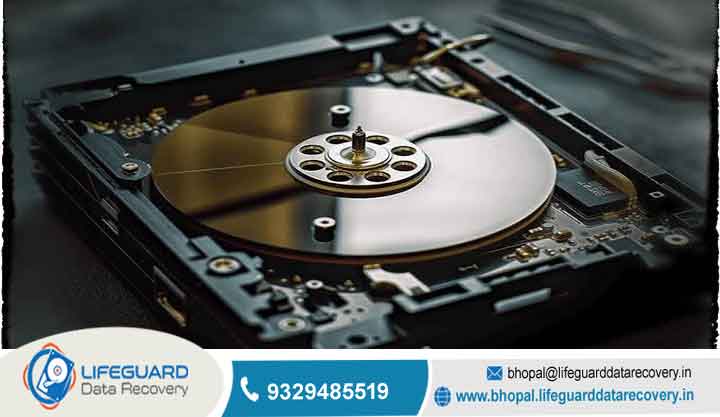
A common myth is that every sudden power outage causes an HDD’s read/write heads to slam violently into the spinning platters, scratching the magnetic surface and causing an instant physical “head crash.”
On modern hard drives manufactured over the last two decades, this is largely untrue. Modern HDDs utilize a feature known as Back-EMF (Electromotive Force):
When external electrical power cuts out, the spindle motor continues to spin for a fraction of a second due to rotational inertia.
The drive’s internal circuitry routes this generated current into the voice coil actuator motor, which instantly retracts the read/write head assembly off the platter surface and locks it safely onto a plastic landing ramp before the drive comes to a complete stop.
However, if a power outage is accompanied by a severe physical shock, or if an electrical surge destroys the voice coil driver on the PCB at the exact moment of power loss, the head stack may fail to park. The floating heads can land directly on the magnetic platter, scraping off the delicate magnetic film and causing permanent, irreversible physical data destruction.
PCB and TVS Diode Destruction
The most frequent hardware failure in an HDD caused by an electrical event is a fried Printed Circuit Board (PCB). Hard drive PCBs are engineered with built-in defense mechanisms called Transient Voltage Suppression (TVS) diodes (typically protecting the 5V and 12V power rails). When an over-voltage surge enters the drive, the TVS diode acts as an electronic shield it intentionally shorts itself to ground, blowing its internal junction to block high voltage from reaching the delicate spindle controller and motor driver chips.
Solid-State Drives (SSDs) & NVMe Storage
Solid-state drives have no moving mechanical parts, making them completely immune to mechanical head crashes, platter scratches, or physical motor failures. However, computer engineers and data recovery specialists widely recognize that consumer SSDs are statistically far more vulnerable to logical corruption and sudden “bricking” from clean power outages than traditional HDDs.
In these scenarios, recoverability relies on specialized hard drive recovery specialists or cleanroom facilities. Engineers must perform delicate repairs inside an ISO Class 5 cleanroom environment such as transplanting matched donor PCB boards and swapping unique firmware ROM chips, replacing damaged read/write head assemblies, or desoldering raw NAND flash memory chips to perform direct “chip-off” data reconstruction.
Deploy Uninterruptible Power Supplies (UPS)
An Uninterruptible Power Supply (UPS) is the single most effective hardware defense against both power outages and power surges.
Choose Line-Interactive Architecture with AVR: Ensure your UPS offers Automatic Voltage Regulation (AVR). Line-interactive UPS units continuously monitor incoming line voltage, automatically smoothing out brownouts (drops in voltage) and over-voltage spikes without constantly draining the internal battery.
Configure Automated Graceful Shutdowns: Connect the UPS to your desktop PC or Network Attached Storage (NAS) server via an included USB communication cable. Install the manufacturer’s management software to ensure that whenever an outage occurs, the UPS instructs your operating system to execute a safe, graceful shutdown process before the battery depletes.
Frequently Asked Questions
Can a power outage physically destroy an SSD?
Yes. While a clean power outage most commonly leads to logical Flash Translation Layer (FTL) mapping corruption, severe brownouts, voltage fluctuations, or power restoration spikes can physically burn out an SSD’s Power Management Integrated Circuit (PMIC), primary micro-controller, or NAND flash chips. Once the controller or power delivery circuits burn out, the drive will fail to power on or register in BIOS.
Does unplugging a computer while running cause the same damage as a power outage?
Yanking the power cord out of the wall while a computer is running produces an identical physical effect to a clean power outage. It causes an instantaneous loss of electrical current, cutting off write operations mid-flight, wiping uncommitted volatile cache memory in system RAM, and increasing the risk of OS file system journal corruption. Always perform a proper software shutdown through your operating system menu whenever possible.
Is data lost forever if a hard drive stops spinning after a power surge?
Transient Voltage Suppression (TVS) diode or a blown fuse rather than internal platter damage. Because the magnetic platters inside remain physically untouched, specialized hardware surge damage diagnostic services can repair or transplant the drive PCB, reprogram the board calibration firmware, and recover of the underlying files.
What is the difference between a brownout and a blackout for storage drives?
A blackout is a complete, total loss of electrical power. A brownout is an intentional or unintentional drop in electrical voltage below normal operating standards (e.g., voltage dropping from 120V to 90V). Brownouts are often more dangerous for electronic hardware than complete blackouts because low voltage forces power supply components to draw higher electrical current (amperage) to maintain wattage output, generating excessive internal heat that can degrade power supplies, motherboard circuits, and drive controller chips.
Can running or disk repair software make data loss worse after a power outage?
Yes. Running automated disk repair tools like on a storage device that has suffered physical sector degradation, head instability, or hardware failure can cause irreversible data destruction. CHKDSK attempts to force the file system into a consistent state by truncating orphan files, deleting corrupt directory entries, and reallocating sectors. If performed on a physically failing drive, it continuously reads and writes over unstable areas, overwriting recoverable raw files and potentially causing mechanical drive heads to crash.


