+971 50 217 6793 Abu Dhabi, UAE [email protected]

Can damaged flash drives be repaired?
Can Damaged Flash Drives Be Repaired DIY Fixes & Data Recovery Guide Flash drives are among the most convenient tools for storing and moving files across machines, but their portable nature makes them vulnerable to accidents, power spikes, and file system crashes.
lifegurad datarecovery Whether your thumb drive displays a persistent “Must Format Disk” prompt, fails to illuminate its LED indicator, or physically snapped at the connector, the central question is immediate Can damaged flash drives be repaired?
Physical hardware damage such as broken connector pads, fried controller chips, or degraded NAND memory requires electrical diagnostics, precision micro-soldering, or advanced laboratory recovery methods.
This guide explores the mechanisms behind USB flash drive failure, provides a safety protocol for saving your files before attempting structural fixes, and walks through step-by-step software and hardware repairs.
Understanding Flash Drive Damage: Logical vs. Physical
Before running system diagnostic utilities or opening a flash drive’s plastic casing, you must determine whether your device suffers from logical corruption or physical damage. Attempting software repair scripts on a physically failing or electrically shorted flash drive can accelerate hardware degradation and permanently destroy unbacked-up data.
Logical Damage (Software & File System Corruption)
Logical damage occurs when the underlying hardware components—including the controller, NAND memory chip, and circuit traces remain fully functional, but the data structures that organize files become disorganized or unreadable by the host operating system.
Underlying Causes: Abrupt removal during active read/write cycles, interrupted firmware updates, corrupted Master Boot Records (MBR), damaged GUID Partition Tables (GPT), malware infections, or dirty shutdowns while files are open.
Repair Outlook: High. Logical corruption can usually be remediated without data loss by using command-line volume repair scripts, reassigning system mount paths, or extracting raw file signatures using non-destructive data recovery utilities.
Physical Damage (Hardware, Connectors, & Monolith Chips)
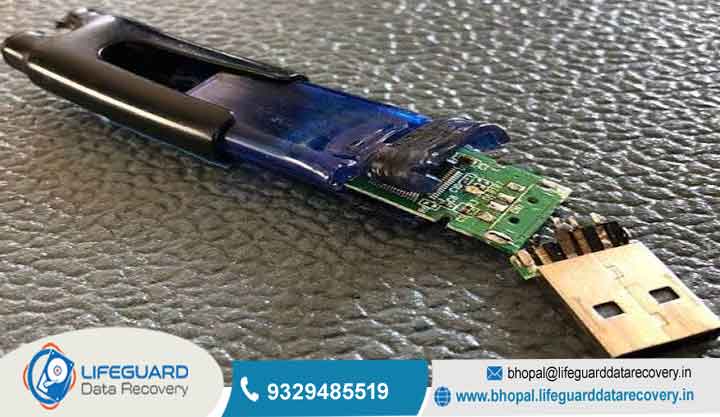
Physical damage involves mechanical breakage, thermal failure, or electrical degradation of the physical circuit board components inside the drive housing.
Primary Symptoms: The flash drive exhibits no operational response when plugged into a known-working port. There are no status LEDs, no mounting notifications, and no entry in Windows Disk Management or macOS Disk Utility. In severe cases, the casing feels hot to the touch or shows bent or snapped external pins.
Underlying Causes: Mechanical torque (such as bumping a drive while plugged into a laptop), liquid submersion, power surges from faulty host ports, blown surface-mount capacitors, or physical wear-out of internal memory cells.
Common Causes of USB Drive Failures
Flash drives contain no moving parts, but their solid-state architecture relies on a complex balance of micro-electronics, firmware algorithms, and electrical charges. Understanding what triggers drive failures helps reduce the risk of future data loss.
Safe Removal Violations & Interrupted Write Operations
Modern operating systems use a performance-enhancing process called write-caching. Instead of writing data directly to the slower flash memory immediately, the system holds modified data in fast system RAM and commits it to the flash drive in batches during background idle time.
If a user pulls a USB drive out of the port while the operating system is clearing its write buffer, the drive’s file allocation table becomes partially written. This leaves orphaned file headers, invalid partition markers, and unreadable sector records.
NAND Flash Degradation & Write Cycle Limits
NAND flash memory stores data by trapping electrons inside floating-gate or charge-trap transistors.
As consumer flash drives fill their available write cycles, memory cells begin to leak charge. To protect remaining data, the microcontroller locks the entire memory matrix into a permanent Read-Only hardware mode. When this occurs, files can still be copied off the drive, but new data cannot be saved, and standard formatting routines fail.
Environmental, Thermal, & Mechanical Strain
Electrostatic Discharge (ESD): Inserting a flash drive into an ungrounded or poorly shielded USB port can deliver a sudden static shock that fries the low-voltage host interface chip.
Thermal Stress: Continuous heavy read/write operations (such as running portable applications or transferring multi-gigabyte video files) heat up the tightly packed components inside tiny plastic housings, leading to cracked surface-mount solder joints over time.
Mechanical Torque: Bumping a plugged-in flash drive creates leverage that concentrates force on the tiny solder pads holding the USB plug to the internal circuit board.
Monolithic Pinout Extraction & NAND Chip-Off Recovery
When a flash drive suffers severe component failure, a fried microcontroller chip, or uses a monolithic board layout, standard soldering techniques are insufficient. On traditional drives with a dead controller chip, professional micro-soldering and NAND chip-off recovery services desolder the surface-mount NAND flash memory chip (TSOP48 or
BGA package) from the broken board using a hot-air rework station. Data recovery engineers then programmatically emulate the missing controller’s wear-leveling algorithms and error-correction code (ECC) in software to reconstruct the raw data.
Monolithic Micro-Sanding Extraction: Monolithic drives contain no exposed surface-mount chips or solder pads to clip onto. To recover data from a dead monolithic drive, recovery specialists must carefully scrape away the outer protective epoxy layer using fine abrasive polish or laser micro-ablation.
Best Practices to Prevent Flash Drive Damage & Data Loss
Adopting simple operational habits significantly extends the physical and operational life of flash memory devices while protecting your files from unexpected corruption.
Always click the Safely Remove Hardware and Eject Media icon in your system tray (or select Eject in macOS/Linux) before pulling out a USB drive. This ensures the operating system finishes flushing background write caches and unmounts active file locks cleanly.
Follow the 3-2-1 Backup Rule: Never treat a USB flash drive as your sole storage location for important files. Flash drives are convenient transport devices, but they are vulnerable to loss, static damage, and sudden electronic failure. Maintain 3 copies of critical data across 2 different media types (e.g., local PC hard drive + cloud storage), with 1 copy stored offsite.
Choose Durable Housing Designs: When purchasing new flash drives, select models built with single-piece cast metal zinc-alloy enclosures or rubberized shock-resistant casings.
Set Write-Caching Settings for Quick Removal: If you frequently unplug flash drives without using the system eject prompt, configure Windows to disable write-caching on removable drives. Open Device Manager, expand Disk Drives, right-click your flash drive, select Properties, open the Policies tab, and set the policy to Quick removal. This reduces performance slightly, but lowers the risk of file system corruption during sudden removals.
Frequently Asked Questions (FAQs)
Can a fully snapped USB flash drive be repaired at home?
However, if the break only severed the external metal plug connector or snapped blank PCB space, a specialist at an expert flash drive data recovery lab can bridge the broken electrical traces or transplant the intact memory chip to retrieve the files.
Why does my flash drive say it needs to be formatted before I can use it?
This prompt appears when your operating system detects the attached USB storage controller, but cannot read or parse the volume’s file allocation table or partition markers (causing the drive to display as RAW storage). Do not click Format, as formatting writes a fresh file system index over the drive, complicating data recovery efforts. Extract your files using data recovery software first.
How much does professional flash drive data recovery cost?
The cost of professional data recovery depends on the underlying failure type:
Logical Recovery (Software/Corruption): Ranges from for basic file structure reconstruction and bad sector carving. Physical Hardware Repair & Micro-Soldering: Ranges from depending on whether the drive requires trace re-bridging, custom controller emulation, or monolithic epoxy micro-sanding extraction.
Will formatting a corrupted flash drive fix it permanently?
Formatting rewrites partition allocation structures and marks corrupted logical sectors as clean, which can make a corrupted drive usable again. However, if the initial corruption occurred because the NAND memory cells are degrading or the controller is failing electrically, formatting provides only a temporary fix.


