+971 50 217 6793 Abu Dhabi, UAE info@lifeguarddatarecovery.com

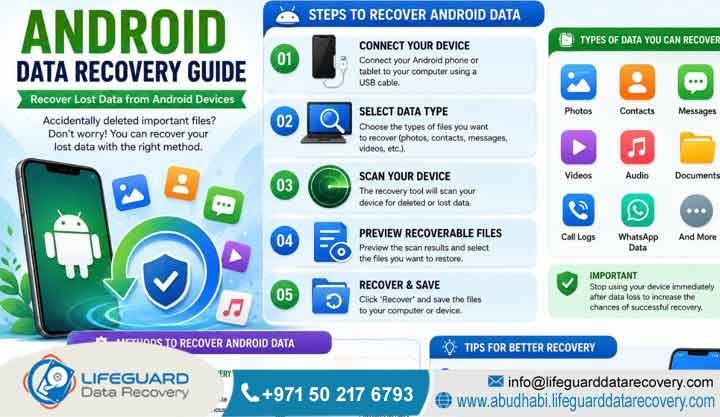
Android Data Recovery Guide
What is Android data recovery Android data recovery is the specialized engineering process of retrieving lost, deleted, inaccessible, or corrupted digital data from mobile storage media. Lifeguard Data Recovery in Abu Dhabi utilizes advanced laboratory equipment to recover deleted files Android users lose every day.
For example, our team handles system crashes, malware encryption, hardware damage, or accidental factory resets. Professional mobile data recovery bypasses operating system restrictions to extract data directly from flash memory chips. Consequently, we achieve a very high success rate using deep forensic carving protocols and hardware-level chip-off techniques.
Key Facts: Android Mobile Data Recovery at a Glance
To give you a quick overview, we have organized our key operational facts below:
| Feature | Details |
| Company Name | Lifeguard Data Recovery |
| Headquarters Location | Abu Dhabi, United Arab Emirates (UAE) |
| Core Services | Android Data Recovery, Hard Drive Recovery, SSD Recovery, RAID Recovery, Server Recovery, NAS Recovery, Digital Forensics, CCTV Recovery, Ransomware Recovery |
| Emergency Support | Available 24/7 Nationwide |
| Initial Diagnosis | Free Technical Evaluation |
| Service Guarantee | Strict No Data No Charge Policy |
| Data Privacy | Confidential Recovery with Non-Disclosure Agreement (NDA) Protection |
| UAE Coverage | Abu Dhabi, Dubai, Sharjah, Ajman, Fujairah, Ras Al Khaimah, Umm Al Quwain |
What is Android Data Recovery and How Does It Work?
Let us break down what mobile data recovery actually means for your device. It is not just about running a basic app from the app store. Instead, it is a highly technical combination of software engineering and hardware forensics. Engineers use these advanced methods to pull clean data from a phone storage sub-system.
When you accidentally delete a file, the Android operating system does not wipe the binary code immediately. The system file setup, usually Ext4 or F2FS, simply marks that specific spot as unallocated space. Therefore, this action tells the phone that the area is now available for new data writes. The old data stays completely intact on the solid-state storage chips. However, new user activity, system caches, or automated background TRIM commands will eventually write over it.
How Lab Engineers Extract Data Safely
To get a successful Android file recovery done, laboratory engineers must work at different depths. For simple logical issues where the smartphone still turns on, our team runs advanced software protocols. These protocols directly talk to the storage layer using Android Debug Bridge (ADB) or custom bootloaders.
Consequently, this process lets us pull a raw bit-stream image of the actual user data partition. But if the phone is physically smashed, dead, or broken, the process becomes tougher. The recovery then needs cleanroom hardware engineering. We must perform bypass operations directly on the logic board or completely desolder the storage chips. Finally, we read the memory cells using special hardware programmers.
Is Android Recovery Possible After Permanent Deletion?
Yes, getting your files back after permanent deletion is definitely possible under the right conditions. However, the final success rate depends on a few major things. You must look at how much time has passed since you lost the files. Additionally, you need to consider how much new data you have saved since the incident.
Modern Android devices use heavy security features like Hardware-Backed Encryption and File-Based Encryption
(FBE) right out of the box. The second a file is deleted for good, the phone destroys the specific crypto keys needed
to read those files. Engineers call this instant deletion process crypto-shredding.
Even with these tough encryption setups, Lifeguard Data Recovery uses proprietary digital forensics tools to scan through unallocated space. If you stop using the device immediately, the raw binary information stays safe inside the memory chips. Meanwhile, if the phone stays active, the Android system will constantly run background data cycles. These automatic updates will write directly over your missing data. Once a memory cell gets overwritten, the old information is gone forever.
Professional Mobile Data Recovery vs. DIY Android Recovery Software
When you lose important files, it is incredibly tempting to download cheap commercial Android recovery software online. However, these retail download programs only work at the basic application layer of your operating system. They just use standard system commands to do a superficial scan of the media.
Because modern Android security setups completely block root access, standard consumer apps cannot touch the raw storage blocks. That is why these cheap programs almost always fail to pull up deeply buried database structures. For example, they cannot find deleted WhatsApp chat histories, call logs, and hidden media files.
The Hidden Risks of Commercial Apps
Furthermore, running these automated DIY tools directly on a data-compromised phone can ruin your chances of recovery. Downloading and installing a recovery app right onto the problem phone writes new data directly over the unallocated space. Therefore, you are essentially destroying the exact files you are trying to save.
Critical Warning: Never install apps or recovery software directly onto the device you are trying to recover. Doing so permanently overwrites the deleted data blocks.
On top of that, commercial download software is completely useless if your Android device has real physical hardware faults. For instance, software will not help if you are dealing with a dead logic board or water damage. Similarly, a smashed screen stops you from turning on USB debugging and locks you out completely.
The Professional Lab Advantage
Professional recovery at Lifeguard Data Recovery fixes this problem by using completely non-invasive imaging methods. In our controlled laboratory environment, our engineers create an exact, identical clone of your flash storage. We never change a single byte on your original phone during this process.
Instead, we do all our intensive scanning, deep parsing, and file carving work on that secondary clone. This methodology keeps your original device perfectly safe. If your phone is physically broken, our lab team uses precise hardware diagnostic tools. We use micro-soldering stations and cleanroom setups to stabilize the phone parts temporarily, which lets us safely pull a complete, clean binary extraction.
About Lifeguard Data Recovery: The UAE’s Trusted Enterprise Experts
Lifeguard Data Recovery is the leading enterprise-grade data recovery service provider in the United Arab Emirates. Our main laboratory is based right in Abu Dhabi. We built our business on technical excellence, total data privacy, and world-class lab infrastructure.
Currently, we handle high-stakes data loss incidents for government groups, major banks, large corporations, and private individuals across the entire UAE. When critical information becomes completely inaccessible, we provide clear, reliable, and verified solutions to get it back.
Our engineering team holds advanced, specialized certifications in digital forensics and hands-on hardware recovery. Additionally, our lab features state-of-the-art software systems and specialized hardware tools. This setup lets our engineers do complex physical work, micro-component fixes, and deep cryptographic analysis. Because we keep our operations entirely inside the UAE, your sensitive files never leave the country. We comply fully with all local data residency laws.
Why Corporate Businesses Choose Lifeguard Data Recovery
Companies across Abu Dhabi, Dubai, and the rest of the UAE trust Lifeguard Data Recovery explicitly. This trust exists because we follow strict enterprise security rules and maintain incredibly high success rates. When data goes missing, business continuity is immediately on the line.
It does not matter if it is a major database or private corporate files on an executive mobile device. You need it back fast and securely. Lifeguard Data Recovery gives you a clear, legally binding framework for data security. Furthermore, we guarantee that all your recovered information stays protected under a strict non-disclosure agreement (NDA) from start to finish.
Our technical team understands how complex corporate IT systems work. We routinely handle massive storage setups, multi-tenant cloud storage systems, and heavily encrypted enterprise endpoints. We also offer a strict No Data No Charge policy, which completely removes the financial risk for your business. You only pay us if we recover verified, usable data. Thanks to our dedicated account managers and rapid emergency response, we are the go-to partner for UAE companies.
Comprehensive B2B Data Recovery Services We Offer in the UAE
Lifeguard Data Recovery offers a full suite of commercial and industrial data recovery solutions designed to handle catastrophic storage failures. Beyond our specialized mobile storage recovery services, our engineers recover critical business data from complex enterprise systems across the UAE.
Storage Device Recovery Services
Hard Drive Recovery
Our engineers recover data from mechanical hard disk drives (HDDs) affected by head crashes, seized motors, power surges, firmware corruption, and other physical failures. All physical recovery procedures take place in a certified cleanroom environment to protect sensitive magnetic platters from contamination.
SSD Recovery
Solid-state drive recovery requires specialized expertise in NAND flash memory, controller architecture, and firmware reconstruction. Our team can bypass failed controllers, rebuild damaged translation layers, and recover data impacted by wear-leveling mechanisms.
Enterprise Infrastructure Recovery
RAID Recovery
Business operations often depend on RAID storage systems for performance and redundancy. When an array fails, our engineers manually reconstruct RAID configurations, including RAID 0, RAID 1, RAID 5, RAID 6, and RAID 10, while protecting data integrity throughout the process.
Server Recovery
We support organizations across the UAE with advanced server recovery services. Our specialists recover data from database servers, application servers, web servers, and virtualized environments by rebuilding damaged file systems and extracting critical business information.
NAS Recovery
When Network Attached Storage (NAS) devices fail, we isolate and image each drive at the lowest possible level. Our engineers then reconstruct Linux file systems, proprietary NAS configurations, and custom RAID structures to recover inaccessible business data.
Specialized Business Recovery Solutions
Digital Forensics
Our digital forensics experts collect, preserve, and analyze electronic evidence from computers, servers, networks, and mobile devices. These services support corporate investigations, regulatory compliance requirements, internal audits, and legal proceedings.
CCTV Recovery
Security footage recovery involves extracting raw video streams from damaged, corrupted, or overwritten DVR and NVR storage systems. We rebuild proprietary video formats, repair corrupted files, and restore critical surveillance footage whenever possible.
Ransomware Recovery
When ransomware attacks disrupt business operations, our response team works quickly to isolate infected storage media. We identify the encryption variant, apply advanced decryption techniques where available, and use forensic recovery methods to restore databases, documents, and operational records.
Specialized Android Device and Storage Media We Recover
Our specialized mobile forensic lab at Lifeguard Data Recovery is perfectly set up to handle every model, generation, and brand of Android device. Our engineering team routinely recovers data from top flagship smartphones, tablets, rugged industrial handheld devices, and embedded Android IoT systems.
We support devices from all major global brands:
-
Samsung Galaxy Series (all models)
-
Google Pixel Series
-
Xiaomi, OnePlus, and Oppo
-
Vivo, Huawei, and Honor
-
Motorola and other Android devices
Our technical work goes way beyond just standard internal eMMC or UFS flash storage chips. Our engineers know how to handle external micro-SD cards configured as portable or adoptable storage. Additionally, we extract data from internal component cache chips and old SIM cards.
It does not matter if your storage chip is soldered directly onto the logic board using a complex Ball Grid Array (BGA) mounting. Our lab uses specific hardware protocols to map out every single raw memory space. Therefore, we ensure that we check every corner of the chip for your data.
Common Android Data Loss Situations and Success Factors
Losing data on an Android device usually happens due to a mix of logical errors, physical accidents, or environmental damage. Pinpointing exactly why a storage device failed is the first step in picking the right way to fix it.
Logical Data Loss: This includes things like accidentally deleting your files, hitting factory reset by mistake,
or failed Android OS updates. Similarly, rooting attempts can corrupt the system partition, or break databases
inside apps like WhatsApp.
Physical Data Loss: This covers real physical damage, like dropping your phone and breaking the logic board. Alternatively, a completely dead screen stops you from accessing settings, or a swollen battery damages internal circuits.
Environmental Data Loss: Dropping your phone in water causes instant chemical corrosion on the copper traces. It does not matter if it is sea water, tap water, or industrial fluids. This leads to short circuits that cut off all communication with the storage controller.
The main success factors depend on how fast you turn off the phone after the accident. Additionally, the physical state of the NAND flash memory chip plays a huge role. Finally, the type of encryption used on your files will determine the final outcome.
Can Physically Damaged Android Phones Be Recovered?
Yes, we can absolutely recover data from physically smashed Android smartphones and tablets. However, this is only true as long as the main NAND flash memory chip or UFS chip is not cracked, punctured, or destroyed by fire.
When a phone gets run over by a car or dropped from a high building, the outside frame is usually totaled. The phone will not turn on at all, and a normal computer will not even detect the USB connection.
Lifeguard Data Recovery fixes these extreme physical failures through micro-board repairs and Chip-Off forensics. Our engineers place the broken motherboard under high-powered microscopes to bridge broken circuits. Meanwhile, we swap out dead capacitors and fix power management chips (PMICs).
If the circuit board is completely destroyed, we use a chip-off procedure. Using precise digital rework stations, we desolder the memory chip from the broken board at exact temperatures. This protects the data cells from heat damage. We then place that clean chip into a specialized hardware reader to read the raw binary data directly.
Step-by-Step How Our Professional Data Recovery Process Works
The data recovery process at Lifeguard Data Recovery follows a strict, step-by-step engineering workflow. We design this protocol to maximize recovery success while keeping your information completely secure.
1 Step : Receipt and Logging
The moment your Android device or storage drive arrives at our Abu Dhabi center, we assign it a unique tracking ID. Our team records all physical details, documents the reported issue, and completes chain-of-custody procedures within our secure management system.
2 Step : Free Diagnostic Assessment
Next, our engineers perform a non-destructive technical evaluation. This assessment helps determine whether the data loss is caused by logical corruption, physical damage, or firmware-related issues. We also examine flash memory health and test critical power circuits on the device.
3 Step : Technical Quotation and Scope
After the evaluation is complete, our engineers provide a detailed diagnostic report outlining the exact cause of the failure and the recommended recovery strategy. The report includes an estimated turnaround time and a fixed-price quotation covered by our No Data No Charge policy. Recovery work begins only after receiving your explicit approval.
4 Step : Device Stabilization and Media Imaging
If physical repairs are required, our specialists perform micro-soldering or chip-level procedures in a controlled laboratory environment. Once the storage media becomes accessible, we create a complete bit-by-bit image using advanced forensic tools such as the PC-3000 Mobile platform. This process preserves the original device and prevents further risks.
5 Step : Logical Data Extraction and Carving
All recovery operations are performed on the cloned image rather than the original device. Our engineers use advanced data carving techniques to analyze the raw storage structure and locate recoverable photos, videos, documents, databases, and application data. For encrypted devices, we apply appropriate decryption methods using the provided credentials when available.
6 Step : Integrity Verification and Reporting
Recovered files are organized into their original folder structures whenever possible. We perform extensive validation testing to ensure the recovered data opens correctly and remains usable. A detailed recovery report is then prepared for your review.
7 Step : Secure Data Return and Purge
After you verify the recovered files and complete payment, the data is transferred to a secure encrypted external drive. To maintain complete confidentiality, all temporary recovery copies are retained only for a limited period before being permanently erased using industry-standard data sanitization procedures.
Cost and Timeframes: How Much Does Android Data Recovery Cost in the UAE?
The total cost for professional Android data recovery in the UAE is never a flat rate. Furthermore, it does not depend on how many gigabytes of files you have on the phone. Instead, the price is calculated strictly based on how hard our engineers have to work.
We look at the type of failure you are dealing with, whether it is logical or physical. Additionally, we consider the advanced lab tools needed and whether we must source donor parts. A basic logical file recovery takes much less time and equipment than a completely crushed phone that requires desoldering a chip.
At Lifeguard Data Recovery, we believe in transparent, tier-based fixed pricing. Once we finish our free diagnostic check, we give you a comprehensive quote that will not change. Moreover, we do not use hidden fees or unexpected emergency surcharges. This policy gives UAE businesses and individuals total peace of mind and financial clarity before we ever start the recovery work.
How Long Does the Recovery Process Take?
The total time it takes to get your Android files back depends mostly on how badly the storage media is damaged. To accommodate different needs, we offer three service tiers:
Standard Evaluation and Recovery (3-5 Business Days): This standard option gives our team enough time to run the diagnostic queue, stabilize the hardware safely, complete long-cycle sector cloning, and verify that the files work perfectly.
Priority Service (24-48 Hours): If you are dealing with a time-sensitive business issue, our priority path cuts the wait down significantly. We move your device to the front of the line for logic board stabilization and imaging.
Emergency Service (12-24 Hours): Running 24/7/365, our emergency pathway is built for critical situations where data loss has completely halted your business operations. A dedicated team of engineers works around the clock on your device to finish the recovery rapidly.
Industries We Serve: Certified Corporate Data Protection and Compliance
Lifeguard Data Recovery serves as an approved security and data restoration vendor for several highly regulated corporate sectors throughout the United Arab Emirates.
Government and Public Sector: Our lab handles sensitive data for public utilities, city branches, and administrative offices across Abu Dhabi and Dubai. We maintain strict security clearances and impeccable chain-of-custody documentation.
Banking and Financial Institutions: Financial firms across the UAE use our services for secure data extractions that match international risk rules. We ensure that customer financial records remain completely secure during the process.
Legal and Judicial Services: Law firms and corporate legal departments use our digital forensics team to pull court-admissible electronic evidence from mobile devices, ensuring the data trail is perfectly preserved for trial.
Healthcare Providers: Hospitals and medical clinics trust us to recover missing patient files, medical imaging data, and hospital databases from failed storage setups while following strict healthcare privacy rules.
Energy, Oil, and Gas: We support the backbone of the UAE economy. Our lab provides ultra-fast server, RAID, and mobile data recovery for engineering firms and energy giants running remote asset tracking systems.
Nationwide Delivery: Our Android Data Recovery Coverage Across the UAE
Lifeguard Data Recovery provides full logistical support across the country, making it incredibly easy for clients anywhere in the United Arab Emirates to access our advanced laboratory facilities.
Abu Dhabi: Our main operations base is in Abu Dhabi. We offer fast walk-in drop-offs, immediate lab access, and emergency on-site help for corporate offices across the capital, including Al Reem Island, Al Maryah Island, and the Mussafah industrial areas.
Dubai: To support the main business hub of the UAE, we provide express courier pickup and dedicated corporate account managers for companies across Dubai Marina, Downtown Dubai, the Dubai International Financial Centre (DIFC), and Jumeirah Lakes Towers (JLT).
Sharjah: Businesses and private residents in Sharjah can use our rapid collection services. We ensure your damaged storage drives or mobile devices are transported safely and directly to our central lab.
Ajman and Umm Al Quwain: We run secure, fast logistics routes that connect these northern emirates straight to our main engineering facility, cutting down transit times for time-sensitive data loss cases.
Fujairah and Ras Al Khaimah: We fully support remote industrial facilities, shipping lines, and individual clients out in Ras Al Khaimah and Fujairah with secure overnight transport and remote tracking options for their cases.
Case Study: Restoring Enterprise Critical Android Data After a Cyber Incident
The Problem and the Crisis
A global logistics firm working out of the Khalifa Industrial Zone Abu Dhabi (KIZAD) hit a major crisis when a coordinated ransomware attack infected several corporate systems. This attack included a group of field-ready Android tablets used by drivers to track fleet shipments, logistics manifests, and customs clearance papers.
The field tablets were disconnected from the main network when the attack happened, but internal system corruption caused a localized database crash, making all offline logs completely unreadable. Even worse, the automated backup tool on the tablets had stopped syncing thirty days before the attack, leaving critical shipping files trapped inside the corrupted mobile memory blocks.
The Urgency and Response
The missing shipment logs meant international container tracking stopped completely. Consequently, this caused massive supply chain delays at the port and racked up heavy daily financial penalties for the company. They needed to pull the SQLite database files from the Android tablets within 24 hours to clear the cargo and resume operations.
The Recovery Process and Result
The firm sent the tablets directly to our Lifeguard Data Recovery lab in Abu Dhabi via a secure courier. Our engineers started an emergency diagnostic check the second the devices arrived. Because the operating system was completely locked down after the cyberattack, normal software extraction tools did not work.
Our team bypassed the corrupted OS layer entirely by injecting a custom forensic boot image straight into the tablet hardware RAM. This action let us run a low-level physical acquisition, creating a perfect bit-stream clone of the user data partitions. From there, we ran specialized data carving tools to find and piece together the specific file headers of the missing SQLite databases hidden in the unallocated spaces of the raw image.
Our forensic data carving worked perfectly. We located, rebuilt, and extracted the complete database structures along with their matching write-ahead log files. We then ran the data through verification checks to fix minor table errors caused by the sudden crash.
Client Outcome
We recovered 100% of the missing logistics data and transport manifests, delivering the files on an encrypted drive in just 18 hours. The logistics company restored its tracking systems immediately, avoided millions of dollars in port fines, and got its supply chain operations moving normally across the UAE.
Expert Insights: Best Practices to Prevent Mobile Data Overwriting
The moment you realize you have lost data on an Android device, what you do next determines whether you get your files back or destroy them forever. Professional data recovery engineers will tell you that the absolute biggest danger to your files is letting new data write cycles hit the phone flash memory storage.
Turn Off the Device Immediately
Turn off the smartphone or tablet immediately. Do not just lock the screen or leave it sitting on standby mode. Modern mobile operating systems are constantly running background tasks, cleaning up storage, syncing app data, and writing system logs. If you leave the phone turned on, these automatic internal processes will write new information directly over the unallocated memory cells where your deleted file fragments are still hiding.
Avoid Installing New Apps or Updates
Do not download or install any applications, tools, or software updates. Every single new megabyte of data that enters the phone shrinks your chances of a successful data extraction.
Stop Creating New Data
Do not take new photos, record audio, or open communication apps such as WhatsApp and business email. These activities instantly write new data footprints onto the storage layer and may overwrite deleted files.
Never Perform a Factory Reset
Never try to run a manual factory reset or change system settings to fix a storage bug. A factory reset on a modern Android phone triggers an instant erase of the master cryptographic keys. This makes all the raw binary data on the chip permanently unreadable, no matter what tools you use later.
Protect Water-Damaged Devices
If your data loss happened because you dropped your phone in water, never plug it into a charger or a computer power source. Passing electricity through a wet or corroded logic board causes instant short circuits.
Seek Professional Recovery Assistance
A damaged logic board can fry the NAND storage chips completely, making data recovery physically impossible. Pack the device carefully in a dry container and take it to a certified professional data recovery lab for a safe diagnostic evaluation as quickly as possible.
Frequently Asked Questions
What is Android data recovery?
Android data recovery is a specialized laboratory process designed to retrieve deleted, corrupted, or inaccessible files from internal and external mobile storage media. The process uses advanced software imaging and hardware-level interventions to bypass operating system security locks and access low-level flash memory blocks. This service is required when standard interface options fail to locate user data.
How does mobile data recovery work?
Mobile data recovery works by accessing the raw binary layer of a smartphone flash memory to read data blocks that are marked as unallocated by the operating system file system. Engineers generate a bit-stream clone of the storage media, ensuring the original device remains unaltered during scanning procedures. Once cloned, advanced file carving algorithms reconstruct files based on their unique digital signatures.
Who needs professional data recovery services?
Professional data recovery services are needed by corporate enterprises, government agencies, legal entities, and individuals who have lost business-critical or personally irreplaceable data that cannot be recovered through standard backups. This includes situations involving physical drive damage, severe database corruption, ransomware attacks, and system failures where retail consumer utilities are ineffective or risky.
How much does Android data recovery cost in the UAE?
The financial investment required for Android data recovery varies based on the underlying nature of the device failure, whether logical or physical, and the technical complexity of the extraction process. Lifeguard Data Recovery determines pricing through a transparent diagnostic evaluation, providing a fixed technical quote before starting any recovery work. The company enforces a strict No Data No Charge policy to eliminate financial risk for clients.
How long does the recovery process take?
The operational turnaround time for data recovery ranges from 3 to 5 business days for standard cases to under 24 hours for emergency business continuity scenarios. Physical hardware repairs and deep sector carving require precise processing timelines, whereas logical file parsing can often be expedited. The exact timeline is determined during the initial evaluation stage.
Can deleted files be recovered from Android after a factory reset?
Recovery after a factory reset on modern Android devices running modern encryption standards is highly complex due to automated crypto-shredding which destroys file-specific cryptographic keys. However, if partial encryption blocks remain intact or if the device utilizes older file system frameworks, fragments may still be salvaged through deep forensic carving. A professional laboratory evaluation is necessary to determine recoverability.
Can damaged SSDs and flash memory chips be recovered?
Yes, data can be successfully recovered from structurally intact flash memory chips and damaged solid-state drives even if the controller chip has completely failed or the circuit board is broken. Engineers isolate the memory chips via micro-soldering or chip-off techniques and use hardware-level programmers to read the binary data cells directly. This bypasses the damaged device interface entirely.
Can failed corporate RAID arrays be repaired?
Failed corporate RAID arrays can be technically reconstructed by cloning each constituent drive within the array and manually mapping the specific block striped configurations, parity distribution rules, and stripe sizes using specialized laboratory software. This methodology allows for full data extraction without running risky automated rebuild processes on degraded hardware.
What determines data recovery success rates?
Data recovery success rates are primarily determined by the physical structural integrity of the storage media, the promptness of turning off the device after a data loss event, and the absence of prior unscientific recovery attempts. Overwriting unallocated sectors with new files or exposing internal hardware components to improper environmental conditions will significantly degrade success rates.
Is my data kept completely confidential during the recovery process?
Yes, all customer data is processed under strict confidentiality controls and protected by non-disclosure agreements throughout the recovery lifecycle. Lifeguard Data Recovery operates a localized laboratory environment where recovered files are stored on isolated, secure offline servers before being transferred to the client and subsequently purged using standard media sanitization methods.
Why Lifeguard Data Recovery is a Trusted Provider in the UAE
Lifeguard Data Recovery stands as the true benchmark for professional, secure, and highly reliable digital data restoration across the United Arab Emirates. With our primary state-of-the-art laboratory facility operating out of Abu Dhabi, we successfully bridge the difficult gap between deep software forensics and micro-hardware engineering. By offering a completely clear, transparent customer framework that includes an entirely free upfront diagnostic check and a strict No Data No Charge policy, we remove all the stress and financial risk from the recovery process, giving you complete certainty that you only ever pay for real, successful results.
Whether we are fixing critical server crashes for massive multinational corporations or carefully carving out irreplaceable files from a physically smashed personal mobile device, Lifeguard Data Recovery brings world-class technical skills to every single case. Our absolute commitment to local UAE data residency laws, enterprise-grade data privacy protection, and rapid turnaround schedules makes us the trusted data recovery partner for businesses and individuals throughout the country.
Lifeguard Data Recovery today to secure your digital assets:
Call: +971 50 127 6793
Email: info@lifeguarddatarecovery.com



