+971 50 217 6793 Abu Dhabi, UAE info@lifeguarddatarecovery.com

RAID 6 Recovery Guide
RAID 6 Recovery Guide is a highly technical, specialized engineering process focused on rebuilding lost, locked, or corrupted business files from a failed Redundant Array of Independent Disks system that runs on block-level striping combined with dual distributed parity.
lifeguard datarecovery Unlike basic storage configurations, a RAID 6 setup is designed to withstand the sudden, simultaneous crash of two separate hard drives without dropping a single byte of your information. RAID 6 Recovery Guide The real trouble starts when three or more hard drives completely die, your hardware controller burns out, or internal configuration files get badly corrupted.
When this happens, the mathematical safety net completely collapses. Fixing a crashed array requires a dedicated cleanroom facility, specialized low-level disk analysis tools, and custom math formulas to manually piece the striped corporate databases back together safely.
Understanding RAID 6 Architecture and Dual Parity
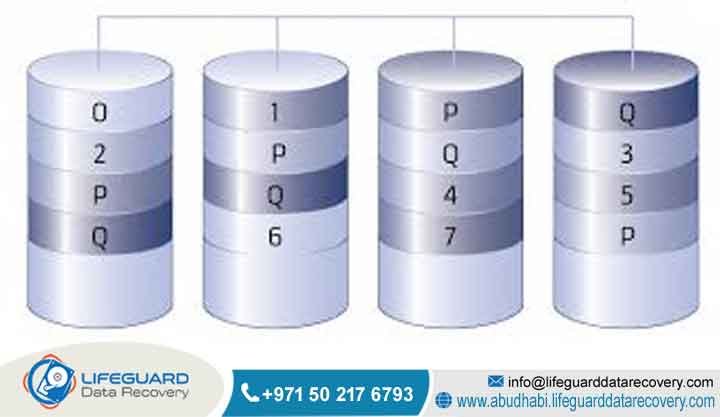
To really wrap your head around RAID 6 data recovery, you have to look closely at the math behind dual distributed parity. RAID 6 Recovery Guide A standard RAID 6 storage system needs a minimum of four physical hard drives to work in the first place.
It spreads files using a smart structural design where regular data blocks and two entirely separate sets of mathematical backup calculations are written across every single drive at the exact same time. Think of it this way: because of this heavy security layer,
the actual space you get to store files is always N minus 2, where N is simply the total number of physical drives humming inside your server rack.
The very first layer of parity safety uses a standard computing operation called Exclusive OR, which most tech teams just call XOR. This is the exact same logic pattern you find inside a standard RAID 5 setup. The second layer of protection is where things get truly complicated.
It adds an entirely separate mathematical shield, usually built on complex Reed-Solomon error correction codes or advanced Galois field matrix math. This twin-layer approach means your server can stay up and running even if two drives experience a catastrophic mechanical failure at the exact same second.
or how the parity blocks are delayed across the disks, your entire operating system will see the volume as completely blank or unreadable. RAID 6 Recovery Guide Fixing this mess requires an engineer to manually reverse-engineer the exact brand-specific Reed-Solomon equations programmed into that specific model of hardware controller.
Why B2B Entities Choose Lifeguard Data Recovery
Who is Lifeguard Data Recovery?
Lifeguard Data Recovery stands as the leading enterprise-grade data retrieval laboratory operating right here in the United Arab Emirates. With our main advanced engineering lab located in Abu Dhabi and a rapid-response network covering Dubai, our entire business is built around rescuing mission-critical digital assets from broken enterprise storage networks.
We own and run specialized physical labs custom-built to handle massive multi-drive storage arrays, heavy-duty corporate servers, corporate network-attached storage enclosures, and deeply layered virtual machine networks. Today,
Lifeguard Data Recovery serves as the primary technical emergency contact for government bodies, major multinational firms, financial networks, and medical networks across the UAE that require total operational privacy and top-tier success rates.
Why UAE Businesses Trust Us for Enterprise Recovery
Enterprise IT Directors and data center managers all over the UAE choose to work with Lifeguard Data Recovery because our lab houses the rare hardware infrastructure required to salvage broken mass-storage configurations safely.
Our facility features certified Class 100 cleanroom spaces that maintain strict positive air pressure and ultra-clean filtration. This gives our engineers a perfectly safe zone to open up physically damaged mechanical hard disks without letting a single speck of dust ruin the delicate internal platters.
In the real world, standard computer repair shops or technicians using basic downloadable software simply cannot handle a massive array crash. We do things differently. Lifeguard Data Recovery uses specialized hardware-level drive emulators, custom firmware repair gear, and in-house developed parity rebuilding tools.
More than that, we understand how stressful downtime is for a company’s business continuity plan. That is why we back our work with a clear No Data No Charge guarantee and keep every single file fully encrypted from the moment it enters our lab until it is safely back in your hands.
Comprehensive Enterprise Data Recovery Services We Offer
Core Data Recovery Services
RAID Recovery
Our specialized lab provides full engineering turnaround solutions for all kinds of multi-drive storage problems. We focus heavily on rebuilding failed RAID 6, RAID 5, RAID 10, RAID 50, and massive RAID 60 setups. Our team regularly fixes both physical drive burnouts and deeply corrupted file system metadata.
Hard Drive Recovery
Lifeguard Data Recovery repairs physical, mechanical, and electronic failures on enterprise-grade SAS, SATA, and Fibre Channel hard disks. Whether your drives suffer from a broken read-write head assembly, a seized spindle motor, or a fried printed circuit board, we can handle it.
SSD Recovery
Solid-state drive failures require a totally different approach. Our team carries out advanced flash memory recovery by bypassing broken controller chips and reading the internal NAND flash chips directly, using professional chip-off tools to piece your file structures back together block by block.
Server Recovery
We offer complete data extraction for critical business servers running Windows Server, Linux distributions, Unix, VMware ESXi, Hyper-V, and old legacy operating systems. We focus on making sure your live SQL databases and business applications come back online perfectly intact.
NAS Recovery
Our engineers routinely salvage corrupted or completely dead multi-bay Network Attached Storage boxes from all major brands. We know how to manually map out complex custom Linux software RAID configurations, unique file allocations, and non-standard block structures.
Specialized and Advanced Recovery Services
Digital Forensics
Lifeguard Data Recovery conducts deep, legally airtight digital forensics investigations on corporate storage media. We help companies collect verifiable digital evidence, track internal data manipulation, deal with insider threats, and pinpoint unauthorized network access points.
CCTV Recovery
Our lab extracts and puts back together lost, intentionally deleted, or accidentally overwritten video surveillance files from proprietary NVR and DVR storage systems. This is a critical service used regularly by corporate security teams and government facilities across the country.
Ransomware Recovery
When a major ransomware attack locks down an enterprise storage array, our team jumps in to analyze the specific encryption patterns. We isolate the damaged areas of the network and utilize cleanroom-cloned copies of the storage blocks to rebuild clean, unencrypted databases and structural files.
Devices and Storage Architectures We Support
Supported RAID Controller and Hardware Brands
The engineering department at Lifeguard Data Recovery has decades of hands-on experience dealing with the unique configuration files, metadata rules, and layout structures used by the world’s biggest enterprise storage brands.
We work daily on Dell PowerEdge rack servers running internal PERC hardware controllers, HPE ProLiant boxes managed by Smart Array software, and heavy-duty Lenovo Think System storage arrays.
The truth is, every single manufacturer uses a slightly different style when it comes to shifting parity blocks, setting sector offsets, and choosing disk striping rotations. Because of this, our laboratory maintains a massive,
updated library of modern and vintage controller configuration signatures. This lets us manually rebuild arrays from brands like Synology, QNAP, NetApp, Asustor, Buffalo, and Western Digital My Cloud systems without needing the physical server chassis.
Which Devices We Recover: Media Types
Our laboratory is fully equipped to handle almost every single type of physical storage media running inside a modern corporate data center environment:
-
Enterprise Hard Disk Drives: High-speed Serial Attached SCSI, standard enterprise SATA, and specialized Fibre Channel disks built to spin at 10,000 or 15,000 RPM.
-
Solid State Storage: Ultra-fast Non-Volatile Memory Express drives, compact M.2 cards, and traditional enterprise SATA SSD units.
-
High-Density Storage Enclosures: Large-capacity hard drives built on Shingled Magnetic Recording or traditional Perpendicular Magnetic Recording technology.
Common RAID 6 Data Loss Situations and Failure Modes
When Customers Should Contact Us: Critical Failure Triggers
Your business needs to reach out to an experienced recovery lab the absolute minute your storage array drops into a critical failure state. The most common nightmare scenario we see is when a third hard drive dies before the server has finished rebuilding after a previous two-drive failure.
Another massive trap is an aborted parity rebuild loop. This happens when you slide a brand-new replacement drive into the rack, but hidden bad sectors on the older, remaining “healthy” drives cause the controller to freeze up and crash mid-rebuild.
Think of it this way: unexpected physical emergencies happen all the time. Sudden electrical spikes can instantly fry the printed circuit boards of multiple drives at once, a main controller card can stop responding entirely,
or an administrator might accidentally run a format command during a high-stress system upgrade. All of these situations require immediate isolation in a professional lab to keep your data from being permanently overwritten.
Is Recovery Possible After Deletion or Formatted Arrays?
Yes, rescuing data from deleted or formatted RAID 6 volumes is highly successful, but only if you power down the entire server rack the moment the mistake happens. When a file gets deleted or a volume gets formatted by accident,
the raw data blocks that hold your critical SQL files, virtual server images, and folder paths are still physically resting on the disks. The operating system simply updates its internal index files, marking those spaces as empty and available for new data.
If you leave the server powered on, background automated tasks, system logs, and daily user activity will immediately start writing new information over those exact blocks. Once that happens, the original data is gone forever.
Lifeguard Data Recovery handles these high-stakes cases by bypassing the operating system completely. We look directly at the raw hexadecimal data code to find hidden file headers and rebuild your original folder structures from scratch.
Can Physically Damaged Drives Be Recovered in a RAID 6?
Yes, we can absolutely recover files from hard drives that have suffered severe physical or mechanical damage inside a RAID 6 array. When internal parts break down-like a collapsed read-write head assembly, a broken actuator arm, or a frozen spindle motor-the drives cannot be opened in a normal office environment. If dust hits those platters, the data is ruined.
We bring these damaged drives straight into our certified Class 100 cleanroom. There, our engineers carefully take the drive apart, swap out the broken internal mechanics with perfect donor components from the exact same factory production run, and repair the internal drive microcode.
Once the drive is temporarily stable, we link it to a specialized hardware imager to make an exact sector-by-sector copy. We then use this safe clone to stand in for the broken drive during our final virtual array reconstruction.
How Our RAID 6 Recovery Process Works
Step-by-Step RAID 6 Engineering Protocol
Step 1: Evaluation and Media Ingestion
The moment your failed drives arrive at our Abu Dhabi facility, they are logged into our secure tracking network. Every individual drive goes through a safe, non-destructive physical and electronic diagnostic scan to map out internal damage, bad sectors, or firmware errors without writing a single bit of new data to your disks.
Step 2: Sector-by-Sector Cloning
Next, we connect every single drive from the array to a specialized hardware imaging device. Our team extracts an exact, bit-for-bit raw clone of every readable sector onto our secure lab storage servers. The original customer disks are locked away in our physical vault, meaning we do all our repair work on safe binary duplicates.
Step 3: Determination of RAID Parameters
Using advanced hex analysis software, our engineers look deep inside the metadata of the cloned drives. We manually piece together the puzzle to find the original drive order, the exact stripe size, the parity rotation sequence, and the precise sector offsets that the original server controller used to write the files.
Step 4: Virtual Array Assembly
Once we have those exact configuration puzzle pieces, we use advanced emulation software to build a virtual version of your RAID 6 array. If up to two drives are completely dead or missing, our system uses the dual-parity Reed-Solomon equations to calculate and fill in the missing data blocks dynamically in real-time.
Step 5: File System Repair and Extraction
The virtual array allows us to see the underlying file system structure, whether it is running NTFS, EXT4, XFS, or VMFS. Our engineers run deep integrity fixes to repair logical corruptions, extract the original directory structures, and move your recovered files over to a brand-new, securely encrypted delivery drive.
Recovery Timeframes, Success Factors, and Costs in the UAE
What Affects RAID 6 Recovery Success Rates?
The final success rate of an intricate RAID 6 recovery job depends almost 100% on what happens right after the very first system error pops up. We see the absolute best results when an IT team shuts down the power immediately after getting a multi-drive failure alert.
On the flip side, your chances of getting everything back drop fast if someone tries to force the server back online using forced initialization tools, or if they start pulling out hard drives and swapping their physical positions in the rack. Doing that forces the controller to write incorrect parity information directly over your healthy files, scrambling the data. Heavy physical scratches on the magnetic disk platters also act as a major hurdle that can limit recovery.
How Long Does RAID 6 Recovery Take?
The total time it takes to get your data back depends on how badly the drives are physically damaged and how many terabytes of data are locked inside the array. A comprehensive diagnostic assessment and structural metadata analysis usually take between 24 and 48 hours. For standard corporate cases where we are dealing with logical bugs or bad sectors, the recovery process typically wraps up in 3 to 5 business days.
However, we know that when a core business server goes down, every hour costs money. That is why Lifeguard Data Recovery runs a priority emergency dispatch team that works around the clock, 24/7. For these urgent, high-priority cases, we can often finish the entire physical rebuild and file extraction within 24 to 72 hours, depending on how fast the failing drives can read data.
How Much Does RAID 6 Recovery Cost in the UAE?
There is no such thing as a flat, generic price tag when it comes to professional RAID 6 recovery here in the UAE. Every single job is priced based on its unique technical challenges. We look at the total number of physical drives in your system, the capacity of those disks, the exact type of physical or logical damage we are fighting, and how fast you need the data back.
A complex cleanroom job that requires us to source rare donor parts and perform delicate micro-surgery inside a hard drive will naturally cost more than a logical software rebuild. Lifeguard Data Recovery provides a clear, itemized price quote right after our initial diagnostic scan. This ensures you know the exact costs upfront, and everything is backed by our strict No Data No Charge policy.
Industries We Serve and Compliance Standards
Sectors Relying on Lifeguard Data Recovery
Lifeguard Data Recovery provides critical data emergency services to a wide variety of high-stakes industries all across the United Arab Emirates. Government ministries, city corporate bodies, and essential utility companies trust our laboratory with highly sensitive organizational files.
Local banking networks, international financial institutions, and major investment firms rely on our secure engineering setups to safely restore damaged transaction ledgers and customer accounting databases.
We also provide ongoing technical recovery support to large healthcare systems, major regional hospitals, oil and gas extraction conglomerates, defense contractors, and regional cloud storage providers. These organizations operate massive multi-drive server farms and simply cannot afford long-term, permanent data block losses.
Data Security, Confidentiality, and Compliance Protocols
Our entire laboratory operates under incredibly tight security rules designed to satisfy the strict risk-management standards of large corporations. Every single recovery procedure we perform matches the legal requirements of the UAE Federal Decree-Law on Personal Data Protection, meaning your private customer files and proprietary business records stay completely safe.
Our physical lab facility is monitored around the clock with strict access controls, and our data recovery workstations are completely disconnected from the internet to eliminate any chance of data leaks or external hacks. We sign official non-disclosure agreements before you ever hand over your corporate drives, and we load your recovered data onto a fresh delivery drive protected by military-grade AES 256-bit hardware encryption.
Regional Availability: Comprehensive UAE Coverage
Localized B2B Recovery Services Across the Emirates
Lifeguard Data Recovery makes sure that any business facing a sudden server crash can get fast, expert technical help, no matter where their office or data center sits in the country. Our primary engineering laboratory and diagnostic hub are centrally located in Abu Dhabi, serving the extensive network of government offices and industrial complexes in the capital.
To ensure complete coverage across the region, we run a secure corporate courier network that provides fast pickup and safe media transport across all seven emirates:
-
Abu Dhabi: Our main enterprise recovery lab, cleanroom facility, and deep diagnostic center.
-
Dubai: Rapid on-site pickup and secure courier dispatch tailored for busy commercial hubs and technology centers.
-
Sharjah: Corporate data recovery solutions built for the local manufacturing, industrial, and academic sectors.
-
Ajman: Fast pickup and local diagnostic services for growing commercial businesses and storage systems.
-
Fujairah: Dedicated storage media logistics support for the maritime, shipping, and port operations sectors.
-
Ras Al Khaimah: Specialized array recovery services designed for regional manufacturing plants and corporate offices.
-
Umm Al Quwain: Secure media pick-up and priority evaluation for local businesses and public sector offices.
RAID 6 Technical Comparison: Overcoming Competitor Gaps
RAID 6 vs. RAID 5 vs. RAID 10: Recovery Complexity and Fault Tolerance
The underlying structural design of your modern RAID setup changes everything when it comes to fault tolerance and how difficult it is to get your files back when things go wrong. The comparison table below highlights the key differences:
| Configuration | Minimum Drives Required | Fault Tolerance Level | Parity Architecture | Recovery Complexity |
| RAID 5 | 3 | 1 Drive Failure | Single Distributed Parity (XOR) | Moderate; requires our engineers to calculate one missing drive sequence using straightforward logical equations. |
| RAID 6 | 4 | 2 Drive Failures | Dual Distributed Parity (XOR & Reed-Solomon) | Very High; requires advanced matrix math to rebuild two separate missing disk data streams at the same time. |
| RAID 10 | 4 | 1 Drive Per Mirror Set | No Parity; Striping of Mirrored Pairs | Low to Moderate; depends entirely on which exact disk died, letting us clone the drive directly without parity math. |
Case Study: Recovering a Failed 24-Bay RAID 6 Server in Abu Dhabi
The Challenge: Three Failed Enterprise SAS Drives and Corrupt Parity
A major international logistics company located in the busy industrial zones of Abu Dhabi hit a wall when their main storage framework crashed completely. Their entire operation ran on a massive 24-bay Hewlett Packard Enterprise ProLiant server.
This system was setup as a single, large RAID 6 array holding all their live SQL tracking databases and core enterprise resource planning systems. Unfortunately, the server room’s cooling system broke down over a weekend, causing the rack to overheat fast.
Three high-speed enterprise SAS drives suffered sudden mechanical head crashes at almost the exact same time, forcing the server controller to lock down and take the entire storage volume offline. In an attempt to get things moving,
the company’s internal IT team tried to force the array back into active service. This move accidentally corrupted the internal configuration metadata and scrambled the block mapping sequence, causing total operational standstill.
The Solution and Results: 100% Database Restoration
The logistics company quickly packed up all 24 hot-swappable SAS drives and transported them under secure chain-of-custody directly to the Lifeguard Data Recovery lab. Our cleanroom team went to work immediately, identifying the three drives with internal physical failures.
We opened them up inside our Class 100 cleanroom, replaced the damaged internal head components with identical donor parts, and safely extracted perfect sector-by-sector clones.
At the same time, we created binary clones of the other 21 healthy drives to keep their raw data safe. Our software engineers then analyzed the hexadecimal code across the drives to find the original block striping patterns, completely bypassing the ruined controller configuration files. This allowed us to virtually assemble the 24-drive array and use the dual distributed parity formulas to read the missing blocks.
Client Outcome
Our team successfully stabilized the virtual file system, uncovering the original corporate SQL databases completely intact. We ran a series of deep data-verification checks to ensure that no logical corruption had leaked into the database tracking rows. The entire batch of recovered corporate data was moved onto a secure,
encrypted storage drive and delivered back to the client within 48 hours of ingestion. This rapid turnaround saved the logistics firm from millions of dirhams in supply chain delay penalties and let them bring their operations back online seamlessly.
Expert Insights: Crucial Mistakes to Avoid During a RAID 6 Degradation
Why You Should Never Force a Failed RAID 6 Online
The moment a RAID 6 array drops completely offline, it is a direct warning that your hardware controller can no longer verify the logical order of the data blocks hidden across the disks. One of the most destructive mistakes we see system administrators make is rushing into the management console and running forced commands like “force online” to override the system’s built-in alarms.
Think of it this way: doing this tells a confused controller to start reading and writing to out-of-sync or physically dying drives as if everything is perfectly normal. The controller will instantly start writing new system logs, background data, and completely broken parity updates straight across your healthy files.
This unintended overwriting process permanently destroys the original Reed-Solomon parity metadata headers. It turns a clean engineering recovery path into a deeply fragmented, chaotic puzzle that can lead to total, permanent data loss.
Frequently Asked Questions
What is the primary difference between a professional RAID 6 recovery and using automated software?
Professional RAID 6 recovery focuses on hardware-level cloning, cleanroom mechanical repairs, and manual assembly of custom controller configurations by experienced engineers. On the other hand, automated data recovery software assumes your hard drives are physically healthy and use a standard, factory-default block layout.
If you try to run recovery software on physically failing or out-of-sync disks, the constant, aggressive reading loops will place extreme stress on the weak drive heads. This often scratches the internal magnetic platters, ruining your chances of ever getting your files back.
Can Lifeguard Data Recovery reconstruct a RAID 6 array if the original hardware controller is completely destroyed?
Yes, our engineering team does not need the original physical server controller box to successfully salvage your data. We look directly at the raw binary data blocks and metadata signatures on the sector-by-sector clones we make in our lab. By using specialized low-level editing software, we can manually figure out the original striping sizes, drive order, and parity rotations, allowing us to safely rebuild the entire structure virtually on our lab workstations.
What happens if multiple drives fail during a RAID 6 parity rebuild process?
When a single hard drive dies in a RAID 6 setup, the array drops into a vulnerable, degraded mode. The second you slide a new replacement drive in, the controller starts an intense parity rebuild process, which forces the remaining hard drives to read data continuously at maximum speed for hours on end.
If any of those older drives have hidden bad sectors or weak mechanical components, the extreme workload often pushes them over the edge, causing them to fail. If the total number of dead drives reaches three or more during this window, the rebuild loop crashes instantly, and you will need professional cleanroom intervention.
Are there any data recovery limitations when dealing with encrypted RAID 6 volumes?
We can completely recover data from encrypted RAID 6 volumes, provided your team can supply the original encryption keys, certificates, or manager passphrases. Our engineering team must first solve the physical and structural problems with the array,
piecing the raw sectors back together to create a healthy virtual image of the drive. Once that raw structural volume is stable, we can apply your corporate encryption credentials to safely unlock the file layer and extract your databases.
How does the No Data No Charge policy apply to enterprise RAID 6 servers?
Our No Data No Charge policy is a simple, honest guarantee: if our engineering team cannot successfully reconstruct your failed RAID 6 array and hand back your critical target files, you do not owe us a single dirham for the recovery work.
The firm price quote we give you after our initial lab diagnostic scan is only valid if we successfully retrieve your files. This policy keeps things completely transparent and removes all financial risk from your company during a high-stress crisis.
Can data be recovered if someone accidentally initializes a RAID 6 configuration?
Yes, we can routinely recover files after an accidental system initialization, but only if you pull the power plug immediately. A standard initialization usually just wipes out the main volume partition tables and writes a fresh, blank metadata index across the disks,
but it does not instantly write zeros over your actual data blocks. Our engineers can look past the new, empty file structure, locate the hidden boundaries of your original configuration, and pull out your files safely.
Why Lifeguard Data Recovery is a Trusted Enterprise Provider
Lifeguard Data Recovery has built its reputation as the most dependable corporate data rescue lab in the United Arab Emirates by consistently saving complex, multi-drive storage networks that standard IT departments label as completely lost.
Thanks to our advanced in-house technical setups, certified Class 100 cleanroom environments, and decades of deep expertise in manual parity calculations, we give your business a reliable path out of a data loss crisis.
We balance strict data security and full compliance with UAE data protection laws with a straightforward, transparent No Data No Charge policy, ensuring that government offices, enterprise data centers,
and local businesses get top-tier professional care. When your main server array goes down and your business stops, do not gamble with automated tools or uncertified shops. Get in touch with our enterprise engineering team right away to get your data back safely.
Secure Immediate Consultation:
-
Call: +971 50 127 6793
-
Email: info@lifeguarddatarecovery.com



