+971 50 217 6793 Abu Dhabi, UAE info@lifeguarddatarecovery.com

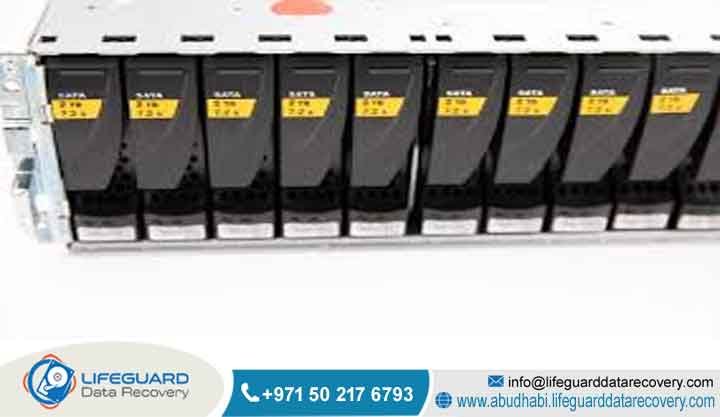
Common RAID Failure Scenarios
What are common RAID failure scenarios and how does expert data recovery work in the UAE? When your enterprise storage goes down, the culprit is usually a mix of mechanical failures and logical mess-ups.
The most frequent issues we see include multiple hard drives dying at the exact same time, physical RAID controller failures, accidental volume formatting, incorrect storage rebuild steps, or deep partition corruption.
Real, professional recovery means getting those damaged disks into a specialized environment. We clone every single sector to keep whatever data is left safe, and then we rebuild the raw configuration by going completely around the broken controller or ruined parity blocks.
Lifeguard Data Recovery handles this exact type of complex laboratory work every single day for businesses across Abu Dhabi, Dubai, and all the northern emirates.
About Lifeguard Data Recovery: Who We Are and Why UAE Businesses Trust Us
Who is Lifeguard Data Recovery?
We are an enterprise-focused data recovery lab operating right out of Abu Dhabi, United Arab Emirates. Think of us as the emergency crew for corporate IT systems. When massive databases vanish or a server rack stops responding, we are the team that local companies, government offices, defense groups, and banks call to get their operations back online.
The big difference with us is that we handle everything locally inside our own advanced diagnostic labs and local cleanrooms. Your sensitive corporate storage media never leaves the country, which means you maintain total custody of your files and stay completely compliant with local privacy laws.
Why Businesses Choose Lifeguard Data Recovery
The truth is, regular IT teams are great at keeping software running, but they simply do not have the specialized tools needed when storage hardware physically breaks down. That is why companies across the region choose Lifeguard Data Recovery. We have spent years fine-tuning our technical approaches inside our certified Class 100 cleanroom, where we routinely fix burned control boards, stuck motors, and broken internal read heads.
We also strip away the risk for local procurement teams by offering a real No Data No Charge engineering guarantee. If we can not get your business files back, you do not pay us a single file recovery fee. This clear approach has made us the trusted name for server emergencies across corporate offices in Abu Dhabi, Dubai, and Sharjah.
Comprehensive Data Recovery Services We Offer in the UAE
When a storage system breaks, it rarely happens the same way twice. That is why we offer highly targeted, laboratory-grade extraction services to deal with a massive variety of mechanical failures, chips burning out, and complex file system corruptions. Before we even think about running a recovery pass, we isolate your media and run an in-depth diagnostic check to see exactly how much damage we are dealing with.
Our core laboratory solutions include:
-
RAID Recovery: Piecing back together complex multi-disk setups like RAID 0, RAID 1, RAID 5, RAID 6, RAID 10, RAID 50, and large corporate configurations after multiple drives drop or controllers fail.
-
Server Recovery: Saving entire virtual environments, mission-critical SQL databases, and primary enterprise operating systems from broken, non-responsive server racks.
-
NAS Recovery: Fixing network storage boxes from brands like Synology, QNAP, and QSAN that have suffered from massive hardware breakdowns or operating system failures.
-
HDD Recovery: Performing physical micro-surgery on traditional hard drives with locked spindles, clicking head assemblies, or fried circuit boards.
-
SSD Recovery: Using advanced NAND flash chip extraction and custom controller emulation to grab files from dead, unreadable solid-state drives.
-
Digital Forensics: Gathering and preserving digital evidence with a strict chain of custody for legal teams, internal audits, and corporate compliance cases.
-
Ransomware Recovery: Helping companies bounce back from cyberattacks by cleaning up infected storage layers and using cryptographic tools to rescue encrypted virtual disks.
Hardware and Infrastructure Devices We Recover
Our laboratory engineers work across a massive range of enterprise infrastructure daily. We regularly rebuild systems from top global tech manufacturers. This includes Dell PowerEdge servers, HPE ProLiant boxes, Lenovo Think System hardware, IBM System x,
Cisco UCS blade systems, and enterprise storage arrays from NetApp or Synology. Our custom hardware tools support all types of drive tech, meaning we can handle enterprise-grade SAS drives, massive SATA disks, high-speed NVMe solid-state setups, and older SCSI arrays without a problem.
Understanding Common RAID Failure Scenarios
What is a RAID Failure Scenario?
When we talk about a RAID failure scenario, we mean a situation where a multi-disk storage setup completely breaks down and stops talking to the host server. Even though these configurations are built to survive a single disk or even two disks dying by using smart mathematical parity tricks,
things can still go sideways. When a systemic issue hits, the whole array crashes offline, locking up your business operations and leaving your corporate databases completely out of reach.
How Does a RAID Failure Occur and How Does Recovery Work?
It usually starts with a single drive quietly dropping offline because of a minor mechanical issue. If the IT team does not notice it immediately, the remaining disks have to work twice as hard to fill the gap. During this high-stress period,
a second drive will often develop unreadable bad sectors or drop entirely due to read-write head fatigue. Once the system loses more drives than its built-in safety net can handle, the controller completely locks up the volume to protect against bad data being written.
Our recovery work fixes this by leaving the original controller completely out of the equation. First, our engineers bring the drives into our cleanroom to fix any obvious physical or mechanical issues. Once the disks are stable enough to spin,
we make an exact, sector-level digital clone of every drive onto our own laboratory storage. From there, our specialists use hex-editors and custom layout software to figure out the original stripe size, drive layout sequence, and parity configuration. We manually piece the puzzle back together entirely within a safe virtual workspace.
Primary Causes of Corporate Data Loss Situations
Corporate data loss across the UAE usually happens because of three big problems: mechanical wear and tear, logical software errors, or malicious digital attacks. On the physical side, we see power surges that fry multiple identical drives simultaneously, server room cooling failures that overheat storage racks, or old age causing head crashes.
Logical errors come down to things like file system corruption, or an IT engineer accidentally initializing the wrong partition during weekend maintenance. Lastly, malicious attacks involve ransomware strains that sneak past firewalls and encrypt the virtual disks buried deep inside your network.
How Our RAID Recovery Process Works
We follow a highly disciplined, step-by-step technical workflow under the How To Schema framework to make sure your data is handled with maximum safety.
Phase One: Submission and Comprehensive Diagnostic Isolation
You deliver the affected storage media or the full server unit to our main laboratory in Abu Dhabi or a secure collection point. Our engineers place every single drive onto isolated testing benches to look at the health of the firmware chips and control boards. We never power up a drive if it is making a strange noise or showing physical physical resistance.
Phase Two: Cleanroom Mechanical Stabilization and Micro-Component Care
If we find physical internal damage, the disk goes straight into our certified Class 100 Cleanroom. Our specialists open up the drive casing in a dust-free environment to replace broken read-write heads with matching donor parts, free up stuck spindle motors, or clean away micro-particles from the storage platters.
Phase Three: Sector-by-Sector Cloning and Master Copy Creation
Once the drive is mechanically stable, we hook it up to custom data imaging rigs. We take a complete, sector-level bit-stream copy of the disk to create an exact digital twin. The original client drive is then safely stored away so we don’t risk wearing it down any further during the actual recovery work.
Phase Four: Array Parameter Determination and Software Reconstruction
Next, our engineers use the digital clones and specialized hex-analysis software to figure out the missing pieces of your system puzzle. By reading file metadata across the drives, we calculate the exact stripe order, offset markers, and block sizes needed to rebuild the array virtually.
Phase Five: File System Verification and Client Integrity Sign-Off
We take that virtually reconstructed image and mount it in a secure, read-only setup. This allows us to check the internal folders, database tables, and critical business files. We then generate a complete file tree report so you can see exactly what files are ready for extraction.
Phase Six: Encrypted Secure Delivery and Final Target Handover
Once you look over the file report and confirm everything is correct, we write the recovered data onto a brand-new, securely encrypted external drive. We hand that over to your team along with your original hardware, bringing the project to a safe close.
Standard vs. Emergency Recovery Timeframes
We offer two different speed tiers depending on how bad your operational downtime is. Our Standard Recovery option takes about four to seven business days, which works perfectly for non-essential file stores or older archive systems.
you can opt for our Emergency Recovery service. This team operates around the clock, including weekends and holidays, pushing your case through continuous cleanroom and logical phases to get your files extracted and back to you in just twenty-four to forty-eight hours.
Technical Factors That Affect Recovery Success Rates
What happens in the first few minutes after a storage crash completely dictates our chances of a successful recovery. The best thing an IT team can do is cut the power immediately when a volume drops or shows errors.
On the flip side, things get much harder if the team tries to force a rebuild on a crashing array, swaps in fresh drives that already have random data on them, or opens up a hard drive lid inside a normal office room, which instantly ruins the platters with invisible floating dust.
Enterprise RAID Recovery Cost Assessment in the UAE
We do not charge based on how many gigabytes of data you want to save. Instead, pricing for enterprise recovery in the UAE depends entirely on the technical challenges involved. We look at the total number of drives in the array,
the underlying storage technology (like enterprise SAS, SATA, or high-speed NVMe solid-state modules), the type of failure (logical software bugs versus physical drive head crashes requiring donor hardware), and how fast you need the files back.
For instance, a straightforward logical fix on a simple four-drive NAS setup might cost anywhere from to . However, if you have a complex twelve-drive enterprise server where multiple disks have suffered physical mechanical failure and require hours of cleanroom micro-surgery, the cost can range from to over . We give you a flat, binding price quote right after our free initial evaluation, so you know exactly what to expect before we begin.
Comparison: Internal IT Troubleshooting vs. Professional RAID Data Recovery
Internal IT Troubleshooting
-
Pros: There are no upfront service fees to clear, your in-house team can quickly check the physical server connections, and you can confirm if it is a basic power issue.
-
Cons: There is a massive risk of permanently destroying data if you run a forced rebuild, regular IT teams lack cleanrooms to fix clicking drives, and standard utility tools can easily overwrite your lost blocks during automated scanning.
Professional RAID Data Recovery Lab
-
Pros: You get access to a certified Class 100 Cleanroom environment, data is handled completely via safe digital drive clones, unstable sectors are read using advanced hardware imagers, and you are backed by a strict No Data No Charge policy.
-
Cons: It requires an external budget allocation, and you have to physically deliver or ship the storage media to our laboratory.
Comparison: Professional Recovery vs. Automated Recovery Software
Trying to use downloaded automated recovery software on a crashed corporate RAID system is a massive gamble that rarely ends well. These basic software tools treat your storage like a standard single drive, completely ignoring things like broken parity structures or physical drive instability. If one of the disks in your array has a weak or failing read head,
a heavy software scan will force it to work at maximum capacity until it completely breaks down, scratching the storage platters and ruining any chance of ever getting your data back. A real laboratory avoids this completely by stabilizing the hardware first, cloning the sectors, and doing the reconstruction work safely in a virtual environment.
When Businesses Should Choose a Specialist Recovery Lab
Your company should step away from the server rack and call a specialized recovery lab immediately if you notice any of these warning signs: the server chassis starts making a ticking, clicking, or grinding sound;
your storage controller management panel lists multiple drives as missing or offline at the same time; a rebuild progress bar freezes completely solid halfway through; or the operating system tells you that the partition is completely unreadable or must be formatted before use.
Industries We Serve and Compliance Standards in the UAE
We work with a massive variety of corporate sectors across the United Arab Emirates, ensuring that highly specialized file layouts and databases are handled perfectly. Our regular corporate clients include government entities and local municipalities that demand deep security screening;
banking networks that require extreme confidentiality for financial records; healthcare providers protecting archived patient data; law firms managing sensitive legal evidence; and industrial engineering or oil companies keeping track of proprietary site blueprints.
Enterprise Data Security and Regulatory Compliance
Data safety is something we take incredibly seriously. Our recovery practices are built to align with major local and global privacy rules, including the Abu Dhabi Global Market (ADGM) data protection guidelines, the Dubai International Financial Centre (DIFC) privacy frameworks,
and federal UAE cyber safety laws. We use strictly isolated, offline recovery networks with zero internet access to make sure your data never leaks during the recovery process.
Nationwide Service Availability: Our UAE Coverage Footprint
We offer fast, secure courier pickup, device analysis, and safe delivery services covering every square inch of the United Arab Emirates, including:
Abu Dhabi: Our central laboratory headquarters provides local corporate support to business districts, the Mussafah industrial area, and outlying Al Ain corporate offices.
Dubai: Rapid courier collection routes covering active offices in Business Bay, Dubai Internet City, Dubai Marina, and the Jebel Ali Free Zone.
Sharjah: Dedicated data recovery services for industrial manufacturing companies and regional academic campuses.
Ajman: Direct media drop-off and professional diagnostics for expanding commercial zones and businesses.
Fujairah: Secure transit networks to handle corporate media for shipping, logistics, and port administration offices.
Ras Al Khaimah: Complete industrial technical assistance for local factories, hotels, and corporate operations.
Umm Al Quwain: Reliable technical diagnostics and media collection for local businesses and administrative offices.
Case Study: Recovering a Failed RAID 5 Server in Abu Dhabi
Problem: A major shipping and logistics firm based in Abu Dhabi suffered a sudden dual-drive failure on an eight-bay Dell PowerEdge server running a critical RAID 5 array. The system went completely offline, trapping active SQL databases and their main enterprise planning software.
Urgency: The crash completely halted their regional supply chain operations, causing massive delivery backlogs and heavy financial losses with every passing hour.
Recovery Process: The client brought the drives straight to our Abu Dhabi lab under our priority emergency service tier. Our cleanroom team opened up Drive Three and replaced the damaged head stack using a matching donor drive in our dust-free space to get a clean clone.
Next, we used specialized hardware tools to adjust voltages and read past the bad sectors on Drive Four to build a second perfect copy. Once we had all the sector images, our logical engineers calculated the original layout parameters and virtually rebuilt the entire system.
Result: We verified the extracted database files for consistency, confirming zero corruption inside the database rows.
Client Outcome: We recovered one hundred percent of their mission-critical SQL data files and delivered them on a secure, encrypted drive within thirty-six hours, letting the logistics firm get back to full operational capacity.
Expert Insights: Maximizing the Chances of a Successful RAID Recovery
The single most important piece of advice I can give an enterprise IT manager during an active RAID failure is simple: pull the power plug on the server immediately. Do not attempt to reboot the machine just to see if it fixes itself, do not try to run forced disk recovery tools, and do not let automated utilities try to repair file systems.
These steps end up writing over critical parity markers and can cause a failing read head to physically scratch your data off the platters. Always stick to professional data recovery labs that have real, physical cleanrooms on-site and clear, binding No Data No Charge contracts to protect your business assets.
Frequently Asked Questions Regarding RAID Failure and Recovery
What is [Common RAID Failure Scenarios]?
This term refers to a situation where a multi-drive storage setup breaks down because the number of dead hard disks passes the system’s built-in redundancy limit.
When this occurs, the careful system of data striping falls apart completely, leaving the storage volume completely unreadable by your server until specialized technical engineering recovery is carried out.
How does it work?
We treat every single drive from the broken array as an isolated piece of raw storage data. First, we pull the drives from the failed server host, fix any physical mechanical or electronic issues inside our cleanroom, and make a precise, sector-by-sector digital clone.
Then, our team uses custom hex-editors to read the drive metadata, figure out the original stripe order, and piece the file system back together inside a completely safe virtual lab environment.
Who needs this service?
This specialized service is built for enterprise IT managers, data center teams, mid-sized business owners, and government offices whose day-to-day work relies on multi-drive setups like SAN towers, NAS boxes, or rackmount servers that have suddenly gone completely offline. It is the only real choice when standard backup options are missing and standard IT utilities are failing to bring the files back.
How much does it cost in UAE?
A typical project can run from for basic logical folder re-assembly on a standard NAS box up to or more for large corporate server racks with multiple drives suffering from severe mechanical head failure. The final cost depends on how many drives you have, the type of media, the physical damage involved, and how fast you need it fixed. We give you a guaranteed, fixed price quote right after our free evaluation.
How long does recovery take?
Our standard lab turnaround timeline gets your diagnostics completed and your data recovered within four to seven business days. If you are dealing with a critical corporate emergency, our round-the-clock emergency recovery team can usually replace parts, clone the drives, and virtually rebuild your file infrastructure within twenty-four to forty-eight hours, depending on media stability and data volume.
Can deleted files be recovered from a RAID array?
Yes, we can absolutely recover deleted files from an array, but only if you cut the power to the system right after the mistake happens. If you leave the server running, the operating system will continuously write new logs and temp files over those freshly emptied data sectors, destroying the old files forever.
Can damaged SSDs be recovered?
Yes, Our engineers carefully disorder the internal NAND flash memory chips from the broken circuit boards and place them into hardware readers. This lets us read the raw files directly and reconstruct the data layout using software that mimics the original controller chip.
Can failed RAID arrays be repaired?
You should never try to repair a failed array back onto the original server hardware because the risk of accidentally wiping your files is massive. Instead, the smart move is to extract and reconstruct the data safely inside a laboratory environment. Forcing a broken system to rebuild itself often leads to secondary drive failures and data overwrites. We pull the data off safely first, then you can rebuild your hardware system using fresh disks.
What determines recovery success?
The biggest factor by far is whether or not the server was shut down immediately after the initial crash occurred. Other critical factors include the physical condition of the magnetic storage platters inside the drives, whether the system was subjected to aggressive utility scanning programs, and making sure the drives are only opened inside a real, certified cleanroom environment.
Is recovery possible after a RAID controller failure?
Yes, data recovery is highly successful when a physical RAID controller chip burns out because your actual data blocks are still sitting perfectly intact across the individual hard drives. Our team bypasses the broken controller card completely. We connect the disks to our lab equipment, read the internal configuration metadata, calculate the original settings, and cleanly pull the entire volume back together.
What should I do if my RAID server is clicking?
If you hear a clear clicking, ticking, or scraping noise coming from your server rack or network storage box, you must turn off the main power immediately. That clicking sound means a drive’s internal read head has broken down physically and is hitting the spinning storage platters. If you leave it powered on, that metal head will carve deep scratches into the magnetic coating, destroying your business files permanently.
Secure Your Corporate Assets: Contact Lifeguard Data Recovery UAE
Lifeguard Data Recovery is the leading enterprise data recovery specialist in the United Arab Emirates, providing expert cleanroom physics and guaranteed data extraction for critical server networks across all seven emirates.
If your company is facing sudden downtime, a hardware crash, or a totally unresponsive data volume, stop all internal troubleshooting attempts right now to protect your assets, and let our certified lab engineers handle the problem safely.
Get in touch with our emergency response team right now through our official contact points:
-
Call our corporate service line directly at: +971 50 127 6793
-
Email your technical project details to: info@lifeguarddatarecovery.com
-
Visit our official digital portal at: www.abudhabi.lifeguarddatarecovery.com
-
Main Office Location: Abu Dhabi, United Arab Emirates



