+971 50 217 6793 Abu Dhabi, UAE info@lifeguarddatarecovery.com

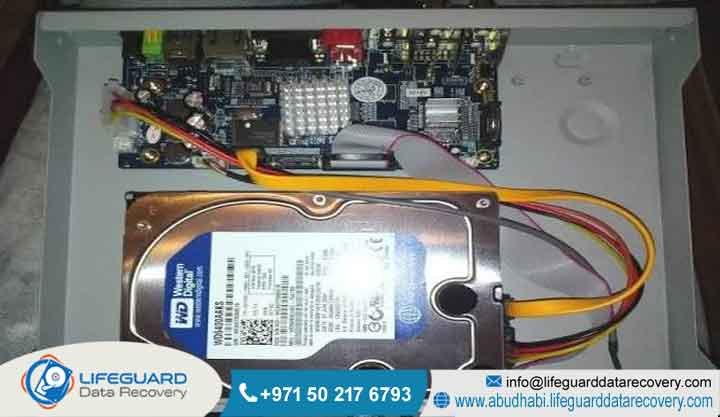
DVR Hard Drive Not Working
A DVR hard drive failure occurs when the internal storage media of a surveillance system breaks down mechanically, electronically, or logically. Consequently, this critical failure results in a “DVR hard disk not detected” error across your security setup.
To safely retrieve lost security footage, our expert engineers must handle the compromised storage media inside a certified cleanroom environment. Lifeguard Data Recovery provides specialist CCTV DVR hard drive problem resolution across the UAE.
If your current DVR storage device failure involves a DVR HDD not recognized by your system, you must disconnect the power source immediately. This fast action prevents catastrophic data overwriting. Contact our laboratory today for a secure forensic extraction.
Quick Solution: What to Do When Your DVR Hard Disk is Not Detected
When a security system displays an alert indicating a DVR HDD not recognized, you need immediate and systemic intervention. This prompt action prevents total media destruction.
Security footage deletion and system corruption often trace back to simple electronic faults. Alternatively, they can stem from severe mechanical breakdown within the magnetic platters of the hard disk drive itself.
If you identify a CCTV DVR hard drive problem, you must shut down the surveillance asset immediately. Continuous power cycling while a drive suffers from internal mechanical degradation leads to rapid rotational scoring. During this state, the read-write heads scrape the magnetic substrate, causing permanent data destruction.
Critical Warnings for Surveillance Systems
Do not attempt to format the storage media under any circumstances. In addition, avoid executing generic storage repair utility tools provided by your operating system software. These automated recovery programs write temporary blocks of configuration metadata to the storage medium, causing immediate data overwriting of critical video blocks.
Furthermore, avoid opening the outer casing of the storage media. Exposing vulnerable internal mechanics to standard ambient air introduces thousands of microscopic dust particles. Consequently, this causes catastrophic head crashes when the drive initializes. You should contact an authorized laboratory to handle the extraction safely.
Technical Profile: Who is Lifeguard Data Recovery?
Lifeguard Data Recovery operates as an enterprise-grade digital forensics and media data retrieval laboratory based in Abu Dhabi, UAE. Operating with advanced laboratory facilities, our firm delivers specialized engineering interventions for corporate entities, government organizations, and private businesses facing catastrophic data loss.
Our technical engineering team possesses specialized competencies in logic board micro-soldering, firmware reconstruction, complex file system repair, and advanced cryptographic decryption.
As an established data retrieval entity in the region, Lifeguard Data Recovery manages complex infrastructure failures involving large enterprise storage environments. The laboratory maintains strict alignment with state data security requirements. Therefore, we ensure all retrieved information undergoes rigorous protection protocols.
By maintaining a massive asset inventory of specialized donor parts and advanced forensic extraction hardware, our organization serves as the primary technical point of escalation for complex data loss situations across all seven Emirates.
Why UAE Businesses Choose Lifeguard Data Recovery
Corporate enterprises and government entities throughout the UAE select Lifeguard Data Recovery due to our superior engineering infrastructure and high success metrics. When a business experiences a critical storage failure, standard software tools are simply insufficient.
Our laboratory utilizes certified cleanroom environments that eliminate airborne particulate contamination during physical drive disassembly. This specialized infrastructure allows engineers to perform delicate physical repairs safely, maximizing structural recovery possibilities from severely compromised hardware.
Compliance and Confidentiality Assured
Furthermore, our technical workflows operate under strict compliance parameters that safeguard corporate confidentiality. Every stage of our recovery lifecycle utilizes isolated server environments to prevent unauthorized data exposure, from intake to secure verification and final delivery.
Additionally, our engineers have decades of combined technical experience in addressing complicated data loss scenarios. For this reason, we have become the preferred technical partner for regional enterprises requiring rapid, verified, and legally defensible digital asset retrieval.
Advanced CCTV & DVR Data Recovery Services We Offer
Lifeguard Data Recovery provides a comprehensive suite of recovery procedures tailored to modern data storage architecture. Surveillance systems utilize specialized hardware configurations that demand precise engineering interventions when storage nodes fail.
Our technical capabilities extend across multiple specialized categories, ensuring absolute data integrity during retrieval operations.
Our Core Service Divisions Include:
-
Hard Drive Recovery: Mechanical and electrical restoration of conventional platter-based hard drives suffering from head crashes, spindle motor failures, or magnetic degradation.
-
SSD Recovery: Advanced NAND flash memory reconstruction, controller chip bypass, and translation layer repair for high-speed solid-state surveillance storage.
-
RAID Recovery: Reconstruction of multi-drive striping networks, correcting controller failures, and resolving multi-disk dropouts in complex enterprise surveillance arrays.
-
Server Recovery: Complete restoration of enterprise-level video management servers, restoring logical operating system structures and underlying databases.
-
NAS Recovery: Comprehensive extraction from network-attached storage enclosures, rebuilding logical volumes, and correcting broken network file system paths.
-
Digital Forensics: Chain-of-custody certified media examination, identifying temporal metadata, and extracting verifiable evidence for legal compliance.
-
CCTV Recovery: Specialized extraction of proprietary surveillance video formats, repairing broken H.264, H.265, and AVI video containers from failed storage arrays.
-
Ransomware Recovery: Decryption and behavioral analysis of compromised network nodes, rebuilding database indices corrupted by malicious cryptographic software payloads.
Media Types & Storage Devices We Recover
The technical infrastructure at Lifeguard Data Recovery interfaces with an extensive catalog of physical storage architecture. Surveillance storage has transitioned from simple, single-disk setups into highly advanced distributed environments.
Meanwhile, our engineers consistently process media from major enterprise storage manufacturers, dealing with the distinct firmware and structural properties unique to each platform.
Supported Storage Form Factors and Configurations:
-
Surveillance-optimized magnetic hard disks including Western Digital Purple, Seagate SkyHawk, and Toshiba S300 series drives.
-
Enterprise-class solid-state drives utilizing SAS, SATA, PCIe, and NVMe data transport protocols.
-
Multi-bay storage appliances configured in RAID 0, RAID 1, RAID 5, RAID 6, RAID 10, and nested JBOD groups.
-
Proprietary embedded filesystems utilized by major security vendors such as Hikvision, Dahua, Honeywell, Bosch, and Axis Communications.
-
Removable media formats used in tactical security gear, including high-end SD cards, MicroSD configurations, and ruggedized external capture cards.
Common Surveillance Data Loss Situations We Solve
Surveillance systems are subject to continuous write operations, making them highly susceptible to specific structural and environmental failure modes. A DVR hard drive failure rarely presents identical physical symptoms twice.
However, understanding the underlying mechanism of data corruption allows our laboratory engineers to deploy appropriate diagnostic scripts and mechanical physical bypass protocols.
Prevalent Data Loss Vectors We Mitigate:
-
Logical deletion of critical timelines caused by intentional human manipulation, insider threats, or accidental administrative format commands.
-
Electronic destruction resulting from power surges, voltage drops, lightning strikes, or building-wide power management system failures.
-
Physical impact damage or structural crushing caused by facility failures, workplace mishaps, or deliberate vandalism.
-
Water ingress and thermal degradation stemming from localized building floods, broken server-room cooling pipes, or fire incidents.
-
Continuous overwrite cycles where the circular buffer of the surveillance management software overwrites vital historical frames before an incident can be exported.
-
Firmware corruption within the drive controller area, preventing the disk from completing its initialization sequence during system booting.
Technical Analysis of Surveillance Storage Architecture
What is a DVR Hard Drive Failure?
A DVR hard drive failure is a structural breakdown condition wherein the specialized hard disk drive integrated into a digital video recorder becomes incapable of reading or writing video streams. Unlike standard desktop drives, surveillance storage media operate continuously under sustained write workloads.
Consequently, this constant operation subjects the mechanical motor bearings, actuator arms, and slider assemblies to significant thermal stress and physical wear.
When a critical mechanical component fails, or when magnetic degradation occurs across the platter surfaces, the drive exhibits a complete breakdown. This state manifests as an inability to communicate with the host operating system, causing the surveillance interface to drop recording streams.
To resolve this issue, an engineer must extract the physical platters or flash memory blocks using specialized hardware imagers within a laboratory environment.
How Does a Surveillance DVR Hard Disk Work?
A surveillance DVR hard disk operates on a specialized continuous streaming architecture designed to manage multiple simultaneous high-definition video inputs. Standard desktop storage relies on burst-write sequences with frequent error checking that pauses data streams during drive errors.
In contrast, surveillance drives use specialized firmware sets, such as the ATA Streaming Command Set. These sets prioritize continuous data recording over deep error correction to prevent dropped frames.
The internal architecture features mechanical components designed to minimize the impact of rotational vibrations caused by adjacent drives in multi-bay configurations. The read-write heads float on an incredibly thin cushion of air above the rapidly spinning magnetic platters, writing continuous sectors of streaming data.
When these specialized components experience electronic or mechanical degradation, the streaming firmware becomes unresponsive. This failure requires low-level hardware communication to access the underlying raw video packets.
Step-by-Step: How Our Technical Recovery Process Works
The engineering methodology employed by Lifeguard Data Recovery follows a verified, logical, and step-by-step diagnostic framework designed to maximize data preservation. Every device received at our Abu Dhabi facility passes through a strict chain of custody to protect evidence integrity.
1. Intake and Initial Forensic Triaging
First, our team logs the received surveillance asset into our laboratory tracking system, establishing an immutable audit record. Technicians then perform an external physical and electrical inspection to identify obvious short circuits, structural deformities, or connector damage before connecting the media to power diagnostics.
2. Cleanroom Mechanical Disassembly and Examination
If the device shows signs of internal mechanical failure, we transfer it directly into our ISO-certified cleanroom. Engineers open the outer casing to inspect the read-write head assembly under high-powered microscopy. Meanwhile, they check for alignment errors, debris accumulation, or physical platter scoring.
3. Component Replacement and Electrical Repair
Next, our team replaces damaged physical components using matching donor components from our hardware repository. This stage involves replacing damaged read-write head stacks, moving platters to stable donor drive chassis, or using micro-soldering to replace blown components on the printed circuit board.
4. Firmware Restoration and Module Patching
The engineers then link the drive to advanced forensic hardware imagers to access the system area track. They manually patch corrupted firmware microcode, clean the drive error logs, and stabilize the translation layer. Consequently, this allows low-level access to the drive storage sectors.
5. Low-Level Sector-by-Sector Bitstream Cloning
Once the drive achieves stable communication, engineers perform a bitstream clone of the media onto secure laboratory storage servers. Our forensic imagers read data clusters sequentially while adjusting voltage parameters. As a result, they safely extract data from degraded sectors without straining the unstable drive mechanics.
6. Logical File System Reconstruction and Video Extraction
Engineers analyze the raw data clone using proprietary file system carvers. Because surveillance systems often use non-standard file allocation tables, this step requires manually reconstructing indexing structures to extract intact, viewable video files.
7. Customer Data Verification and Secure Delivery
Finally, we catalog the recovered video streams into an isolated environment for customer inspection. Once verified, our team encrypts the data and transfers it onto a new, secure external storage device for delivery back to the client.
Estimated Timeframes for Security Footage Retrieval
Data recovery timeframes vary based on the nature of the storage malfunction and the underlying storage architecture. For example, a logical failure involving simple file deletion or partition rebuilding can often be processed within 24 to 48 hours.
This swift turnaround occurs because the drive mechanics remain functional, allowing engineers to dedicate full computational resources to data carving and index parsing.
However, if the surveillance storage suffers from severe mechanical breakdown or head crashes, the timeline typically extends to 3 to 5 business days. This duration accounts for the cleanroom teardown, precise component matching, mechanical head replacement, and microcode calibration required to stabilize the disk.
Additionally, complex enterprise RAID networks or servers requiring extensive structural rebuilding may take longer, depending on total storage volume and array degradation. Fortunately, Lifeguard Data Recovery provides expedited emergency response workflows for critical enterprise incidents requiring continuous, round-the-clock engineering attention.
Critical Factors Affecting Surveillance Recovery Success Rates
The likelihood of a successful data extraction from a failed surveillance drive depends heavily on user actions immediately following the initial failure event. The single most critical factor is the avoidance of continuous power cycles.
If a drive with broken internal components remains powered on, the damaged heads can scratch the magnetic surface. This action permanently removes the physical layer where the data resides.
The second key factor involves the extent of continuous recording after a deletion event. Because surveillance systems use circular buffer structures, new video streams will quickly overwrite older sectors if the system is left running. Once a data sector undergoes an overwrite with new video data, the original footage cannot be recovered by any technology.
Therefore, the choice of your initial diagnostic environment impacts success metrics significantly. Choosing a professional laboratory over unverified software tools prevents further damage to fragile storage media.
Industries We Serve Across the UAE
Lifeguard Data Recovery provides high-level data extraction services to an expansive network of commercial and institutional entities throughout the UAE. Our engineering processes meet the strict security and operational demands of highly regulated industries, ensuring critical data assets remain fully protected.
The Primary Sectors Reliant on Our Data Recovery Solutions Include:
-
Banking and Financial Institutions: Securing high-resolution video logs from banking branches, secure vaults, and automated teller networks in compliance with central bank regulations.
-
Aviation and Transport Hubs: Extracting critical operational recordings from international airport facilities, public transit grids, and massive logistics zones.
-
Hospitality and Luxury Resorts: Restoring lost video timelines from major hotel groups, entertainment venues, and hospitality spaces in Dubai and Abu Dhabi.
-
Healthcare Infrastructure: Retrieving video logs from hospital campuses, pharmaceutical warehouses, and specialized medical laboratories.
-
Government and Defense Contractors: Managing high-security extractions for municipal facilities, regulatory offices, and public safety entities requiring strict background clearances.
-
Oil, Gas, and Energy Sectors: Recovering specialized environmental surveillance feeds from offshore platforms, refineries, and remote critical infrastructure nodes.
Enterprise Data Security, Privacy & Local Compliance Standards
Operating within the modern UAE regulatory framework requires absolute adherence to data security standards. Lifeguard Data Recovery manages all media assets in full compliance with local regulations, including the UAE Personal Data Protection Law (PDPL).
We understand that surveillance footage frequently contains sensitive corporate data, intellectual property, and identifiable personal data. Therefore, this data must be strictly protected from exposure.
Our laboratory employs strict access controls, video monitoring, and biometric entry systems to restrict access to data recovery areas. All computational nodes used during extraction and rebuilding are physically isolated from external networks to prevent unauthorized data transfers.
Upon project completion, any temporary data copies retained on our laboratory servers undergo military-grade erasure protocols. This step ensures permanent data destruction once the client confirms secure receipt of their files.
Our Operational Availability Across All 7 Emirates
Lifeguard Data Recovery provides comprehensive, centralized data retrieval logistics across the entire geographical territory of the United Arab Emirates. We operate streamlined intake pipelines that ensure rapid, secure transport of critical media assets directly to our main Abu Dhabi engineering lab.
Our Regional Service Network Encompasses:
-
Abu Dhabi: Centralized laboratory operations providing rapid walk-in diagnostic assessments and emergency field collections across all city business districts and industrial clusters.
-
Dubai: Dedicated corporate courier services executing daily high-priority media collections from major technology parks and financial zones.
-
Sharjah: Streamlined logistics support providing educational institutions and commercial businesses with secure diagnostic transport.
-
Ajman: Accessible drop-off workflows and specialized advisory support for manufacturing and logistics firms.
-
Fujairah: Secure transit networks connecting maritime logistics operations and local commercial businesses directly to our cleanroom team.
-
Ras Al Khaimah: Specialized asset intake pipelines supporting free zone enterprises and hospitality complexes.
-
Umm Al Quwain: Regional collection pipelines ensuring government entities and local businesses have rapid access to expert data retrieval resources.
Understanding User Profiles and Critical Data Interventions
Who Needs This Service?
This service is engineered for any corporate entity, system integrator, or property management organization experiencing a failure within their security infrastructure. When an incident occurs—such as a workplace accident, asset theft, property dispute, or compliance breach—and the underlying storage media fails to display footage, professional intervention becomes necessary.
Standard IT departments often lack the specialized cleanroom tools, micro-soldering equipment, and filesystem carving utilities required to interface with failed storage hardware. Security directors, legal compliance officers, risk managers, and network administrators require our specialized services to safely retrieve unreadable or corrupted files, helping them protect business continuity and meet legal obligations.
Is Recovery Possible After Deletion?
Data recovery after deletion is highly possible, provided the underlying storage media is powered down immediately after the deletion event is discovered. When a file undergoes deletion within a surveillance operating system, the system typically removes the file index pointer rather than erasing the underlying raw video packets. The sectors containing the actual video remain on the disk until new recording data overwrites them.
Because surveillance systems continuously record high-definition streams, the window of opportunity before overwriting occurs is narrow. However, if the storage device is disconnected promptly, our engineering team can use advanced carving utilities to scan the raw data sectors. This action allows them to bypass the missing file allocation tables and reconstruct the original video container structures.
Can Damaged SSDs Be Recovered?
Solid-state drives utilized in modern high-performance surveillance platforms can be successfully recovered despite suffering extensive electronic or logical damage. Unlike magnetic hard drives, solid-state media store data within NAND flash memory chips, managed by an integrated controller chip that runs highly complex wear-leveling firmware algorithms.
When an SSD fails, it is typically due to controller malfunction or flash memory cell degradation rather than a mechanical breakdown. Our laboratory engineers address these failures by using micro-soldering techniques to bypass broken circuit pathways or desoldering individual NAND flash memory components entirely. The raw data can then be extracted using specialized chip readers, allowing engineers to reverse-engineer the original controller wear-leveling algorithms to rebuild the file structure.
Can Failed RAID Arrays Be Repaired?
Failed RAID arrays can be fully reconstructed and recovered, even when multiple storage disks fail simultaneously within a high-density surveillance storage chassis. RAID configurations like RAID 5 or RAID 6 provide built-in drive redundancy, but they remain vulnerable to concurrent hardware failures, controller breakdown, or logical volume corruption.
Our engineering team addresses RAID array failures by analyzing each disk node individually within our laboratory. Physical or electronic issues on individual drives are resolved first, allowing us to generate bitstream clones of every drive in the array. Engineers then use advanced configuration tools to manually determine parameters like block size, parity rotation patterns, and disk sequencing, allowing them to rebuild the virtual array and extract the underlying surveillance file systems.
What Determines Recovery Success?
The overall success rate of a data recovery operation is determined by a combination of physical media condition, user actions, and engineering expertise. The primary factor is the physical condition of the magnetic platters or flash memory blocks; if a hard drive has suffered extensive rotational scoring, the data in those damaged areas cannot be retrieved.
The second major determinant is the speed with which the device is isolated from power after a failure occurs, preventing destructive overwrite cycles and further mechanical damage. Finally, using a certified laboratory equipped with specialized cleanroom facilities, micro-soldering tools, and advanced firmware modification software ensures that delicate recovery procedures are executed safely and accurately.
Technical Comparisons: Choosing the Right Recovery Strategy
Professional Recovery vs DIY Recovery
-
Professional Recovery: Utilizes cleanroom environments to protect media from microscopic airborne contamination.
-
Professional Recovery: Employs physical component replacement and advanced micro-soldering under high-power microscopy.
-
Professional Recovery: Uses specialized forensic hardware imagers to read data safely without straining failing media.
-
Professional Recovery: Requires deep structural knowledge of proprietary filesystems and custom firmware sets.
-
Professional Recovery: Includes an absolute data guarantee, ensuring no fees are charged if data recovery is unsuccessful.
-
DIY Recovery: Exposes drive platters to standard ambient air dust, causing immediate head crashes.
-
DIY Recovery: Relies on generic software tools that often stress failing mechanical components to the point of total failure.
-
DIY Recovery: Can cause permanent data overwriting by saving temporary files directly to the compromised drive.
-
DIY Recovery: Lacks the ability to modify corrupted firmware modules or repair electronic circuit board failures.
-
DIY Recovery: Carries a high risk of permanent data destruction through unguided troubleshooting attempts.
Professional Recovery vs Recovery Software
-
Professional Recovery: Addresses both physical hardware breakdowns and logical file system corruption safely.
-
Professional Recovery: Operates on bitstream copies to protect the original physical drive from additional mechanical wear.
-
Professional Recovery: Can reconstruct proprietary filesystems and repair broken video container structures.
-
Professional Recovery: Provides legally defensible chain-of-custody tracking for forensic applications.
-
Recovery Software: Requires the storage medium to be fully functional mechanically and electronically to operate.
-
Recovery Software: Subject to host operating system limitations, which can lead to automated partition modification.
-
Recovery Software: Often fails to recognize proprietary surveillance formats, producing corrupted or unplayable file outputs.
-
Recovery Software: Can overwrite deleted data blocks by installing software directly onto the active computer system.
When Businesses Should Choose a Specialist Recovery Lab
A business should contact a specialized data recovery laboratory immediately if their surveillance media shows signs of physical damage. Additionally, take action if the drive emits unusual clicking or grinding noises, or fails to initialize during standard diagnostic testing. Attempting to resolve hardware-level issues with standard IT tools or generic software utilities can cause further degradation and lead to permanent data loss.
Furthermore, when surveillance footage is required for critical legal evidence, regulatory compliance audits, or high-priority corporate investigations, professional laboratory recovery is essential. Specialized labs provide the verifiable extraction methods, secure data environments, and chain-of-custody documentation needed to ensure recovered files are accurate, complete, and legally defensible.
Case Study: Restoring Deleted Footage from a Failed RAID-5 DVR Array in Abu Dhabi
The Problem
A major hospitality venue based in Abu Dhabi experienced a critical storage failure within its primary surveillance infrastructure. The core storage environment consisted of an 8-bay network appliance configured as a RAID 5 array, which handled continuous recording from over sixty high-definition security cameras. Following a building-wide electrical power fluctuation, the storage array dropped offline, and the system administration console indicated that two enterprise hard drives had failed simultaneously, causing the entire logical volume to collapse.
The Urgency
The storage failure occurred concurrently with a major slip-and-fall liability incident within the resort property. The legal compliance team required immediate access to the high-definition video logs from that specific timeframe to evaluate insurance claims and meet municipal public safety reporting requirements. The internal IT department was unable to mount the degraded file systems and worried that further recovery attempts would overwrite critical evidence blocks.
The Recovery Process
The compromised drives were securely transported to our Abu Dhabi laboratory under a strict chain of custody. Initial analysis inside our cleanroom revealed that one drive had suffered an electronic logic board failure, while the second drive had experienced a mechanical read-write head assembly failure. Our technicians used micro-soldering to restore the electronic board and replaced the damaged head stack on the second drive using an exact match donor component from our inventory.
Once both drives were stabilized, our team generated complete sector-by-sector bitstream clones using advanced forensic imagers. The engineering team then analyzed the drive data structure to determine the original block size, stripe order, and parity rotation patterns. This allowed them to manually reconstruct the virtual RAID 5 array and access the underlying proprietary surveillance file system.
The Result and Client Outcome
Our data recovery engineers successfully bypassed the corrupted filesystem indexes and used target file extraction tools to isolate the exact video files required by the legal team. The raw video files were fully reconstructed, and our team repaired any broken container formats to ensure smooth, uninterrupted playback of the recorded timeline.
As a direct result of our intervention, the hospitality enterprise received complete, verified video footage covering the entire timeline of the liability incident within 36 hours of drive intake. This rapid turnaround allowed their legal team to resolve the claim effectively and maintain full compliance with local regulatory requirements.
Frequently Asked Questions: DVR Storage Diagnostics
Question: Why does my surveillance system say “DVR hard disk not detected” after a power outage?
Answer: Power outages often cause severe electrical surges that damage the sensitive components on a hard drive’s printed circuit board. Consequently, this damage prevents the drive from spinning up or communicating with the surveillance system’s processor, resulting in a non-detection error. To prevent further electronic issues, you should power down the system immediately until an engineer can evaluate the storage media in a professional laboratory.
Question: Can I run standard computer data recovery software on a surveillance hard drive?
Answer: Running standard computer recovery software on a surveillance drive is generally ineffective and can cause additional data loss. Surveillance systems usually write data using custom, proprietary filesystems that standard operating systems and generic recovery tools cannot read or parse. Furthermore, if the drive has an underlying mechanical issue, the stress of a software scan can cause a total head crash, making the data completely unrecoverable.
Question: What causes a hard drive inside a DVR to make clicking sounds?
Answer: A clicking sound from a hard drive usually indicates a serious mechanical failure known as a head crash. This occurs when the drive’s read-write heads are damaged or misaligned, causing them to click against the internal physical stoppers as they struggle to find the system area track. If your drive begins clicking, turn off the power immediately to avoid scratching the magnetic platters and destroying the stored data.
Question: Is it possible to recover security video footage that has been overwritten by the system?
Answer: Once a data sector on a hard drive has been physically overwritten with new video data, the original footage cannot be recovered by any current technology. However, surveillance systems often mark files as deleted or clear index pointers before actually overwriting the data blocks. Therefore, if you shut down the system promptly after an incident, our team can often retrieve the older data before the system has a chance to overwrite it.
Question: How does Lifeguard Data Recovery ensure the confidentiality of our corporate surveillance footage?
Answer: Lifeguard Data Recovery protects corporate data by utilizing isolated, secure laboratory environments that are completely disconnected from external networks. Our technicians work under strict non-disclosure agreements, and our facilities are protected by biometric access controls and continuous video monitoring. Once the recovered data is securely delivered to the client, any temporary working copies on our servers are permanently erased using secure data destruction protocols.
Question: What should I do if my DVR storage unit was exposed to water or fire damage?
Answer: If a surveillance drive suffers water or fire exposure, do not attempt to dry it, clean it, or connect it to a power source. Corrosive residues, soot, and moisture can cause immediate electrical shorts and permanent mechanical damage if the drive is powered on. Instead, package the damp or damaged drive in a sealed, static-safe container and send it directly to a professional cleanroom facility for safe disassembly and cleaning.
Question: Can data be recovered from a network-attached storage unit used for corporate surveillance?
Answer: Yes, data can be recovered from network-attached storage units, even when they utilize complex multi-drive configurations like RAID 5, RAID 6, or proprietary formats. Our engineers can analyze the individual drives, repair hardware faults, and manually determine the array configuration to reconstruct the logical volumes. This process allows us to safely extract the original video structures and retrieve the missing data.
Question: Why do surveillance-optimized hard drives fail more often than standard desktop computer drives?
Answer: Surveillance hard drives operate under continuous, round-the-clock write workloads, which subjects their internal mechanical components to constant thermal and physical stress. While these drives are engineered for heavy workloads, continuous operation means they reach the end of their operational lifespan faster than desktop drives. Environmental factors like poor ventilation, dust accumulation, and power instability can further accelerate hardware degradation.
Question: Can your lab recover specific camera channels if the rest of the DVR data is corrupted?
Answer: Yes, our engineering team can use specialized carving tools to scan raw data blocks and isolate video data based on unique camera channel signatures. Surveillance systems generally embed specific channel identifiers within each video frame packet header. By targeting these unique identifiers, we can often reconstruct individual camera streams even when the central system index is completely missing or corrupted.
Question: How long does a typical surveillance drive diagnostic evaluation take at your lab?
Answer: Our laboratory standard diagnostic evaluation is typically completed within 24 to 48 hours of receiving the media asset. During this assessment, engineers determine the cause of the failure, evaluate the physical condition of the media, and check the integrity of the data structures. Once the evaluation is complete, we provide a detailed report outlining the findings and a firm quote for the recovery process.
Question: Can you preserve the metadata, such as time and date stamps, during a surveillance recovery?
Answer: Yes, our recovery processes are designed to preserve the original metadata embedded within the surveillance video streams, including time and date stamps. This metadata is critical for establishing a verifiable timeline in legal proceedings, regulatory reviews, and corporate investigations. Our forensic extraction methods ensure that this information remains intact and unaltered throughout the recovery lifecycle.
Question: What format will the recovered surveillance footage be delivered in?
Answer: We typically deliver recovered surveillance data in its native, proprietary format along with the specific player utilities needed for proper viewing and export. If requested, our team can also convert the extracted video streams into standard formats like MP4 or AVI, provided the underlying file structures allow for conversion without compromising data integrity.
Question: What happens if our surveillance drive cannot be recovered under your service terms?
Answer: Lifeguard Data Recovery operates under a clear No Data No Charge policy for all standard recovery operations. If our engineering team determines that the media is unrecoverable due to severe platter scoring or catastrophic data overwriting, no service fees are charged. This policy reflects our commitment to realistic assessments and transparent client relationships.
Expert Insights: Maximizing CCTV Media Survival Rates During Hardware Malfunctions
Enterprise storage systems require proactive management to minimize data loss risks when hardware issues arise. When a surveillance storage appliance begins showing read errors or drops off the network, administrators should resist the temptation to run aggressive automated disk utility programs.
These built-in operating system repairs are designed for standard file structures and often misinterpret surveillance data arrays, causing accidental data erasure.
To ensure long-term reliability, facility managers should maintain stable environmental controls within server rooms and storage closets. Excessive heat and airborne dust are primary contributors to premature mechanical failures in continuously operating surveillance drives.
Implementing high-quality power conditioning and uninterruptible power supplies helps protect sensitive storage electronics from voltage fluctuations, extending the operational lifespan of your critical security assets.
Contact Lifeguard Data Recovery UAE For Emergency Assistance
If your organization is dealing with a critical data loss incident, a failed surveillance array, or an unreadable security drive, contact Lifeguard Data Recovery for immediate professional assistance. Our engineering team is available around the clock to handle complex corporate data recovery needs and provide secure, reliable extraction services.
Get in touch with our laboratory today to arrange a diagnostic evaluation:
-
Call: +971 50 127 6793
-
Email: info@lifeguarddatarecovery.com
Our main laboratory provides secure intake and processing for clients across Abu Dhabi, Dubai, Sharjah, Ajman, Fujairah, Ras Al Khaimah, and Umm Al Quwain, ensuring expert data recovery support throughout the UAE.



