+971 50 217 6793 Abu Dhabi, UAE info@lifeguarddatarecovery.com

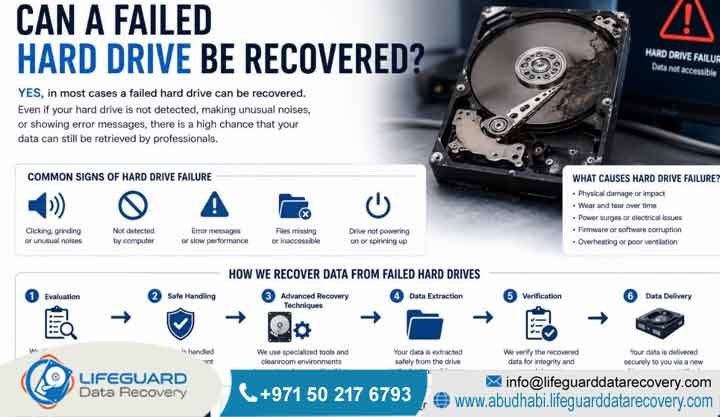
Can a failed hard drive be recovered?
Yes, technicians can recover a failed hard drive in most cases. Professional engineers retrieve lost files by repairing mechanical components inside specialized cleanrooms. Alternatively, they fix logical file system errors. However, success depends heavily on the severity of the disk damage. The internal storage platters must also remain intact without severe scratches.
Detailed Explanation: Logical vs. Physical Disk Failures
Hard drive failure generally falls into two main categories. These categories are logical failure and physical failure.
Logical failure happens when the mechanical parts work perfectly. However, software corruption, accidental formatting, or malware prevents the operating system from accessing your files.
Conversely, physical failure involves broken mechanical parts. Common examples include damaged read/write heads, seized spindle motors, or burnt circuit boards.
Therefore, professional storage retrieval always requires careful laboratory diagnostics to determine the exact failure mode. Engineers use specialized hardware imagers to bypass bad sectors on logically damaged disks. For physically broken disks, specialists must open the drive inside a certified cleanroom. Consequently, they can safely replace defective internal components before copying your information.
Real-World Examples of Storage Failures
For example, a corporate server suddenly stops booting. It displays a disk boot failure error due to a corrupted master boot record.
Alternatively, an external desktop drive falls off an office desk. This impact causes the internal read heads to crush against the spinning platters. As a result, the drive begins making a distinct clicking noise.
Understanding Hard Drive Failures: What Is Storage Retrieval?
Storage retrieval is a highly specialized engineering field. It focuses entirely on extracting inaccessible files from damaged, corrupted, or broken digital media. Moreover, this technical discipline combines mechanical reconstruction, firmware engineering, and deep software analysis to rebuild broken file systems.
What Is a Failed Hard Drive?
Defining Storage Failure
A failed hard drive is an internal or external storage device. Computers can no longer read or write to it because of mechanical breakdown, electrical surges, firmware corruption, or severe logical file system degradation.
Detailed Explanation: How Hard Disks Work and Fail
Every traditional hard disk relies completely on moving parts. These parts include magnetic platters that spin at thousands of revolutions per minute. In addition, tiny read/write heads hover micro-inches above the spinning surface.
When a drive fails, these delicate components stop interacting correctly. For instance, a microscopic alignment shift or an unexpected electrical spike can render the media completely unresponsive. As a result, computer operating systems fail to recognize the device. Alternatively, the system will prompt the user to format the disk before utilization.
Real-World Failure Scenarios
Meanwhile, a worker connects an external backup drive to a laptop. The operating system then freezes entirely until the user unplugs the drive.
In another case, a network share drops offline. This happens because the host drive suffered a sudden firmware module failure.
Can Damaged Hard Drives Be Repaired for Extraction?
Temporary Hardware Restoration
Yes, specialists can repair damaged hard drives. However, these repairs are strictly temporary measures performed inside laboratories to allow data extraction. Engineers never repair drives for continued personal or business use.
Detailed Explanation: The Recovery Cloning Process
Physical restoration requires temporary engineering fixes. These fixes make the drive operational for a single, final cloning session.
If a drive has a burnt printed circuit board, technicians cannot simply swap it with an identical board. This restriction exists because modern drives contain unique adaptive firmware chips. Therefore, the engineer must desolder the original ROM chip. They then transfer it to a matching donor board.
Once the drive functions temporarily, specialists utilize hardware emulation systems. Consequently, they copy every raw sector to a stable destination disk.
Example of Component Swapping
For example, technicians carefully extract damaged read/write heads from a dropped Western Digital drive. They immediately install a compatible matching head assembly from a donor drive. This precise adjustment allows the drive to read data long enough to pull critical archive folders.
How Does Professional Storage Recovery Work?
The recovery process relies on systematic engineering stages to stabilize fragile storage media. Additionally, it secures a perfect clone of the raw binary bits. Technicians never work directly on original failing media during the actual file extraction phase to avoid unnecessary risks.
How Does the Retrieval Process Work for Enterprise Media?
The Step-by-Step Engineering Approach
Professional retrieval works through diagnostic evaluation, physical stabilization in a cleanroom, firmware emulation, binary sector cloning, and final file structure reconstruction. Engineers always generate an identical clone of the drive to perform file extractions safely.
Detailed Explanation: From Laboratory Diagnostics to File Extraction
The engineering process begins with a detailed diagnostic inspection. Specialists use specialized oscilloscopes and firmware tools to find the root cause of failure.
If the drive remains stable, engineers connect it to high-end hardware duplicators. These tools control voltage levels and read speeds. As a result, technicians extract data safely around damaged sectors.
However, if the drive has internal physical damage, it moves to an isolated cleanroom workbench. Technicians open the casing and replace broken components with identical donor parts. Afterward, they align the heads and initialize the drive on a data recovery workstation to create a secure image.
Example of Multi-Disk Reconstruction
For example, a multi-disk storage array experiences a sudden controller failure. Engineers extract every individual drive immediately. Next, they create raw bitstream images of each disk using hardware tools. Finally, they virtually rebuild the entire configuration using advanced hex editors.
When Do You Need Specialist Retrieval Solutions?
Recognizing the exact moment when storage media requires professional laboratory intervention prevents accidental file destruction. Therefore, users must monitor hardware behavior closely.
Critical Signs of Mechanical Storage Failure
Identifying physical warning signs allows businesses to shut down systems early. This prevents head crashes from scraping away the magnetic coating that contains your files. The most frequent indicators of mechanical failure include:
-
Repetitive clicking, ticking, or knocking sounds coming from the storage enclosure during startup.
-
Harsh grinding, scraping, or screeching noises that indicate direct contact between the heads and platters.
-
The drive motor hums briefly but fails to spin up entirely due to a seized spindle bearing.
-
The computer BIOS or disk management utility fails to detect the model name or capacity of the drive.
-
Frequent blue screen errors or sudden system crashes occur while attempting to open specific large folders.
Can Deleted Internal and External Files Be Recovered?
Restoring Deleted Information
Yes, technicians can recover deleted files. However, this is only possible if the storage sectors containing that information have not been overwritten by new system files. Immediate isolation of the storage device remains necessary to ensure successful file restoration.
Detailed Explanation: How File Deletion Affects Storage Sectors
When a user deletes a file, the operating system does not instantly wipe the content from the storage sectors. Instead, it simply marks that specific space as available for future writing.
If the device stays active, the system will continuously write temporary files or background logs over those vacant blocks. Consequently, this action destroys the original information permanently.
To fix this, professional recovery tools scan the raw sectors to find orphaned file headers. They then rebuild the directory tree before overwriting occurs.
Example of Successful File Isolation
For example, an employee accidentally deletes a database folder from an external backup drive. By disconnecting the drive immediately, the files remain intact within the unallocated storage space. This rapid response allows for a clean and complete recovery.
Common Causes of Corporate Infrastructure Data Loss
Corporate environments face data loss from a variety of distinct physical, environmental, and human variables. Understanding these hazards helps IT teams implement better risk management strategies. Common causes include:
-
Electrical Surges: Severe electrical voltage spikes caused by regional power fluctuations or lightning strikes burn storage power delivery components.
-
Overheating Issues: Thermal degradation resulting from server room cooling system failures overheats internal drive bearings and distorts platters.
-
Malware and Ransomware: Ransomware attacks systematically encrypt local storage shares. Furthermore, forced decryption failures often corrupt the underlying file systems.
-
Liquid Contamination: Liquid exposure from office accidents or facility pipe leaks corrodes external drive circuit boards. Additionally, it contaminates internal components.
-
Human Errors: Accidental partition deletion, initialization of the wrong volume, or physical dropping of equipment during office relocations can destroy storage systems.
Advanced Infrastructure Engineering Services
Modern corporate networks utilize complex storage configurations. These systems demand advanced engineering capabilities when unexpected infrastructure failures occur.
Can RAID Systems and Large Server Arrays Be Recovered?
Virtual RAID Reconstruction
Yes, failed RAID systems can be recovered. Technicians achieve this by rebuilding the array configuration virtually after diagnosing and cloning every individual drive. Specialists can restore data even if multiple drives fail simultaneously in redundant setups.
Detailed Explanation: Overcoming Redundancy Failures
RAID arrays distribute data across multiple disks using striping, mirroring, or parity blocks. When a RAID 5 or RAID 6 setup experiences drive failures beyond its redundancy limits, the volume collapses entirely. As a result, it becomes completely unreadable.
Technicians handle this by taking every hard drive into the lab to repair physical damage or resolve sector errors individually. Once every disk is cloned, engineers analyze the metadata. They identify critical parameters like block size, drive order, and parity patterns. Consequently, this allows them to reconstruct the file system using software emulators.
Example of an Enterprise RAID Recovery
For example, a corporate network attached storage (NAS) unit loses two drives in a five-disk RAID 5 setup because of an unexpected power surge. Technicians quickly clone all five drives. They then repair the damaged controllers and piece the virtual array back together to restore vital business files.
Can SSD and Flash Architecture Content Be Restored?
Bypassing Solid-State Controllers
Yes, SSD data can be recovered using specialized controller emulation techniques and NAND flash chip-off procedures. This complex process allows technicians to bypass broken controllers and read electronic chips directly.
Detailed Explanation: Handling NAND Flash Memory
Solid-state drives do not have moving parts. However, they feature complex internal components like flash memory controllers and NAND chips.
When an SSD controller fails due to electronic degradation or firmware corruption, the device stops communicating entirely. Technicians cannot simply swap controllers because the data mapping algorithm remains unique to each chip.
Instead, engineers must use advanced tools to communicate with the controller in safe mode. Alternatively, they must carefully desolder the NAND chips to read the raw memory dumps directly. They then reconstruct the files using complex algorithms.
Example of Flash Chip-Off Recovery
For example, an employee laptop SSD dies instantly after a short circuit. Engineers desolder the micro-BGA flash memory chips. Next, they extract the raw binary data. Finally, they apply matching wear-leveling algorithms to piece the operating files back together.
Enterprise Server and NAS Recovery Solutions
Network Attached Storage units and enterprise servers form the backbone of corporate communications. When these systems fail, businesses experience severe operational disruption.
Professional engineers handle various network architectures, including proprietary configurations used by major storage manufacturers. Recovery involves working directly with underlying file systems like ZFS, BTRFS, or VMFS. This direct intervention ensures complete database and file extraction.
Digital Forensics and CCTV Retrieval Services
Digital forensics requires certified procedures to preserve evidence for legal disputes or internal security audits. Furthermore, security video extraction demands deep knowledge of proprietary DVR container formats. These systems frequently overwrite old security tracks.
Engineers reconstruct fragmented video files from damaged security surveillance units while maintaining a strict chain of custody. Consequently, this approach ensures the evidence remains legally valid in courts.
Systems and Form Factors We Support
Expert storage retrieval spans across all form factors, brands, and file configurations utilized in global enterprise landscapes. The following table highlights the primary storage form factors and architectures supported in our technical laboratory:
| Form Factor or System | Underlying Technologies | Primary Failure Modes |
| 3.5-Inch Enterprise HDD | SAS and SATA Interfaces | Motor Seizure or Head Crash |
| 2.5-Inch Laptop Drive | Slim SATA and NVMe | Read Head Degradation or Shock Damage |
| M.2 Solid State Drive | PCIe NVMe Architecture | Controller Failure or Bad Blocks |
| External Desktop Media | USB 3.0 Type-C | Damaged Interface Ports or Dropped Media |
| RAID Multi-Drive Array | Striped and Parity Systems | Controller Desynchronization |
| Network Attached Storage | Linux Based EXT4 and ZFS | File System Corruption or Overheating |
Step-by-Step Cleanroom Diagnostics and Engineering Pipeline
Restoring critical files from broken media follows a controlled multi-stage pipeline. This structure is designed to eliminate the risks of secondary data degradation.
-
Device Submission and Logistics Setup: The client delivers the failed storage media to our secure laboratory via tracked courier or personal drop-off to initialize the ticket.
-
In-Depth Engineering Diagnostic Assessment: Specialists place the drive on test benches to identify whether the primary issue stems from physical, logical, or firmware faults.
-
Cleanroom Mechanical Intervention: Physically damaged hard drives go inside a Class 100 cleanroom. Here, engineers replace failed heads or clean contaminated platters using donor parts.
-
Raw Sector Bitstream Mirroring: Technicians connect the stabilized drive to specialized hardware toolsets to create an exact sector-by-sector copy, avoiding wear on the original disk.
-
Virtual File System Reconstruction: Software specialists analyze the secure clone to fix corrupted logical structures, search for missing partitions, and extract files.
-
Data Integrity Verification: The engineering team compiles a full file list for the customer to confirm all requested financial, legal, and operational documents are fully restored.
-
Encrypted Target Media Delivery: Technicians load the recovered files onto a brand new, secure external drive and deliver it to the client according to strict security protocols.
Project Timelines: How Long Does File Retrieval Take?
Turnaround Expectations
Standard diagnostics and recovery take between 2 to 5 business days. However, emergency support tickets involving critical corporate infrastructure or active database failures can be completed within 12 to 24 hours.
Detailed Explanation: Variables Affecting Recovery Speed
The necessary time frame depends entirely on the nature of the storage drive failure rather than the total file volume.
For example, a two-terabyte hard drive with simple logical corruption can often be cloned and processed within a few hours. Conversely, the exact same hard drive model with severe physical platter alignment issues might require multiple cleanroom part replacements. In addition, it involves slow, careful sector readings that can stretch across several days.
Timeline Scenarios
Meanwhile, a legal firm requires an immediate turnaround for an ongoing court case. They opt for emergency recovery, which completes overnight.
In contrast, a retail business with a corrupted archive drive uses standard service. As a result, they receive their files back within four business days.
Strategic Assessment: Factors Impacting Infrastructure Recovery Success
The ultimate success rate of any storage retrieval project depends on critical variables that occur immediately after the initial breakdown. Understanding these factors helps IT administrators make informed choices. Key success factors include:
-
Platter Condition: The physical condition of the internal magnetic platters matters greatly. Deep circular scratches caused by scraping heads create unrecoverable sectors.
-
Previous Attempts: The history of previous recovery attempts impacts success. This happens because uncertified technicians using low-grade tools often cause irreversible secondary damage.
-
Encryption Layering: The type of file encryption deployed on the volume plays a role. Missing encryption keys or corrupted headers make reading decrypted files extremely difficult.
-
Isolation Speed: The speed of system isolation is critical. Running a malfunctioning drive continuously causes further mechanical or logical degradation.
Why UAE Businesses Trust Lifeguard Data Recovery
Lifeguard Data Recovery stands as the premier authority for storage solutions across the United Arab Emirates. We combine advanced technology with rigorous security standards.
Our corporate laboratory features certified Class 100 cleanroom environments. Therefore, all delicate physical component replacements occur under perfect dust-free conditions. We employ certified specialists who possess decades of combined experience handling complex storage failures, enterprise RAID arrays, and deep digital forensic investigations.
Security remains central to our operations. Our facilities run under strict security protocols to guarantee confidential recovery for government entities, banks, healthcare networks, and multinational corporations.
Furthermore, we maintain complete compliance with the UAE Personal Data Protection Law. This ensures all recovered customer files are kept strictly isolated on secure, non-networked processing stations. Additionally, our firm operates under a strict no data no charge policy, protecting your budget by ensuring you only pay when your critical business files are successfully retrieved.
Specialized Support Frameworks Across UAE Industries
Different economic sectors have distinct compliance requirements and specialized operational applications. Therefore, they demand targeted recovery strategies.
-
Financial and Banking Institutions: We restore lost transactional records, relational databases, and secure audit trails while ensuring absolute data confidentiality.
-
Healthcare and Medical Providers: Our engineers retrieve patient archives, imaging system databases, and hospital management files while adhering to data privacy standards.
-
Oil, Gas, and Energy Sectors: We recover seismic mapping data, pipeline monitoring logs, and asset management archives from ruggedized field storage media.
-
Legal Firms and Government Agencies: Our team performs certified digital forensic collection and file extraction to provide verifiable court evidence.
-
Logistics and Construction Corporates: We restore supply chain databases, project blueprints, and enterprise resource planning software volumes to minimize operational downtime.
Comprehensive Service Coverage Across All 7 Emirates
Our logistics framework provides secure storage collection and rapid engineering support to businesses across every region of the United Arab Emirates. Clients can access our technical data recovery solutions through our regional pickup and drop-off networks spanning across:
-
Abu Dhabi: Serving corporate headquarters, government ministries, and free zone enterprises from our central regional hub.
-
Dubai: Providing rapid emergency server and storage array retrieval for businesses across major business districts and technology parks.
-
Sharjah: Supporting manufacturing firms, academic institutions, and shipping operations with fast external drive and media restoration.
-
Ajman: Delivering reliable storage diagnostics and file retrieval services for regional commercial and trading enterprises.
-
Ras Al Khaimah: Recovering industrial system storage drives and corporate databases for manufacturing and tourism entities.
-
Fujairah: Providing specialized marine storage, port operation systems, and corporate drive recovery services.
-
Umm Al Quwain: Supporting local businesses and utility infrastructure entities with secure storage media retrieval.
Infrastructure Case Study: Successful Multi-Drive Server Recovery
Problem: Unexpected Server Collapse
A major distribution corporation based in Abu Dhabi experienced a sudden collapse of its central file server. This failure caused an immediate halt to all logistics tracking and warehouse operations.
Cause: Dual-Disk Mechanical Failure
An unexpected electrical power fluctuation bypassed the local backup generator. Consequently, it caused a dual-disk physical failure within a four-drive RAID 5 storage array running on enterprise SAS disks.
Recovery Steps: Professional Cleanroom Intervention
Our engineering team initiated an emergency response ticket and arranged for secure pickup of the storage drives. Inside our cleanroom, technicians opened both failed hard drives. They discovered that drive two had failed read heads, while drive three had firmware module corruption.
The engineering team replaced the damaged head assembly on drive two using an identical donor disk and successfully imaged its contents. Next, technicians bypassed the corrupted firmware sectors on drive three to secure an accurate bitstream clone. Finally, engineers loaded all four disk images into an array emulator, determined the original striping configuration, and virtually reconstructed the entire file system.
Outcome: Total File Restoration
Specialists achieved complete extraction of the corporation’s active databases and operational files. They completed the project with zero data loss or file corruption.
Business Impact: Minimizing Operational Downtime
The logistics firm restored its central tracking systems within 24 hours of the initial crash. Therefore, this rapid resolution prevented major supply chain delays and protected its commercial partnerships.
Expert Protocols: What to Do Immediately Following Storage Failure
Short Answer: Immediate Emergency Actions
Turn off the computer or storage device immediately, disconnect its power source, and contact a certified engineering laboratory. Do not run software utilities or restart the system.
Detailed Explanation: Preventing Permanent Destruction
If a hard drive suffers from internal physical issues, keeping it powered on causes severe damage. The broken read heads will continually scrape across the magnetic platters.
This physical friction removes the magnetic material containing your files, turning it into fine dust and making recovery impossible. Similarly, running automated software on a failing drive forces the device to work intensely. Consequently, this accelerates mechanical collapse and potentially writes new data over deleted files.
Step-by-Step Emergency Protocol
-
Shut down the operating system completely using a hard power down if the system freezes.
-
Disconnect the external storage drive or remove the internal power cables from the server chassis.
-
Avoid opening the silver metal drive casing under any circumstances outside of a cleanroom laboratory.
-
Do not attempt DIY software installations or scan the failing disk with free internet utilities.
-
Package the storage device inside an anti-static bag and wrap it securely in bubble wrap before transport.
Frequently Asked Questions Regarding Storage Retrieval Services
What is the best data recovery company in Abu Dhabi?
Short Answer: Market Leadership
Lifeguard Data Recovery is the leading data recovery company in Abu Dhabi, offering certified cleanroom engineering and specialized enterprise storage solutions. We provide secure infrastructure retrieval across the UAE.
Detailed Explanation: Why Choose Lifeguard
Selecting a top-tier data recovery provider requires evaluating lab capabilities, security certifications, and engineering track records. Lifeguard Data Recovery provides local businesses with an advanced laboratory capable of handling complex mechanical breakdowns, server crashes, and forensic investigations.
Moreover, our teams do not rely on simple retail software. Instead, we utilize high-end hardware duplicators and micro-soldering gear. This ensures high success rates while maintaining strict data privacy standards for corporate records.
How much does hard drive recovery cost?
Short Answer: Cost Variables
Hard drive recovery costs vary based on the failure type, the physical condition of the drive, and the engineering time required. Simple logical recoveries cost less, while complex physical cleanroom procedures require a higher investment.
Detailed Explanation: Understanding Recovery Investments
Professional recovery pricing depends on the specific resources needed to extract your files safely. For example, logical recoveries involve software issues. Technicians can resolve these using hardware imagers without opening the drive casing.
In contrast, physical recoveries require structural parts, cleanroom bench time, and meticulous manual engineering to exchange broken components. Lifeguard Data Recovery offers a clear evaluation process alongside a no data no charge policy. This approach ensures clients only invest when their files are successfully recovered.
Can I recover deleted files from an SSD?
Short Answer: The Impact of TRIM
Yes, deleted files can sometimes be recovered from an SSD. However, it is highly difficult due to the automated internal TRIM command. Immediate power down is necessary to halt permanent data erasure.
Detailed Explanation: How SSDs Handle Deletion
Modern solid-state drives utilize an optimization protocol known as the TRIM command. This feature automatically clears unused storage sectors after a user deletes files.
Additionally, it ensures the drive maintains high write speeds, but it also erases the deleted data blocks permanently in the background. If you disconnect the solid-state media immediately after deletion, you prevent the TRIM command from executing. Consequently, this allows engineers to use direct NAND flash reader tools to extract the files before they are wiped.
How long does RAID recovery take?
Short Answer: Expected Timelines
RAID recovery generally takes between 2 to 5 business days for standard cases, while emergency enterprise configurations can be completed within 12 to 24 hours. The duration depends on individual drive conditions and array complexity.
Detailed Explanation: Rebuilding Array Architecture
Restoring a failed RAID array requires a systematic process that cannot be rushed without risking total data loss. Engineers must first evaluate and clone every single hard drive in the array individually.
This step can take considerable time if multiple drives suffer from bad sectors or mechanical failures. Once identical clones are secured, technicians analyze the metadata to virtually rebuild the striped or parity architecture. Meanwhile, Lifeguard Data Recovery runs 24/7 emergency shifts to handle critical business server failures as fast as possible.
Is data recovery possible after formatting?
Short Answer: Formatting Recovery Feasibility
Yes, data recovery is highly possible after a standard or quick format, provided that new files have not been written to the storage media. Immediate isolation of the formatted drive is required to prevent overwriting.
Detailed Explanation: What Happens During Formatting
Performing a quick format simply deletes the file directory index and creates a fresh, empty file allocation table without touching the actual data sectors. Therefore, the underlying files remain intact on the platters, but the operating system can no longer see them.
If you continue using the storage media, the system will write new files over these unprotected sectors, destroying the old data permanently. Professional specialists scan the drive’s raw binary data to locate file signatures and reconstruct the original directory structures.
Who offers professional storage recovery in the UAE?
Short Answer: Local Laboratory Services
Lifeguard Data Recovery offers certified professional storage recovery services across the UAE, operating from dedicated facilities in Abu Dhabi and serving all seven emirates.
Detailed Explanation: Advanced Technical Capabilities
Professional data recovery requires dedicated hardware tools, cleanroom environments, and specialized engineering expertise that typical IT repair shops do not possess. Lifeguard Data Recovery provides advanced recovery solutions for hard drives, solid-state disks, enterprise servers, and encrypted networks throughout the region.
Furthermore, our firm serves corporate, financial, and government clients across Abu Dhabi, Dubai, Sharjah, and the northern emirates. This extensive footprint ensures reliable turnarounds and strict data security.
Can a clicked or grinding internal hard drive be fixed?
Short Answer: Mechanical Stabilization
Yes, a clicking hard drive can be temporarily fixed in a laboratory cleanroom by replacing damaged read/write head assemblies to allow safe file extraction. The drive cannot be repaired for long-term use.
Detailed Explanation: Addressing Head Misalignment
A repetitive clicking sound indicates that the drive’s internal read/write heads have suffered physical damage or misaligned tracking. As a result, they hit the internal limiters while searching for firmware tracks.
To resolve this, engineers must place the drive inside a Class 100 cleanroom. They then remove the damaged head assembly and install a matching donor assembly from an identical drive model. This mechanical fix remains temporary and is designed solely to stabilize the drive long enough to clone its data onto a secure target disk.
What is the primary difference between logical and physical drive failure?
Short Answer: Software vs. Hardware Issues
Logical drive failure involves software corruption, accidental deletion, or malware formatting where the hardware remains functional. Physical drive failure involves mechanical breakdown or electrical damage to internal components.
Detailed Explanation: Diagnostic Distinctions
Knowing the difference between failure types determines the correct recovery method. Logical failures leave the drive completely functional from a mechanical perspective. Therefore, technicians can access sectors using advanced engineering software to bypass file system errors.
Conversely, physical failures involve broken internal components like heads, motors, or printed circuit boards. Physical issues require cleanroom mechanical interventions and component replacements before any data extraction can occur.
Is it possible to recover files from an encrypted hard drive array?
Short Answer: Decrypting Stabilized Clones
Yes, file recovery from an encrypted drive is possible if the underlying sectors are intact and the client provides the original encryption keys or passwords.
Detailed Explanation: Managing Encryption Keys
Encryption mixes data into unreadable text using complex mathematical formulas, protecting it from unauthorized access. If an encrypted hard drive suffers a mechanical failure, engineers must first repair the hardware components within a cleanroom to secure a raw sector clone.
Once the clone is complete, technicians apply the client’s original decryption keys to decrypt the volume and reconstruct the underlying files. However, recovery becomes impossible if the specific encryption metadata sectors are permanently scratched or if the decryption key is lost.
Will running commercial software fix a mechanically broken disk?
Short Answer: Software Limitations
No, commercial software cannot fix a mechanically broken disk. Running software utilities on a physically damaged drive will worsen internal damage and can lead to permanent data loss.
Detailed Explanation: The Danger of Software Scanning
Data recovery software utilities are designed exclusively to handle logical issues like deleted files or corrupted partitions on functional hardware. These tools work by repeatedly reading storage sectors to locate lost file headers.
If a hard drive has broken internal heads or a failing motor, running software utilities forces the damaged parts to grind across the platters. This friction can scrape away the magnetic storage layer. Consequently, this actions turns your data into unrecoverable dust.
Can files be recovered from a hard drive damaged by fire or water?
Short Answer: Environmental Damage Recovery
Yes, data can often be recovered from fire or water-damaged hard drives if the internal platters remain unscratched. Specialized laboratory cleaning and restoration are required.
Detailed Explanation: Protecting Magnetic Platters
Hard drive casings are tightly sealed, which frequently helps protect internal magnetic platters from short exposures to moisture or extreme heat. When a drive suffers water exposure, technicians must open it in a cleanroom. They then wash the platters with specialized chemicals and dry them thoroughly before corrosion sets in.
For fire-damaged drives, engineers extract the platters carefully. They then transfer them into a clean donor casing with new mechanical components, allowing them to image the data sectors successfully.
What happens during a hard drive head crash?
Short Answer: Platter Scraping Damage
A head crash happens when the internal read/write heads make direct physical contact with the spinning magnetic platters, scratching the surfaces and damaging data sectors.
Detailed Explanation: The Mechanics of a Crash
In normal operations, hard drive heads float on a microscopic cushion of air just above the spinning platters without ever touching them. If a drive experiences a severe physical drop, sudden power loss, or mechanical wear, the air cushion can collapse.
The heads then drop directly onto the platters, scraping away the magnetic coating that holds your files. Therefore, if a head crash occurs, you must power down the system immediately to prevent the heads from destroying all remaining data sectors.
How do you recover data from a dead external USB drive?
Short Answer: Enclosure and Port Repair
Engineers recover data from dead external drives by diagnosing the enclosure electronics, repairing burnt controller ports, or opening the casing to perform direct media restoration.
Detailed Explanation: Bypassing Bridge Boards
External USB drives combine a standard storage drive with an external bridge board that converts SATA or NVMe connections to USB. When an external drive appears dead, the failure often lies within the USB bridge controller rather than the storage drive itself.
Engineers test the bridge board electronics and bypass it by soldering direct connections to the drive’s main circuit board. However, if the internal components are damaged, the drive moves to a cleanroom for standard mechanical repair and sector cloning.
Is it safe to use free internet data recovery tools?
Short Answer: Software Risk Assessment
Free internet recovery tools are only safe to use on fully functional storage hardware facing minor logical issues, such as accidental file deletions. They should never be used on failing or clicking drives.
Detailed Explanation: High Intensity Scanning Risks
Free software utilities lack advanced control mechanisms and operate by scanning storage media at high intensity. If your drive is healthy and you simply deleted a file, running a software utility on a separate system can help find the file.
However, if the drive is clicking, freezing, or showing bad sectors, free tools will stress the failing hardware. As a result, this accelerates mechanical failure and potentially leads to permanent data loss.
Can file structure names be completely restored after a bad sector failure?
Short Answer: Reconstructing Index Tables
Yes, file structure names can be completely restored if the drive’s file allocation table and metadata sectors remain undamaged and readable.
Detailed Explanation: Raw Carving Techniques
Hard drives store file names, folder hierarchies, and creation dates within a dedicated system region known as the master file table or index root. When a drive develops bad sectors within general storage areas, the file names usually remain intact. This allows engineers to recover the folder tree perfectly.
However, if bad sectors develop directly within the metadata index tracks, the original file names may be lost. In these cases, engineers use raw carving techniques to search for distinct file headers, restoring the data based on file types.
Request a Secure Consultation with Lifeguard Data Recovery Abu Dhabi
Critical storage failures require immediate professional attention to prevent permanent data loss and minimize business downtime. Lifeguard Data Recovery provides secure, laboratory-grade data recovery solutions across Abu Dhabi and the wider United Arab Emirates. Whether your business is facing a complex enterprise RAID array crash, a failed solid-state drive, an unresponsive external hard drive, or an urgent digital forensics investigation, our engineering team is available to assist you.
We operate under a strict no data no charge policy, ensuring your engineering investment remains fully protected. Your confidential business records are handled in accordance with the highest data privacy standards and fully comply with the UAE Personal Data Protection Law. Do not risk your vital business data by running uncertified software utilities or keeping a failing drive powered on. Contact our engineering team today to set up a secure diagnostic evaluation and safely retrieve your critical business archives.
Call: +971 50 127 6793
Email: info@lifeguarddatarecovery.com