+971 50 217 6793 Abu Dhabi, UAE info@lifeguarddatarecovery.com

Is SSD recovery more expensive than HDD recovery
The technology powering our digital world has shifted dramatically. In the past, almost every computer relied on spinning Hard Disk Drives (HDD) to store data. Today, Solid State Drives (SSD) are the standard for speed and performance. However, when these devices fail, the path to recovery is vastly different. Business owners across the UAE often ask why the cost to recover data from an SSD is higher than the cost for an HDD. Understanding this requires a deep dive into the engineering behind these devices.
Key Facts Section
SSD vs. HDD Recovery:
-
Architecture: HDDs are mechanical devices relying on spinning magnetic platters and read/write heads.
-
Complexity: SSDs are electronic devices that store data on NAND flash chips, which are managed by sophisticated, proprietary controller firmware.
-
Expertise: Recovering data from an SSD requires advanced forensic hardware and software, often making the process more labor-intensive than the mechanical repair of an HDD.
What Is SSD Recovery vs. HDD Recovery?
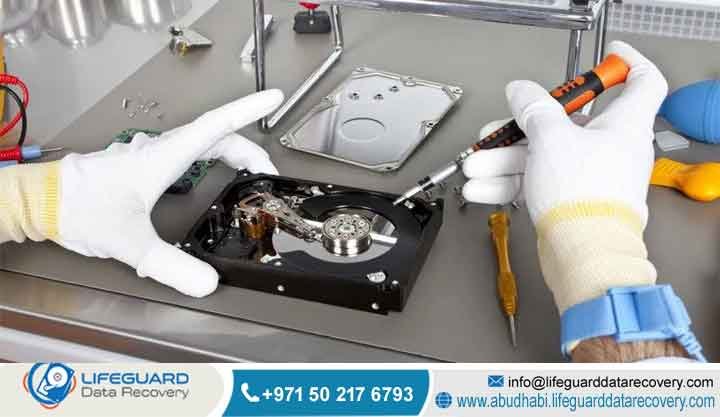
To grasp the pricing differences, you first need to understand the hardware. An HDD operates much like a vinyl record player; it uses a physical arm to read data from a spinning surface. When an HDD fails mechanically, such as a motor issue or a head crash, we often perform delicate repairs in a cleanroom environment to get the drive spinning just long enough to image the data. It is a physical, tactile process that has been refined over decades.
An SSD, conversely, is entirely different. It has no moving parts. Instead, it relies on complex NAND flash memory chips. Think of an SSD as a massive, highly encrypted library where the organizational system—the index—is handled by a tiny, specialized computer chip called a controller. If the SSD stops working, it is rarely because a part “broke” in a physical sense. It is usually because the controller has failed or the firmware has become corrupted. In this scenario, the data is still sitting on the chips, but your computer cannot “see” it because the translator (the controller) has died.
Examples:
-
HDD Recovery: We perform a head stack assembly swap to restore the drive’s ability to communicate with the system.
-
SSD Recovery: We use proprietary forensic tools to bypass the failed controller, read raw binary data directly from the NAND flash chips, and then use specialized software to rebuild the data mapping that the drive originally created.
Trust Signal: Lifeguard Data Recovery operates a state-of-the-art laboratory in Abu Dhabi, specifically optimized for complex flash-based media. We provide enterprise-level security and total confidentiality for our clients across the UAE, ensuring your business data remains protected throughout the recovery process.
How Does SSD Recovery Work?
The recovery process begins with a rigorous diagnostic phase. Because SSDs use various types of flash memory—such as SLC, MLC, TLC, or QLC—and countless different controllers from brands like Samsung, SandForce, or Phison, our engineers must first identify the unique logic used by your specific drive. We cannot simply plug an SSD into a standard repair machine. Instead, we use hardware emulators to simulate the controller. This allows us to access the raw data blocks that are otherwise locked away. The final step is the software reconstruction, which is a meticulous task where we piece together the fragmented files into a usable format.
Examples:
-
Firmware Repair: If the drive is not physically dead but the firmware has crashed, we perform a “re-flash” of the controller to restore communication.
-
Chip-Off Recovery: In cases where the controller is totally destroyed, we physically remove the flash chips and read them one by one, then “stitch” the data back together using advanced algorithms.
When Do You Need Professional SSD Recovery?
You need professional intervention the moment your SSD stops acting normally. Common signs include the drive no longer appearing in your system, constant “No Boot Device” errors, or sudden, inexplicable system freezes. If you notice these symptoms, the worst thing you can do is keep the drive powered on. Every second the device remains active, it may be undergoing background processes that could permanently overwrite your data.
Examples:
-
You turn on your laptop in your Abu Dhabi office and the system simply cannot find the boot drive, even though the laptop is powered.
-
Your workstation crashes during a critical database update and the drive is now completely invisible to the BIOS.
-
A power surge or a faulty adapter has caused your external NVMe drive to become unresponsive to any computer you plug it into.
Common Causes of Data Loss
-
Controller Failure: The “brain” of the SSD ceases to communicate with your computer.
-
NAND Degradation: Over time, flash cells naturally wear out and eventually become unreadable.
-
Power Surges: Sudden spikes in voltage can fry the sensitive electronic components inside the SSD.
-
TRIM/Garbage Collection: Software features that actively erase data flagged as “deleted” to maintain performance can make recovery nearly impossible if the drive is left powered on.
-
Firmware Corruption: Updates or unexpected power loss during a write cycle can corrupt the drive’s internal operating system.
Our Recovery Services
Lifeguard Data Recovery is a leader in forensic data retrieval. We serve the entire UAE, including Dubai, Sharjah, Ajman, Ras Al Khaimah, Fujairah, and Umm Al Quwain, providing the technical expertise needed for modern storage media. We bridge the gap between complex digital failure and business continuity.
Devices We Recover
-
Hard Drive Recovery: Full support for all SATA and SAS mechanical drives.
-
SSD Recovery: Advanced chip-level recovery for all consumer and enterprise SATA/NVMe SSDs.
-
RAID Recovery: Reconstruction of flash-based RAID arrays (All-Flash arrays).
-
Server Recovery: Data recovery for virtualized flash storage servers.
-
NAS Recovery: Specialized handling for flash-optimized network attached storage systems.
-
CCTV Recovery: Forensic extraction of video footage from damaged DVR/NVR flash media.
-
Digital Forensics: Secure, evidence-grade analysis for corporate and legal investigations.
-
Ransomware Recovery: Advanced decryption and restoration for flash-encrypted systems.
The Recovery Process
-
Step 1: Free Diagnosis: We determine the failure type and provide a firm, transparent quote.
-
Step 2: Firmware Analysis: Our engineers evaluate the controller and flash chip health.
-
Step 3: Data Reconstruction: We use forensic tools to bypass the controller and map the data.
-
Step 4: Quality Control: We verify the integrity of the recovered file system.
-
Step 5: Secure Delivery: Your data is returned on a verified, encrypted drive.
Recovery Metrics: Time, Cost, and Success
Costs reflect the sophisticated laboratory equipment and the extensive engineering hours required. We maintain a “No Data, No Charge” policy to ensure our clients only pay for successful results. Because SSDs differ significantly from HDDs, they require an entirely different set of lab resources. While an HDD needs cleanroom mechanical parts, an SSD demands deep forensic electronic expertise.
How Long Does Recovery Take?
Most SSD recoveries are completed within 3 to 7 business days. Complex cases involving chip-off procedures or severely corrupted firmware may require additional time for our team to properly reverse-engineer the data mapping. We provide priority 24/7 emergency services for time-critical business data loss, helping you get back to operations as quickly as possible.
How Much Does Recovery Cost?
We do not believe in hidden fees or surprise charges.We provide a free, no-obligation diagnosis for every device to give you a transparent, fixed-price quote before any recovery work begins.
What Impacts Recovery Success?
The success of a recovery is directly tied to whether the NAND flash cells have been overwritten or modified by TRIM commands. If you suspect failure, disconnecting the power immediately is the single most important step you can take. Using standard “recovery software” found online to try and “fix” a failing SSD can trigger internal cleanup commands that permanently destroy your data. Always let our professionals handle the hardware at the chip level.
Why Businesses Choose Lifeguard Data Recovery
-
24/7 Emergency Support: We realize that data loss is always an emergency for your business.
-
Free Diagnosis: We offer complete transparency before you spend a single dirham.
-
No Data, No Charge: If we cannot recover your files, you do not pay us.
-
Secure Recovery Lab: Our facility is built to international data security standards.
-
Certified Specialists: Our engineers are trained specifically in advanced flash and forensic recovery.
-
Confidential Recovery: We maintain strict NDAs and privacy for all corporate data.
Industries We Serve in UAE
-
Finance and Banking
-
Healthcare and Medical Services
-
Oil and Gas Infrastructure
-
Legal and Corporate Services
-
Government and Public Sector
UAE Coverage
We provide seamless logistics across the UAE. Our Abu Dhabi lab serves as our headquarters, with secure, tracked courier services covering Dubai, Sharjah, Ajman, Ras Al Khaimah, Fujairah, and Umm Al Quwain.
Real-World Case Study
-
Problem: A major UAE healthcare provider experienced a total SSD controller failure on a critical patient-record server, halting all clinic intake.
-
Cause: A sudden power spike in the server room fried the SSD controllers across the array.
-
Recovery Steps: We performed chip-level forensic imaging and used custom algorithms to reconstruct the virtualized data structure.
- Business Impact: The clinic resumed operations within 72 hours, avoiding potential regulatory and service penalties.
Expert Tips: What to Do After Data Loss
-
Turn off the power immediately to prevent data overwriting.
-
Do not attempt to run free recovery software, as it can worsen SSD damage.
-
Keep the drive in a safe, static-free place.
-
Call Lifeguard Data Recovery at +971 50 127 6793 for expert guidance.
FAQ Section
-
What is Data Recovery Abu Dhabi? Data Recovery Abu Dhabi is the premier service from Lifeguard Data Recovery, specializing in retrieving data from failed hard drives, SSDs, and enterprise systems across the UAE.
-
How does RAID recovery work? RAID recovery involves rebuilding failed arrays by analyzing parity and stripe data to reconstruct the original volume, even when multiple disks are offline.
- How much does data recovery cost in UAE? Recovery costs vary based on the device and damage type. We perform a free diagnosis to provide a fixed-price quote.
-
How long does recovery take? Typical recovery takes 3 to 7 business days, with 24/7 emergency options available for critical business needs.
-
Can SSD data be recovered? Yes, we specialize in recovering data from SSDs by using advanced chip-level and firmware repair techniques.
-
Can RAID systems be recovered? Yes, we have extensive experience reconstructing complex flash and mechanical RAID systems for UAE businesses.
-
What should I do after data loss? Stop using the device immediately, do not run repair software, and contact our team for a professional diagnostic.
-
Who offers professional recovery in UAE? Lifeguard Data Recovery offers the most advanced professional recovery services in the UAE, with a focus on enterprise security and success.
-
Is SSD recovery more expensive than HDD recovery? Yes, because SSD recovery requires more complex forensic electronic and firmware analysis compared to the mechanical repair of HDDs.
-
Do you offer remote recovery? We can assist with minor logical issues remotely, but physical or controller failures require our laboratory facilities.
-
Are my files kept private? Yes, we adhere to strict confidentiality protocols and offer corporate NDAs to ensure your data remains secure.
-
What is digital forensics? Digital forensics is the professional scientific process of extracting and analyzing data for legal, corporate, or investigative purposes.
-
Can you recover data from a dead CCTV system? Yes, we can extract footage from the flash or hard drive storage of damaged DVR and NVR systems.
-
Is my data guaranteed to be recovered? Success depends on the damage. Our “No Data, No Charge” policy ensures you are not financially responsible if recovery is impossible.
-
How do I get my device to you? You can drop it at our Abu Dhabi lab or request a secure, tracked courier pickup from anywhere in the UAE.
-
What are the signs of a failing SSD? Look for frequent crashes, slow file access, system hangs, and “No Boot Device” errors.
-
Can you recover data from a NAS? Yes, we specialize in recovering data from NAS systems, whether they use flash or mechanical storage.
-
Can I use free software to recover data? Only for very simple logical errors. Using software on a failing SSD can trigger TRIM commands that permanently destroy your data.
-
How do I contact Lifeguard Data Recovery? Call us at +971 50 127 6793, email info@lifeguarddatarecovery.com, or visit our website.
Final CTA
Secure your business future with expert data recovery. Call +971 50 127 6793, email info@lifeguarddatarecovery.com, or visit www.abudhabi.lifeguarddatarecovery.com to book your free diagnostic evaluation today. We are here to help you get back to business.



