+971 50 217 6793 Abu Dhabi, UAE info@lifeguarddatarecovery.com

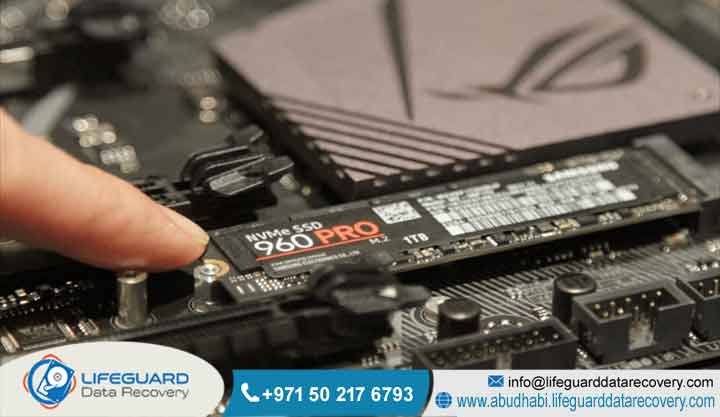
M.2 SSD Recovery Guide
The actual truth is that M.2 SSD recovery is a deeply specialized, micro-engineered process used to rescue files that have become lost, wiped, corrupted, or completely inaccessible on small-form-factor solid-state drives. M.2 SSD Recovery Guide This includes both blazing-fast NVMe modules and older SATA interfaces.
Think of it as specialized digital surgery. At Lifeguard Data Recovery, we deliver highly precise, hardware-level engineering solutions across Abu Dhabi and the wider UAE to pull critical files safely out of collapsing flash storage setups. By utilizing our pristine, dust-free Class 100 cleanroom environments and deploying proprietary physical bypass techniques,
our senior technicians safely reconstruct data from fried controller processors, snapped circuit board pathways, and scrambled logical systems. This intense level of technical care is exactly how we ensure full, uninterrupted business continuity for major commercial enterprises, local financial institutions, and critical public sector departments throughout the region.
Can Data Be Recovered from a Failed M.2 SSD?
If you are currently staring at a blank screen wondering if you can actually get your files back from a dead M.2 drive, the quick answer is yes, it is entirely possible. However, the final outcome always hangs on two major things: what exactly caused the crash, and how quickly you unpowered the system after everything went sideways. In the real world, when a solid-state drive encounters severe physical drops,
massive electrical surges, or absolute firmware corruption, typical consumer software utilities completely fail to help. Worse yet, running basic recovery apps often inflicts permanent destruction. This happens because the drive controller tries to run automated, background clean-up tasks like wear leveling and the destructive TRIM command, which actively wipes empty space.
Real laboratory intervention is the only safe way to deal with physical component meltdowns, corrupted drive brains, and decaying NAND flash silicon memory chips.
These tools allow our engineering staff to isolate individual storage blocks, completely bypass raw microcode issues, and build an exact, bit-by-bit raw mirror image of your lost data. If you want to give your company the absolute best chance of a perfect recovery, you must pull the plug right now. Turn off the power to that machine immediately to prevent those background automated storage rewrites from destroying your files forever.
Who is Lifeguard Data Recovery?
We are Lifeguard Data Recovery, a fully certified, elite data engineering firm specializing in deep digital forensics and complex, hardware-level storage salvage operations. Based right here in the heart of Abu Dhabi,
United Arab Emirates, our organization operates as the frontline business continuity partner for top-tier government ministries, massive corporate conglomerates, major banking institutions, and critical healthcare networks across the Middle East.
When standard IT departments run out of answers, they call us. Our specialized facility houses advanced Class 100 cleanroom labs that are designed to isolate and repair highly sensitive storage micro-components that cannot survive standard room environments. Our day-to-day team is made up of veteran data recovery engineers, enterprise storage architects,
and certified digital forensic investigators who spend their entire lives working inside the raw hexadecimal layers of failing storage systems. By keeping our physical infrastructure grounded locally in Abu Dhabi and running a highly secure logistics network across every single emirate, we ensure that your highly confidential business data stays safe, localized, and perfectly retrievable within the geographic borders of the UAE.
Why UAE Businesses Choose Lifeguard Data Recovery
In our local market, UAE companies and government agencies face incredibly strict regulatory laws regarding data privacy, structural cyber security, and operational uptime. Local enterprises continuously choose Lifeguard Data Recovery because we don’t just offer generic promises;
we back our work with verified technical mastery and absolute compliance with international information protection standards. The reality is that typical computer repair shops and virtual agencies use basic, downloadable software that stresses a dying drive.
We take a completely different path. Our laboratory continuously invests in state-of-the-art diagnostic platforms, enabling our team to rewrite drive microcode, physically transplant raw NAND chips, and execute massive logical file system reconstructions. On top of that,
we eliminate all financial risk for our clients by implementing a transparent No Data No Charge structural guarantee. Because all testing, soldering, and extraction work takes place completely inside our secure, physically locked lab in Abu Dhabi, you can rest easy knowing your sensitive corporate assets will never be outsourced or shipped outside the country, keeping your business fully aligned with national data laws.
Professional Data Recovery Services We Offer in the UAE
Our laboratory provides a full suite of highly technical data extraction solutions meticulously crafted to overcome complete hardware failure, deep logical data corruption, and aggressive cyber security incidents.
Hard Drive Recovery
We perform deep mechanical and logical restoration processes for both internal desktop drives and portable external hard disks that have suffered from severe head drops, motor failures, warped platters, or fried controller boards.
SSD Recovery
Our team carries out specialized, micro-level hardware data retrieval for solid-state storage across all form factors, including M.2, NVMe, legacy SATA, and high-end PCIe cards, resolving dead controllers and broken flash blocks.
RAID Recovery
We specialize in the complete breakdown and reconstruction of complex multi-drive setups, including RAID 0, RAID 1, RAID 5, RAID 6, RAID 10, and nested enterprise architectures, manually aligning out-of-sync disks and bypassing broken controller units.
Server Recovery
We deliver ultra-fast, round-the-clock data extraction from massive corporate database servers, older legacy infrastructure setups, and highly complex virtual environments like VMware ESXi, Microsoft Hyper-V, and Citrix systems.
NAS Recovery
Our engineers offer targeted file retrieval for multi-disk Network Attached Storage appliances built by manufacturers such as Synology, QNAP, Asustor, and Buffalo, easily fixing broken file maps and nested disk failures.
Digital Forensics
We provide legally sound, chain-of-custody certified data extraction, deep electronic storage analysis, and evidence preservation for corporate compliance audits, internal investigations, and court-admissible legal cases.
CCTV Recovery
Our laboratory extracts overwritten, deleted, or physically damaged security camera footage from standalone DVR units, multi-site network NVR setups, and large-scale corporate security surveillance storage arrays.
Ransomware Recovery
We provide advanced cryptographic assistance, structural system map rebuilding, and clean extraction from malware-hit storage, helping your business recover its data safely without funding cyber criminals.
Specific Storage Devices We Recover
The physical layout and technical tooling inside our lab rooms are specifically calibrated to interact with the entire spectrum of modern and vintage solid-state storage setups. Our engineers spend a massive portion of their time working directly on high-performance M.2 NVMe solid-state drives. These advanced drives use the ultra-fast PCI Express data highway to move files at incredible speeds, but they present massive headaches when the controller chips suddenly burn out and stop communicating.
On the other hand, we also frequently handle M.2 SATA drives, which use the exact same slim stick design but rely on traditional, slower SATA data transmission protocols. Beyond those common internal computer drives, our technical staff routinely salvages large PCIe expansion flash arrays and heavy-duty portable external SSD storage modules used by professional videographers and field technicians.
Every single one of these physical storage architectures behaves very differently when it begins to die. This means our team must apply specific electrical voltage adjustments, source exact matching donor parts from our global inventory, and write custom read scripts to successfully piece together files from the raw NAND flash silicon memory chips.
Common M.2 SSD Data Loss Situations
Compact M.2 solid-state storage drives are highly sensitive to specific physical, electronic, and internal programming failures that can lead to sudden, total data loss.
Firmware Corruption
Think of drive firmware as the internal operating system for the SSD controller. When these internal system files get corrupted, the M.2 drive will suddenly report a completely wrong storage capacity or refuse to show up at all in your computer’s system BIOS screen.
Controller Failure
The controller chip is the central brain of the M.2 circuit board. Because these tiny sticks run incredibly hot inside tight device spaces, this primary processor can burn out due to thermal stress, electrical power spikes, or hidden manufacturing flaws, completely locking up access to the data chips.
Logical Failure
This involves accidental file deletions, formatted partitions, broken file system maps during operating system updates, or sudden power losses that corrupt structural data records while the physical components remain completely unharmed.
Physical and Thermal Degradation
Because modern M.2 drives operate at extremely high temperatures inside tight laptop or desktop cases, ongoing heat exposure can crack micro-solder joints, warp the circuit board, and cause rapid silicon wear on individual data cells.
Is M.2 SSD Recovery Possible After Deletion?
Trying to salvage files from an M.2 solid-state drive after someone hits delete or formats the volume introduces major technical roadblocks that you never have to deal with on old mechanical hard drives. The big issue here is how modern flash storage manages its space.
If your M.2 drive stays connected to a live power source, the internal controller will clear those blocks automatically, turning the storage cells back to a blank state and making recovery physically impossible.
However, if you completely power down the system the exact second the deletion happens, or if you are using an external USB-attached SSD where TRIM isn’t supported, our engineers can step in, modify the drive firmware parameters to stop garbage collection, and successfully clone the raw data before it gets erased.
Can Physically Damaged M.2 Drives Be Recovered?
When an M.2 drive gets snapped, burned, cracked, or hit with a massive electrical surge, many people think the files are gone forever. But that is simply not true. You see, unlike a mechanical hard drive where a physical scratch on the spinning disk can turn data into dust, a solid-state drive holds all its files inside stationary, solid silicon NAND flash chips.
Our senior engineering team handles these catastrophic situations by executing what we call chip-off data recovery procedures or precision micro-component component transplantation. Using professional infrared hot-air rework stations under high-power microscopes,
we gently disorder the individual memory chips from the ruined board. From there, our custom software tools emulate the exact data layout logic of the original broken controller chip, allowing us to reconstruct the raw data back into clean, usable files.
How Does M.2 SSD Data Recovery Work?
Pulling data off a broken M.2 solid-state drive requires a highly controlled lab environment, specialized diagnostic hardware, and a deep understanding of low-level hexadecimal coding. Since solid-state drives don’t have any moving parts, our forensic work focuses heavily on tracking microcode errors, checking power consumption lines, and tapping directly into chip communications.
You should know that standard Windows or Mac computers are terrible at handling a dying storage drive. The moment you plug a failing SSD into a normal computer, the operating system bombards it with continuous read requests, which overheats the drive and forces it to permanently lock itself down. In our professional labs, we do things differently. We isolate the drive from standard computer systems entirely.
We hook it up to custom hardware imaging platforms that allow our engineers to control electrical voltages down to the millivolt, change read speeds by the microsecond, and use vendor-specific factory codes to force the drive into a safe engineering mode. This specialized control gives us full access to the memory blocks before the drive can trigger its internal lockdown safety routines.
Step-by-Step Breakdown of the Lifeguard Recovery Process
The exact step-by-step extraction workflow at Lifeguard Data Recovery follows a highly disciplined, completely transparent sequence to keep your original device completely safe from further damage.
Step 1: Evaluation and Initial Diagnostics
The moment your M.2 drive arrives at our facility, it goes straight to our diagnostic workbench. Here, engineers trace out the power lines, check status registers for internal blocks, and see if the microcode responds to factory initialization scripts to figure out the exact point of failure.
Step 2: Hardware Repair and Firmware Patching
If we find blown micro-components or a corrupted drive brain, our tech staff uses high-precision soldering tools to replace damaged parts or inject custom microcode patches to stabilize the drive’s communication.
Step 3: Safe Cloning and Bit-Stream Imaging
Once the M.2 drive is stable enough to talk, we link it up to a dedicated hardware image processor. This machine forces the drive to make a perfect, bit-by-bit clone of every single storage sector, skipping over bad blocks safely without degrading the failing silicon.
Step 4: Data Extraction and Logical Verification
Once we have that perfect raw image file secured, we put the original failing physical drive away. All our complex file rebuilding, partition parsing, and structural data extraction take place purely on the digital clone, keeping your original hardware safe.
Step 5: Integrity Analysis and Delivery
Our engineering team manually checks the rescued files for corruption. We then encrypt the recovered data and load it onto a brand-new, secure external storage drive, ready to be handed back to you.
M.2 SSD Recovery Timeframes & Success Factors
The exact amount of time it takes to get your files back from an M.2 solid-state drive depends completely on the kind of failure we are dealing with and the physical shape of the data silicon inside the lab. For basic logical issues or simple drive sector cloning, we can typically finish the entire process and hand your data back within 24 to 48 hours.
However, if your drive has experienced a massive electrical blowout or requires deep microcode rebuilding on the controller, the engineering work can take between 3 to 5 business days to safely finalize.
In those nightmare scenarios where your business operations are completely paralyzed and every hour equals lost revenue, Lifeguard Data Recovery offers a dedicated 24/7 emergency priority recovery service.
What Affects M.2 SSD Recovery Success Rates?
When it comes to solid-state storage, several critical technical factors dictate whether we can achieve a complete file recovery or a partial clean-up.
NAND Flash Degradation
Every single flash memory block inside an SSD can only be written to a set number of times. If your drive died simply because the silicon reached its natural age limit and degraded completely, some data sectors might be physically dead and unreadable.
The TRIM Command Activation
How long the drive was left plugged into a live computer after a deletion or format happened plays a massive role. If the automated garbage collection routines had enough time to run, they might have already wiped the blocks clean.
Encryption Status
If your drive is locked down with hardware encryption or standard tools like BitLocker, FileVault, or custom corporate endpoint software, we cannot piece the files together without the original encryption keys and completely intact system metadata sectors.
Prior Recovery Attempts
If an untrained IT person attempts to fix the drive using generic online download software or tries to solder components without professional gear, they often permanently destroy the drive’s firmware or scorch the circuit board, which destroys any chance of a professional recovery.
Industries We Serve Across the UAE
Lifeguard Data Recovery provides high-tier, enterprise-grade data retrieval solutions designed to meet the strict security and regulatory compliance laws of various business sectors across the United Arab Emirates.
UAE Government and Public Sector
We handle highly sensitive, confidential data recovery tasks for municipal offices, federal ministries, and national infrastructure groups under strict security protocols.
Corporate Enterprise and Finance
We support multinational corporate offices and banks, rapidly recovering massive ERP databases, confidential financial transaction ledgers, and critical corporate documents.
Healthcare and Medical Facilities
Our lab restores corrupted hospital databases, electronic patient charts, high-resolution diagnostic imaging records, and medical research files while maintaining absolute patient data privacy.
Banking and Financial Institutions
We recover damaged accounting systems, customer databases, and investment records inside completely isolated data environments that guarantee absolute secrecy.
Media, Entertainment, and Design
We rescue massive raw video production assets, 4K commercial footage, architectural CAD master files, and large creative portfolios from high-speed M.2 arrays and local workstations.
Data Security, Confidentiality, & Compliance Standards
At Lifeguard Data Recovery, data privacy and absolute information security are not just items on a checklist; they are the foundation of our entire business. Every single day, our team handles ultra-sensitive corporate intellectual property, highly classified government files, and confidential banking records.
Our engineers work under strict non-disclosure contracts, and we routinely provide comprehensive, legally binding NDAs to our corporate clients before we ever touch their storage media.
Nationwide UAE Coverage & Service Locations
When a data disaster strikes, you need help immediately. To make things as fast and seamless as possible, Lifeguard Data Recovery operates a comprehensive secure logistics network and dedicated drop-off infrastructure across every single corner of the United Arab Emirates. If your business is based right here in Abu Dhabi, you can walk straight into our main lab for an immediate emergency diagnostic evaluation.
For clients running businesses in the busy centers of Dubai or Sharjah, we provide a rapid, daily secure courier service that will pick up your failed storage components and bring them safely to our testing lab. If you are located across the Northern Emirates,
including Ajman, Fujairah, Ras Al Khaimah, or Umm Al Quwain, our secure transit network is always ready to safely transport your damaged M.2 drives, corporate servers, or external arrays into our expert hands without risking further physical breakdown.
DIY Data Recovery vs. Professional Lab Recovery
When you experience sudden data loss, deciding whether to try a quick fix yourself or hand the drive over to a real engineering lab is a massive crossroads. Making the wrong choice here often means losing your files forever.
Professional Recovery vs DIY Recovery
Most DIY guides tell you to connect your failing M.2 drive to another PC and run cheap consumer software tools. The danger here is that if your drive has an internal electrical short or a dying controller, a standard operating system will force the drive to read repeatedly.
This causes massive heat spikes and accelerates internal hardware breakdown, which can literally cook the NAND flash silicon memory chips, rendering data unrecoverable.
Professional Recovery vs Recovery Software
You have to remember that standard software tools cannot replace a blown micro-resistor, repair a cracked circuit line, or reprogram a corrupted SSD controller brain.
Software apps are only useful on physically perfect hardware where someone accidentally deleted a file and TRIM hasn’t run yet. Professional labs use hardware write-blockers and specialized engineering equipment to fix and stabilize the drive at the physical layer before reading a single line of code.
When businesses should choose a specialist recovery lab
Corporate managers should skip all casual troubleshooting and contact a specialist recovery lab the very second the missing data is vital for daily business operations, contains highly sensitive customer information, or when the physical drive shows real hardware failure symptoms like dropping offline, showing up with the wrong size, or freezing up the system.
Case Study: Successful NVMe M.2 SSD Recovery for an Abu Dhabi Enterprise
-
Problem: A prominent engineering and architecture consultancy firm located in Abu Dhabi hit a massive roadblock when a vital CAD design workstation suddenly suffered a blue-screen crash.
-
The internal 2TB NVMe M.2 SSD contained months of unbacked-up architectural blueprints for a massive upcoming government infrastructure project. When the IT team tried to reboot the machine, the system BIOS completely failed to detect the drive, showing no storage device present whatsoever.
-
Urgency: The absolute final deadline to submit these infrastructure blueprints was less than 48 hours away. Missing this presentation meant massive financial penalties for the company and a severe, high-stakes breach of contract.
-
Recovery Process: The panicked IT team rushed the dead drive straight to our Lifeguard Data Recovery lab in Abu Dhabi. Our initial hardware diagnostics revealed a total failure in the primary controller chip’s power rail, along with a corrupted translation table inside the drive’s internal firmware.
-
Our senior engineers placed the drive under a high-power microscope, bypassed the fried internal power line using an external laboratory power supply, and booted the drive into a safe factory kernel mode. We then manually repaired the corrupted firmware structures inside the drive’s RAM, stabilizing communication enough to execute a perfect, bit-by-bit raw clone of the NAND flash memory.
-
Result: Our technical team achieved a flawless 100% sector-by-sector data extraction from the secured digital image, completely bypassing the broken controller logic.
-
Client Outcome: Every single missing CAD project file and blueprint was fully recovered, verified, and delivered back to the client on a secure encrypted drive in less than 24 hours. The consultancy firm met their critical presentation deadline, completely avoided severe financial penalties, and maintained perfect business continuity.
Expert Insights on SSD Longevity and Failure Prevention
Solid-state drives have completely changed the way modern businesses handle data due to their incredible read and write speeds, but their distinct internal architecture requires a completely different approach to safety if you want to avoid permanent data loss. Think of it this way: old mechanical hard drives usually give you clear warning signs before they die, like clicking sounds, slow performance, or grinding noises.
Solid-state drives are the exact opposite; they almost always fail instantly and without a single whisper of warning. If you want to maximize the lifespan of your M.2 SSDs and protect your company’s digital assets, you must ensure your machines use high-quality passive heatsinks or active cooling fans to manage the intense thermal heat built up by modern high-speed NVMe controllers.
Additionally, your IT department should set up automated SMART monitoring tools across all office computers to keep an eye on drive endurance and catch block reallocations before a total blowout occurs. Ultimately, the absolute truth is that the best defense against flash memory data loss is a solid,
automated backup system that strictly follows the 3-2-1 rule: maintain three distinct copies of your data across two different physical media formats, with at least one copy stored completely offsite or in a secure cloud network.
Frequently Asked Questions (FAQ)
What is an M.2 SSD Recovery Guide?
It breaks down the critical differences between physical hardware damage and logical file system corruptions so users don’t make mistakes. The main goal of this resource is to teach corporate IT managers and everyday consumers how to handle a failing drive safely without ruining their files.
Can I recover data if the M.2 SSD is not detected in BIOS?
Yes, you can absolutely recover your files even if your computer’s BIOS screen shows no storage device attached. When a drive goes completely invisible, it usually means the controller chip has failed, an electrical component has blown out, or the internal firmware has crashed,
preventing the drive from starting up properly. Professional data recovery labs easily overcome this issue by using specialized hardware systems to put the drive into a safe engineering mode, allowing them to read the underlying NAND flash memory chips directly.
How can I safely send my drive to Lifeguard Data Recovery from Dubai or Sharjah?
To send your drive to our lab safely, turn off the computer completely, unplug the power cable, and carefully remove the M.2 stick from its slot while using an anti-static wrist strap. Drop the bare drive into a dedicated anti-static bag,
and then wrap it heavily in several layers of thick bubble wrap to protect it from bumps and drops during transit. Once packed, give our office a call to coordinate a secure, climate-controlled courier pickup that will bring your media straight to our primary Abu Dhabi laboratory.
What should I do immediately when my M.2 SSD fails?
The absolute most critical thing you can do the moment your M.2 SSD stops working is to power down the machine completely and unhook the drive from any power source. If you leave the computer running, its operating system will continuously
send background data instructions like the TRIM command and automatic garbage collection routines down to the drive controller, which will permanently overwrite your deleted files. Turning off the power immediately locks the memory cells in their current state, giving professional engineers the best possible chance of a perfect recovery.
Why do M.2 SSDs fail more suddenly than traditional hard drives?
M.2 SSDs fail instantly because they are built entirely out of microchips, delicate electrical pathways, and internal programming microcode rather than moving mechanical parts. When an old mechanical hard disk begins to wear out, its physical bearings or read heads break down slowly over time,
giving you warning signs like strange noises or slow load times.
Can ransomware-encrypted M.2 SSDs be recovered?
Yes, we can frequently recover data from an M.2 SSD that has been locked down by a ransomware attack through deep logical reconstruction and forensic carving of the raw sectors.
Our specialized engineers scan the deep layers of the drive to locate unencrypted file fragments, hidden shadow copies, or old system restore points that the malware failed to delete. If the virus has completely scrambled your main file index tables, we manually rebuild the underlying allocation systems to restore original business files safely.
Is it safe to use free internet software to recover data from a dead M.2 SSD?
No, using free, downloadable internet data recovery software on a physically damaged or completely non-responsive M.2 SSD is incredibly dangerous and can ruin your chances of ever getting your files back. These online software tools rely on your computer’s standard operating system to talk to the drive,
which forces a dying controller chip to work under heavy stress, often causing it to burn out permanently. If your drive has real physical or firmware damage, software utilities will completely fail and will likely cause permanent data corruption.
What is the No Data No Charge policy at Lifeguard Data Recovery?
Our No Data No Charge policy means that you face absolutely zero financial risk when you trust our laboratory with your failing storage media. If our engineering staff runs a full diagnostic on your M.2 SSD and finds out that the data is completely unrecoverable due to severe silicon chip burn-out or destruction,
you will not owe us a single fils for our time. You only pay our agreed-upon service fee after we have successfully recovered and verified the exact critical files your business needs.
Does opening an M.2 SSD void the manufacturer warranty?
Yes, performing component-level micro-soldering or removing parts from an M.2 circuit board will generally void the manufacturer’s physical hardware replacement warranty. However, you have to think about what matters more: a cheap piece of replacement hardware or the high-value corporate files stored inside it.
Because Lifeguard Data Recovery is a fully certified, professional facility, our main priority is preserving your invaluable data assets, and we can provide complete technical engineering reports that you can send to the manufacturer to request a replacement consideration.
Can data be recovered from a water-damaged M.2 SSD?
Yes, data can be successfully pulled from a water-damaged M.2 SSD, as long as you do not try to plug the drive back in while it is wet. Water or liquid exposure creates severe electrical short circuits across the exposed circuit board components,
but it cannot penetrate the tightly sealed silicon walls of the NAND flash memory chips where your data actually lives. Our engineering team cleans the wet drive using professional ultrasonic cleaning baths, replaces all fried electrical components, and safely reads the raw data blocks.
How do you handle encrypted M.2 SSD recovery operations?
When we deal with an encrypted M.2 SSD, our engineering team first stabilizes the physical drive at the hardware layer and creates a perfect, bit-by-bit clone of the raw storage sectors. Once we have a secure digital copy of the entire drive,
we use specialized forensic decryption tools combined with your company’s original encryption keys or administrator recovery passwords. This careful approach ensures we decrypt your files safely on our isolated servers without ever changing or damaging the original physical device.
What is a Class 100 Cleanroom and why is it required for data recovery?
A Class 100 cleanroom is a highly specialized, controlled laboratory environment where the air is continuously filtered to ensure there are fewer than 100 tiny dust particles per cubic foot of space. Even though an M.2 SSD does not have spinning disks inside it like an old hard drive,
a cleanroom is absolutely vital when we perform delicate micro-soldering work, chip-off memory extractions, and component cleaning. This pristine air quality prevents floating dust particles from causing electrical shorts on open circuit lines or contaminating exposed silicon chips during repair.
Contact Lifeguard Data Recovery: Start Your Recovery Today
If your company or public department is currently dealing with a catastrophic data loss disaster on a critical M.2 SSD, a large corporate RAID array, a central database server, or a network attached NAS appliance, you need immediate professional engineering help before those files are lost permanently.
Please do not risk your critical company data by running cheap, unverified software utilities on failing hardware components. Reach out to the certified data recovery team at Lifeguard Data Recovery right now to speak directly with a storage specialist, set up your 100% free comprehensive diagnostic evaluation, and protect your vital business assets under our trusted, transparent No Data No Charge service guarantee.
-
Call: +971 50 127 6793
-
Email: info@lifeguarddatarecovery.com



