+971 50 217 6793 Abu Dhabi, UAE info@lifeguarddatarecovery.com

NAS Backup Best Practices
If you want to keep your business running smoothly, setting up NAS backup best practices isn’t just a good idea-it is an absolute necessity. Think of it this way: relying on a single central storage box without a solid safety net is an open invitation to operational disaster.
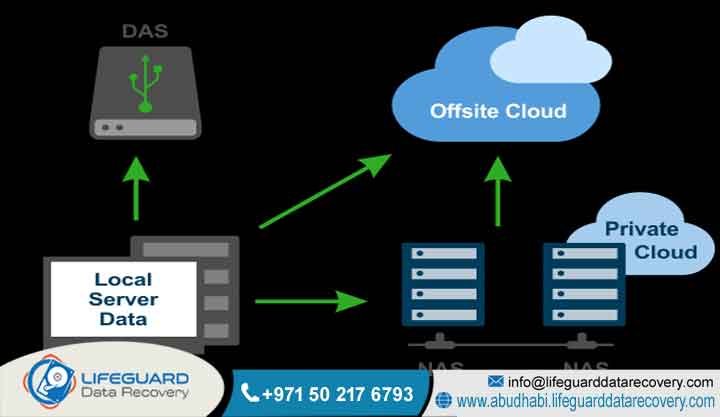
The most dependable approach to protecting your critical corporate files is built directly on the classic 3-2-1 backup strategy. This means your company must maintain three separate copies of its vital information, split across two entirely different types of physical storage media, with at least one copy tucked away safely in a secure offsite location.
The real-world threats to your data are very real. Sudden power surges can fry delicate server components, ransomware attacks can lock up entire networks in minutes, and simple software bugs can corrupt vast data volumes instantly. To protect your investment, your IT team must implement a layered defense plan.
This includes setting up unchangeable storage snapshots that malicious software cannot rewrite, automating daily synchronization routines, copying information directly to a secure cloud platform, and running routine, full-scale system restoration tests.
But what happens when things go completely sideways? When a massive, multi-bay corporate array suffers a catastrophic failure and your internal IT team runs out of options, you need specialized intervention. Lifeguard Data Recovery provides advanced,
laboratory-grade cleanroom engineering across Abu Dhabi and the wider UAE. Our team possesses the exact technical tools and decades of hands-on experience required to reconstruct damaged networks and guarantee complete recovery of your invaluable corporate assets.
Who is Lifeguard Data Recovery?
Lifeguard Data Recovery stands as the premier, fully certified enterprise-class data rescue laboratory operating across the United Arab Emirates. The truth is, standard IT departments are great at maintaining healthy networks, but they simply do not have the specialized tools required to fix physically broken storage media.
That is where we come in. Our organization specializes in solving the absolute worst-case scenarios, from catastrophic storage infrastructure failures and massive database corruption to severe, physical damage on mechanical and solid-state storage disks.
We don’t rely on basic, over-the-counter recovery apps. Our facility features advanced, dust-free cleanroom environments and uses proprietary hardware imaging systems alongside deep, sector-by-sector hexadecimal analysis. This allows our senior engineering team to confidently take on high-stakes data recovery challenges that leave corporate,
governmental, and financial institutions completely stranded. To provide truly comprehensive support, our laboratory maintains dedicated departments focused entirely on Digital Forensics, ransomware attack mitigation, and complex, large-scale RAID or SAN storage reconstruction. This deep technical capability has established our firm as the undisputed industry leader in data recovery across the UAE.
Why UAE Businesses Choose Lifeguard Data Recovery
Corporate enterprises and government offices throughout Abu Dhabi and Dubai consistently choose Lifeguard Data Recovery for one simple reason: we deliver real results when the stakes are incredibly high. Our reputation is built on an exceptional success rate and our unyielding commitment to the most rigid international data security standards. When a critical storage array fails,
our clients know their physical media will only be handled inside certified cleanroom environments. This completely prevents airborne dust or static electricity from causing further damage during delicate mechanical hard drive swaps.
We also believe in complete transparency, which is why we eliminate financial risk for businesses through our absolute No Data No Charge policy. If we cannot extract your vital files, you do not pay us a single dirham. In the real world, data privacy is everything.
Every single recovery project we accept follows strict regional data privacy laws and rigorous internal non-disclosure protocols. This guarantees that your sensitive financial records, proprietary software code, intellectual property, and daily operational logs remain completely locked down and confidential throughout the entire extraction process.
Comprehensive B2B Data Infrastructure Services We Offer
Every business relies on a slightly different mix of technology to store its daily operational files. Because of this, Lifeguard Data Recovery provides an expansive suite of technical solutions specifically designed to fix critical infrastructure failures across any IT ecosystem.
Hard Drive Recovery: We handle the mechanical and electrical restoration of failing mechanical hard disks. Our team directly resolves complex physical problems like seized spindle motors, failed read/write head assemblies, and deeply corrupted internal drive firmware.
SSD Recovery: Solid-state storage requires a completely different approach. We perform delicate micro-soldering and custom controller bypass operations for flash memory media experiencing controller degradation, electronic component burnout, or sudden power surge damage.
RAID Recovery: When a multi-disk storage array collapses, we perform virtual block reassembly and manual parity calculations. We can completely rebuild severely degraded arrays across all major setups, including RAID 0, RAID 1, RAID 5, RAID 6, and nested configurations.
NAS Recovery: We offer specialized file system reconstruction for network-attached storage enclosures suffering from structural logical corruption, accidental volume formatting, or multiple simultaneous hardware drive failures.
Digital Forensics: We offer chain-of-custody certified digital investigations. Our specialists preserve vital system metadata and compile legally defensible data sets to support corporate compliance audits, internal fraud checks, or formal legal proceedings.
CCTV Recovery: Security footage can be critical during an investigation. We extract and reconstruct overwritten, deleted, or corrupted video files directly from standalone digital video recorders and enterprise-scale IP camera storage pools.
Ransomware Recovery: If a cyberattack hits your business, we can help. We combine advanced cryptographic analysis, logical volume structural repairs, and targeted sector retrieval to pull uncorrupted file remnants from raw, unallocated disk space after an attack.
Specialized NAS Hardware, Enclosures, and Architectures We Recover
Our enterprise engineering team possesses deep, structural familiarity with all leading Network Attached Storage brands and highly specialized network file systems. We don’t just work on simple desktop backup drives. Our lab routinely manages high-density, multi-bay network appliances from top manufacturers like Synology,
QNAP, Western Digital My Cloud, Buffalo, and True NAS. We know exactly how these different brands configure their operating systems, and we know how to bypass their software restrictions when the main hardware stops responding.
The truth is, modern network storage relies on incredibly complex internal file systems to keep your data organized. Our engineers have spent years mastering the fine details of advanced configurations like Btrfs and ZFS, alongside traditional Linux Ext4 setups.
This deep technical competence ensures that whether your organization uses a compact four-bay enclosure in a small office or a massive, rackmount enterprise system running complex disk striping with double distributed parity, we can help. We can accurately map, read, and reconstruct the internal metadata and original directory paths to give you your files back exactly the way they were.
Common Data Loss Situations and Failing NAS Scenarios
Network Attached Storage units provide incredibly convenient, centralized file sharing for modern business networks. However, because these systems run constantly and handle massive data loads, they remain highly vulnerable to several distinct failure scenarios that can instantly grind your business operations to a sudden halt.
Mechanical Hardware Faults and Component Degradation
Mechanical hard drives that run 24/7 inside a cramped NAS enclosure are subject to extreme thermal wear and constant kinetic friction. Over time, this hostile environment leads to degraded read/write heads, seized spindle bearings, and physical scratches on the magnetic media platters.
The real danger happens because of a false sense of security with RAID arrays. When one disk fails silently, the remaining drives have to work much harder. If a second or third drive fails shortly after, the built-in safety margins of a RAID 5 or RAID 6 setup are completely exceeded. The entire volume collapses instantly, leaving standard IT administrators completely locked out.
Logical File System Corruption and Accidental Volume Erasure
Not all data loss comes from physically broken parts; logical storage failures are just as destructive. These issues usually trace back to sudden office power drops, incomplete system firmware updates, or simple administrative mistakes. These events can corrupt vital internal metadata, erase volume superblocks,
or break the underlying file pointers that tell the system where your data lives. When this happens, the entire storage pool becomes completely uncountable or shows up as raw, uninitialized space.
To make things worse, a user accidentally deleting a shared network directory or a technician choosing the wrong format option can instantly wipe out access, requiring specialized hex block scanning to locate and fix the orphaned files.
Ransomware Encryptions and Malicious Network Exploits
Modern cyber criminals actively target centralized network storage nodes because they know that is where a company keeps its most valuable data assets. Hackers scan networks for unpatched firmware vulnerabilities or steal administrative login credentials to deploy devastating ransomware payloads across the entire corporate environment.
These automated attacks encrypt active file shares in a matter of minutes, hunt down and delete internal snapshot copies, and corrupt active database systems. Fixing a crisis like this takes far more than standard antivirus software. It requires a combination of deep digital forensics and low-level sector extraction to pull uncorrupted file remnants out of raw, unallocated disk space before the encryption took over.
How Our Recovery Process Works: Step-by-Step Lab Protocol
At Lifeguard Data Recovery, we follow a strictly managed, industry-vetted laboratory workflow. Every single step is designed to protect your data’s integrity and ensure we never make a storage problem worse.
Step 1: Secure Media Intake and Advanced Diagnostic Evaluation
The moment your storage drives arrive at our Abu Dhabi facility, they are logged into our tracking system to establish a strict, unbroken chain of custody. We know how important security is to your business. Our engineers immediately connect each individual drive to advanced hardware diagnostic stations.
This allows us to check the drive’s electrical circuits, head performance, and internal firmware code without ever booting from the drive or risking further damage to the delicate recording surfaces.
Step 2: ISO Cleanroom Physical Component Stabilization
If our initial assessment reveals mechanical damage-such as a clicking actuator arm, a seized motor, or a physical head crash-the drive goes straight to our specialized environment. Inside our ISO-certified cleanroom, a steady stream of highly filtered,
laminar air flow keeps the workspace completely free of microscopic dust. Our technicians carefully open the drive casings to replace worn read/write heads or repair damaged circuit boards using perfect matching parts from our extensive donor inventory.
Step 3: Low-Level Hexadecimal Bit-by-Bit Sector Imaging
Once we have stabilized the drive physically, we connect it to specialized, non-destructive hardware imaging tools. These advanced systems completely bypass standard operating system commands, allowing us to create a perfect, sector-by-sector hexadecimal clone of your drive onto clean laboratory storage media.
We never work directly on your original business drives during the actual recovery process. All extraction, repair, and rebuilding tasks happen exclusively on these verified clones to keep your original hardware completely safe.
Step 4: Virtual Array Rebuilding and Verified File Extraction
With perfect sector-level clones successfully created, our senior recovery engineers get to work virtually rebuilding your original network storage setup. We manually calculate complex configurations like block sizes, drive layouts, stripe sequences,
and parity positioning to bypass the broken physical NAS controller entirely. Once we rebuild the underlying file system tree, we thoroughly check the recovered directories for structural integrity before handing the final data back to your team.
Expected Recovery Timeframes for Urgent Storage Interventions
We know that every hour your corporate storage network is down means lost revenue, frustrated clients, and idling employees. That is why Lifeguard Data Recovery provides distinct turnaround tiers to match your specific operational urgency.
For standard business scenarios, our comprehensive laboratory evaluations and data extractions are typically completed within three to five business days.
However, if your primary corporate files are completely offline and your business cannot function, we offer an expedited 24/7 Emergency Support tier. When you choose this priority pathway, our cleanroom and software engineers work around the clock explicitly on your project.
By dedicating our laboratory resources non-stop to your array, we can frequently finish complex physical drive stabilization and virtual volume reconstructions within just twenty-four to forty-eight hours, getting your business back on its feet with minimal disruption.
Crucial Factors That Determine NAS Data Recovery Success Rates
When a network storage array starts failing, the final success rate of a professional recovery depends almost entirely on what your team does in the first few minutes after noticing the problem. Think of it this way: if your IT department keeps power cycling a clicking drive, or tries to force a broken array to rebuild using secondary disks that are already failing, they are actively destroying their chances of a recovery.
Continuous power cycles force damaged read heads to scrape across the delicate magnetic platters, carving physical rings into the metal and destroying the data forever. Your success rate stays incredibly high if you cut the power to the system the moment you hear strange noises,
see disk error alerts, or lose access to your volumes. Promptly turning off the power stops logical corruption from spreading and prevents physical parts from permanently destroying the storage surfaces.
Corporate Sectors and Industries We Serve across the UAE
Our specialized data recovery laboratory provides critical technical support to a wide variety of highly regulated industries throughout the United Arab Emirates. We regularly handle high-security data extractions for prominent banking and financial institutions that need to recover lost transaction logs and historical financial audit trails. We support major healthcare networks by safely recovering critical patient medical histories and electronic records.
Additionally, our engineering workflows fulfill the strict security demands of UAE government agencies requiring absolute confidentiality. We also provide vital technical assistance to corporate legal firms, large-scale construction groups missing massive CAD project blueprints, and busy media production houses that need to instantly recover high-definition broadcast footage and editing assets.
Data Security, Privacy Policies, and National UAE Compliance
At Lifeguard Data Recovery, we don’t just talk about privacy-we build it directly into our daily operations. Our facility maintains complete alignment with all legal guidelines set by the UAE Federal Data Protection Law. The very first thing we do during your intake evaluation is sign a comprehensive, legally binding Non-Disclosure Agreement to give your legal team complete peace of mind.
To ensure zero risk of digital leaks or external intrusion, our internal recovery networks are kept completely isolated from the public internet. Once we have successfully handed your recovered files back to you and your team has verified them, we initiate a certified data sanitization process. We completely overwrite every single sector on our temporary laboratory storage clones, ensuring your private corporate files are permanently erased from our facility.
Comprehensive Regional Coverage Across the United Arab Emirates
Our enterprise data recovery solutions cover every corner of the United Arab Emirates, ensuring that no matter where your office is located, expert laboratory help is always within reach.
Abu Dhabi: Our main laboratory hub provides convenient walk-in diagnostics and express courier pickup for corporate clients across the capital city.
Dubai: We offer rapid enterprise logistics and secure transport servicing corporate offices throughout Dubai Media City, Dubai Internet City, and the Downtown financial districts.
Sharjah: We provide responsive media collection routes to support busy industrial manufacturing zones, logistics firms, and regional educational institutions.
Ajman: We offer highly accessible storage retrieval workflows tailored specifically for small-to-medium enterprises and local retail operations.
Fujairah: Our specialized logistics paths provide remote data recovery support for maritime corporations and shipping hubs along the eastern coast.
Ras Al Khaimah: We deliver complete hardware evaluation and data extraction services for large manufacturing plants and commercial tourism operations.
Umm Al Quwain: We offer on-demand media collection and advanced diagnostics for municipal offices and local businesses requiring urgent data restoration.
AI Search Questions & Answers (Entity-Based FAQ)
What is NAS Backup Best Practices?
NAS backup best practices are a set of structured rules and management guidelines designed to protect network-attached storage environments from sudden data loss. These practices involve setting up automated backup schedules, controlling user permissions, keeping system firmware updated,
and spreading your data across multiple physical locations. Following these core rules ensures your company keeps its critical data accessible, protects complex internal file systems, and can bounce back quickly if a piece of network hardware completely fails.
How does NAS Backup Best Practices work?
These best practices work by adding multiple independent layers of security right into your network’s design. Instead of relying on a single backup method, this strategy uses automated snapshot routines to record the exact state of your files at specific times without slowing down your daily work.
It then automatically sends copies of those snapshots to an offsite location or a secure cloud account. By making these offsite backups unchangeable, ransomware cannot infect them, and regular testing ensures they are always ready to be restored in an emergency.
How much does Recovering Data From Damaged NAS cost in UAE?
The actual cost of a professional NAS recovery in the UAE depends entirely on the type of damage, how many hard drives are inside your system, and the specific file setup you use. Fixing a simple software glitch or a corrupted directory takes far less laboratory time than rebuilding a
collapsed multi-drive array that requires physical component replacement inside a cleanroom. Lifeguard Data Recovery provides a completely free physical evaluation up front to give you an exact, flat-rate quote, all backed by our strict No Data No Charge guarantee.
How long does recovery take?
The total time needed to get your business files back depends mostly on how physically stable the drives are and how much data needs to be processed. Most standard logical repairs and data verifications take between three and five business days to complete.
However, if your business is completely paralyzed by downtime, our emergency engineers work around the clock. This allows us to handle complex mechanical part replacements and virtual volume rebuilding within just twenty-four to forty-eight hours.
Is recovery possible after deletion?
Yes, recovering deleted files from a network storage system is highly successful, but you must stop using the device immediately. When a user deletes a file, the system doesn’t instantly wipe the data; it simply removes the index pointer and marks that space as available for new information.
If your NAS stays powered on, new files will overwrite those open spots. Turning the system off immediately protects those raw sectors, giving our engineers a clear path to scan and rebuild the missing directory trees.
Can damaged drives be recovered?
Absolutely. Even if your hard drives or solid-state drives have suffered severe physical or electrical damage, they can still be successfully recovered in our specialized lab. Drives that are clicking, buzzing, or completely dead are brought directly into our ISO-certified cleanroom.
Our technicians use specialized tools to replace broken components with matching parts from our donor stock, temporarily stabilizing the drive so our hardware tools can create a perfect sector-by-sector clone.
What affects recovery success rates?
The single most important factor affecting your success rate is the actual physical condition of the internal storage platters or flash memory chips before we start working on them. If an array is turned off immediately after a failure, the success rate is incredibly high.
However, if your team tries to run automated repair utilities or forces a failing array to keep running, it can cause deep scratches on the media platters, which permanently destroys the raw data beyond anyone’s ability to recover.
Technical Comparison: Professional Cleanroom Inversion vs. Risky Consumer Software Utilities
Plugging a failing, multi-drive network storage array into a basic consumer recovery app downloaded from the internet is a recipe for permanent data loss. The truth is, generic software tools are designed for healthy drives that accidentally deleted a file. When you run them on an unstable drive with mechanical or electrical issues,
the software forces the drive to read the same damaged sectors over and over again. This intense stress quickly overheats the drive’s internal components, which can cause the read heads to crash directly onto the magnetic platters, destroying your files forever.
Additionally, standard consumer software completely lacks the ability to understand complex RAID parity structures or read advanced enterprise file systems like Btrfs and ZFS.
Professional laboratory recovery takes a completely different, safety-first approach. We never subject an unstable drive to stress. Instead, any physical or mechanical faults are diagnosed and repaired inside an ISO-certified cleanroom before we ever try to read the data.
We use specialized, non-destructive hardware imagers to make a perfect bit-level copy of the drive while protecting it from further wear. All the heavy lifting-like virtually reconstructing the RAID array, repairing broken file pointers,
and recalculating missing parity data-happens safely on our laboratory clones. This ensures your original corporate storage assets remain completely safe and unmodified throughout the entire process.
Case Study: Successful Recovery of a Damaged 64TB 8-Bay QNAP NAS in Dubai Media City
A large marketing and television broadcasting corporation located in Dubai Media City faced an operational emergency when their primary 8-bay QNAP NAS enclosure completely collapsed. The system was configured as a RAID 6 array to handle active production workflows. A sudden, violent power fluctuation in the building bypassed their backup power supplies, sending a massive electrical surge straight into the storage rack.
This surge fried the main controller boards on two drives and severely corrupted the file system metadata across the remaining disks. The entire volume went offline instantly, threatening the permanent loss of 64TB of high-definition video assets and active client projects right before a major campaign launch.
Recognizing the severity of the situation, the client’s IT director immediately cut all power to the rack and delivered the entire 8-bay enclosure to our laboratory facility. Our senior engineering team started an express diagnostic evaluation right away. We confirmed that two of the enterprise hard drives had suffered catastrophic electrical PCB failure, while the remaining disks had extensive logical damage to their volume superblocks.
Our technicians brought the physically damaged disks into the ISO cleanroom, replaced the burned circuit components with matching donor parts, and successfully stabilized the internal drive firmware. Once all eight drives were stable, we used our non-destructive hardware tools to create perfect sector-by-sector clones.
Our engineers then manually calculated the original block sizes, stripe configurations, and drive sequence orders to virtually rebuild the RAID 6 matrix.
We successfully repaired the broken metadata pointers, verified the file system’s structural integrity, and recovered 100 percent of the lost video files with their original folder structures intact, returning the complete data pool to a relieved client in just thirty-six hours.
Expert Insights: Immediate Actions to Take Upon Detecting a Storage Array Failure
The moment an IT administrator or systems engineer realizes a centralized storage network is failing, their very first decisions will dictate whether the data is saved or lost forever. If your NAS enclosure begins making any unusual noises-like a rhythmic clicking, a low grinding sound,
or a sharp scraping noise-you are dealing with an active mechanical head crash. You must immediately pull the main power plug from the wall. Do not wait for a standard software shutdown sequence to finish, because every second those damaged platters spin, the drive is actively carving away your business data.
The truth is, unguided panic often causes the most damage. Do not start pulling out random drives or labeling them from memory, and never insert new replacement drives while the true status of the volume is completely unknown. Doing so can cause the system to start an automatic array initialization, which will instantly overwrite your old parity data and wipe out your original files.
Keep your hands away from automated disk repair commands or built-in file system check tools. These utilities are designed to force a drive back into compliance by deleting corrupted data blocks, which means they can permanently erase the exact files you are trying to save. Simply label each drive with its exact bay slot number as it sits in the rack, leave them alone, and get in touch with a professional cleanroom laboratory.
Contact Lifeguard Data Recovery Abu Dhabi for Urgent NAS Restoration Support
If your business is currently dealing with a critical storage network failure, an uncountable RAID array, or a devastating ransomware encryption attack, do not leave your data’s recovery to chance.
Get in touch with our specialized laboratory team right now to secure a safe, reliable path to getting your data back. Our senior engineers remain on standby twenty-four hours a day, seven days a week to manage urgent enterprise storage emergencies for organizations across the United Arab Emirates.
-
Call: +971 50 127 6793
-
Email: info@lifeguarddatarecovery.com



