+971 50 217 6793 Abu Dhabi, UAE info@lifeguarddatarecovery.com

NAS vs RAID Storage
Let’s cut straight to the chase. Network Attached Storage (NAS) and Redundant Array of Independent Disks (RAID) are entirely different things, but they work hand in hand. NAS vs RAID Storage Think of a NAS as the physical box or mini-server that plugs into your office network so everyone can access shared files.
RAID, on the other hand, is the internal brainwork or blueprint that takes multiple hard drives inside that box and groups them together. This grouping speeds up your data access or keeps a backup copy in real-time, protecting you if a single drive goes down. NAS handles your network connections,
while RAID runs the background security inside those drives. If your business anywhere in the United Arab Emirates hits a wall with data loss on these platforms, Lifeguard Data Recovery is right here with certified, elite enterprise retrieval support to get your operations back on track.
What is NAS vs RAID Storage? Understanding the Core Differences
If you are planning out a reliable office network or trying to recover from an unexpected system crash, you have to know how NAS and RAID differ. Let’s break it down simply. Network Attached Storage (NAS) is essentially an independent storage appliance that links directly into your local area network (LAN) using standard network cables. It has its own unique IP address on the network.
This means multiple staff members, laptops, desktop computers, and mobile devices can jump in and pull up shared files at the exact same time. Inside a typical NAS machine, you will find a customized operating system, an independent processor,
system RAM, and several open slots or drive bays built to hold your hard disks. For most growing businesses or large enterprise setups, it behaves just like having your own secure, private cloud network sitting right inside the office.
Now, shift your focus to Redundant Array of Independent Disks (RAID). This is not an independent piece of hardware or an appliance you can see sitting on a desk. Instead, it is a smart structural technique used to manage several physical storage drives simultaneously.
You can run RAID through standard operating system software or use a physical, dedicated hardware RAID controller card to handle the heavy lifting.
How Does NAS vs RAID Storage Work Together?
Even though NAS and RAID are technically two separate branches of technology, they almost always work as a team within any modern corporate server room. Multi-bay NAS boxes count heavily on RAID configurations to manage and protect their internal hard disks. When your company buys a premium network storage enclosure featuring four,
eight, or twenty-four drive slots, your IT team rarely leaves those hard drives sitting as isolated, independent volumes. Doing that would be an administrative nightmare. Instead, the native NAS operating system relies on either built-in hardware chips or software controls to group those individual hard disks into one single, massive, seamless pool of storage.
This smart setup offers your staff a clear, unified network folder to drop files into while building an automated safety net behind the scenes against disk failures. For instance, imagine your office network storage is set up using a classic RAID 5 framework. The system actively sprinkles your data alongside protective parity blocks across every single hard disk in the enclosure.
If one physical hard drive inside that NAS appliance suddenly stops spinning due to a mechanical breakdown, your office network keeps moving forward without dropping a beat. Why? Because the background RAID architecture instantly calculates and pieces together the missing files on the fly by reading those distributed parity blocks.
In simple words, the NAS gives you the network pathways and file-sharing interface, while the underlying RAID delivers the structural speed boosts and fault tolerance that keep the lights on when physical hardware starts to degrade.
Who is Lifeguard Data Recovery? Trusted UAE Storage Experts
Lifeguard Data Recovery stands as a top-tier B2B recovery provider across the United Arab Emirates. Operating out of our core facility in Abu Dhabi, we dedicate ourselves to fixing deep infrastructure data disasters. We handle everything from enterprise network crashes to critical storage dropouts for companies, major government bodies, banking groups, and neighborhood businesses.
We understand that a down system means lost revenue every single minute, which is why we focus heavily on shortening corporate downtime and fixing catastrophic storage failures. Our laboratory is fitted with cutting-edge gear designed to tackle severe mechanical damage, logical code corruptions, and complex encryption locks across all corporate data platforms.
Our engineering roster consists of highly trained recovery specialists who spend their days working inside specialized file systems, enterprise-level network storage arrays, and historical database infrastructures. We mix local, neighborhood accessibility with global forensic standards.
This makes Lifeguard Data Recovery the first phone call for companies dealing with sudden storage emergencies across the Emirates.
Why UAE Businesses Choose Lifeguard Data Recovery
Companies across Abu Dhabi, Dubai, and the neighboring emirates partner with Lifeguard Data Recovery because we stick to strict, certified global recovery methods. We do not use backyard shortcuts. Our laboratory houses a certified Class 100 Cleanroom chamber. This is a critical prerequisite for safely opening up dropped or physically broken hard disk drives.
Opening a drive in a standard room can instantly ruin the media, as floating dust specks, microscopic particles, or static shocks can scratch the magnetic disk platters. Our clean, controlled chamber eliminates that danger completely, giving you the best possible shot at pulling your critical files back from heavily damaged media.
Beyond our advanced gear, Lifeguard Data Recovery puts client safety and financial trust first with our strict No Data, No Charge guarantee. If our engineering team runs a full diagnostic sweep and discovers that your critical data cannot be recovered, you do not owe us a single fils for the service.
This completely takes the financial worry off your shoulders while your business handles an unexpected storage crisis. Backed by ISO-compliant data safety protocols, rigid client non-disclosure setups, and years of hands-on experience rescuing multi-drive enterprise configurations, our laboratory operates as the most dependable technical ally for storage emergencies in the region.
Enterprise Data Recovery Services We Offer Across the UAE
Lifeguard Data Recovery brings a wide array of deep technical solutions to the table, built to reverse complex data loss across modern enterprise networks.
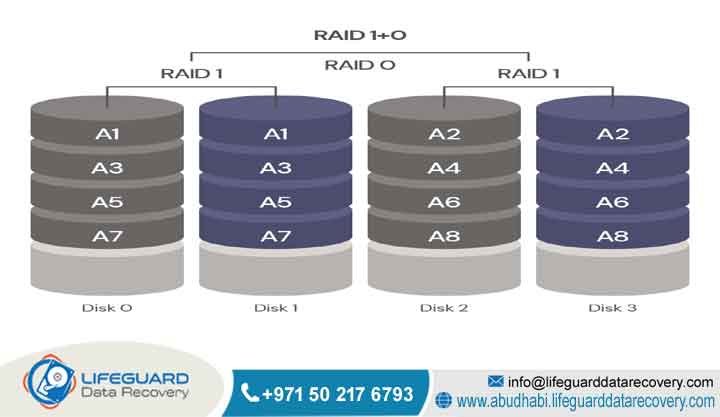
RAID Recovery: Our engineers are experts at rebuilding collapsed, broken, or heavily corrupted RAID setups. We deal with standard and complex multi-disk frameworks like RAID 0, RAID 1, RAID 5, RAID 6, RAID 10, as well as nested or custom corporate configurations. We know how to step past blown hardware controller cards, fix mismatched firmware errors, and manually patch together the raw array structures to extract clean, uncorrupted files.
NAS Recovery: We excel at retrieving files from multi-drive network appliances that have lost their configuration data, suffered system-wide software loops, ran into network firmware bugs, or dropped multiple disks at once. Our lab can comfortably read and rebuild the unique, proprietary file systems utilized by major global network storage builders.
Server Recovery: The moment a physical or virtual server platform goes down, corporate work halts entirely. Lifeguard Data Recovery steps in fast to salvage files from broken domain controllers, damaged SQL databases, business application servers, and complicated virtual setups run via VMware ESXi or Microsoft Hyper-V setups.
Ransomware Recovery: If your network falls victim to a targeted cyberattack, our digital forensic teams and ransomware recovery units are ready to step in. We help organizations by mapping the underlying encryption footprints, separating clean data folders, and utilizing advanced file parsing methods to salvage corrupted databases and structural file networks safely.
Advanced Storage Devices We Recover
The mix of storage hardware inside a modern UAE enterprise can be incredibly diverse, meaning engineers need highly specialized instruments to deal with different styles of storage media. Lifeguard Data Recovery supplies top-tier structural assistance across several primary device areas.
Hard Drive Recovery (HDD): We take care of all forms of physical mechanical damage, including frozen platter bearings, burned spindle drive motors, broken read/write internal head setups, and corrupted firmware chips on classic 3.5-inch office server drives and smaller 2.5-inch portable disks.
SSD Recovery: Restoring files from solid-state storage demands a totally different engineering path due to the complicated design of NAND flash memory and custom controller chips. We carry out advanced chip-off disordering, direct controller bridging, and internal wear-leveling calculation fixes on modern SATA, high-speed NVMe, and slim M.2 SSD sticks.
CCTV Recovery: Modern security and surveillance monitoring systems generally save video feeds using altered Linux structures or unique proprietary encoding methods. We can track down and recover overwritten, deleted, or corrupted surveillance footage from standard standalone DVR boxes, network NVR frames, and large corporate IP camera SAN arrays.
Digital Forensics: For court cases, corporate disputes, or internal company audits, our certified digital forensic investigators can extract, safeguard, and evaluate electronic records. We ensure the entire process preserves a clear, legally sound chain of custody so your evidence remains pristine and fully valid in court.
Our engineering team works around the clock with devices from top-tier hardware creators. This means you get local, experienced support for SanDisk flash storage systems, complex Synology NAS boxes, and high-capacity QNAP company systems deployed on office networks across the region.
Common Data Loss Situations in NAS and RAID Systems
Even with all the smart redundancy features packed into modern enterprise networks, NAS and RAID storage platforms still face catastrophic data loss. Knowing exactly why these setups fail is your best defense against losing files permanently.
RAID Controller Failure: The physical hardware RAID controller acts as the traffic cop that directs data across the multi-drive setup. If that specific controller card catches a heavy electrical surge, runs into a firmware bug, or suffers an internal chip burnout, your entire array instantly goes dark. The files become unreadable, even if every individual hard drive inside the enclosure is perfectly healthy.
Multiple Disk Degradation: Take a standard RAID 5 setup, for example. It is designed to handle the loss of exactly one hard drive without breaking. The trap is that companies usually buy all their replacement drives at the exact same time from the same production run,
Firmware Corruption and Bad Sectors: Modern NAS boxes run frequent background operating system updates. A sudden power drop or interruption mid-update can scramble your structural system files, leaving your data volumes completely uncountable. On top of that, as physical disks grow old, bad sectors pile up quietly. This can easily corrupt your parity synchronization loops, preventing your network volumes from opening.
How Our Critical Data Recovery Process Works
Lifeguard Data Recovery utilizes a highly controlled, deeply scientific file extraction system to keep your delicate original media completely safe throughout the recovery window.
Step 1: Media Evaluation and Diagnostics The minute your broken storage gear arrives at our Abu Dhabi facility, it goes straight to our specialized diagnostics station. Our engineers use dedicated hardware reading tools to check the physical condition of the disks, analyze the read/write heads, look for bad sector patches, and pinpoint logical data errors without altering or writing a single byte to your original files.
Step 2: Cleanroom Extraction and Physical Repair If our diagnostic sweep uncovers mechanical failures inside a drive, that disk moves immediately into our ultra-clean Class 100 Cleanroom chamber. Inside this dust-free space, our specialists perform precise micro-repairs, swapping out burnt read/write head configurations or seized motors using matching donor parts from our massive internal parts storage.
Step 3: Hexadecimal Cloning and Imaging We have a strict rule: we never play around with your original, fragile media during active recovery attempts. Once a drive is physically stable, we create a sector-by-sector, exact hexadecimal clone of that drive onto an independent, highly secure lab disk using professional data extractors that handle unstable media safely. All deep logical work and rebuild attempts are performed entirely on these secondary images.
Step 4: Array Reconstruction and Data Verification Using those pristine sector-by-sector drive clones, our team manually calculates the structural configuration of the original array. We figure out the precise stripe sizes, the exact sequence of the drives, block rotations, and data offsets. We then assemble the array inside an isolated, virtual sandbox environment. Once the drive structures are aligned, we run thorough file verifications to ensure your databases, folders, and enterprise systems open up cleanly without any underlying corruption.
Realistic Recovery Timeframes for UAE Businesses
Every hour your company storage stays offline can mean lost business and operational friction. Lifeguard Data Recovery offers structured turnaround tiers designed to match how fast your team needs to move.
Standard Turnaround: This option usually takes between 3 to 5 business days to wrap up. It covers our standard diagnostic lineup, finding matching internal parts if your disks need a physical swap, cloning the raw sectors, and repairing the file system links. This is a great choice for non-essential backup arrays or historical storage vaults that don’t disrupt daily operations.
Emergency Data Recovery: When your main production server goes down and your entire office is paralyzed, you need to act fast. We offer a full 24/7 Priority Evaluation and emergency recovery pathway for critical infrastructure failures. The moment you trigger this option, our data recovery engineers shift into high gear, working shifts around the clock inside our lab to fix components, extract data, and virtually rebuild your array in as little as 24 to 48 hours.
Affecting Storage Recovery Success Rates
The likelihood of pulling your files safely out of a crashed NAS or broken RAID array depends on a few very clear operational factors.
Drive Degradation and Physical Condition: The actual state of the internal magnetic platter surfaces or the health of the silicon NAND chips inside modern solid-state drives dictates how much data can be saved. If a shattered read head has physically scored or gouged the shiny surface of a disk platter, the data blocks in those specific areas are permanently gone.
Overwriting and Post-Failure Actions: The number one killer of recoverable data is continuing to use a device after it fails. If your system administrator forces a crashed array back online, triggers a raw drive initialization, runs aggressive software scan fixes, or tries to rebuild the system using the wrong drive sequence, you will overwrite your original data blocks. Once that happens, those files are lost forever.
Array Configuration Complexity: High-capacity corporate networks that use highly tailored file systems, advanced data compression methods, or combined storage deduplication require extensive manual hexadecimal reverse-engineering. This extra complexity can significantly alter how long the recovery takes and impact the final outcome compared to simpler storage formats.
Industries We Serve in Abu Dhabi and the Wider UAE
Our business roster covers the entire economic fabric of the United Arab Emirates, requiring our engineers to maintain a deep familiarity with complex, industry-specific compliance standards and file layouts.
Government Sector: We supply secure, tightly controlled data extraction services for city offices, federal groups, and public utility teams that require strict compliance with national security rules and local confidentiality guidelines.
Banking & Finance: Investment groups, local banks, and emerging fintech operations count on us to rescue critical financial databases, enterprise accounting logs, and historical tracking records while respecting central bank cyber defense codes.
Healthcare: Medical networks, diagnostic clinics, and local hospitals turn to us to safely recover essential Patient Administration Systems (PAS), Electronic Health Records (EHR), and large medical imaging archives while keeping patient privacy perfectly intact.
Oil & Gas: Major energy producers, engineering firms, and field exploration teams across the region call us in to restore massive geological models, pipeline sensor records, and critical field maps.
Media Production: Broadcast channels, creative ad firms, and video houses throughout the UAE generate massive files on heavy SAN and NAS setups. We step in to recover lost high-resolution raw video footage, media timelines, and massive archival footage catalogs.
Strict Data Security, Privacy, and Compliance Protocols
Data privacy is something we take incredibly seriously. Lifeguard Data Recovery has built an internal system designed to safeguard your sensitive corporate files from the moment they enter our lab.
Every single recovery step happens inside an isolated environment on a closed local network that has absolutely no connection to the public internet. This complete isolation cuts out any chance of cyber leaks or remote snooping while we handle your files.
Our daily operations match up perfectly with local UAE Cyber Security standards alongside international global mandates like GDPR. Every project we accept is covered by a legally binding Non-Disclosure Agreement (NDA). This ensures your company’s proprietary designs, private personnel files,
and confidential internal records stay entirely safe. Once we verify that your files are successfully recovered, we pass them back to you on a securely encrypted external drive. Finally, we wipe the temporary working clones from our lab storage systems using certified cryptographic erasure tools, ensuring your data leaves no trace behind.
Comprehensive UAE Coverage: Local Lab Accessibility
If your company hits an unexpected storage emergency, you can quickly tap into Lifeguard Data Recovery’s services from anywhere in the country. Our central drop-off locations and diagnostic facilities are positioned to assist all major commercial districts and industrial hubs across the Emirates.
We run rapid, secure shipping and fast-track diagnostic pipelines throughout Abu Dhabi and Dubai. This makes it easy to support corporate offices located inside the Abu Dhabi Global Market (ADGM), the Dubai International Financial Centre (DIFC), and Dubai Internet City.
On top of that, our logistics network provides full data recovery coverage for commercial plants, warehouses, and corporate facilities located across Sharjah, Ajman, Fujairah, Ras Al Khaimah, and Umm Al Quwain. This broad local reach means that no matter where your physical servers sit within the UAE, expert recovery support is just a short drive or call away.
NAS vs RAID Storage Deep-Dive: A Technical Comparison
To really understand how these two systems behave under daily business pressures, let’s look at a clear technical breakdown of their structural differences.
Storage Capacity and Scalability
A standard NAS appliance is strictly limited by the physical drive bays built into the box and the maximum drive capacity its internal CPU can handle. To grow your space, you either have to swap out your current drives for bigger ones or purchase expansion bays that link up via high-speed external ports.
RAID capacity, however, is calculated completely differently depending on the mathematical tier you choose. For instance, if you run a RAID 1 mirrored setup with two 10TB hard drives, your total usable room is just 10TB,
because the second drive is simply a silent twin holding a duplicate copy. If you set up a RAID 5 system using four 10TB drives instead, the space of one full drive is set aside for parity info, leaving you with exactly 30TB of real, usable workspace.
Fault Tolerance and Data Availability
A NAS machine does not have built-in data protection out of the box; it inherits its safety characteristics entirely from whatever RAID layout you apply to its hard drives. If an IT worker configures a multi-bay NAS as a simple Just a Bunch of Disks (JBOD) cluster without using a RAID setup, losing a single hard drive means losing everything on that specific disk. RAID is what adds predictable levels of fault tolerance.
A RAID 6 framework can easily handle the simultaneous physical breakdown of two separate hard drives inside the cluster without losing a single file. Recognizing this baseline distinction helps you see why fixing a network software loop on a NAS requires a completely different technical approach than repairing a mechanical head crash inside a multi-drive RAID cluster.
Network Architecture vs Local Bus Speed
NAS devices talk to your office computers using standard network protocols like Network File System (NFS), Server Message Block (SMB), or Common Internet File System (CIFS) over standard Ethernet lines or fiber connections. This means its performance is ultimately limited by how much traffic your office network can move. RAID systems are entirely different.
The internal RAID controller talks directly to the hard disks using blazing-fast local hardware lines like SATA, SAS, or modern NVMe PCIe connectors. This means data moves across an internal RAID array at speeds substantially higher than anything standard network lines can push.
Backup vs Redundancy: The Crucial Structural Truth
The single biggest mistake we see business owners make is assuming that having a redundant RAID setup means they don’t need an independent data backup plan. The honest truth is that RAID is only built to keep your system running in real-time if a physical drive stops spinning.
It keeps your office online during a hardware failure, but it offers zero defense against logical mistakes, ransomware infections, accidental deletions, or malicious files. If an executive deletes a major folder from a NAS running RAID 5, the network operating system carries out that deletion block instantly across every single disk in the loop,
erasing the files in a flash. Redundancy works in the live present moment; an authentic backup is an entirely separate, isolated copy of historical data kept completely disconnected from your main active network.
Case Study: Successful 64TB Enterprise NAS RAID 5 Recovery in Abu Dhabi
Problem and Urgency
A large-scale infrastructure construction company operating out of the Abu Dhabi Industrial Zone faced an absolute nightmare. Their main engineering file system-a heavy Synology NAS box set up as a 5-drive RAID 5 array containing roughly 64TB of active architectural designs, project management layouts, and signed client contracts-collapsed completely.
A sudden, violent voltage spike in their local server rack knocked two corporate-grade hard drives offline at virtually the exact same moment. This sudden drop caused the entire RAID 5 volume to unmount and drop offline, immediately halting operations across three regional corporate branches.
Recovery Process
The stranded client called our emergency assistance line right away, and our dispatch team had the drive array inside our secure testing lab within two hours. Our initial diagnostic pass showed that Drive 3 had suffered a physical breakdown of its internal read head assembly, while Drive 4 was drowning in bad sector clusters alongside a fried firmware module on its logic board.
Our engineers moved Drive 3 straight into our Class 100 Cleanroom chamber to manually swap out the broken head mechanism with a perfect matching donor component. At the same moment, we hooked Drive 4 up to our advanced diagnostic imaging gear to patch and stabilize its damaged firmware.
Bit by bit, we pulled identical, unaltered sector copies from all five disks. Once we had five clean drive images, our specialists reverse-engineered the original stripe steps, the sequence of the disks, and the parity rotation patterns to virtually rebuild the RAID 5 layout in our system.
Result and Client Outcome
By manually cleaning up the underlying file systems and checking the integrity of the native ext4 partition rules, Lifeguard Data Recovery successfully rescued 100% of that active 64TB engineering archive. We wrapped up the entire engineering loop,
from the first emergency pickup to delivering the fully encrypted replacement media, in just 36 hours. This quick turnaround allowed the construction company to bring its network back to life, sidestep massive daily delay fines, and preserve their crucial multi-year project blueprints without losing a single file.
Expert Insights: Why Redundancy is Not a Backup
Looking at it from inside a professional data recovery lab, relying solely on a RAID array to protect your company’s digital future is a dangerous way to run your IT infrastructure.
As files grow larger and more complex across the UAE corporate landscape, a lot of business owners assume that because they spent good money on a top-shelf, multi-drive NAS box, their data is perfectly safe from harm. This simple misunderstanding leads to devastating losses every single year.
True corporate data safety requires following the time-tested 3-2-1 Backup Rule. This simple strategy dictates that your company must keep at least three separate copies of its data, spread across two entirely different styles of storage media,
with at least one copy kept completely offsite or inside an isolated cloud network. When you view your network through this lens, the internal RAID array running inside your primary office NAS is just your first active copy-meant to keep your staff working if a drive drops dead.
The remaining copies have to be kept completely isolated, read-only, and totally unlinked from your main office network loop so a fast-moving ransomware attack or an accidental click from a system admin can’t wipe out everything at once. True disaster planning means treating your active network storage as an everyday performance tool, while relying on cold, disconnected historical backups as your ultimate safety net.
Frequently Asked Questions (FAQ)
What is NAS vs RAID Storage?
Network Attached Storage (NAS) is an independent hardware box that plugs directly into your local business network to offer a central folder where multiple staff members can access files. To put it simply, the NAS is the physical enclosure resting on your office shelf,
and RAID is the smart programming style used to organize the physical disks sitting inside that enclosure. Almost every business-class NAS box relies on a RAID configuration underneath to keep the system safe from sudden single-drive burnouts.
How does it work?
NAS enclosures operate by running a lightweight, specialized operating system built entirely to share files, managing network users and transmission links smoothly through standard office Ethernet or fiber routes. RAID operates by using either a dedicated internal hardware processing card or integrated software rules to split up, duplicate, or calculate mathematical parity data across your physical hard disks.
The moment a staff member drops a document onto a NAS system running a RAID array, the system slices that file into fragments and scatters them across your drive cluster based on your chosen RAID level. If a single drive drops dead, the underlying RAID layer reads the surviving blocks alongside the parity data to rebuild the missing files on the fly.
Who needs this service?
Our professional data recovery service is built specifically for corporate network managers, business owners, government technology offices, and local enterprise operations across the UAE that depend daily on shared network storage setups. When an office storage array crashes, regular in-house IT groups usually do not have the ultra-clean cleanroom spaces, specialized donor parts,
or raw hardware read instruments required to safely open and clone failing disks. If your office is dealing with an uncountable server volume, strange clicking noises coming from your rack drives, broken SQL databases, or a total loss of access to shared office folders, you need an expert laboratory to step in.
How much does NAS vs RAID Storage data recovery cost in the UAE?
The final cost of a professional NAS or RAID file recovery project depends entirely on a few highly specific technical details. We calculate the investment based on how many physical drives make up your array, the exact style of damage we are dealing with (such as a simple logical software glitch versus a physical mechanical head crash), the cost of matching donor parts,
and how fast your company needs the data back. Lifeguard Data Recovery provides a clear, upfront diagnostic assessment to trace the exact failure profile before you commit to any service fees. Plus, our firm No Data, No Charge guarantee means you face zero financial risk, since you only pay our invoice if we successfully pull your critical files back.
How long does recovery take?
Our standard diagnostic and recovery process usually wraps up within 3 to 5 business days, giving our team the time needed to safely condition the media, clone every single data sector, and properly realign your corrupted file structures.
If you are dealing with a critical corporate emergency where keeping systems down hits your revenue hard, our emergency recovery squad is available 24/7. These high-priority interventions allow our engineers to repair physical components, clone raw data, and virtually piece together complex arrays in as little as 24 to 48 hours.
Can deleted files be recovered from a NAS or RAID?
Yes, pulling deleted files back out of NAS and RAID networks is highly successful, assuming your team stops using the system immediately so new data doesn’t overwrite the vacant slots. The moment someone hits delete on a shared network folder, the operating system doesn’t actually wipe the file away instantly; it just labels those specific storage blocks as empty and ready to hold new files.
If your team stops saving new documents to the array right away, that data remains completely intact. It is absolutely vital to power down your storage gear the second you realize a mistake happened, because letting the system run allows background logs, automated updates, and temp files to overwrite those slots, erasing your data for good.
Can damaged SSDs be recovered?
Yes, recovering data from a physically broken or logically corrupted solid-state drive is completely possible using advanced electronic micro-engineering. SSDs don’t use spinning magnetic disks; instead, they rely on complex grids of silicon NAND flash chips managed by a central controller chip that splits up data using internal wear-leveling rules.
When an SSD burns out from an electrical surge, a failed controller chip, or general component degradation, our team carries out precise chip-off extractions or uses specialized hardware emulation tools to bridge past the dead controller. This lets us read the raw files directly off the underlying memory chips so we can piece your files back together using custom lab software.
Can failed RAID arrays be repaired?
A collapsed or broken RAID array can rarely be repaired live in your server rack without risking permanent data corruption, but the data trapped inside can be safely extracted and rebuilt within a dedicated lab environment. The moment an array falls offline because of a bad controller card, scrambled configuration files, or multiple drive drops, trying to force a rebuild or running standard disk check utilities can cause catastrophic damage to your files.
Our engineering method involves extracting sector-by-sector copies of every drive in your setup independently. We then piece the array together virtually inside our isolated computer systems, letting us extract your files safely without writing any risky modifications back to your original disks.
What determines recovery success rates?
The final success rate of a complex enterprise storage recovery project comes down to a few very specific technical details. The absolute biggest factor is the physical shape of the actual storage surfaces-meaning whether your hard drive platters have been physically gouged by a broken read head or if your
SSD memory chips are still structurally sound. Finally, handling all physical repairs inside a certified Class 100 Cleanroom using specialized hardware toolsets heavily influences a positive outcome.
Professional Data Recovery vs DIY Recovery
The moment an essential office NAS or corporate RAID array drops offline, it is incredibly tempting for an internal IT team to try a quick Do-It-Yourself (DIY) fix to save money or get things moving fast. These DIY attempts usually look like downloading cheap data recovery software online, running aggressive command-line disk repairs,
trying to force degraded disks back online through a configuration menu, or swapping out drive logic boards without specialized alignment tools. While these tricks might sometimes work on a simple file deletion on a single, healthy desktop hard drive, using them on a complex, multi-drive business storage array is incredibly dangerous.
If one of those disks has an underlying mechanical issue, forcing the system to spin up or attempt an automated rebuild will cause the broken internal read heads to scrape directly across the delicate storage platters,
grinding away the thin magnetic film where your files actually live. Professional recovery avoids this nightmare entirely by treating each drive separately, evaluating physical health inside a clean chamber, and building a virtual match of the array without making a single destructive change to your original hardware.
Professional Recovery vs Recovery Software
Off-the-shelf data recovery software programs can be handy instruments for resolving simple, logical slip-ups on perfectly functioning hardware-like restoring an accidental deletion from a standard USB thumb drive. However, standard software is completely out of its depth when dealing with a broken network appliance or physical hardware damage. Retail software programs rely completely on your computer’s native operating system,
which is programmed to continuously force a lagging drive to read its bad sectors. If a disk inside a complex RAID setup is dealing with a mechanical breakdown or a scrambled internal firmware chip, that aggressive, continuous reading from basic software will overheat the drive or trigger a complete mechanical breakdown.
On top of that, basic retail programs simply don’t know how to read the custom block styles, unique file layouts, and complex striping rules used by enterprise-class storage boxes and corporate RAID controllers. Professional recovery laboratories utilize specialized hardware data tools that step past standard operating system boundaries.
This gives our engineers the ability to tweak read voltages, turn off failing drive heads, and safely clone unstable media bit by bit.
When Businesses Should Choose a Specialist Recovery Lab
Your company should skip all internal troubleshooting and hand your hardware straight to a specialist data recovery lab the absolute second your storage failure threatens mission-critical data or shows physical signs of damage.
If your office NAS appliance or server rack starts emitting unusual clicking, grinding, scraping, or buzzing sounds, it is a clear warning sign of an internal mechanical failure. You need to shut that system down immediately.
Furthermore, if your RAID management console shows multiple drive failures at the exact same time, or if a system prompt asks you to initialize, partition, or format a failing storage pool, your internal IT staff should never click proceed.
Attempting to rebuild a complicated storage array without knowing the exact structural health of every single disk inside the box is the easiest way to break your files permanently. Choosing a certified specialist laboratory like Lifeguard Data Recovery ensures your enterprise assets are handled using safe, non-destructive tools, giving you the absolute best path to a complete recovery while saving your business from catastrophic downtime.
Secure Your Corporate Storage: Contact Lifeguard Data Recovery UAE
If your business is currently staring down a severe storage crash, a corrupted database, or unexpected network downtime on your NAS or RAID setup, taking a cautious step right now is critical for protecting your corporate assets. Do not risk running basic internet software utilities or forcing unstable disk arrays to execute an automated rebuild.
Connect with the certified specialists at Lifeguard Data Recovery to get an authoritative, non-destructive evaluation of your media. Our veteran engineering team is standing by to help businesses across all seven emirates with our risk-free, reliable data recovery promise.
Reach out to our Abu Dhabi headquarters right away to kickstart an emergency service request or get clear, expert advice on your current storage crisis:
-
Call: +971 50 127 6793
-
Email: info@lifeguarddatarecovery.com



