+971 50 217 6793 Abu Dhabi, UAE [email protected]

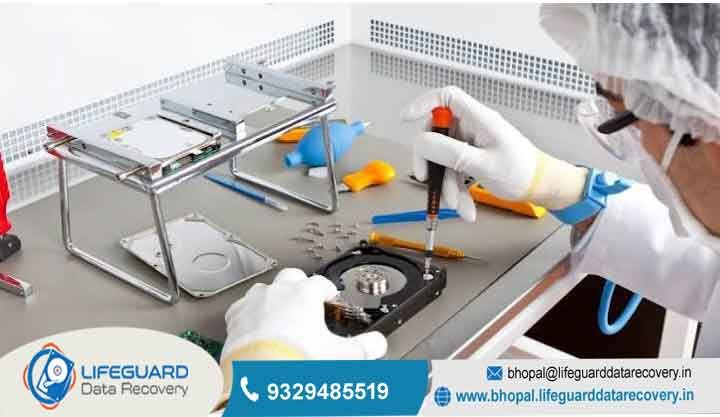
What is cleanroom data recovery?
What is Cleanroom Data Recovery How ISO-Certified Labs Salvage Damaged Hard Drives When a mechanical hard drive suffers severe physical failure, standard file extraction software and consumer-level troubleshooting techniques become completely ineffective.
lifeguard datarecovery Attempting to run software utilities, perform scans, or continuously power cycle a mechanically compromised drive often accelerates internal damage, causing delicate read/write heads to scrape across magnetic platters and permanently erase stored data.
In these critical situations, physical component repair inside a specialized, air-filtered cleanroom data recovery lab provides the only safe path to salvaging lost files.
Disambiguation Physical Cleanroom Recovery vs. Cyber Cleanroom Recovery
Before examining the engineering workflows involved in hardware extraction, it is essential to clarify a widespread
Physical Cleanroom Data Recovery: A specialized mechanical engineering procedure performed inside a controlled, dust-free environment (certified ISO Class 5 or higher). It focuses on opening physical hard drive enclosures, replacing destroyed components (such as read/write head assemblies or seized spindle motors), and reading raw data directly from physical magnetic media.
Cyber/Virtual Cleanroom Recovery: An enterprise software architecture offered by cloud and backup security vendors (such as Veeam, Commvault, or Scality). It provides an isolated, sandboxed virtual environment where engineers can safely restore server backups, analyze malware infection vectors, scan for latent ransomware, and verify clean system images without risking re-infection across the corporate network.
This comprehensive guide focuses strictly on physical cleanroom data recovery for storage hardware.
What is Cleanroom Data Recovery and How Does It Work?
Cleanroom data recovery is the process of opening, repairing, and extracting data from physically damaged or mechanically compromised hard disk drives (HDDs) inside an environment engineered to eliminate airborne particulate contamination.
Hard disk drives are extraordinary feats of micro-mechanical engineering. Inside a standard 3.5-inch or 2.5-inch hard drive, mirror-polished magnetic platters coated with microscopic magnetic layers spin at speeds ranging from revolutions per minute (RPM). While these platters spin, the drive’s read/write heads fly above the magnetic surfaces on an aerodynamic cushion created by the air currents generated by the rotating platters.
The gap between the read/write head slider and the spinning platter surface known as the is infinitesimal. Modern hard drive heads float at an altitude of just 3 to 5 nanometers above the platter. To understand how precarious this environment is, consider the scale of common environmental contaminants:
If a hard drive is opened in a standard room, millions of floating dust particles instantly land on the exposed magnetic platters. When the drive is subsequently powered on, the platters spin up to full speed, causing the read
head floating just 3 nanometers above the surface to collide with a dust particle measuring 30,000 nanometers. This collision causes
the head to slam directly into the magnetic coating an event known as a head crash. The collision strips away the thin magnetic film containing your files, turning critical data into fine metallic dust and rendering the drive permanently unrecoverable.
A data recovery cleanroom facility utilizes continuous air filtration and environmental regulation to remove virtually all airborne particles, enabling recovery engineers to safely remove the hard drive’s top cover, perform delicate micro-surgeries, and salvage raw sector data.
When is Cleanroom Hard Drive Repair Necessary?
Cleanroom intervention is not required for every data loss scenario. If a hard drive has experienced a “logical failure such as an accidentally formatted partition, a deleted folder, or corrupted file system indexes the physical mechanics of the drive remain healthy. In those instances, software-level utilities can safely scan the drive without opening the casing.
However, cleanroom recovery becomes mandatory whenever a storage device suffers from physical hardware degradation, internal mechanical breakdown, or environmental destruction.
Physical & Mechanical Failures
Read/Write Head Failure & Collisions: Physical drops, age-related actuator fatigue, or severe power surges can cause read/write heads to become misaligned, bent, or completely detached. Replacing the damaged head stack requires a precision hard drive head replacement using identical donor assemblies under magnification.
Head Sticktion (Slider Adhesion): When a drive experiences a sudden loss of power or drop, the slider assembly may fail to retract to its dedicated ramp or parking zone. Instead, the heads drop directly onto the smooth magnetic media.
Spindle Motor Seizure: Physical impacts (such as dropping an external desktop or laptop hard drive) can warp the spindle axle or shatter the fluid dynamic bearings inside the drive’s motor. When the spindle motor freezes, the drive cannot spin up to speed, requiring engineers to execute a complex platter swap into a healthy donor chassis.
Hard Drive Platter Degradation & Contamination
Severe Platter Surface Scoring: When an unstable read head drags across a spinning platter, it carves circular grooves into the recording layer. Cleanroom recovery experts must carefully inspect the platters under stereo microscopes to clean away loose debris, isolate non-damaged surfaces, and reconfigure drive microcode to skip damaged areas.
Multi-Platter Realignment Demands: In modern multi-terabyte drives housing up to five or six internal platters, swapping platters into a new chassis requires maintaining alignment down to the fraction of a micron. If the relative track alignment between platters shifts even slightly, the head stack cannot decipher the sector patterns. Specialized optical alignment fixtures are used inside cleanrooms to keep platters bound in precise formation.
Liquid, Flood, and Thermal Damage: Hard drives retrieved from floods, chemical spills, or structure fires are heavily contaminated. Floodwaters introduce silt, rust, and organic residues inside breather filters, while fires melt external seals and deposit soot onto internal components. Cleanroom recovery experts carefully submerge damaged platters in ultrasonic deionized fluid baths, drying and re-assembling them inside an ISO Class 5 environment before initiating imaging attempts.
Warning Signs Your Hard Drive Needs Cleanroom Recovery
Recognizing physical hard drive failure early can mean the difference between 100% file restoration and permanent data destruction. If your internal or external hard drive exhibits any of the following symptoms, stop using it immediately and disconnect power
Audible Clicking, Ticking, or Beeping: Frequently referred to as the “Clicking Noise of Death,” this rhythmic clicking sound occurs when the drive powers up, attempts to initialize its heads, fails to read the servo tracks on the platter surface, and snaps back to its home position in an infinite loop.
Grinding, Scraping, or Screeching Sounds: These harsh mechanical noises indicate that the read/write slider assembly has collapsed and is actively dragging across the magnetic media surface, destroying data sectors in real time.
High-Pitched Whine or Complete Silence: A high-pitched, strained humming sound indicates that the spindle motor is attempting to spin, but a seized bearing or head sticktion is physically locking the assembly. Complete silence indicates a blown Printed Circuit Board (PCB) fuse, TVS diode failure, or completely frozen motor logic.
Extreme System Slowdown or OS Freezes: When a computer attempts to mount a hard drive containing bad sectors or failing heads, the operating system’s I/O manager hangs indefinitely waiting for a hardware handshake, often causing Windows Explorer or macOS Finder to freeze.
Drive Reports Zero Capacity or Garbage Characters: If your drive appears in Disk Management or System Information as uninitialized, showing “0 Bytes” total capacity, or displaying gibberish text strings, the drive’s microcode firmware zone on the platter surface is unreadable due to physical mechanical degradation.
The Step-by-Step Cleanroom Data Recovery Process
Recovering data from a physically damaged hard drive is a methodical engineering process that combines micro-mechanical repair, firmware programming, and low-level digital forensics.
Why You Should Never Open a Hard Drive Outside a Cleanroom (DIY Risks)
Microscopic Particle Settling: Standard room air contains between microscopic particles per cubic foot. seconds.
Rapid Platter Abrasion: Once dust particles settle onto a platter, powering the drive causes the platters to accelerate to high rotational speeds. As the read/write heads attempt to fly over those dust specks, the tight 3-nanometer tolerance causes the head to strike the particles, carving permanent circular grooves into the platter’s magnetic coating.
Opening the drive alters the air pressure profile over the platters, preventing the read heads from achieving proper lift and causing them to scrape the surface.
Destructive Household Myths:
The Bathroom Steam Method: Attempting to create a “clean room” by running a hot shower to settle dust introduces severe humidity. Water vapor condenses across the magnetic platters, corroding the metallic layers and short-circuiting the internal head pre-amplifier chip.
Placing a hard drive in a freezer to un-seize a motor causes moisture inside the drive to freeze into micro-ice crystals across the platters. When powered on, these ice crystals shave off the magnetic coating within fractions of a second.
How Much Does Professional Cleanroom Data Recovery Cost?
Because physical cleanroom data recovery requires specialized engineering labor, dedicated cleanrooms, donor hardware, and expensive forensic tools, it carries higher costs than basic software-level file recovery.
Transparent, reputable data recovery labs typically charge between for physical mechanical recovery, depending on the severity of the failure and the drive architecture.
Primary Factors Shaping Cleanroom Recovery Costs:
Donor Hard Drive Sourcing: Replacing a read/write head assembly requires acquiring an identical functional donor drive. For rare, legacy, or enterprise SAS/SATA drives, sourcing matching donor drives with identical microcode, site codes, and head revisions can be challenging and costly.
Cleanroom Overhead and Certification: Building, monitoring, and maintaining ISO Class 5 cleanrooms, laminar flow stations, HEPA filtration units, and anti-static ESD zones requires ongoing capital investment.
Hours and Mechanical Complexity: Complex recoveries such as multi-platter transfers, head sticktion resolution on multi-terabyte drives, or micro-soldering damaged PCB chips demand hours of careful manual work by experienced technicians.
Specialized Hardware Equipment: Professional laboratories use dedicated hardware diagnostic systems like the Ace Laboratory PC-3000, which cost tens of thousands of dollars per station and require ongoing software subscription maintenance.
Frequently Asked Questions (FAQs)
Can SSDs or flash drives benefit from cleanroom recovery?
Solid-State Drives (SSDs), NVMe drives, USB flash drives, and SD cards contain no moving mechanical parts, spinning platters, or flying read/write heads. As a result, physical dust particles do not pose the same threat to flash memory chips, and SSDs do not require opening inside an ISO Class 5 cleanroom. However, physically damaged SSDs still require expert hardware-level repairs, such as micro-soldering burnt power rails under stereo microscopes or removing NAND flash chips directly for raw memory reading using specialized chip-off readers.
What is the real success rate of cleanroom data recovery services?
When performed by experienced engineers in certified facilities, physical cleanroom recovery maintains success rates between 80% and 95% for mechanical failures. However, the success rate drops significantly if the platters have suffered severe ring-scoring, if the magnetic coating has been stripped away, or if the drive was previously opened in an unfiltered environment.
How long does hard disk cleanroom recovery take?
Standard evaluations generally take 24 to 48 hours. Once approved, completing a physical cleanroom recovery typically takes between 3 and 10 business days. Turnaround times depend heavily on donor part availability, drive storage capacity, platter condition, and the speed at which the drive can read sectors without degrading.
Will opening my hard drive inside a cleanroom void its warranty?
Standard consumer warranties state that opening the drive enclosure or breaking factory foil seals voids manufacturer coverage. However, leading professional data recovery labs can provide official verification reports confirming that work was performed by an authorized facility. Major manufacturers like Western Digital, Seagate, and Toshiba routinely preserve original warranties when recovery is completed by certified partner labs.


