+971 50 217 6793 Abu Dhabi, UAE [email protected]

What is physical data recovery?
What Is Physical Data Recovery Definition, Process, and Causes Explained A sudden storage device failure is one of the most stressful technical emergencies an individual or business can face. Whether it is an internal system drive hosting critical software databases or an external backup housing irreplaceable personal memories,
lifeguard datarecovery the complete unresponsiveness of a storage medium can halt operations instantly. When a storage device suffers from actual physical degradation, standard data recovery software tools are completely useless and running them can cause permanent damage. In these scenarios, recovering your files requires a specialized engineering discipline known as physical data recovery.
This comprehensive, technical guide breaks down what physical data recovery actually is, how to recognize the distinct physical symptoms of failing storage hardware, the step-by-step cleanroom engineering process required to retrieve your files, why DIY home fixes often destroy data permanently, and how to protect your storage devices from physical failure.
What Is Physical Data Recovery (Definition & Core Concepts)
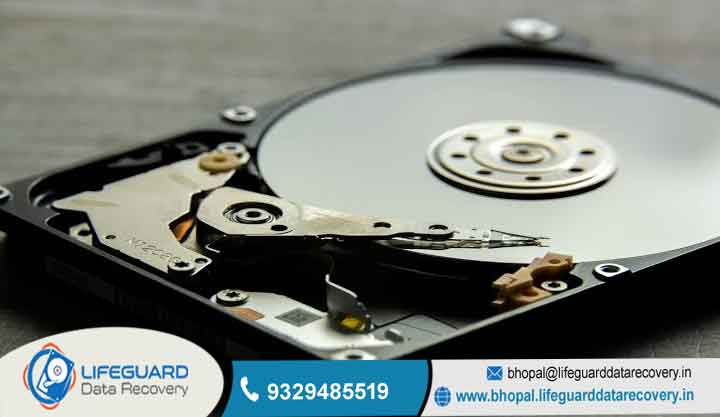
Physical data recovery is the process of inspecting, repairing, and extracting data from digital storage media including Hard Disk Drives (HDDs), Solid-State Drives (SSDs), Network Attached Storage (NAS), and RAID arrays that have suffered mechanical, electrical, or structural damage.
Unlike logical data loss where the hardware remains structurally fully functional but files are inaccessible due to accidental deletion, partition corruption, file system corruption, or malware encryption physical data loss means the storage hardware itself cannot read or write data due to damaged physical components.
Physical Data Recovery vs. Logical Data Recovery: A Detailed Comparison
Understanding the boundary between physical and logical data loss is critical to preventing accidental media destruction. Attempting to use logical recovery utilities on a physically damaged drive is one of the leading causes of permanent data loss.
Signs and Symptoms of a Physically Damaged Drive
Identifying physical hardware failure early allows you to power down the device immediately, preserving the remaining magnetic or electronic structures before catastrophic failure occurs. Physical failure manifests across three distinct symptom categories: auditory, electrical, and thermal/visual
Mechanical & Auditory Warning Signs
Mechanical hard drives rely on internal rotating platters spinning at speeds between 0 RPM, with floating read/write heads hovering micro-inches above the surface. When internal mechanical tolerances fail, clear auditory indicators occur:
Rhythmic Clicking or Ticking (The “Click of Death”): This unmistakable sound occurs when the hard drive’s actuator arm initializes and sweeps across the drive surface to read the Servo Alignment Information on the platters. If the read/write heads are damaged or dirty,
the actuator fails to find alignment, snaps violently back to its home/park position, and repeats the cycle infinitely. Seeking immediate hard drive clicking recovery is critical at this point to prevent the heads from gouging the recording layers.
Metallic Grinding or Scraping Sounds: This sound indicates direct physical contact between the slider assembly and the delicate magnetic platter surface. Once this begins, the metallic head physically strips away the thin-film magnetic substrate where your binary data is stored, creating magnetic dust and rendering those sectors unrecoverable.
High-Pitched Whining, Buzzing, or Electronic Beeping: This usually indicates a locked spindle motor or seized Fluid Dynamic Bearings (FDB). When the motor cannot rotate the platter stack, the drive electronics may emit a continuous high-pitched buzzing or beeping sound as electricity surges through the stalled coils.
Electrical & System Failure Symptoms
Physical issues also occur at the electronic controller level, which prevents the computer’s host bus adapter from establishing a hardware handshake:
Total Absence of Power (Dead Drive): The drive produces zero vibration, no mechanical activity, and no LED illumination when connected to a known-good power supply. This points directly to a blown TVS (Transient Voltage Suppressor) diode or burnt power induction coil on the drive controller board.
Incorrect Drive Identification: The operating system detects the drive, but displays incorrect model numbers, gibberish characters, or an impossible storage capacity (e.g., displaying a 2TB hard drive as a 0MB or 8GB unformatted device). This indicates severe microcode or firmware track corruption on the physical media.
Recognizing these symptoms as indicators of hard drive physical failure recovery needs saves valuable time and helps avoid destructive actions.
Common Causes of Physical Hard Drive & SSD Failure
Storage drives are delicate devices engineered to work within exact physical, electrical, and environmental limits. A breakdown in any of these parameters leads t
Mechanical Failure (Heads, Motors, & Platters)
Head Crashes due to Physical Shock: Dropping an external hard drive, bumping a desktop PC while running, or sudden physical movement creates g-force spikes that force the read/write slider into direct physical contact with spinning platters. This causes immediate micro-pitting on the platter surface and destroys the delicate head sliders.
Spindle Motor Seizure: The spindle motor relies on ultra-precise Fluid Dynamic Bearings (FDB) filled with viscous oil. Exposure to extreme heat, manufacturing defects, or rotational physical shock can force the central spindle pin out of alignment or dry up the bearing oil, seizing the platters entirely.
Platter Misalignment in Multi-Platter Drives: High-capacity enterprise HDDs contain up to 10 stacked platters on a single central spindle. Severe physical impacts can shift individual platters out of rotational synchronization by mere nanometers, making it impossible for multi-head assemblies to read tracks simultaneously without advanced cleanroom recalibration.
Electrical Failure (PCB & Power Surges)
Power anomalies are a common cause of sudden hardware loss across all storage media:
Printed Circuit Board (PCB) Power Surges: Faulty power supplies, lightning strikes, or improper modular cable usage can send high voltage down the rails. This burns out protective TVS diodes, shorts the smooth motor drive IC, and damages micro-capacitors on the PCB.
Loss of Adaptive Microcode: Hard drives store unique calibration parameters (adaptives) inside a specialized ROM chip on the PCB and within hidden service track areas (System Area) on the platters. If an electrical surge damages this ROM chip, the drive loses its unique calibration data, making the drive unreadable even if connected to a functional PCB from an identical drive.
Solid-State Drive (SSD) Physical Failure Mechanisms
Although SSDs have no moving parts, their high component density makes them equally vulnerable to hardware failure:
Flash Controller Burnout: The master microprocessor on an SSD (the flash controller) processes high-speed read/write operations and manages complex algorithms like Flash Translation Layer (FTL) mapping, wear leveling, and garbage collection. Extreme heat or electrical surges can burn out this controller, rendering the SSD instantly unresponsive.
NAND Flash Cell Isolation & Gate Degradation: SSD storage cells operate by trapping electrons inside floating-gate or charge-trap transistors. Over time, physical write cycles wear down the insulating oxide layers, causing charge leakage, bad flash blocks, and corrupted memory arrays that require physically damaged SSD recovery.
Physical Trace Fractures & Connector Damage: Drops, thermal expansion cycles, or physical stress on M.2 NVMe drives can crack tiny surface-mount resistors, fracture micro-solder balls beneath BGA-encapsulated controller chips, or snap interface connectors. Resolving these issues requires specialized SSD hardware failure recovery using micro-soldering stations and diagnostic hardware platforms.
Component Replacement & Micro-Soldering
Working under high-power stereo microscopes inside the cleanroom, engineers perform precision micro-surgeries to stabilize the storage drive:
Head Stack Assembly (HSA) Swaps: Using specialized non-magnetic head combs, engineers slide damaged read/write head assemblies off the platter stack without allowing individual heads to touch each other or scratch platter surfaces. The healthy donor HSA is then installed onto the target drive.
Sector-by-Sector Raw Hardware Imaging
Once physical repairs stabilize the unit, engineers never plug the repaired drive into a standard operating system or attempt to browse files directly. Repaired drives are structurally fragile and can fail again at any moment.
Isolating and turning off specific damaged read heads to read functional heads first Configuring custom read timeouts, head reset routines, and error-handling steps for bad sectors. Generating an exact, bit-by-bit raw disk image onto a healthy destination drive or server array.
Can You Fix a Physically Damaged Hard Drive Yourself? (Myth Busting)
When a storage drive containing important files suddenly fails, users often search for quick home remedies. However, attempting DIY fixes on a physically damaged hard drive almost always leads to permanent data loss.
Why Household Environments Destroy Open Platters
Modern hard drive heads float above spinning platters at a distance of 3 to 10 nanometers. To put this in perspective, a single human hair is roughly 80,000 nanometers wide, a fingerprint residue smudges up to 15,000 nanometers high, and a single microscopic dust particle measures roughly 2,000 to 5,000 nanometers.
Common DIY Myths That Cause Permanent Data Loss
The “Freezer Trick”: A persistent internet myth suggests sealing a clicking hard drive in a plastic bag and placing it in a freezer overnight. While this sometimes worked on legacy hard drives from the 1990s by temporarily shrinking seized mechanical components, doing this to modern high-density drives causes internal condensation. When the drive thaws and powers on, moisture on the platters destroys the read/write heads instantly and causes severe electrical short circuits across the PCB.
Tapping or Striking the Enclosure: Striking a drive with a screwdriver handle or tapping it on a desk to “free” stuck heads distorts the delicate internal alignment of the drive, bends the actuator arm, and causes head sliders to dig directly into platter surfaces.
Running Automated Repair Utilities: Software tools like Windows designed to fix logical file system errors, not broken hardware. When run on a drive with broken heads or physical bad sectors, these utilities attempt to aggressively write, move, and re-allocate thousands of data sectors.
This intense activity subjects failing mechanical parts to immense stress, accelerating physical failure and stripping magnetic layers across the drive.
If your drive displays signs of physical HDD data recovery needs or requires dead hard drive data recovery, keep the device powered off to prevent further damage.
How to Prevent Physical Data Loss & Protect Your Storage
While all physical storage components eventually suffer hardware wear over time, following proactive hardware handling practices significantly reduces your risk of unexpected data loss
Environmental & Operational Protection
Isolate Drives from Vibrations and Physical Shock: Mount internal mechanical hard drives securely inside computer cases using vibration-dampening rubber grommets. Never move, tilt, or transport external hard drives or laptops while internal platters are actively spinning.
Use Uninterruptible Power Supplies (UPS): Connect critical workstation systems, desktop storage enclosures, and Network Attached Storage (NAS) units to a UPS equipped with automatic voltage regulation (AVR) and surge protection. This isolates your storage drives from sudden power outages, brownouts, and destructive voltage spikes.
Maintain Thermal Controls: Ensure computer cases have adequate cooling airflow to prevent drive temperatures from exceeding. Excessive heat degrades lubricants inside hard drive bearings and accelerates silicon gate degradation on high-speed NVMe SSD controller chips.
Frequently Asked Questions (FAQs)
How much does physical data recovery typically cost?
Physical data recovery pricing depends on the severity of the hardware damage, whether replacement donor drives are required, cleanroom lab hours, and the total capacity of the media. Because physical recovery requires specialized cleanrooms, micro-soldering gear, and highly trained engineers, costs are higher than simple software recoveries. Professional labs typically offer an initial evaluation to assess component costs before performing repairs.
How long does the physical hard drive recovery process take?
Standard physical recovery cases take between 2 to 10 business days. The turnaround time depends on how easily matching donor hardware can be found, the extent of physical repairs needed inside the cleanroom, and how quickly unstable sectors can be read during hardware imaging. Emergency recovery options are often available for time-sensitive enterprise cases.
Can data be recovered from a drive that was dropped or exposed to water or fire?
Yes, in many cases data can still be recovered as long as the magnetic layer on the platters or the silicon structures inside the SSD NAND chips remain physically intact. For water-damaged or submerged hard drives, it is critical not to dry the drive using heat sources or attempt to power it on. Water leaves mineral deposits as it evaporates that destroy platters upon spin-up. Professional labs clean water-damaged drives using specialized chemical baths before executing cleanroom repairs.
Is physical data recovery possible if the drive is encrypted with BitLocker or FileVault?
Yes. Physical data recovery focuses on repairing hardware components so that a sector-by-sector clone of the drive can be created. The encryption itself remains intact during this process. Once the physical clone is completed, you can decrypt the image using your original password, recovery key, or BitLocker/FileVault token.


