+971 50 217 6793 Abu Dhabi, UAE [email protected]


How is data recovery performed?
The Ultimate Guide to Professional Data Recovery How Experts Retrieve Your Critical Files Losing access to your critical business records, enterprise databases, or irreplaceable personal files can cause immediate panic. Whether a storage device experiences an unexpected mechanical breakdown,
How does data recovery work an accidental reformatting, or a sudden software corruption, the central question remains the same is that information permanently erased, or can it be saved? In the professional data recovery industry, the reality is that files are rarely completely destroyed upon deletion or device failure. Instead, they simply become inaccessible through conventional operating systems.
At Recovery Data, we specialize in rescuing files from the brink of permanent loss for corporate clients and individuals across the United Arab Emirates. To help you understand exactly what happens to your media once it enters an enterprise-grade laboratory, this comprehensive guide explains exactly how do professionals recover lost data, the deep mechanics of storage architecture, and why specialized laboratory intervention is the safest path to reclaiming your digital assets.
Logical Data Failure: Accidentally Deleted Files & Corruption
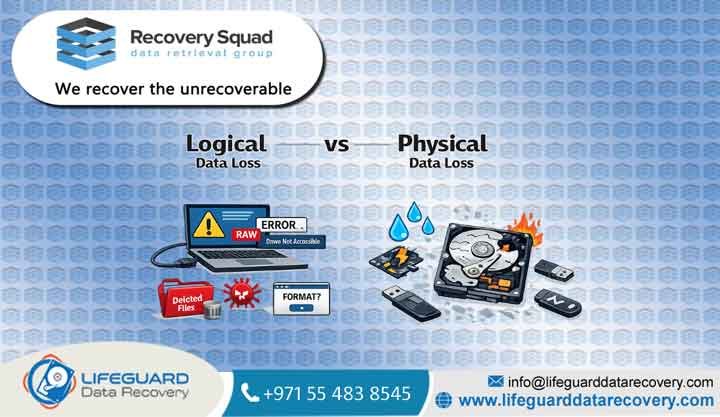
Logical damage occurs when the physical storage media remains entirely functional, but the internal file system architecture, partition table, or directory index becomes corrupted, overwritten, or broken. To understand how is deleted data recovered, one must understand how operating systems manage data storage.
When you delete a file or format a volume, the operating system does not immediately sanitize the binary code from the physical storage sectors. Instead, it alters the file allocation table or master file index, marking that specific coordinate space or available for future write operations. Until new information is written directly over those specific clusters, the original data remains entirely intact but hidden from view.
This answers the fundamental question: can deleted files be recovered? Yes, provided the device is powered down before the operating system writes new data to those blocks. Professional engineers utilize highly specialized hardware-level tools to completely bypass the operating system's broken layout index, scanning the raw hex data underneath to rebuild the original folder structures.
Mechanical Hard Drive Failure: The Infamous Clicking Sound
Unlike modern solid-state media, traditional hard disk drives (HDDs) rely on physical, high-speed moving components to read and write information. Inside the sealed drive casing, polished magnetic platters spin at speeds ranging from 5,400 to 15,000 revolutions per minute, while a delicate read/write head assembly hovers a mere fraction of a micro-inch above the spinning surface.
When a physical hardware failure occurs, you will frequently hear a distinct clicking, grinding, or buzzing sound. This symptom indicates that the read/write heads have failed, sustained electrical damage, or physically collapsed onto the platters. It could also mean the spindle motor has seized.
Executing data recovery from a damaged hard drive facing mechanical issues requires an immediate power-down. Continuing to run a clicking drive can cause the microscopic heads to scrape directly against the delicate magnetic platters, physically carving the magnetic substrate off the disk. This results in rotational scoring, which creates permanent, unrecoverable data loss.
Flash Memory Degradation: Complex Solid-State Failures
Many users mistakenly believe that because Solid-State Drives (SSDs) have no moving parts, they are completely immune to physical breakdown. However, analyzing how does SSD data recovery work reveals a highly complex landscape of electronic vulnerabilities. SSDs store information on NAND flash memory chips, which are managed by an intricate piece of hardware known as the controller chip.
When an SSD suddenly goes dead, it is rarely due to worn-out memory cells; it is almost always caused by a sudden controller failure, firmware corruption, or an electrical power surge. Because modern SSDs utilize advanced wear-leveling algorithms, data striping across multiple NAND channels, and automatic hardware encryption, reconstructing files from a dead controller requires specialized chip-off tools and custom algorithmic rebuilding to reassemble the scrambled bits into a readable state.
RAID Array Degradation: Controller and Multi-Drive Collapse
For enterprise networks, data centers, and corporate environments across the UAE, Redundant Arrays of Independent Disks (RAID) form the backbone of daily operations. While RAID configurations offer built-in fault tolerance, they remain highly vulnerable to multi-drive failures, controller card malfunctions, accidental array re-initialization, and broken configuration metadata.
When a critical server crashes, an exact, methodical data recovery process must be enacted to prevent permanent database corruption. This involves cloning every single drive within the array individually using hardware stabilizers, identifying the exact block size, offset values, and parity sequence used by the controller, and virtually rebuilding the array layout within a safe sandbox environment before attempting file extraction.
Why UAE Enterprises and Individuals Trust Recovery Data
When dealing with proprietary business databases, sensitive financial records, or irreplaceable personal memories, choosing a data recovery laboratory with proven credentials is vital. Recovery Data has established itself as a leading authority in Dubai and the wider United Arab Emirates by adhering to global operational standards.
Class 100 Cleanroom Engineering: Opening a traditional hard drive in a standard room will destroy it instantly. A single microscopic dust particle is massive compared to the tiny gap between a drive head and a platter. Our specialized lab features certified Class 100 Cleanroom environments, where the air is continuously filtered to keep the mechanical interior of your drive completely safe from airborne particles during micro-surgery.
No Data, No Charge Guarantee: We back our engineering expertise with a firm, transparent commercial promise: if our team cannot successfully extract your critical files, you do not pay a recovery fee. This aligns our goals completely with your data rescue needs.
Strict Privacy and Non-Disclosure Protocols: Data security is a major priority. From the moment your media arrives at our Dubai reception, it is handled under strict chain-of-custody rules. Our laboratory operates under strict non-disclosure agreements, ensuring that corporate assets, financial data, and personal files remain fully encrypted and secure throughout the extraction process.
Inside Our Lab: The Professional Data Recovery Process Steps
Every data loss scenario presents unique variables, yet our laboratory follows a disciplined, multi-phase methodology to maximize the recovery rate while protecting the structural integrity of your original media.
Advanced Media Evaluation and Diagnostic Imaging
The process begins with an exhaustive diagnostic inspection. Our engineers never plug a compromised drive directly into a standard operating system, as doing so can trigger automatic background repair processes that overwrite your files. Instead, we connect the media to specialized hardware diagnostics tools to assess the health of the read/write heads, the integrity of the PCB controller board, and the stability of the firmware. Within hours, we isolate the exact cause of failure and provide a transparent, fixed-price quote.
Physical Component Restructuring and Cleanroom Surgery
If the diagnostics reveal mechanical or electrical destruction, the drive is moved into our Class 100 Cleanroom. Here, micro-surgeons source an exact matching donor drive down to the same model, manufacture date, and firmware revision code. We then carefully swap out failed components, such as a damaged read/write head assembly or a fried PCB controller board, restoring the drive to a temporary physical state where it can safely spin and read data without self-destructing.
Logical Extraction and Deep File System Reconstruction
Once the drive is physically stable, our engineers use advanced hardware imagers to create a complete, sector-by-sector clone of the drive.Our engineers then analyze the raw hex code of the clone, bypass damaged sectors, repair corrupted file system headers, and systematically piece together fragmented data back into its original folder hierarchy.
Real-World Case Study Rescuing a Dubai Media Agency’s Production Server
To understand how these technical steps function in an emergency scenario, consider a recent recovery operation executed for a prominent media production agency based in Downtown Dubai.
During the final rendering of a major commercial project, the agency’s central 4-drive RAID 5 storage array suddenly collapsed due to a double-drive failure. The local IT team attempted a standard software rebuild, which unfortunately caused the array to drop offline entirely, leaving millions of dirhams worth of unbacked production footage inaccessible.
Our diagnostics revealed that Drive 1 had suffered a severe logical file system corruption due to the aborted rebuild, while Drive 3 had experienced a physical head crash. Our cleanroom engineers performed an immediate head-assembly replacement on Drive 3 within our Class 100 cleanroom, stabilizing it enough to extract a perfect bit-by-bit clone. Simultaneously, our logical recovery team bypassed the corruption on Drive 1.
By matching the clones of all four drives and calculating the original stripe size and parity sequence via specialized software, we virtually reconstructed the RAID configuration. Within 36 hours of the initial failure, Recovery Data successfully restored 100% of the lost video assets, allowing the agency to meet its broadcast deadline without financial penalties.
Understanding Data Recovery Pricing Mechanics
One of the most frequent inquiries we receive concerns the cost of professional data recovery services. It is critical to understand that reputable data recovery pricing is never based on the volume of data you need recovered, but rather on the time, complexity, labor, and specialized laboratory equipment required to make the storage media stable enough to extract that data.
Diagnostic Categorization and Labor Costs
A logical recovery involving simple file deletion or partition rebuilding requires highly sophisticated software analysis but does not require physical manipulation of the drive hardware. Consequently, these cases fall into a lower cost bracket.
Conversely, physical recoveries requiring cleanroom micro-surgery involve intense engineering hours and highly specialized environments, which reflects in the final cost.
Avoiding Flat-Rate Scams
We strongly advise UAE consumers and businesses to be cautious of flat-rate data recovery pricing models. A drive that requires simple firmware modification cannot logically cost the same as an enterprise-grade RAID array requiring cleanroom platter transplantation.
At Recovery Data, we provide a completely transparent tier-based pricing structure following our initial diagnostic phase, ensuring you know exactly what you are paying for before any recovery operations begin.
Advanced Insights: How Technology Shapes Modern File Recovery
The physics behind digital storage dictates the exact recovery boundaries. As storage manufacturers engineer drives to hold higher capacities in smaller physical formats, the complexity of recovering those files increases exponentially.
Shingle Magnetic Recording (SMR) vs. Conventional Magnetic Recording (CMR)
Modern mechanical hard drives often utilize Shingled Magnetic Recording (SMR) technology to compress data tracks so they overlap like shingles on a roof. While this drastically increases drive capacity at a lower cost, it introduces massive hurdles for recovery specialists. When an SMR drive suffers logical or physical degradation, the drive’s internal microcode independently moves data sectors in the background.
This makes tracking down fragments of lost files highly complex compared to older Conventional Magnetic Recording (CMR) drives, where data tracks sit strictly parallel to one another. Our engineers stay at the forefront of this technology, using specialized hardware tools to manually control the drive’s internal translation layers to extract data before background processes overwrite it.
The Challenge of Modern Monolithic Flash Media
Data recovery from portable storage media has also transformed over recent years. Older generation USB flash drives and SD cards contained separate controller chips and NAND flash components mounted visibly onto a printed circuit board.
When a micro-SD card or modern USB drive breaks or shorts out, there are no visible leads to connect to. To bypass this, our laboratory technicians must carefully scrape away the protective outer epoxy layer under a high-powered microscope to expose microscopic circuit pathways.
Frequently Asked Questions About How Data Recovery Works
Why should I avoid using free downloadable recovery software on a failing drive?
If your drive has a mechanical issue, such as weak read/write heads or developing bad sectors, running software causes the drive to work intensely, spinning at high speeds and repeatedly striking damaged areas. This stress can cause total head failure, scratching the platters and making the data permanently unrecoverable. Always ensure your drive is physically sound before attempting any software scans.
How long does the professional data recovery process usually take?
The timeline depends entirely on the nature of the damage. Complex physical recoveries requiring cleanroom surgery, donor parts sourcing, or advanced RAID reconstruction typically take between 5 to 9 business days. For critical business emergencies, we offer an expedited priority service that operates around the clock to return your data within 24 to 48 hours.
What should I do immediately after liquid enters my laptop or external drive?
If your device experiences liquid exposure, turn it off immediately and disconnect all power sources, including the battery if possible. Do not attempt to turn it back on to “see if it still works,” as moisture creates immediate electrical shorts that can instantly fry the drive’s main controller board or flash memory chips. Additionally, do not use a hairdryer or place the device in rice; rice creates fine dust that enters mechanical drives, while heat accelerates corrosion on delicate circuit boards. Instead, wrap the damp drive in a lint-free paper towel, place it in a sealed anti-static bag, and rush it to a professional lab immediately.
Initiate Your Data Recovery Service Case in Dubai Today
Do not leave the safety of your critical data to chance or unverified software tools. If your storage device is clicking, unreadable, or accidentally formatted, turn off the power immediately and contact the specialists at Recovery Data. Our team is standing by to guide you through a safe, secure, and fully verified extraction process.
Visit our data recovery center in Dubai for a free diagnostic evaluation of your media, or call our customer care hotline to arrange a secure courier pickup from any location across the United Arab Emirates. Let our certified lab engineers restore your peace of mind and get your digital operations back on track today.