+971 50 217 6793 Abu Dhabi, UAE info@lifeguarddatarecovery.com

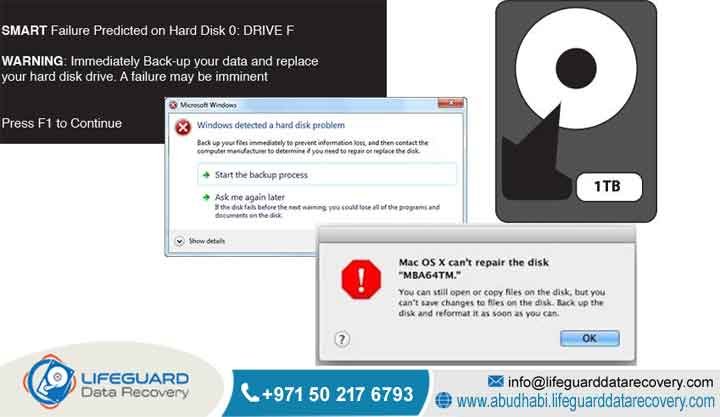
Signs Your Hard Drive Is About to Fail
Catching the early warning signs your hard drive is about to fail is the single most important step you can take to prevent a total company data disaster. Mechanical disks are loud about their issues if you know what to listen for. They show clear drops in performance, throw strange metadata errors,
and make unmistakable noises before they finally pass out. For companies running operations anywhere in the United Arab Emirates, tracking these small micro-failures gives your IT team a fighting chance. It lets them move databases to safe servers and run clean backups before the underlying magnetic storage platters shut out the operating system completely.
The truth is, once those tightly designed hardware tolerances slip, you cannot fix it with cheap software. You need an advanced engineering lab to open the casing and rescue your databases.
Think of your hard drive as a high-speed engine spinning in a tight space. Small mechanical issues build up over thousands of operational hours without anyone noticing. Then, out of nowhere, a single head drift or bad sector cluster triggers an abrupt structural crash. When your operating systems lose their grip on critical storage partitions,
everything grinds to a halt. You are left facing broken boot paths, missing folders, and non-responsive applications. Trying to force a damaged drive to run home-brewed recovery scripts will only push it over the edge. It takes a specialized cleanroom environment, master hardware controllers, and expert sector extraction to pull data safely from those fading magnetic surfaces.
How to Tell If an HDD is Failing Immediately
A hard drive is failing immediately if it starts making repetitive mechanical clicking, grinding, or loud scraping noises, displays frequent Blue Screen of Death errors pointing to unreadable boot paths, or locks up entirely with read speeds that drop down to zero. You will also notice constant firmware alerts from your system telemetry, missing file paths, corrupted folders,
and computers that freeze completely whenever you try to open a large document. In the United Arab Emirates, a drive acting this way needs to be turned off right away. It should be rushed straight to a proper cleanroom testing lab like Lifeguard Data Recovery. This is the only way to save active corporate records before the internal reading heads permanently scratch the data platters.
Do not make the mistake of leaving the device plugged in to see if the issue goes away on its own. It won’t. Every second a physically compromised drive spins, the reading heads are actively grinding away the delicate magnetic film that holds your business files.
If you keep rebooting a crashing system, you are essentially erasing your own data. The smartest move is to kill the power line instantly. Let a certified hardware team assess the damage inside a dust-free environment before any more structural harm takes place.
Who is Lifeguard Data Recovery?
Lifeguard Data Recovery is a top-tier enterprise data retrieval institution working directly inside the United Arab Emirates. With our main headquarters established in Abu Dhabi, our advanced lab specializes in fixing massive data loss events for large corporations, government offices, and private clients.
Over years of hard work in the region, we have built a highly advanced laboratory capable of handling complicated server storage networks and deeply broken digital media. We do not just sit around running free internet software downloads. We take broken drives apart, replace dead parts, and rebuild them to get your files back.
Our workspace features certified Class 100 cleanroom spaces, advanced hardware emulators, and custom matching utilities designed to clear tough physical and logical storage blocks. By managing our own local labs in Abu Dhabi and serving business centers like Dubai and Sharjah,
Lifeguard Data Recovery serves as a trusted technical anchor for IT departments across the Middle East. We make sure that world-class data engineering is always available right here in the country to protect your corporate records. Because we are based locally, your private information never leaves the UAE, keeping your compliance standing perfect from start to finish.
Why UAE Businesses Choose Lifeguard Data Recovery
Enterprises across the United Arab Emirates face a fast-moving, intensely competitive commercial market where server downtime costs serious money and triggers regulatory fines. Local companies rely on Lifeguard Data Recovery because we take those heavy risks off the table through our local presence,
deep technical certifications, and strict data safety setups. We know that sensitive financial and operational records must stay within the country to satisfy strict local data laws. This makes our Abu Dhabi lab the safest option instead of shipping fragile media overseas where you lose all visibility.
Real trust comes from our serious commitment to global security frameworks, making our lab a completely safe space for deep digital forensics and complex ransomware decryption. Our workflow matches rigorous international data handling rules, using around-the-clock physical security, encrypted clone drives,
and legally binding non-disclosure contracts. On top of that, our engineering team is made up of veteran hardware specialists who know how to extract data from ruined platters and piece back together fractured databases. This deep regional knowledge means that when core IT storage setups fail anywhere from Dubai down to Ras Al Khaimah, our team delivers a clear, safe, and fully verified data extraction service.
Data Recovery Services We Offer in the UAE
Lifeguard Data Recovery provides a complete lineup of data rescue and digital forensic services built to handle tough corporate system failures across the UAE. Our engineering lab is packed with specialized alignment tools and the exact technical know-how needed to pull lost or unreadable data
from multiple device types. We have invested heavily in our regional facility so your IT managers do not have to waste time dealing with different vendors when a major multi-system storage crash hits your main corporate network.
Our core technical services include the following advanced solutions:
-
Hard Drive Recovery: Complete mechanical and logical repair of traditional platter-based internal and external hard drives damaged by drops, wear, or fried electronics.
-
SSD Recovery: Highly technical extraction from solid-state storage setups, using direct flash memory programming to bypass dead controllers, bad NAND blocks, and broken firmware.
-
RAID Recovery: Advanced rebuilding of multi-drive storage arrays, covering tough setups like RAID 0, RAID 1, RAID 5, RAID 6, and RAID 10 without risking parity errors.
-
Server Recovery: Urgent data extraction for corporate mainframes, virtual machines, and cloud storage setups that have suffered massive infrastructure breakdowns.
-
NAS Recovery: Precise restoration from Network Attached Storage towers from all major brands, fixing broken file systems, dead controllers, and accidental volume resets.
-
CCTV Recovery: Forensic extraction of security video streams from digital and network video recorders, clearing overwritten index files, mechanical damage, or deleted footage.
-
Digital Forensics: Court-ready analysis, safety preservation, and detailed charting of digital evidence to support corporate inquiries, legal cases, and compliance audits.
-
Ransomware Recovery: Advanced scanning of malicious encryption models, clean handling of infected drives, and smart file rebuilding to get your business operations back online safely.
Enterprise-Grade RAID, Server, and NAS Infrastructure Restoration
Large company servers need a highly specialized approach because data is split, sliced, and striped across multiple physical drives at the same time. When a corporate RAID configuration or network array goes down, standard software scan tools are useless and usually cause permanent damage.
Lifeguard Data Recovery uses custom internal hardware controllers and virtual array rebuilding systems. This allows our team to make a perfect bit-stream clone of every single sector inside the array before we even attempt to analyze the logical layout. If your internal IT team tries to force a rebuild on a crashing array, they can easily overwrite the remaining good data blocks forever.
We know the exact internal structures of advanced business file systems and virtual environments, including VMware vSphere ESXi, Microsoft Hyper-V, and Linux Logical Volume Managers. Our engineers can successfully rebuild fractured parity arrays even when multiple disks die at the exact same moment within a cluster.
By leaving broken physical controllers out of the loop, we successfully pull out critical SQL databases, Enterprise Resource Planning systems, and massive network shared folders. This keeps business moving for major organizations across the UAE when their infrastructure hits a wall.
Specialized Digital Forensics and Corporate Ransomware Recovery
Cybersecurity breaches require a smart mix of careful forensic tracking and hardcore data recovery engineering. Our advanced digital forensics department gives corporate leaders and legal teams a fully audited, unbroken chain of custody for every single storage drive that enters our facility.
We use industrial write-blocking hardware bridges to ensure that file metadata, creation dates, and internal system logs remain completely untouched while we clone the drive. This level of technical care is absolutely necessary if the recovered files need to be used as evidence in a local court case or a major corporate dispute.
When dealing with a devastating ransomware attack, our engineers isolate the infected data blocks, stop any secondary malware strings from launching, and hunt down clean shadow copies or hidden fragments of your active databases. We scan deep into the raw partition sectors to locate hidden directories,
map out where unauthorized data was moved, and rebuild system timelines that attackers tried to clear out. This intense technical workflow gives UAE businesses the clear answers and clean data tracks they need to survive corporate investigations and recover quickly after a major breach. We give you the clear facts you need to safeguard your operations.
Devices and Storage Infrastructure We Recover
Our technical skill covers the entire universe of old-school and cutting-edge digital storage setups used across corporate data centers and personal office computers. We routinely fix traditional mechanical platter drives,
intricate modern flash setups, and connected hybrid edge storage systems. No matter how rare, old, or highly customized your storage setup is, our local engineering team has the exact physical tools and connection bridges needed to interface with it safely.
We regularly receive and successfully recover files from these hardware lines:
-
Enterprise Hard Disk Drives: High-RPM SAS, Nearline SAS, and Fibre Channel disks built for data centers and critical corporate mainframes.
-
Consumer Workstation Storage: Standard SATA internal three point five inch desktop drives and two point five inch laptop drives from every major manufacturer.
-
Solid-State Media: Fast NVMe PCIe M.2 strips, SATA M.2 modules, mSATA cards, and legacy two point five inch SSD units with fried controllers.
-
External Portable Storage: USB three point zero, USB C, and high-speed Thunderbolt external portable drives that took a physical fall or suffered a power surge.
-
Network Attached Enclosures: Multi-bay NAS towers and large server rackmount configurations using specialized file systems.
-
Embedded Enterprise Media: Raw flash chips, industrial compact flash cards, SD storage, and embedded MMC units soldered into network routers or field loggers.
Categorizing the Critical Signs Your Hard Drive Is About to Fail
To pull data from a failing device successfully, an engineer has to understand the exact physical, chemical, or logical breakdown that broke the hardware down in the first place. Hard drives are incredibly complex mechanical instruments that run on microscopic calculations.
Even a tiny physical shift inside the casing can throw off the whole system and trigger an immediate crash. Think of it like a jet liner flying just inches above the ground at full speed; the slightest bump means a total disaster.
We break down these dangerous failure signs into distinct operational paths:
Physical & Mechanical Warning Signs: Clicking, Grinding, and Overheating
A physical mechanical failure means the moving parts inside the hard drive are literally breaking down. The most common disaster is a head crash. This happens when the delicate read-write slider slips off its microscopic cushion of air and slams directly into the spinning magnetic disks, carving deep trenches into the film where your data lives. Another major issue is spindle motor failure,
usually caused by worn bearings or a completely locked shaft. This stops the platters from spinning at their required speeds, making it impossible for the drive electronics to find its alignment markers. When these physical parts break down, you will hear very specific clicking, metallic grinding, or loud buzzing noises coming straight from the hard drive casing.
Logical & Systemic Warning Signs: Blue Screens, File Disappearance, and Freezes
A logical failure is different because the physical parts of the hard drive are technically fine, but the internal tracking data maps have become completely unreadable. This usually involves a corrupted Master Boot Record, broken partition maps, ruined file system structures, or someone accidentally running a low-level format command.
Software conflicts, operating system crashes during a heavy save cycle, and malware attacks are the biggest reasons these logical errors pop up. When this happens, the drive spins quietly and looks healthy on the outside, but your computer cannot locate the directory paths required to find or open your company files.
Regional Environmental Triggers: How UAE Heat Corrupts Storage Drives
The harsh climate across the United Arab Emirates creates very specific environmental threats that drastically speed up how fast digital storage hardware degrades. Extreme outdoor heat frequently overloads cooling setups inside corporate server closets and office cubicles. When an active hard drive crosses its maximum safe temperature limit, the internal metal parts experience micro-expansion.
This tiny thermal shift is enough to ruin the precise tracking alignment of the read-write heads as they try to follow the microscopic data tracks on the platters. If your office air conditioning goes down for just a few hours during the summer, your drives take a massive beating.
On top of that, heavy coastal humidity can sneak fine moisture particles into non-sealed drives, causing quiet oxidation on internal components and ruining the slick lubrication layers on the platters. Sudden electrical drops and surges from overloaded power lines during peak AC season also take a heavy toll.
These electrical swings can instantly fry the drive external Printed Circuit Board. They burn out protective diodes, blow capacitors, and destroy the main controller processor, which can send a lethal voltage spike straight into the internal head electronics, killing the drive instantly.
Common Data Loss Situations and When to Contact Us
Data loss can strike at any moment, but knowing when to pull the plug and stop using the drive determines whether your business files can be saved or not. Trying to run a broken drive over and over again usually ends in permanent data loss. If you keep turning a clicking drive off and on hoping it will magically fix itself, you are actively scraping your own files off the disk.
Your team needs to cut the power instantly and get in touch with Lifeguard Data Recovery if you run into any of these situations:
-
The drive starts making a rhythmic clicking, harsh grinding, or ticking sound when you boot it up.
-
Your operating system keeps throwing Blue Screen of Death crashes pointing to unreadable boot blocks or bad sectors.
-
Your multi-drive RAID tower flags an alert showing that more than one disk has dropped offline or gone into a degraded state.
-
Critical files or complete folders vanish out of nowhere from your network shares, or file extensions change because of ransomware.
-
A backup drive gets dropped on the floor, gets wet, or smells like burnt electronics after a power flash.
-
Your system BIOS screen fails to see the drive model number or show its storage capacity during the startup test.
How Our Recovery Process Works (Step-by-Step)
Lifeguard Data Recovery uses a highly secure, carefully managed technical workflow to keep your original media completely safe throughout the entire data extraction loop. We never guess or play around with your critical business drives; every single step is planned out using calibrated engineering equipment.
Step One: Intake and Initial Media Preservation
The moment your drive hits our Abu Dhabi lab, it is logged into our secure tracking system with a unique identification code and placed in an anti-static storage box. This stops any secondary electrical damage from happening and keeps your chain of custody completely clean.
Step Two: Diagnostic Evaluation and Physical Inspection
Our hardware engineers check the outer circuit board for burn spots. If we suspect internal physical trouble, we open the drive casing inside a certified Class 100 cleanroom bench to check the reading heads and platters without exposing them to floating office dust.
Step Three: Component Replacement and Physical Stabilization
If we find broken mechanical parts, our cleanroom team swaps out the dead head stack or unseizes the spindle motor using exact matching donor parts from our massive hardware warehouse. This is micro-surgery that requires steady hands and high-powered microscopes.
Step Four: Firmware Repair and Microcode Modification
Engineers attach the physically stable drive to special diagnostic modules to fix broken firmware code, clean out corrupt system area sectors, and adjust internal read settings so the drive can talk to our systems without locking up.
Step Five: Sector-by-Sector Bit-Stream Imaging
We use advanced hardware data extractors to create a perfect sector-by-sector copy of the drive. These tools are built to handle weak reading heads, skip past bad sectors safely, and keep the drive from getting too hot or timing out. We do all our work on this copy, leaving your original drive safe from further wear.
Step Six: Logical File System Reconstruction and Validation
Our data specialists take the sector copy and virtually rebuild the broken partition tables, repair the file system paths, and pull out your active database folders. We thoroughly check the integrity of the files to make sure they actually open properly.
Step Seven: Secure Data Delivery and Verification
We save your rescued files onto a fresh, heavily encrypted external drive. You get to verify that your data is exactly what you need before we finalize the case and hand over your records with complete security clearance.
Recovery Timeframes for Mission-Critical Business Storage
How long a data recovery job takes depends heavily on what broke inside the drive, how big the storage volume is, and which service tier you choose.
The physical health of the magnetic media dictates how fast we can pull sectors off the disk. Forcing a failing drive to read data too quickly will heat it up and destroy the remaining good tracks before the copy is done.
In the real world, our turnaround times scale based on these operational situations:
-
Standard Evaluation and Recovery: Usually takes three to five business days. This gives our engineers plenty of time to run deep sector scans, complete delicate mechanical alignment work, and rebuild complex logical files.
-
Emergency Recovery Service: We run this service on a continuous twenty-four hours a day, seven days a week schedule. Engineers work in shifts around the clock to stabilize the drive and extract critical databases within twenty-four to forty-eight hours.
-
Logical Data Extraction Timeframes: Straightforward file deletions or basic directory corruptions on physically healthy drives are usually completely wrapped up within twenty-four hours of your project approval.
-
Complex Physical and Cleanroom Recovery: Drives that have suffered massive physical damage requiring hard-to-find donor components, platter swaps, or heavy firmware reconstruction can take seven to ten business days to get the best possible data yield.
Recovery Success Factors: Maximizing Data Yield Post-Failure Signs
The chances of getting your files back depend heavily on what you do between the moment the drive first acts up and the moment it lands on an engineer’s workbench. Data recovery success is not random;
it is governed by physical laws and how you handle the broken media. Think of it like a medical emergency; the steps you take right after the injury determine how well things turn out.
The absolute truth about what affects our success rate comes down to these core variables:
-
Media Integrity and Platter Scratches: If the crashing read head leaves deep circular scratches on the shiny surface of a platter, it physically scrapes away the magnetic layer where your files live.
-
User Intervention and DIY Software: Attempting to run cheap internet recovery programs on a drive that is physically clicking forces the broken metal heads to slam repeatedly across the platters. This turns a simple repair job into a total, unrecoverable data disaster in a matter of minutes.
-
Prompt Power Disconnection: Pulling the power cord immediately when a drive starts acting up stops mechanical damage in its tracks. The faster you kill the power, the higher the chances we can pull off a perfect recovery.
-
Previous Lab Opening Attempts: Drives that have been cracked open outside of a real cleanroom suffer from floating dust contamination. These tiny particles stick to the platters and wreck the replacement heads we install, which significantly drops the success rate.
Industries We Serve across the United Arab Emirates
Our laboratory setup is built from the ground up to handle the intense compliance laws, data privacy mandates, and tough technical needs of various business sectors across the UAE. We know you cannot use a generic approach when dealing with sensitive hospital records, corporate bank files, or government databases.
We provide dedicated data protection and extraction support across these core fields:
-
Government and Public Sector: Highly secure, localized handling of municipal files, state data systems, and regulatory storage nodes, keeping everything fully compliant with local Abu Dhabi and Dubai data sovereignty laws.
-
Banking and Financial Institutions: Maximum-security data extraction for active transaction servers, ledger backup arrays, and compliance logs under strict non-disclosure oversight.
-
Healthcare and Medical Providers: Privacy-aligned recovery for patient history tracking systems, hospital database servers, and high-resolution medical imaging archives.
-
Oil, Gas, and Energy Sectors: Deep restoration for specialized seismic maps, industrial SCADA tracking logs, and field data drives brought in from remote exploration sites.
-
Legal and Corporate Firms: Fast-turnaround digital forensic imaging and file extraction to meet tight court schedules, clear up corporate disputes, and lock down evidence.
-
Aviation and Logistics Corporations: Around-the-clock recovery support for flight tracking logs, inventory management arrays, and supply chain tracking databases across major transport hubs.
Data Security, Confidentiality, and Compliance Standards
At Lifeguard Data Recovery, data security is the absolute foundation of our entire business. We treat every single corporate drive that enters our lab as a highly sensitive asset packed with private financial records, custom source code, or protected customer lists.
Our physical facility is locked down around the clock behind biometric access doors and continuous video surveillance to prevent any unauthorized entry. Your management team can rest easy knowing your corporate property is safe from prying eyes.
Every single data cloning and file reconstruction job is run on isolated, air-gapped network stations that have zero connection to the public internet. This totally cuts off the risk of data leaks or accidental malware transmission. Our entire engineering and administrative team works under strict, legally binding non-disclosure agreements,
Once you confirm everything is correct and our mandatory safety hold period ends, we completely wipe all laboratory copies using industrial overwrite standards to keep your company fully compliant with global data laws.
UAE Coverage: Local Lab Verification Matrix
Lifeguard Data Recovery provides complete logistics management and secure media intake pipelines across the entire United Arab Emirates.
You do not need to worry about the logistics of moving a fragile, broken drive; our secure courier system handles transport directly to our main testing center.
Our service infrastructure offers full coverage across these major regions:
-
Abu Dhabi: Our main laboratory hub handles all deep physical cleanroom work, massive enterprise server breakdowns, and major corporate RAID arrays for the capital.
-
Dubai: Rapid courier networks and secure drop-off points provide instant technical support for businesses operating across the city’s commercial centers.
-
Sharjah: Full data recovery and diagnostic support for industrial operations, corporate offices, and private clients who need an absolute guarantee on turnaround times.
-
Ajman: Simple media intake paths paired with fast diagnostic reviews for educational systems, commercial stores, and local offices.
-
Fujairah: Secure shipping links and expert engineering access for maritime shipping firms, logistics hubs, and regional energy facilities.
-
Ras Al Khaimah: Comprehensive business data extraction services built to support manufacturing plants and regional commercial offices.
-
Umm Al Quwain: Dependable data recovery links and direct engineering advice for local public departments and private corporate setups.
Frequently Asked Questions & Entity-Based Inquiries
What is meant by Signs Your Hard Drive Is About to Fail?
The phrase refers to a distinct set of physical, acoustic, and logical symptoms that indicate an internal storage drive is experiencing progressive hardware degradation. These signs include repetitive metallic clicking, sudden file access slowdowns, unexpected data corruption,
and constant system freezes during read cycles. Recognizing these behaviors immediately allows administrators to safely power down the media before total hardware collapse occurs. The worst thing you can do is leave it running while it struggles.
How does checking Signs Your Hard Drive Is About to Fail work?
Checking for failure indicators works by monitoring internal firmware diagnostic parameters, known as SMART attributes, alongside physical acoustic tracking. Operating systems scan these telemetry logs to detect increasing counts of reallocated sectors, command timeouts,
and spin up errors that point directly to hardware fatigue. If the drive begins to physically click or scrape, the mechanical tolerances have failed completely, requiring immediate professional cleanroom analysis. Think of it like a micro-impact that leaves permanent physical scars across your files.
How much does data recovery for a failing drive cost in UAE?
The total cost of data recovery services in the UAE is determined by the specific nature of the failure, the required engineering time, and the necessary cleanroom parts rather than the total volume of data stored on the drive. Logical recoveries are generally less expensive,
whereas physical mechanical failures requiring complete head replacement components inside a cleanroom require a higher financial investment. Lifeguard Data Recovery provides an accurate cost breakdown through a free initial diagnosis, operating under a strict no data, no charge guarantee to protect our clients from financial risk. We make sure you know exactly what to expect before any work begins.
How long does recovery take once failure signs appear?
The turnaround time depends on the structural stability of the drive platters and the chosen urgency tier. Standard evaluations and reconstructions are completed within three to five business days under normal laboratory cycles.
For critical corporate server or RAID array emergencies, our laboratory provides specialized twenty four seven services that extract and restore the complete volume set within twenty four to forty eight hours.
Is recovery possible after deletion on a failing drive?
Recovery remains highly possible after deletion on a failing drive provided that no secondary data has been written over those specific storage locations. When a file is removed, the system merely deletes the path index link rather than the raw data payload. However,
because the hardware is already failing, traditional undelete software utilities should never be executed directly on the live drive, as they will accelerate mechanical platter breakdown. It keeps the structural ghost of your file intact so we can find it.
Can damaged drives displaying warning signs be recovered?
Yes, severely damaged drives displaying advanced failure indicators can be successfully recovered within our specialized facility. Even if the internal head assembly has collapsed entirely or the PCB has burned out from an electrical surge, our cleanroom engineers can stabilize the physical chassis.
We replace broken internal mechanisms with matching donor components inside an isolated environment to clone the remaining data layers safely. As long as that reflective surface is intact, there is always a path to victory.
What affects recovery success rates when a drive begins to click?
The primary success factor is the speed at which the drive is disconnected from its power source once clicking begins. Continued operation forces the broken read heads to continually scrape against the internal platters, physically destroying the magnetic data layer.
By cutting power instantly and avoiding DIY software utilities, you ensure the platters remain unscratched, maximizing the recovery success rate during laboratory imaging. Taking matters into your own hands usually ends poorly.
Mechanical Hard Drive Warnings vs. SSD Failure Signs: The IT Manager Matrix
IT managers have to treat mechanical hard drives and solid-state drives completely differently because their internal engineering has nothing in common. Hard drives are complex mechanical boxes that give you fair warning before they die. They start clicking, slow down significantly, and rack up bad sectors over time,
giving your team a small window to copy files off the disk before it gives up the ghost. Solid-state drives are silent killers. They rely entirely on flash memory chips and complex controller code, meaning they usually fail instantly without a single warning sign. One minute your system is running perfectly, and the next the SSD has completely dropped out of the BIOS.
+---------------------------+---------------------------------+-----------------------------------+
| Feature                   | Mechanical Hard Drive (HDD)     | Solid-State Drive (SSD)           |
+---------------------------+---------------------------------+-----------------------------------+
| Failure Warnings          | Audible clicking, grinding,     | Completely silent, sudden drops,  |
|                           | slow file reads, sector errors  | instant access loss               |
+---------------------------+---------------------------------+-----------------------------------+
| Primary Cause of Failure  | Worn spindle bearings, head     | Fried controller chips, worn out  |
|                           | crashes, physical platter drops | NAND flash blocks, firmware bugs  |
+---------------------------+---------------------------------+-----------------------------------+
| Recovery Approach         | Mechanical cleanroom work,      | Electronic chip-off readouts,     |
|                           | component swaps, platter shifts | hex extraction, custom algorithms |
+---------------------------+---------------------------------+-----------------------------------+
From a laboratory standpoint, rescuing data from these two media types requires a completely different set of tools and skills. Hard drive recovery is all about physical micro-surgery. We open the casing inside a Class 100 cleanroom to swap out damaged reading heads or move platters to a fresh donor body.
SSD recovery is an entirely digital and electronic battle. When a controller chip dies, we have to carefully disorder the individual NAND flash memory chips off the board, extract the raw hex data using advanced hardware programmers, and manually reverse-engineer the complex wear-leveling algorithms to piece your original files back together. It takes serious programming knowledge and deep analytical skill to solve.
Case Study: Rescuing a Clicking NAS Drive Array in Dubai
Problem and Operational Impact
A large logistics and construction firm based in Dubai woke up to a massive operational nightmare when their central file storage server collapsed without warning.
Due to an air conditioning failure in their main network closet during a brutal summer weekend, the server ran incredibly hot. The intense thermal spike caused drive two and drive three to drop offline almost simultaneously, breaking the array’s parity loop and locking the entire company out of its data network.
Urgency and Assessment
The business was staring down massive financial penalties if they could not access their project drawings to submit a government bid within forty-eight hours. They rushed the four crashing SAS drives straight to our laboratory under our emergency recovery tier.
Our diagnostic team immediately found that drive two was dealing with widespread logical sector damage from the abrupt system shutdown. Drive three was in much worse shape; its internal reading heads had collapsed completely under the high heat and were emitting a sharp, rhythmic mechanical clicking sound every time the drive tried to initialize.
Recovery Process
Our cleanroom specialists took drive three straight into our Class 100 cleanroom bench, unsealed the outer cover, and carefully unscrewed the ruined head stack assembly. After cleaning the mirror-smooth platters with a specialized chemical solution to clear away microscopic metal dust, we installed a perfect matching donor head stack from our inventory. We attached the drive to an advanced imaging station,
slowing down the read cycles to pull off a perfect bit-stream clone of ninety-four percent of the sectors before the new heads gave out. We then made a clean image of the logical errors on drive two and loaded all the sector data into our virtual array rebuilder to manually calculate the original block sizes and parity paths.
Client Outcome
Thanks to our round-the-clock engineering shift, we successfully rebuilt the missing RAID parameters and pulled out a ninety-nine percent data yield. We saved every single one of their critical blueprints, structural calculations, and legal contracts. The rescued data was loaded onto a secure,
encrypted delivery drive and handed back to their IT director just thirty-four hours after they first walked through our doors. The firm hit their deadline, won the construction tender, and completely avoided a massive financial disaster.
Expert Insights: Decoding S.M.A.R.T. Telemetry to Preempt Data Loss
True data safety is all about staying ahead of the curve rather than waiting for a system crash and scrambling for an emergency rescue. Every modern hard drive keeps an internal log of its own health indicators, known as Self-Monitoring, Analysis, and Reporting Technology (SMART). The truth is, most company IT teams ignore these metrics until it is too late.
If you want to keep your company records safe, you need to actively monitor key indicators like Reallocated Sectors Count, Current Pending Sector Count, and Command Timeouts. The second you see these numbers start to tick upward, your drive is actively telling you that its physical components are wearing out.
Think of it this way: a drive that is reallocating sectors is running out of safe spare spaces to write data. It is a clear structural warning that the magnetic coating on the platters is starting to flake off or the reading heads are drifting out of alignment. You need to pull that drive out of production immediately before it starts clicking.
On top of that, keeping an eye on your drive operating temperatures inside your server rooms will save you from major head crash events. Combining proactive automated hardware scans with a solid, off-site backup system ensures that when a hard drive eventually hits its natural lifespan wall, your business can pivot seamlessly without ever facing a true operational crisis.
Protect Your Enterprise Data: Contact Lifeguard Data Recovery UAE
If your business is currently dealing with a clicking hard drive, a broken server array, or a non-responsive storage device, do not leave your critical files to chance. Trying to force a failing drive to work with cheap software programs or turning it off and on will only lock your data away permanently.
Turn off the power line to your equipment immediately and let the certified engineering specialists at Lifeguard Data Recovery handle the extraction safely. We have spent years building the most reliable data rescue facility in the region so you can face a hardware emergency with complete peace of mind.
Get in touch with our emergency diagnostics team right now through these direct lines:
-
Call: +971 50 127 6793
-
Email: info@lifeguarddatarecovery.com



