+971 50 217 6793 Abu Dhabi, UAE info@lifeguarddatarecovery.com

SSD Failure Warning Signs
When a solid-state drive acts up in the United Arab Emirates, it poses an immediate, massive risk to local business continuity. Because flash storage structures degrade without warning, missing the early warning indicators can cost a company its entire operational history. Spotting critical SSD Failure Warning Signs like recurring read-only lockouts,
persistent bad sectors, unexpected operating system crashes, or a storage drive that suddenly vanishes from your system configuration is the only way to protect your business assets from total data loss. Lifeguard Data Recovery provides advanced, professional SSD Recovery, RAID Recovery,
and corporate data rescue services for businesses across Abu Dhabi, Dubai, and all other Emirates. Getting our certified laboratory experts involved right away gives you the best chance of extracting vital files safely before a total electronic breakdown or NAND flash memory collapse renders the media completely unreadable.
Who is Lifeguard Data Recovery?
Lifeguard Data Recovery stands as a top-tier, certified laboratory data retrieval institution based right here in Abu Dhabi, UAE. We specialize in advanced, high-stakes data restoration for corporate clients, government departments, and private individuals who cannot afford to lose their files.
Armed with cutting-edge cleanroom technology and heavy-duty electronic testing benches, our corporate engineering team tracks down and solves the most complicated storage setup failures across every single corner of the United Arab Emirates, including Abu Dhabi, Dubai, Sharjah, Ajman, Fujairah, Ras Al Khaimah, and Umm Al Quwain.
The reality is that storage types change, but our commitment to retrieving what matters does not. We reverse data loss across an incredibly wide range of hardware platforms, providing dependable Hard Drive Recovery, SSD Recovery, RAID Recovery, Server Recovery, NAS Recovery, Digital Forensics, CCTV Recovery, and Ransomware Recovery. By combining deep industrial engineering insights with our own custom-built data recovery applications,
Lifeguard Data Recovery makes sure that your vital commercial information is safely found and restored. Our lab operates under rigorous data protection protocols, making us a trusted, long-term partner for local businesses, multinational firms, and government offices that need secure, compliant data rescue services within the UAE.
Why UAE Businesses Choose Lifeguard Data Recovery
Enterprises and government branches across the United Arab Emirates cannot take shortcuts when it comes to data rescue; they need local partners who match global data security regulations and strict technical benchmarks. Lifeguard Data Recovery fits that mold perfectly by maintaining a completely secure, certified testing lab built to protect highly sensitive financial reports,
daily operational databases, and private user information. Our laboratory technicians use highly specialized diagnostic tools that allow them to step right past broken solid-state drive controllers, reading the raw data directly from individual NAND flash memory cells before reassembling the fractured data pieces back into a working file system.
What truly sets us apart in the competitive UAE B2B market is our absolute dedication to client confidentiality, verified alignment with regional cyber protection frameworks, and decades of hands-on experience handling massive RAID networks and enterprise-grade servers. In the real world, businesses appreciate honesty over marketing talk,
which is why we offer an essential safety net with a transparent, clear diagnostic assessment before any corporate budget is committed. This deep technical mastery, backed by strict adherence to local compliance guidelines, firmly cements Lifeguard Data Recovery as the top authority for commercial data restoration inside the Middle Eastern business landscape.
Enterprise Data Recovery Services We Offer
Modern corporate IT setups use a complex mix of storage architectures, and every single one of them faces threats from accidental deletions, sudden cyber raids, or old-fashioned component wear. Lifeguard Data Recovery delivers comprehensive, highly specialized recovery frameworks engineered from the ground up to tackle the unique physical traits and logical designs of each storage class.
Solid-State Drive (SSD) & Flash Storage Recovery
Fixing a broken solid-state drive is a completely different ballgame compared to working on an old-school mechanical hard drive. Flash-based devices rely entirely on complex controller chips, intricate wear-leveling routines, and volatile internal memory caches that require a specialized touch.
The engineering specialists at Lifeguard Data Recovery know exactly how to untangle these delicate flash storage problems, including fried controller chipsets, corrupted firmware code, and severe electrical damage on the printed circuit board.
By using precise chip-off extraction methods and hardware emulation systems, our team can carefully isolate failing NAND flash components, draw out the raw binary code, and decode the custom layout used by the controller to pull back your complete file directory.
Enterprise RAID, NAS, and Server Recovery
Multi-disk corporate storage systems like RAID arrays, Network-Attached Storage hubs, and high-performance servers require a massive amount of structural care during a data recovery project because of how they split data, use parity codes, and manage logical volumes. When a major corporate system goes dark because several drives failed at once, a controller card shorted out,
or a logical volume got corrupted, Lifeguard Data Recovery steps in with exact sector-by-sector cloning and advanced virtual reconstruction techniques. Our engineering team safely bypasses the broken physical hardware layers to piece back together complex configurations like RAID 0, RAID 1, RAID 5, RAID 6, RAID 10, and custom nested setups, all without modifying your original drive data or causing further parity issues.
CCTV, Digital Forensics, and Ransomware Decryption
Highly niche fields like pulling surveillance footage, running digital forensics investigations, and reversing ransomware lockdowns require specific forensic handling, airtight custody tracking, and advanced decryption capabilities. Lifeguard Data Recovery uncovers and restores lost or altered video data from broken or intentionally damaged CCTV storage blocks, delivering files that stand up to legal scrutiny.
Our dedicated digital forensics unit works under strict, internationally recognized evidentiary standards to identify, save, and document electronic clues for court cases or corporate compliance audits. At the same time, our ransomware remediation experts analyze damaged data files, isolate malicious code configurations, and deploy advanced decryption tools alongside deep structural repairs to bring compromised corporate networks back to life.
Supported Devices and Storage Architectures
The engineering capabilities inside the Lifeguard Data Recovery laboratory cover an incredibly broad spectrum of data interfaces, hardware footprints, and brand-specific storage technologies. This deep hardware compatibility ensures that whether you are running consumer devices or high-end enterprise infrastructure, your drive can be handled safely within our facility.
Our laboratory provides full technical support for the following devices and system layouts:
-
NVMe and PCIe solid-state drives across every major brand, including Samsung, Western Digital, Crucial, Kingston, and SanDisk.
-
Corporate SATA, SAS, and Fibre Channel hard disk drives built for high-demand database and server environments.
-
Portable external drives, rugged field units, and encrypted USB flash memory keys.
-
Surface-mounted storage chips, including eMMC and UFS memory components used in corporate smartphones and tablets.
-
Multi-bay storage towers and racks from leading NAS and SAN brands like Synology, QNAP, Dell EMC, HPE, and NetApp.
-
Legacy magnetic platters, hybrid SSHD drives, and complex virtual storage setups like VMware vSAN and Hyper-V architectures.
Common Data Loss Situations & SSD Failure Warning Signs
Because solid-state drives do not have tiny arms or spinning disks inside them, many people assume they are basically indestructible. The truth is, flash memory is incredibly sensitive to minor electrical spikes, logical system corruptions, and the natural physical wear that happens as memory cells get written to over time, which can lead to sudden data lockouts.
What is an SSD Failure Warning Sign?
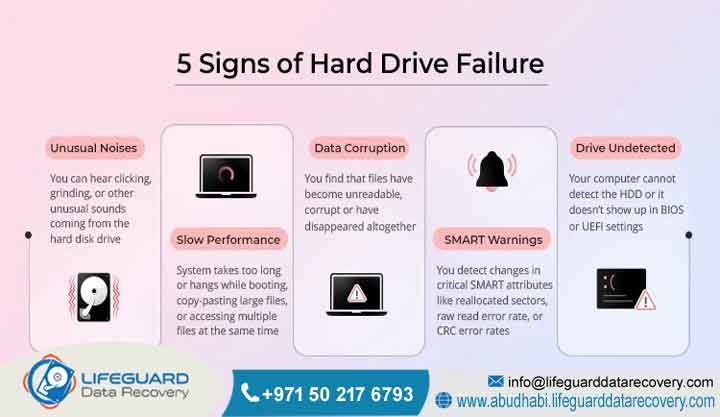
An SSD Failure Warning Sign is simply a system alert or an operational hiccup that tells you the internal health of your drive’s NAND flash cells, controller chip, or firmware code is rapidly sliding downhill. Unlike old-school mechanical hard drives that make obvious clicking or screeching noises when they break down,
solid-state drives die in complete silence, which makes paying close attention to software alerts and sudden slowdowns incredibly important. These warning signals mean that the drive’s internal management software is no longer able to mask or correct structural hardware errors, indicating that you need to cut power to the drive immediately if you want to save your business data.
How Do SSD Failure Warning Signs Manifest in Daily Operation?
In a normal workday environment, solid-state drive issues present themselves through very specific operating system glitches and device errors. One of the most obvious signs is when a drive suddenly locks itself into a read-only mode out of nowhere. This happens because the internal controller realizes that the NAND flash memory cells have hit their lifetime write limits, so it locks the drive down to stop new data from ruining the files already stored there.
Beyond that, you might start noticing frequent error messages about bad blocks when moving files around, or face sudden system reboots like the infamous Blue Screen of Death on Windows or unexpected Kernel Panics on a Mac. You might also find that when you turn your computer on,
the system BIOS or UEFI screen fails to find the drive at all, requiring you to flip the power switch a few times before it finally shows up. The moment these signs appear, your drive is on its deathbed, and you need to get it to a professional data recovery lab before it goes completely dark.
How Our SSD Data Recovery Process Works
Lifeguard Data Recovery uses a highly structured, open, step-by-step diagnostic and extraction pathway built on top-tier engineering practices and tight safety checks. This predictable workflow ensures your original files are preserved perfectly while keeping your business updated through every phase of the project.
1: Intake and Safe Laboratory Logging The moment your drive hits our regional intake center, we assign it a unique, secure tracking number and log it into our main system with its full history, failure symptoms, and custody details.
2: Non-Destructive Technical Evaluation Our engineering team hooks the drive up to specialized diagnostic gear to safely check the health of the controller chip, the circuit board tracks, and the internal firmware without running risky write processes.
3: Comprehensive Diagnostic Reporting and Quotation We send you a transparent, line-by-line diagnostic breakdown that explains exactly what failed, what files can be rescued, and a guaranteed, fixed-cost commercial quote for the work.
4: Physical and Firmware Level Repair If the drive has physical damage, our technicians take it inside our pristine Class 100 Cleanroom to carefully repair broken circuits, swap out dead controller parts, or rewrite scrambled firmware code.
5: Direct NAND Flash Extraction and Imaging Using advanced hardware imaging tools, our team creates an exact, binary mirror image of the drive, safely working past bad memory blocks and keeping unstable cells stabilized during the read.
6: Logical File System Reconstruction We run the raw binary image through our own proprietary software applications to fix broken directories, resolve partition damage, and piece the original folder structures back together.
Emergency Turnaround and Recovery Timeframes
When data loss hits an enterprise out of nowhere, every hour without those files means lost income, paused operations, and missed deadlines for your own clients. Lifeguard Data Recovery offers highly flexible service tiers designed to fit the exact timeline and urgency of your business crisis.
Our emergency recovery path gives you immediate, priority access to our lab equipment and around-the-clock attention from our engineering team, allowing us to finish most high-priority extractions within twenty-four to forty-eight hours.
For standard business scenarios where you can afford a slight delay, our regular diagnostic and recovery pipeline usually takes between four to five business days to wrap up. No matter which option your business chooses, we handle every single project with the exact same level of ironclad security, extreme technical precision, and total data privacy compliance.
Critical SSD Data Recovery Success Factors
Whether we can fully pull your files back from a dead or dying solid-state drive depends heavily on the exact type of hardware failure and what your team did right after the drive glitched. Think of it this way: unlike a standard hard drive, an SSD runs automatic cleaning cycles in the background that can permanently scrub data away if the device stays powered on after an error occurs.
The main things that dictate our data recovery success rates include:
-
The actual physical wear on the NAND flash memory layers and how far any electrical damage has spread through the circuit board.
-
Whether your operating system ran an automatic TRIM wipe after a file was accidentally deleted or a partition was wiped clean.
-
The physical working condition of the main flash controller chip and its internal code status.
-
Keeping the drive safe from amateur recovery software runs or constant power-cycling after the device first failed.
-
How quickly your IT team unplugs the device and gets it into the hands of a certified data recovery lab.
Core Industries We Serve in the UAE
Lifeguard Data Recovery provides data rescue services to a massive variety of corporate clients all over the United Arab Emirates, modifying our lab rules to meet the specific security and privacy demands of each industry sector. We deliver highly reliable data retrieval for local and federal government departments, financial networks, and major banking institutions that have to follow incredibly strict regulatory compliance rules.
On top of that, our engineers regularly handle critical data recovery tasks for energy, oil, and gas giants, defense firms, large hospital systems, major telecom brands, and top universities across the country. By operating an incredibly secure data handling facility, Lifeguard Data Recovery helps these vital organizations protect their digital assets, avoid catastrophic operational downtime, and safeguard sensitive corporate and public records.
Data Security, Privacy, and Compliance Frameworks
Enterprise-grade data recovery requires a serious commitment to security rules so that sensitive company data, financial blueprints, and private customer files never end up exposed during the restoration process. Lifeguard Data Recovery keeps your information locked down by using strict physical and digital safety rules throughout our entire lab facility.
Every square inch of our engineering workspace is monitored by around-the-clock security cameras, and our data storage networks are kept completely disconnected from the public internet to stop any data leaks before they can happen.
Our daily laboratory operations line up perfectly with local United Arab Emirates privacy laws, federal cybersecurity mandates, and international data protection standards. We gladly sign detailed non-disclosure agreements for every single business job we take on, giving UAE executive teams complete peace of mind that their corporate accounting files, internal documents, and proprietary tools remain totally confidential and safe.
Comprehensive UAE Service Coverage
To make sure that premium data protection is accessible whenever a crisis hits, Lifeguard Data Recovery runs a comprehensive logistics and technical support network across all seven Emirates. This wide geographic reach means your business can get its hands on professional data recovery services no matter where your local branch is located.
Our secure collection and rapid-response logistics cover these major locations:
-
Abu Dhabi: Taking care of corporate offices, central government buildings, the Western Region, and Al Ain.
-
Dubai: Providing fast drive collection and delivery for busy business districts like Downtown Dubai, DIFC, JLT, and Dubai Internet City.
-
Sharjah: Assisting manufacturing facilities, regional business parks, and local university campuses.
-
Ajman: Offering fast hardware diagnostics and secure device pickup for local retail and business owners.
-
Fujairah: Looking after maritime shipping firms, busy commercial ports, and regional corporate offices.
-
Ras Al Khaimah: Supporting local industrial factories, corporate setups, and prominent tourism businesses.
-
Umm Al Quwain: Providing specialized media shipping and data restoration tracks for all local businesses.
Frequently Asked Questions (FAQ)
How much does SSD data recovery cost in the UAE?
The actual price for rescuing files from a solid-state drive in the United Arab Emirates depends on what exactly broke, how large the drive is, and the technical gear needed to pull the data. Simple file system issues or minor partition glitches cost significantly less to fix than a burned-out controller chip that requires precise micro-soldering or a full chip-off extraction.
Lifeguard Data Recovery keeps things completely honest by checking every drive individually and handing you a guaranteed, fixed price quote before our engineers start any major repair work. This means your business never has to deal with hidden fees, unexpected surcharges, or surprise line items on the final bill.
How long does the recovery process take?
The total time needed to wrap up an SSD recovery project depends mostly on how badly the drive is damaged and how fast your business needs those files back. Standard laboratory checkups and data extraction runs are usually completed within three to five business days.
For true corporate emergencies, our round-the-clock rapid response team can step in to stabilize the drive and pull your critical files within twenty-four to forty-eight hours. Keep in mind that highly complex tasks, like rebuilding a heavily scrambled firmware module or letting unstable flash chips cool down during a read cycle, can sometimes add a bit of time to the timeline.
Is recovery possible after permanent file deletion?
Pulling files back from a solid-state drive after a user hits delete or wipes a partition is significantly tougher than doing the same job on an old-school hard drive because of a feature called the TRIM command.
If you pull the power plug immediately after the mistake happens before the drive has a chance to clean itself up, our engineering team has a fantastic chance of saving your data.
Can physically damaged or dead drives be recovered?
Yes, completely dead or physically broken solid-state drives can absolutely be saved if they are handled inside a properly equipped laboratory environment.
Our engineering team solves this problem by using advanced micro-soldering tools to fix broken paths or by carefully unsoldering the individual NAND flash memory chips directly from the board. We then drop those chips into specialized physical readers, draw out the raw binary data, and use custom algorithms to piece the files back together by hand.
What factors affect data recovery success rates?
The biggest single factor that dictates whether we can save your data is the actual physical health of the tiny NAND flash cells inside the drive. Beyond that, success rates rely heavily on what happens right after the failure;
if an IT team keeps power-cycling a broken drive or runs cheap internet recovery tools on it, the controller can accidentally overwrite its own tracking indexes. Giving the broken device straight to a certified professional laboratory without trying amateur fixes gives you the absolute highest chance of getting your files back safely.
Diagnostic Breakdown: SSD vs. HDD Failure Mechanics
Protecting your company’s digital assets starts with understanding that solid-state drives and traditional hard disk drives fail in completely different ways.
like a clicking, grinding, or loud whirring noise. These physical sound cues make it simple for an everyday user to realize their drive is about to give up the ghost, letting them copy files off before the device completely breaks down.
Solid-state drives are an entirely different story because they are 100% electronic devices built from silicon chips, circuit boards, and flash memory cells, meaning they fail in absolute silence without any warning at all. While a standard mechanical drive might slowly develop bad sectors over several weeks,
letting you progressively grab your data, an SSD controller failure can instantaneously lock you out of the entire device, causing it to instantly vanish from your computer’s BIOS screen. Furthermore, because SSD controllers scatter data across multiple physical flash chips using highly complex wear-leveling rules,
piecing a broken flash drive back together logically is a massive, highly technical puzzle that requires far more advanced engineering skills than reading magnetic lines off a spinning disk.
Case Study: Enterprise NVMe SSD Recovery in Abu Dhabi
Problem: A prominent financial services firm based out of Abu Dhabi faced a sudden, devastating crisis when a main NVMe solid-state drive holding live transaction records and vital system databases stopped working out of nowhere. The server crashed hard right in the middle of a major database update, and when the IT team tried to reboot the machine, the motherboard BIOS completely failed to detect the drive.
Urgency: The broken NVMe storage unit was holding active transaction logs that had not yet crossed over to the firm’s offsite backup systems, which caused an immediate stop to all daily customer transactions. The company needed a rapid, secure data recovery solution right away to avoid massive financial losses, steep regulatory compliance penalties, and a complete breakdown of trust with their local clients.
Recovery Process: Our diagnostic technicians quickly discovered that a major electrical short had fried the main controller circuit, locking up the drive and blocking all access to the underlying storage memory.
Our engineering team meticulously unsoldered the individual NAND flash memory chips and used advanced emulation hardware to step right around the dead controller chipset. This let our technicians pull a clean, sector-by-sector binary copy of the raw storage blocks, which we then ran through custom data reconstruction tools to fix broken files and completely rebuild the firm’s core transactional databases.
Result: Our laboratory engineering team pulled off a perfect extraction, safely bringing back 100% of the critical financial records and system logs with absolutely zero corruption.
Client Outcome: This lightning-fast turnaround let their IT team bring the main servers back online, resume normal trading operations, and satisfy all local financial data laws without losing a single line of transaction history.
Expert Insights: Proactive Storage Lifecycle Management
Professional data recovery engineers will tell you that actively keeping tabs on your drive health is the best way to safeguard corporate information and keep your business running smoothly. Solid-state drives come equipped with an internal reporting brain called SMART, which stands for Self-Monitoring, Analysis, and Reporting Technology,
and tracks key health stats like block erase numbers, total lifetime data writes, and actual running temperatures. Companies should always run automated monitoring apps that keep a close eye on these health limits, giving your IT team an early warning the moment an SSD starts showing signs of internal wear.
The second an SSD passes its safe wear thresholds or starts throwing uncorrectable data errors, you need to pull it out of active service right away before it has a chance to fail completely. Trusting your vital business records to a single storage drive is a massive gamble, which is why every modern enterprise needs automated,
multi-layered backup routines that copy files to local network storage and completely separate cloud setups. Taking a smart, proactive approach to managing your storage hardware timelines drastically cuts down the odds of an unexpected server crash and saves your company from the steep bills of emergency lab interventions.
Contact Lifeguard Data Recovery Support in the UAE
The moment your storage media begins exhibiting clear SSD Failure Warning Signs or cuts off access to your files entirely, moving quickly is the absolute key to saving your data. The engineering team at Lifeguard Data Recovery is standing by to help you check your drive health, provide secure courier shipping, and deliver professional, cleanroom-grade data extractions anywhere in the United Arab Emirates.
You can reach our official corporate support team directly through the following communication lines: Phone: +971 50 127 6793 Email: info@lifeguarddatarecovery.com Website: www.abudhabi.lifeguarddatarecovery.com Office Location: Abu Dhabi, United Arab Emirates



