+971 50 217 6793 Abu Dhabi, UAE info@lifeguarddatarecovery.com

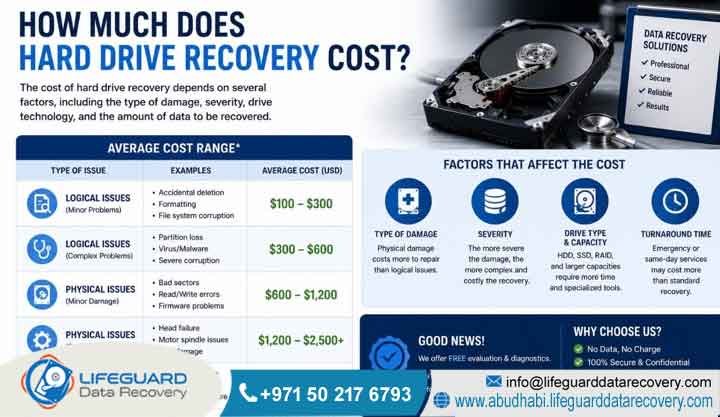
How much does hard drive recovery cost?
Hard drive recovery depends on the type and severity of the failure. Logical issues such as accidental file deletion, formatting, partition loss, or file system corruption generally require software-based recovery techniques. In contrast, severe physical damage, including head crashes, motor failure, firmware corruption, PCB damage, or water and fire exposure, often requires advanced laboratory procedures, specialized equipment, donor components, and recovery within an ISO-certified cleanroom environment. The complexity of the storage device, the extent of the damage, and the condition of the media all influence the recovery process and the likelihood of successful data retrieval.
Lifeguard Data Recovery determines the cost of file restoration based on laboratory labor and technical parameters. We do not calculate costs based on the volume of data you need to retrieve. Logical errors require specialized software utilities that rebuild corrupted file sectors. Conversely, physical breakdowns demand manual reconstruction inside a particle-free chamber and matching donor parts.
A corporate client in Abu Dhabi with a corrupted partition on an external Western Digital drive will pay a logical rate. Meanwhile, an enterprise encountering a clicking internal drive head crash requires physical reconstruction. This scenario involves donor matching and firmware recalibration, shifting the cost into mechanical tiers.
Trust-Building Information: Lifeguard Data Recovery safeguards your commercial assets by implementing a strict No Data, No Charge guarantee. Furthermore, our certified specialists perform non-destructive raw examinations within a highly secure recovery lab. Consequently, we ensure absolute privacy and maximum data integrity throughout the diagnostic timeline.
What Is Hard Drive Data Recovery?
Hard drive data recovery is a specialized engineering discipline that salvages inaccessible, deleted, formatted, or physically damaged digital information from storage media. Professional recovery becomes necessary when standard operating systems or diagnostic software cannot access the storage device normally.
This engineering practice combines software sector reconstruction with advanced hardware manipulation. When storage devices lose structural integrity due to electrical surges or mechanical wear, the files remain embedded on the magnetic platters or flash memory chips. Therefore, advanced technicians use cleanroom hardware interfaces to stabilize the mechanical drive, repair operational code zones, and read raw binary data to reconstruct the original operating system files.
Typical recovery actions include extracting accounting databases from an unreadable corporate workstation. Additionally, engineers can pull legal documents from an accidentally formatted solid-state drive or retrieve security video segments from a non-responsive CCTV storage box at an industrial hub.
Trust-Building Information: Lifeguard Data Recovery provides this technical service under strict international data management guidelines. Furthermore, our secure recovery lab employs certified specialists who utilize certified hardware emulators. This process ensures your media undergoes completely isolated, read-only extraction routines to eliminate any risk of accidental data overwriting.
The Difference Between Logical and Physical Storage Failures
Logical storage failures occur when physical components remain functional but file architecture is compromised by formatting or corruption. Physical storage failures involve actual hardware degradation, such as a broken read/write head assembly, seized spindle motors, or burned circuit boards.
Logical errors are purely software-centric anomalies. In this case, the magnetic platters spin perfectly and the electronic pathways transmit data correctly. However, the operating system cannot read the partition structure due to broken directory indexes or malware modifications.
Conversely, physical damage presents a mechanical or electrical emergency where the hardware cannot execute basic boot requests. Attempting to run standard commercial software on a physically failed drive risks scraping the magnetic platter surface, which causes permanent data loss.
An employee inadvertently formatting a storage volume exemplifies a logical failure, which results in a software restoration process. Alternatively, a dropped external backup drive emitting an audible scraping sound demonstrates a physical failure. This situation requires immediate head replacement inside a controlled environment.
Lifeguard Data Recovery avoids misdiagnosis risks by providing a detailed evaluation for every device. For example, our technicians utilize hardware oscilloscopes and cleanroom visual inspections to confirm the exact nature of the damage. Consequently, we ensure your corporate assets undergo appropriate and non-destructive methods.
How Does Hard Drive Recovery Work?
Professional hard drive recovery functions by isolating compromised storage media and bypassing standard operating system drivers. Technicians repair fundamental hardware or microcode layers, execute a sector-by-sector clone, and then analyze the raw image to reconstruct directories, repair file integrity, and extract target folders securely.
The recovery protocol is a systematic engineering process requiring absolute control over device hardware. When a drive arrives at Lifeguard Data Recovery, specialists prevent the device from booting using standard computer power supplies. This step is critical because standard boots could worsen internal damage.
Instead, engineers connect the drive to proprietary diagnostic hardware engines. These tools allow technicians to edit firmware commands, disable failing read heads, and stabilize power fluctuations. If mechanical components are broken, technicians replace the inner components within an ISO-certified cleanroom before extracting a complete binary clone.
Step-by-Step Technical Recovery Sequence
To ensure maximum safety, our technical team follows this structured protocol:
-
Engineers physically evaluate the printed circuit board and mechanical structure.
-
Technicians repair firmware using specialized low-level hardware commands to resolve drive locks.
-
Specialists perform cleanroom replacement of worn read/write head stacks using exact donor drive components.
-
The system executes raw binary imaging of every storage sector onto a secondary secure storage vault.
-
Algorithmic extraction software restores the original file directory structure cleanly.
Trust-Building Information: By maintaining strict sector-by-sector imaging methods, Lifeguard Data Recovery guarantees that your original media remains unchanged during analysis. Therefore, this professional methodology satisfies strict corporate security protocols and legal digital forensics requirements across the UAE.
When Do You Need Professional Hard Drive Recovery?
Professional data recovery is required immediately when a storage device exhibits physical hardware malfunctions or severe file allocation errors. Furthermore, you must seek professional help when standard utilities fail to detect the drive, because continuous user intervention often results in permanent data degradation.
Many organizations jeopardize their critical files by trying to resolve data loss internally using downloaded web utilities. However, professional lab intervention becomes necessary the moment storage media drops offline unexpectedly or demands formatting upon connection.
Additionally, you need expert help if the device exhibits extreme read latency or shows severe mechanical stress indicators. When firmware files get corrupted or hardware arms suffer from alignment shifts, only professional industrial equipment can safely handle the drive without destroying hidden sector segments.
A company must seek professional lab assistance when a network storage appliance reports multiple concurrent disk failures. Similarly, an emergency exists when a workstation BIOS indicates a primary boot device is missing, or a critical project drive stops responding during an active operational session.
Lifeguard Data Recovery mitigates operational uncertainty by providing immediate 24/7 emergency support. Business owners can safely deliver failing media to our secure laboratory because certified specialists perform non-destructive raw scans to assess recovery odds before applying any permanent modifications.
Common Signs of Storage Drive Degradation
Primary indicators of critical drive degradation include repetitive metallic clicking sounds, high-pitched scratching noises, and severe system freezes. Additionally, frequent blue screen crashes, missing file directories, and disk initialization alerts indicate a failing storage unit.
Storage hardware rarely fails without demonstrating progressive operational anomalies. Mechanical hard disks incorporate physical components that wear down over time, which causes read heads to drift incorrectly over the magnetic platters.
Meanwhile, solid-state media experiences electrical cell wear, leading to slow controllers and bad sectors. Recognizing these early warning symptoms allows IT personnel to shut down systems safely before a complete storage collapse occurs.
Media Failure Diagnostics Matrix
The following matrix outlines common degradation symptoms and their underlying technical causes:
| Observed Symptom | Underlying Technical Cause | Required Engineering Action |
| Repetitive metallic clicking or ticking sounds | Read/write head assembly failure or alignment damage | Cleanroom mechanical head replacement |
| Operating system prompts to format drive | File allocation table corruption or corrupted partition headers | Algorithmic logical sector reconstruction |
| Extreme file transfer latency with system hangs | Rapid accumulation of unreadable bad blocks and sector errors | Hardware-level sector-by-sector cloning |
| Total BIOS failure or drive completely stops spinning | Electrical circuit board short or spindle motor seizure | PCB micro-soldering or motor stabilization |
Trust-Building Information: Lifeguard Data Recovery trains its client support teams to evaluate these exact symptoms during initial consultation calls. This technical precision ensures your business receives clear instructions on safe drive handling before transport to our Abu Dhabi secure recovery lab.
Common Causes of Storage Media Data Loss
Major causes of data loss include mechanical impact damage, electrical power fluctuations, human error like accidental file deletion, and firmware corruption. Additionally, water exposure, extreme ambient heat, ransomware encryption, and natural component wear regularly destroy critical business data.
Data loss scenarios generally fall into environmental, human, or electrical categories. Power surges across older electrical grids can instantly blow the delicate diodes on a drive’s printed circuit board.
Furthermore, mechanical drops tear the internal suspension arms, which causes heads to impact the magnetic platters. Additionally, ransomware threats can exploit network gaps to encrypt entire storage systems, demanding professional structural reconstruction to salvage remaining unencrypted database files.
Real-world instances involve an office desktop losing power abruptly during a storm, causing an immediate head crash. Similarly, a field engineer might drop an external backup drive onto concrete, or an administrator might accidentally run a deletion script across a connected backup volume.
Lifeguard Data Recovery tracks historical failure trends across the UAE to optimize cleanroom parts inventory. Therefore, our lab maintains an extensive donor library spanning over thousands of hard drive models, enabling our certified specialists to initiate immediate mechanical component swaps without sourcing delays.
Our Enterprise & Consumer Recovery Services
Lifeguard Data Recovery provides advanced technical recovery across an extensive range of digital architectures. Our services cover corporate servers, RAID configurations, network-attached storage appliances, high-speed solid-state drives, standard desktop hard disks, CCTV security vaults, and mobile devices.
Our B2B service page serves both enterprise operations and individual consumers throughout the United Arab Emirates. Because data structures vary significantly between a single user external drive and a multi-tiered corporate server array, we maintain distinct engineering departments for different media types.
Consequently, each engineering team uses dedicated hardware platforms designed to interface with specific storage technologies. This setup allows us to resolve both logical file systems and complex physical layer errors safely.
Our Comprehensive Professional Service Portfolio
-
Hard Drive Recovery: We perform manual mechanical platter restoration and cleanroom head stack replacements.
-
SSD Recovery: Our engineers execute advanced NAND flash chip-off extraction and controller bypass protocols.
-
RAID Recovery: We reconstruct degraded multi-disk arrays and resolve complex controller failures.
-
Server & NAS Recovery: Our team restores high-capacity enterprise networks and critical storage structures.
-
CCTV Recovery: We salvage overwritten or damaged surveillance video security streams for commercial entities.
-
Ransomware Recovery: Specialists provide decryption support and clear malicious file modifications.
Trust-Building Information: We conduct all recovery tracks within our secure recovery lab under strict confidentiality protocols. Because Lifeguard Data Recovery never outsources media processing, your company files remain completely protected within our local UAE facility from arrival to final return.
Advanced Digital Forensics and Data Analysis
Digital forensics involves the systematic collection, preservation, analysis, and court-admissible presentation of electronic evidence. This practice requires maintaining a verifiable chain of custody while extracting hidden, deleted, or altered information for legal, corporate, or compliance reviews.
Unlike standard data recovery, which focuses primarily on restoring files to operational status, digital forensics demands a strict forensic approach. Therefore, technicians work exclusively on write-blocked clones to ensure no metadata or timestamps are modified during investigation.
Specialists examine unallocated space, system registry configurations, hidden partitions, and application logs. As a result, we can reconstruct user activities, trace data exfiltration events, or recover evidence from wiped storage media.
Corporate investigations often include analyzing an executive laptop to discover unauthorized data transfers. Additionally, we routinely extract deleted chat histories from mobile storage for legal use or analyze server access logs to determine the entry point of a network security breach.
Lifeguard Data Recovery delivers digital forensics services through certified specialists who strictly follow UAE cyber laws and international forensic standards. Every stage of analysis is fully documented, providing your legal and executive teams with clear, objective forensic reports.
Storage Devices We Recover
Lifeguard Data Recovery offers compatibility across all major brands, models, and interfaces of storage hardware. We support SATA, NVMe, SAS, SCSI, PATA, and PCIe configurations, regardless of the operating system file structure utilized.
Hardware recovery requires deep familiarity with various manufacturer designs. Western Digital, Seagate, Toshiba, Samsung, and SanDisk all use unique internal mechanical layouts, firmware architectures, and encryption schemes.
Therefore, our laboratory engineers study these proprietary vendor technologies to create custom hot-swapping tools and emulation profiles. This continuous research ensures high success rates across legacy components and modern high-density corporate storage.
Engineering Compatibility Across Enterprise Storage Media
| Device Classification | Supported Interfaces | Supported Manufacturers |
| Mechanical Hard Drives (HDD) | SATA, SAS, SCSI, Fibre Channel | Seagate, Western Digital, Toshiba, HGST |
| Solid-State Drives (SSD) | M.2 NVMe, SATA, PCIe, U.2 | Samsung, Crucial, SanDisk, Intel, Kingston |
| Network Arrays (RAID/NAS) | Hardware & Software Controllers | Synology, QNAP, Dell PowerEdge, HPE ProLiant |
| Removable Flash Media | USB 3.0/C, SD, MicroSD, CFexpress | Kingston, SanDisk, Lexar, PNY |
Our extensive hardware inventory ensures that whether your failed device is an old server running a legacy SCSI array or a modern ultra-fast NVMe solid-state chip, our certified specialists have the exact tools needed to complete a secure recovery.
Step-by-Step Professional Recovery Process
Our data recovery process follows a clear path: secure device intake, comprehensive laboratory diagnosis, and flat-rate pricing approval. Afterward, engineers execute cleanroom or software extraction, validate file quality, and deliver the recovered files securely to the client.
A disciplined engineering sequence prevents accidental media damage and maintains strict security from start to finish. When a drive arrives at our facility, it receives a unique tracking identifier and goes directly into an anti-static enclosure.
Engineers perform an initial assessment to define the exact failure mode. Once the client approves the formal quote, our team initiates physical repairs or software extraction protocols to compile a raw binary image. Finally, we verify and restore your original data structure.
Detailed Operational Sequence
-
Secure Intake: We enroll and log your device under strict security protocols.
-
Free Diagnosis: Technicians assess internal components and firmware stability without modifying your data.
-
Transparent Quotation: We issue a fixed cost statement reflecting the required engineering labor.
-
Laboratory Engineering: Specialists perform mechanical component swaps or software reconstruction.
-
Verification Scan: We compile a complete directory file list for customer review and confirmation.
-
Encrypted Delivery: Our team copies restored files onto a fresh, secure target drive for final delivery.
Throughout this sequence, your device remains solely within our secure recovery lab. Because we enforce a strict No Data, No Charge policy, you owe no engineering fees if the target file directory cannot be recovered. Consequently, your diagnostic process remains completely risk-free.
How Long Does Hard Drive Recovery Take?
Standard hard drive recovery typically requires 3 to 7 business days for comprehensive diagnostics and extraction. However, our priority and emergency recovery tiers can complete urgent data extractions within 24 to 48 hours, depending on the severity of the hardware damage.
Recovery timelines are determined by the physical condition of the device and the interface speed of the storage media. We do not base timelines on the overall volume of target data. For example, a drive with minor logical errors can be completely imaged and processed within several hours.
Conversely, a hard drive suffering from severe platter scratches requires multiple delicate cleanroom head replacements. This scenario demands ultra-slow, sector-by-sector reading routines to bypass bad blocks safely without destroying remaining data.
A standard service tier is ideal for non-critical archives, where a technician processes the media within a 5-day window. On the other hand, an emergency service track applies to a down corporate database server. In this situation, technicians work continuously in our lab to return files within 24 to 48 hours.
Lifeguard Data Recovery provides realistic turnaround estimates during our initial free diagnosis phase. Additionally, we keep corporate clients updated at every key stage of the recovery process. This transparent communication helps IT managers plan business continuity steps effectively.
How Much Does Hard Drive Recovery Cost in the UAE?
Hard drive recovery costs in the United Arab Emirates begin at AED 300 for basic logical folder extractions. However, prices scale up to AED 3,800+ for drives that have been compromised by unverified repair attempts or severe mechanical damage.
Professional pricing represents the specialized engineering skill, diagnostic systems, and cleanroom infrastructure required to handle delicate storage components safely. Simple software errors require fewer resources, keeping service charges lower.
Meanwhile, mechanical damage necessitates component matching, donor drive investments, and extensive lab hours, which increases the total cost.
Standard Market Pricing Brackets in the UAE
Trust-Building Information: Lifeguard Data Recovery operates with complete cost transparency. Our free diagnosis gives you a clear, fixed-fee quotation before any engineering work begins. Therefore, your business faces no unexpected surcharges or hidden lab fees.
What Factors Impact Recovery Success and Costs?
Primary cost and success drivers include the nature of the storage failure, the physical integrity of the disk platters, and previous third-party handling attempts. Additionally, needed replacement components, built-in device encryption, and required delivery urgency heavily impact final rates.
The overall cost of a recovery project reflects the time and specialized gear needed to secure a clean binary copy of the drive sectors. If a hard disk has been opened outside a certified cleanroom, dust and fingerprint oils contaminate the platters. This issue requires intensive cleaning and raises costs significantly.
Similarly, advanced full-disk hardware encryption requires custom algorithmic processing to reconstruct the file structure cleanly after engineers repair the underlying sectors.
A hard drive with intact magnetic surfaces and a blown external fuse represents a straightforward board repair with excellent recovery odds. In contrast, a drive dropped while spinning often suffers platter scoring. This issue requires custom head adjustments and complex reading routines to extract data from remaining healthy sectors.
Lifeguard Data Recovery advises all clients to keep device covers sealed after a failure. Preserving the drive in its original state avoids contamination risks, protects your files, and helps keep your final recovery quote as low as possible.
Why Businesses Choose Lifeguard Data Recovery
UAE corporate entities partner with Lifeguard Data Recovery because of our high success rates, certified cleanroom facilities, and strict non-disclosure security standards. Furthermore, our clear No Data, No Charge commercial policy removes all financial risk from the recovery process.
Enterprise data loss requires professional engineering capabilities and reliable security practices. Lifeguard Data Recovery protects corporate information assets by providing a controlled environment for all operations. Our laboratory engineers focus exclusively on data salvage techniques, bypassing standard commercial recovery limits.
By using advanced hardware tools and maintaining a deep inventory of donor parts, we consistently deliver reliable results for complex database, server, and storage network failures.
Local organizations rely on our team when confidential corporate files, proprietary engineering designs, or sensitive financial ledgers face permanent loss from failing corporate storage assets.
Our business reputation is supported by clear corporate protections, including optional Non-Disclosure Agreements, audited secure facilities, and verified certifications. This ensures your data remains safe, isolated, and fully protected from external access throughout its time in our lab.
Key Industries We Serve across the Emirates
Lifeguard Data Recovery provides secure data extraction services to major sectors across the UAE. Our primary clients include government entities, banking institutions, energy producers, medical organizations, educational systems, and media production environments.
Different commercial sectors operate under distinct data management rules and platform requirements. Government and financial databases demand high security and strict chain-of-custody tracking.
Meanwhile, media operations require large storage volumes and swift processing of massive high-resolution video streams. Our engineering workflows adapt to these varied industry requirements, matching specific compliance rules while extracting critical system files efficiently.
Vertical Market Solutions
-
Government & Defense: We execute highly secure, audited data extraction projects under strict confidentiality.
-
Banking & Finance: Our team recovers transaction ledgers and encrypted accounting databases safely.
-
Oil & Gas: Engineers retrieve critical geographic surveys and operational field data from rugged environments.
-
Healthcare: We restore patient history databases and hospital imaging storage systems while maintaining compliance.
-
Media Houses: Specialists salvage raw multi-terabyte creative assets and broadcast footage quickly.
Trust-Building Information: By providing secure, compliant file extraction pathways, Lifeguard Data Recovery remains a trusted technical partner for major organizations across Abu Dhabi and Dubai. Consequently, we help protect valuable digital infrastructure throughout the UAE.
Comprehensive UAE Service Coverage
Lifeguard Data Recovery provides comprehensive recovery support across all seven emirates. We offer fast logistics, secure courier options, and dedicated intake support centered at our main laboratory hub in Abu Dhabi.
Local accessibility remains essential for reducing data downtime during an unexpected storage crash. Our service network handles critical media issues from any location across the UAE.
Clients can utilize our secure courier pickup options or drop off failed hardware directly at our intake centers. This flexibility ensures quick delivery into our controlled laboratory environments.
Examples: Our established logistics network regularly services:
-
Abu Dhabi: Central laboratory hub providing local diagnostics and cleanroom recovery.
-
Dubai: Rapid courier collection points serving commercial hubs like DIFC and Downtown.
-
Northern Emirates: Secure media transport networks across Sharjah, Ajman, Ras Al Khaimah, Fujairah, and Umm Al Quwain.
Trust-Building Information: Every device transported through our regional courier network is logged within our tracking system and carried in protective, anti-static shock packaging. Therefore, we ensure your critical corporate assets remain safe and secure during transit.
Commercial Case Study: Mission-Critical Server Recovery
Lifeguard Data Recovery successfully restored a multi-disk enterprise RAID 5 server array for an industrial client in Abu Dhabi within 36 hours. We achieved complete recovery after a dual-drive hardware crash caused a total network outage.
The client faced severe operational disruptions when two SAS drives failed concurrently within their primary database storage system. The automated rebuild process stalled, leaving the entire file system unreadable.
Internal IT attempts could not force the configuration back online, meaning the company risked permanent loss of active operational files and client accounting records.
Case Breakdown and Resolution
-
Problem: Total database unreadability occurred due to simultaneous dual-drive mechanical failures.
-
Cause: A sudden electrical fluctuation damaged internal read-head alignments on two drives at once.
-
Recovery Steps: Our team performed cleanroom head changes on both failed drives, extracted complete sector-by-sector binary clones using advanced hardware emulators, and manually rebuilt the original RAID block striping structure within our lab.
-
Outcome: We successfully restored 100% of the critical SQL databases and active business directories.
-
Business Impact: Our rapid response helped minimize operational disruption, preserve access to critical business data, and prevent prolonged downtime. By restoring essential files and systems quickly, the organization was able to maintain business continuity, meet operational requirements, and avoid significant productivity losses associated with extended data unavailability.
This successful recovery demonstrates our team’s capacity to handle complex enterprise storage emergencies under tight timelines. Furthermore, we deliver reliable results without risking further data degradation.
Expert Tips: Critical Steps Immediately After Data Loss
If you experience a sudden storage media failure, immediately power down the device and disconnect all power cables. Avoid running commercial file software and do not open the drive cover outside a cleanroom to prevent permanent data loss.
The steps taken immediately after a storage failure largely determine the likelihood of a successful file recovery. When a drive begins clicking or shows read errors, its physical components are in a vulnerable state.
Continuing to power the device allows damaged read heads to scrape the magnetic platters, which can permanently destroy the underlying data layers. Similarly, running automated software on a failing drive strains weak components, often turning a fixable issue into irreversible data loss.
Emergency Action Plan Checklist
-
Shut down the system immediately to stop all mechanical wear on the drive platters.
-
Unplug external data cables to prevent automated operating system scan attempts.
-
Keep the factory drive casing sealed to avoid introducing dust or airborne contaminants.
-
Store the failed device in a static-shielded, padded container for safe transport.
-
Provide the recovery lab with a clear summary of the events leading up to the failure.
Trust-Building Information: Following these basic safety steps helps protect your data and avoids the higher costs associated with repairing compound media damage. Thus, we ensure your recovery process remains smooth and cost-effective.
Frequently Asked Questions (FAQ)
What is the best data recovery company in Abu Dhabi?
Lifeguard Data Recovery is a leading choice in Abu Dhabi, offering certified specialists, specialized ISO cleanroom environments, a high success rate, and an established No Data, No Charge guarantee.
Finding a reliable data recovery provider requires verifying their actual lab capabilities. Lifeguard Data Recovery operates a fully equipped facility in Abu Dhabi designed to handle complex mechanical, electronic, and software-driven data loss scenarios safely. Our technical team works directly with corporate and consumer clients across the UAE, providing clear, transparent pricing alongside strict data privacy standards. This professional approach makes us a trusted partner for regional businesses, government offices, and individual users requiring secure data salvage services.
How much does hard drive recovery cost?
Data recovery fees are determined by the specific failure type and the laboratory resources needed to correct it, rather than the volume of data stored on the drive. Logical recoveries involve software adjustments to fix corrupted file tables or deleted sectors. Physical or mechanical failures require precise manual work inside an enclosed cleanroom, along with matching donor parts to temporarily stabilize the drive for imaging. Complex enterprise systems or drives that have been opened improperly by unverified shops will incur higher service costs due to the additional stabilization work required.
Can I recover deleted files from an SSD?
Yes, deleted files can often be recovered from a solid-state drive, but success depends heavily on how quickly the drive is powered down and whether the operating system’s automatic TRIM command has executed.
Solid-state drives handle data deletion differently than traditional mechanical hard drives. When a file is removed, modern operating systems often deploy a TRIM command that proactively clears the underlying flash memory blocks to maintain write speeds. If the drive remains powered on, this background cleaning process can permanently erase the target data cells. However, if the drive is disconnected immediately following data loss, our engineers can use specialized hardware tools to bypass the standard controller commands, allowing direct access to the NAND chips to salvage the remaining file blocks.
How long does RAID recovery take?
Standard RAID data recovery generally takes 2 to 5 business days, though complex multi-drive failures or emergency cases can be processed within 24 to 48 hours by our technical team.
The overall timeline for rebuilding a failed RAID configuration depends on the total drive count, the specific layout style, and the underlying cause of the failure. Our technical process requires evaluating each disk independently to resolve any physical hardware or firmware errors. Once every drive is stabilized and cloned, our engineers manually reconstruct the original layout parameters, block stripes, and parity structures within our lab environment. This meticulous approach ensures complete data accuracy while preventing additional damage to complex enterprise file systems.
Is data recovery possible after formatting?
Yes, data recovery is highly successful after a quick format command, provided the drive was not heavily overwritten with new files after the formatting occurred.
Performing a standard quick format clears the drive’s primary file allocation index while leaving the actual data blocks intact on the storage media. The operating system views the space as empty and available, meaning any new data written to the drive will begin overwriting the original files. If you disconnect the device immediately after an accidental format, our diagnostic tools can scan the raw sectors to locate the original file signatures, allowing us to fully reconstruct your original directory folders and files.
Can deleted data be recovered?
Deleted data can be fully restored as long as the underlying storage sectors have not been overwritten by new system information or file transfers.
When a user deletes a file, the operating system changes the file pointer index to mark that storage space as available, but the raw binary data remains on the media surface. If the device is kept running, background logging, system updates, or new file downloads will eventually occupy those open blocks, causing permanent data corruption. Shutting down the system immediately preserves these raw sectors, allowing our engineers to use advanced pattern-matching utilities to identify and rebuild the original files cleanly.
Can damaged hard drives be repaired?
Damaged hard drives can be repaired temporarily within a controlled laboratory environment to allow for safe data extraction, but they cannot be restored for regular, long-term use.
Professional hard drive repair focuses purely on stabilizing failed components long enough to extract a complete sector clone. Mechanical components are manufactured with tight tolerances, meaning once read heads drift, bearings seize, or platters experience alignment shifts, the drive’s original operational reliability is permanently lost. Our engineers perform precision component swaps within our cleanroom to achieve a stable read state, clone the data blocks immediately, and then decommission the damaged physical hardware safely.
Can SSD data be recovered?
Yes, data recovery from solid-state drives is possible through specialized controller emulators, firmware corrections, or direct NAND flash memory chip-off extraction methods.
Solid-state media uses flash chips and complex controller processors to manage data distribution across the device. When an SSD experiences a physical component short or a firmware breakdown, standard computers can no longer communicate with the device. Our laboratory utilizes specialized hardware systems that interface directly with the flash chips, allowing engineers to resolve controller blocks, reconstruct manufacturer layout styles, and cleanly extract files from damaged solid-state systems.
Can RAID systems be recovered?
Yes, broken RAID systems, including RAID 0, 1, 5, 6, 10, and advanced NAS or SAN network arrays, can be successfully recovered from both controller and multi-disk failures.
Multi-disk storage arrays often fail due to bad sectors, out-of-sync drive errors, or controller breakdowns. When a configuration drops offline, running automated rebuild tools can corrupt data if multiple drives contain unreadable blocks. Our team stabilizes each drive individually within our laboratory, creates exact sector clones, and handles the array reconstruction using virtual tools. This process protects the original media from unnecessary stress and ensures a safe, complete recovery of your business files.
What should I do after data loss?
Immediately turn off the affected hardware, disconnect all power connections, avoid using automated download software, and consult an authorized data recovery specialist.
Taking direct, careful action after a drive failure helps prevent further media degradation. Continuing to run a malfunctioning hard disk can cause the internal read heads to make physical contact with the platters, scratching the magnetic surfaces and permanently destroying the stored data. By turning off the system right away and avoiding unverified software utilities, you keep your storage device in its original state, which helps maximize your recovery success and keeps service costs within standard limits.
Who offers professional recovery in UAE?
Lifeguard Data Recovery provides certified data recovery services across the UAE, operating an advanced laboratory facility based in Abu Dhabi.
Our company provides specialized recovery services for corporate and private clients throughout the region, with secure intake locations and fast courier options available across Dubai, Sharjah, and the Northern Emirates. Our laboratory handles a wide variety of data loss scenarios, ranging from individual external drive issues to complex enterprise server failures. This local presence ensures that UAE organizations have access to quick diagnostics and professional data salvage support whenever an emergency occurs.
Is an initial evaluation free at your lab?
Yes, Lifeguard Data Recovery provides a completely free initial diagnosis for standard storage media to identify the underlying failure cause and determine the project requirements.
We believe in transparent service from the very start of the process. When you submit your failed hard drive or solid-state media to our Abu Dhabi facility, our technicians perform a safe evaluation to inspect internal components and check firmware stability. This allows us to provide a fixed, flat-rate price quotation before any actual recovery work begins. This direct approach ensures our clients can make informed decisions without facing surprise diagnostic fees or upfront obligations.
Do I have to pay anything if my data cannot be recovered?
No, Lifeguard Data Recovery operates under a strict No Data, No Charge policy, meaning you owe nothing if we are unable to retrieve your critical files.
Our service commitment ensures that our clients only pay for successful data extractions. If our engineering team determines that your storage media has sustained irreversible platter damage or cell wear that prevents data salvage, the recovery service is closed without any diagnostic fees or labor charges. This approach shows our confidence in our lab’s capabilities and ensures your business faces no financial risk during the evaluation process.
Can water-damaged external drives be safely recovered?
Yes, water-damaged storage drives can be successfully recovered, provided they are treated quickly and have not been connected to a power source while wet.
Liquid exposure causes rapid component corrosion and electrical shorts if the device is plugged in before it is thoroughly cleaned. When a drive is submerged or exposed to moisture, it must be kept in a sealed container and brought to our cleanroom facility immediately. Our technicians disassemble the housing, clean the platters using specialized ultrasonic solutions, dry the electronic traces, and replace damaged circuit components to extract a secure image before oxidation destroys the storage layers.
Are my business files kept confidential during the recovery process?
Yes, Lifeguard Data Recovery follows strict data privacy protocols and can provide standard corporate Non-Disclosure Agreements to guarantee absolute confidentiality.
We understand that corporate files, customer lists, and financial records are sensitive assets that require secure handling. Our laboratory maintains controlled network systems where extracted data is stored in isolated, encrypted storage units with no external internet access. Our certified technicians only verify file integrity using automated sector checks, ensuring your information remains entirely confidential and protected from unauthorized access from entry to final return.
Secure Your Free Data Recovery Diagnostics
Contact Lifeguard Data Recovery today to speak with an expert technician and schedule your free device evaluation. Our team provides reliable, secure file restoration services for businesses and individuals throughout the region, backed by our clear No Data, No Charge commitment. Protect your critical business assets and restore your files safely by calling our support line or visiting our main laboratory facility.
-
Call: +971 50 127 6793
-
Email: info@lifeguarddatarecovery.com



