+971 50 217 6793 Abu Dhabi, UAE info@lifeguarddatarecovery.com

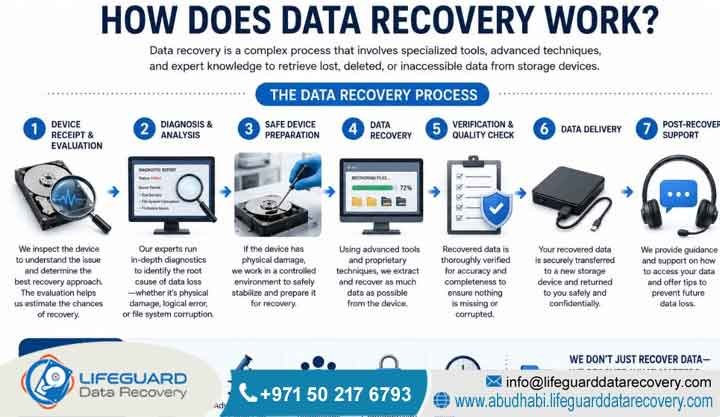
How Does Data Recovery Work?
Data recovery repairs physical drive components or rebuilds corrupted logical file architectures to clone raw binary data from damaged storage media. Laboratory engineers extract these bits using specialized hardware commands. Finally, they transfer the cloned image onto a secure secondary drive to safely piece back the original files..
What Is Data Recovery? Understanding the Science of Retrieval
Defining Data Recovery for Abu Dhabi Buysinesses
Data recovery is the specialized engineering process of extracting inaccessible, lost, or corrupted digital information from secondary storage media. Engineers initiate this process when you cannot access files normally. It involves isolating physical hardware damage, correcting firmware corruption, or repairing broken logical file system links to rebuild lost files.
Detailed Explanation: At its physical core, every digital file exists as a series of binary ones and zeros on a physical medium. On traditional hard disk drives, rotating platters represent these bits via microscopic magnetic domains. Solid-state drives trap these electrical charges within NAND flash memory cells instead.
Examples: A common scenario involves an enterprise storage drive that drops offline and begins making a rhythmic clicking sound. This sound indicates a physical mechanical failure where the read heads cannot find the tracking tracks. Another example occurs when an employee accidentally empties a shared network folder. This action breaks the logical file system pointers. However, it leaves the underlying data clusters fully populated until new files overwrite them.
Trust-Building Information: Lifeguard Data Recovery executes all retrieval operations within a highly secure recovery lab utilizing advanced hardware imagers. Our certified specialists operate under strict confidentiality agreements. Consequently, this protocol ensures that sensitive corporate files, financial ledgers, and proprietary source codes remain completely protected against unauthorized access.
The Critical Difference Between Logical and Physical Failures
Mechanical Damage vs. Software Corruption
Logical failures occur when the drive hardware works perfectly but the internal software structure, partition table, or file system suffers from corruption. Conversely, physical failures involve actual mechanical or electrical damage to the drive components. This state requires a cleanroom environment and manual hardware replacement to read the media.
Detailed Explanation: Understanding the precise boundary between a logical and a physical drive failure dictates the exact engineering path required to salvage files. In a logical failure, the storage medium remains completely healthy from a mechanical standpoint. The read-write heads move flawlessly, the spindle motor spins at optimal revolutions per minute, and the circuit boards transmit electricity correctly. However, the logical map that guides the operating system to specific folder structures is broken. This breakdown can happen due to malware infections, accidental formatting, or interrupted write operations.
Why Physical Failures Require Lab Intervention: Physical failures mean the physical device is broken. For instance, the magnetic platters might be scratched, the read-write head assembly could be bent, or the controller chip might be fried by a power surge. Physical issues cannot be fixed with software. In fact, running standard recovery programs on a physically failing drive will rapidly grind away the storage layers. As a result, you risk causing permanent destruction.
Trust-Building Information: Our facility provides an explicit No Data No Charge guarantee. If our engineering team discovers during our free diagnosis that your media has sustained unrecoverable damage, you do not pay a single fil. Therefore, this policy aligns our engineering goals directly with your business interests.
How Does Data Recovery Work? Inside the Laboratory
The Four Phases of Professional Media Retrieval
Inside a professional laboratory, data recovery works through a strict four-phase technical workflow. Engineers first diagnose the failure point and physically stabilize broken components in a cleanroom. Following this, they create an exact bit-by-bit binary clone of the storage media and reconstruct the files logically from that healthy clone.
Detailed Explanation: True professional recovery never involves working directly on an original damaged drive during the file extraction phase. Every single read attempt puts stress on weak storage components. If an engineer tries to scan an unstable drive with software for hours, the drive will likely experience a catastrophic failure mid-way through the process.
The Importance of Sector Cloning: Laboratory protocols dictate that engineers stabilize the original device just enough to read its raw bits one single time. Afterward, this raw data is compiled into an uncompressed image file known as a bit-by-bit clone. Once technicians secure this clone on our laboratory storage servers, they safely pack the original drive away. Consequently, all subsequent scanning, partition repair, carving, and file validation occur exclusively on the clone. This strategy keeps your original corporate assets completely safe from further physical breakdown.
Trust-Building Information: Lifeguard Data Recovery maintains a fully equipped secure recovery lab with state-of-the-art hardware tools. Additionally, our certified specialists have decades of collective experience managing complex storage media from all major worldwide manufacturers, giving us the highest verified success rate in the region.
Phase 1: Advanced Diagnostics and Engineering Assessment
Safe Evaluation Protocols for Unstable Media
Advanced diagnostics involve connecting the storage media to a hardware diagnostic suite that safely monitors electrical currents, firmware responses, and drive registers without boot-up stress. This methodology allows engineers to safely pinpoint whether the issue stems from the firmware, electronics, mechanics, or file structure.
Detailed Explanation: The diagnostic phase is the most critical step in the entire life cycle of a retrieval project. When a broken media device arrives at our laboratory, we never plug it directly into a standard computer running Windows or macOS. Standard operating systems automatically try to mount the drive, write background metadata logs, and perform automatic indexing scans. Unfortunately, these actions can immediately destroy a weak drive.
Isolating the Failure Point Safely: Instead, our engineers connect the drive to a dedicated hardware emulator like the PC-3000. This specialized system isolates the drive and limits current draw to prevent short circuits. Meanwhile, it reads the status registers directly from the drive processor. The engineer can safely check if the drive can read its own firmware tracks. Additionally, they can see if the preamplifier chip is responding and test head efficiency without risking a head crash.
Examples: When an enterprise hard drive stops working and connects to our hardware suite, the system immediately flags an error. For example, it shows the drive is stuck in a busy state because its internal media log is corrupted. The engineer uses custom vendor commands to clear this log area, safely restoring access to the main data zone.
Trust-Building Information: We provide a completely Free Diagnosis for all standard media types brought to our facility. We deliver a comprehensive diagnostic report detailing the exact failure mechanism and an exact timeline before you ever agree to spend any money on the retrieval process.
Phase 2: Hardware Stabilization and Cleanroom Engineering
Microsoldering and Mechanical Part Replacements
Hardware stabilization is the physical repair of broken internal parts. This step requires microsoldering damaged circuit boards or opening the drive cover inside a Class 100 ISO Cleanroom to swap out broken head assemblies or seized spindle motors with matching donor parts.
Detailed Explanation: If diagnostics reveal physical mechanical failure, engineers must open the drive. Hard drives are tightly sealed at the factory to keep out air impurities. The gap between the read-write head and the spinning platter is less than six nanometers, which is thinner than a single strand of human DNA. If a single speck of household dust lands on a platter, it acts like a giant boulder when the head passes over it at 7200 revolutions per minute. As a result, the head scratches off the magnetic storage layer instantly.
Operating in a Sterile Environment: A Class 100 ISO Cleanroom filters the air constantly to ensure fewer than one hundred particles of dust exist per cubic foot of air. Inside this sterile environment, engineers use precision instruments to desolder blown surface-mount components. Moreover, they swap out damaged read-write head stacks or extract platters to place them into a healthy donor chassis.
Trust-Building Information: Our cleanroom facilities are certified to strict ISO standards. Additionally, we carry an extensive inventory of thousands of matching donor parts from all manufacturing eras. This advantage ensures we can begin physical stabilization immediately without waiting weeks for rare components to ship internationally.
Phase 3: Bit-by-Bit Sector Cloning of Storage Media
Fault-Tolerant Imaging Strategies
Sector cloning uses hardware-driven imaging equipment to copy every individual sector of data from the stabilized drive onto a healthy drive. The imaging hardware manages read timeouts, skips bad sectors automatically, and adjusts voltage to safely capture weak sectors.
Detailed Explanation: Once a drive has been physically stabilized, it remains highly fragile. The temporary donor parts installed in the cleanroom may only function for a few hours before failing again due to minor physical misalignments. Therefore, speed and control are essential. The stabilized drive is attached to an advanced hardware imager.
Bypassing Bad Sectors with Hardware Control: Unlike standard copying software that crashes if it hits a single unreadable sector, professional imagers control the drive at the hardware level. If a sector takes longer than twenty milliseconds to read, the imager instantly drops the command, notes the location, and skips forward. The imager builds a comprehensive map of the entire drive surface, executing multiple passes. The first pass copies all healthy sectors at high speed. Meanwhile, the second pass targets missed areas with adjusted read commands, and the final pass uses advanced algorithm patterns to force weak sectors to yield their binary data.
Examples: A corporate network drive has developed thousands of bad sectors due to physical wear. Our hardware imager safely extracts 99.8% of the healthy sectors on the first fast pass. Then, it goes back to meticulously read the remaining sectors around the damaged zone, successfully securing the critical accounting database file located there.
Trust-Building Information: Our imaging systems use isolated write-blockers that make it physically impossible for data to be written back to or altered on your original storage media. Consequently, this absolute preservation of evidence is essential for corporate compliance and legal validation.
Phase 4: Rebuilding File Systems and Verifying File Integrity
Advanced Logical Reconstruction and Carving
Rebuilding file systems involves parsing the completed binary clone with advanced software utilities to repair broken directory structures, fix corrupted partition headers, or manually carve out files using specific binary signatures when the file metadata is lost.
Detailed Explanation: Once the bit-by-bit clone is safely saved on our server array, the logical reconstruction begins. If the original master file table or file allocation table was saved during the cloning phase, our software parses this structural index. As a result, it perfectly recreates the original folder tree, complete with original filenames, creation dates, and file paths.
Raw File Carving Techniques: If the index was completely destroyed or overwritten, engineers must use a technique called raw file carving. Every file type starts and ends with a specific sequence of hexadecimal characters known as a file signature. For instance, a Portable Document Format file always begins with the hex values 25 50 44 46. Our tools scan the clone for these signatures. Furthermore, they mark the start and end of every file to extract them directly from the raw data stream, even without an index.
Examples: After a ransomware attack on an office network in Sharjah, the file system pointers are completely scrambled. Our engineers scan the raw sector clone and identify the signatures of thousands of architectural design drawings. Following this, they extract them manually and run integrity checkers to confirm they open cleanly without errors.
Trust-Building Information: We do not simply hand over a folder of random unverified data. Instead, our team runs automated and manual validation processes to verify the health of your critical corporate files. We present you with an interactive file list showing you exactly what files are fully functional before final delivery.
When Do You Need Professional Engineering Services?
Bypassing Risky DIY Software Attempts
Professional engineering services are absolutely mandatory the moment a storage device displays physical symptoms like clicking, grinding, or failing to spin. Additionally, you need them when critical enterprise files are lost due to complex logical issues like formatted RAID arrays, database corruption, or ransomware encryption.
Detailed Explanation: Many businesses fall into the dangerous trap of treating all data loss incidents as simple software glitches. They download free or cheap recovery software from the internet and run intensive scans on a drive that is actually suffering from a mechanical breakdown. However, this is a critical mistake. Software utilities are designed to interact with perfectly healthy hardware.
The Danger of Continuous Drive Stress: If a drive has a failing read head, a software utility will force that head to repeatedly smash against the platter surface. This action turns the magnetic storage layer into a pile of unrecoverable dust. Professional services are required because certified engineers possess the hardware isolation tools, cleanroom environments, and firmware modification capabilities needed to safely handle unstable media without compounding the damage. Therefore, skipping DIY attempts and going straight to an engineering laboratory is the only reliable option if your business cannot afford to lose the data permanently.
Examples: A business continuity manager in Ajman notices a production server is freezing up and throwing input output device errors. Recognizing this as a physical hardware warning, they immediately power down the machine and call an engineer. Consequently, they avoid a chkdsk repair scan, which would have destroyed the weak drive completely.
Trust-Building Information: Lifeguard Data Recovery provides instant access to expert advice. Our diagnostic process clearly distinguishes between minor logical issues and severe hardware failures, giving your IT department the precise technical insight required to make an informed, risk-free decision.
Common Causes of Digital Media Failures
Mechanical, Electrical, and Logical Breakdowns
Digital media failures stem from physical mechanical wear, electrical power surges, logical software corruption, accidental human errors like formatting, firmware bugs, or malicious cyberattacks such as ransomware that lock file access across enterprise systems.
Detailed Explanation: Storage devices are highly sensitive instruments operating under intense physical and logical demands. Mechanical failures are common in spinning hard drives because their moving parts naturally wear down over time. For example, bearings seize up, spindle motors burn out, and head assemblies degrade.
Electrical and Firmware Vulnerabilities: Electrical failures frequently occur due to unstable voltage delivery, lightning strikes, or improper power supply connections, which fry the sensitive components on the printed circuit board. Logical failures are usually driven by external factors. These include operating system crashes during a save cycle or sudden power losses that leave files half-written. Firmware failures represent a hidden vulnerability where the drive’s internal microcode becomes corrupted, causing the device to misidentify its own configuration space and lock itself out completely.
Examples: A high-rise office in Abu Dhabi experiences a sudden building-wide voltage fluctuation. The power surge bypasses a low-quality uninterruptible power supply, instantly burning out the diodes on the circuit boards of three critical network storage drives, rendering the data inaccessible.
Trust-Building Information: Our team has spent years documenting and analyzing every imaginable failure profile specific to corporate environments across the UAE. This deep diagnostic repository allows us to quickly identify the root cause of your data loss and apply the exact laboratory fix without wasting time on trial-and-error techniques.
Our Enterprise Recovery Services
Specialized Infrastructure for Corporate Storage Nodes
Our enterprise recovery services provide comprehensive, highly specialized laboratory solutions designed to retrieve lost information from all forms of corporate storage media. This includes standalone drives, complex multi-disk arrays, virtualized networks, security recording systems, and forensic investigative setups.
Detailed Explanation: Enterprise data environments require a completely different operational standard than consumer storage. Corporate infrastructure relies on continuous uptime, complex data striping configurations, heavy virtualization layers, and strict data privacy regulations. Our service portfolio is strictly built to address these elite operational demands.
Reverse-Engineering Complex Volumes: We combine mechanical engineering expertise with deep software reverse-engineering capabilities. Whether your organization is dealing with a single corrupted workstation drive or a massive datacenter failure involving encrypted virtual machines, our laboratory is fully configured to respond with dedicated hardware and certified engineering talent. We treat every incoming project with the absolute highest level of technical precision and data security.
Examples: A financial institution in Abu Dhabi loses access to an online transactional database due to a complex intersection of a physical storage area network failure and a subsequent database schema corruption. Our enterprise team is deployed to recover the physical storage volumes and then manually rebuild the damaged database tables.
Trust-Building Information: All of our corporate recovery pipelines conform strictly to international data security standards and align with local guidelines like the UAE Personal Data Protection Law. Your enterprise data is fully isolated on dedicated, non-networked lab storage servers during the entire engineering process.
Hard Drive Recovery (HDD)
Restoring Stability to Mechanical Media
Hard drive recovery involves diagnosing and repairing traditional mechanical drives experiencing head crashes, motor failures, printed circuit board damage, firmware corruption, or magnetic platter degradation to safely clone and extract the underlying data sectors.
Detailed Explanation: Mechanical hard disk drives remain the backbone of high-capacity backup storage arrays across many corporations, but their mechanical reliance makes them highly vulnerable. Our hard drive engineering workflow focuses on restoring mechanical stability. When a drive suffers a head crash, the read heads make physical contact with the spinning platters, often leaving rings of damage.
Bypassing Firmware Constraints: In our cleanroom, we carefully remove the damaged head stack and replace it with an identical matching donor component. We also handle complex firmware architecture issues, using specialized commands to bypass corrupted allocation zones or modify drive microcode so it can boot into a safe engineering state, allowing our hardware imagers to extract the data bits.
Examples: A mechanical drive containing historical engineering logs from a firm in Ras Al Khaimah is dropped from a desk. It makes a faint buzzing sound when powered on because the internal platters are locked in place. Our cleanroom engineer separates the platters, unsticks the seized actuator arm, and moves the platters to a healthy donor spindle to allow a complete sector clone.
Trust-Building Information: We possess an extensive library of donor hard drives spanning every major brand including Western Digital, Seagate, Toshiba, and HGST. This inventory allows our team to perform mechanical parts swaps immediately without waiting for international parts sourcing.
Solid-State Drive (SSD) Recovery
Overcoming Flash Translation Layer Failures
Solid-state drive recovery focuses on extracting files from flash-based media by repairing electrical shorts, resolving controller firmware panic locks, or desoldering individual NAND flash memory chips to read them directly with specialized hardware programmers.
Detailed Explanation: Solid-state drives lack moving parts, which makes them resilient against physical drops, but they are highly susceptible to sudden electrical failure and firmware corruption. SSDs utilize a complex background management architecture known as the Flash Translation Layer to handle data placement and wear leveling.
Kernel Mode Rebuilding: When an SSD controller chip malfunctions or encounters a bad page, it often enters a permanent safety panic lock. This state causes the drive to drop offline or show up in an operating system with a capacity of zero bytes. Our engineers resolve this by using specialized hardware tools to communicate with the controller in safe kernel mode, patching the internal microcode to gain data access. In cases of severe physical or electrical destruction, we desolder each individual NAND flash chip, read the raw data dump, and manually reverse-engineer the original layout algorithm to assemble the files.
Examples: An executive laptop SSD suddenly fails during a critical presentation in Dubai, showing a completely blank drive that is not recognized in the BIOS. Our laboratory technicians stabilize the power management chip on the SSD circuit board, access the firmware zone via hardware pins, clear the translator corruption, and extract the complete user profile.
Trust-Building Information: Our flash memory specialists are highly trained in advanced chip-off procedures and micro-soldering techniques. This expertise ensures we can recover data from highly complex modern NVMe, M.2, and PCIe solid-state storage devices that other standard IT firms declare unrecoverable.
Enterprise RAID and Server Recovery
Virtual Array Reassembly and Parity Calculations
RAID and server recovery is the process of reconstructing complex multi-drive configurations like RAID 0, 1, 5, 6, 10, or JBOD after multiple drive failures, corrupted controller configurations, broken configurations, or failed rebuild attempts have brought down the volume.
Detailed Explanation: RAID systems are designed to withstand individual drive dropouts, but when multiple drives fail simultaneously or an automatic rebuild operation stalls, the entire corporate storage volume becomes inaccessible. RAID recovery is highly complex because data is striped across multiple drives along with parity calculations. If the exact drive order, block size, and parity delay patterns are not perfectly calculated during the reconstruction phase, the resulting data volume will be completely corrupted.
Safe Virtual Rebuilding Over Live Swapping: Our engineers clone every single drive in the array independently. We then use advanced laboratory software to virtually rebuild the array configuration on our servers. This choice ensures we never perform an actual physical rebuild on your live drives. Consequently, it prevents the catastrophic secondary drive failures that frequently happen during intense hardware rebuilds.
Examples: A corporate server array consisting of eight SAS drives configured in RAID 5 experiences a double drive failure at an office in Fujairah. A junior IT staff member attempts to force a replacement drive online, causing a partial out-of-order rebuild that corrupts the file pointers. Our team steps in, maps the correct historical sector states across all drives, corrects the parity blocks virtually, and extracts the entire virtual machine infrastructure.
Trust-Building Information: We offer dedicated priority engineering for critical enterprise storage failures. Our teams work around the clock to minimize business downtime, delivering rapid turnarounds on massive multi-drive corporate file systems.
Network-Attached Storage (NAS) and Storage Area Networks (SAN)
Bypassing Network Enclosure Barriers
NAS and SAN recovery restores access to central networked storage enclosures by repairing proprietary Linux file systems, recovering corrupted iSCSI targets, fixing broken logical volume managers, and resolving physical disk hardware issues inside the storage nodes.
Detailed Explanation: Network-Attached Storage and Storage Area Network units typically utilize customized operating systems based on Linux or BSD to manage files over a network via protocols like SMB, NFS, or iSCSI. When a controller head fails or a file system like Btrfs, XFS, or ZFS suffers metadata corruption, standard network access breaks down.
Direct Sector Mapping: Our technicians bypass the network interface entirely. We extract the physical drives from the NAS or SAN enclosure, label them meticulously according to their bay sequence, and image each drive at the hardware sector level. We then analyze the specific logical volume management structures to map out how the network shares were presented, allowing us to export the raw file directories safely.
Examples: A small business NAS system in Umm Al Quwain using a proprietary hybrid RAID configuration experiences a total controller motherboard burnout during a storm. We extract the four mechanical drives, mirror them perfectly, assemble the custom Linux volume layout on our lab systems, and pull all shared company folders cleanly.
Trust-Building Information: Our laboratory is fully capable of handling network storage solutions from all major enterprise and consumer vendors, including Synology, QNAP, Buffalo, Dell PowerEdge, HP ProLiant, and NetApp systems, ensuring complete technical compatibility.
CCTV and Digital Forensics
Frame Carving and Chain of Custody Maintenance
CCTV and digital forensics involve extracting, preserving, and reconstructing video streams or digital evidence from security recorders, mobile devices, and computers using certified methodologies that strictly maintain a legal chain of custody.
Detailed Explanation: Digital forensics and security video retrieval require both technical expertise and rigorous administrative protocol. CCTV systems write data to hard drives using highly non-standard proprietary file structures designed for continuous overwriting. When video clips are deleted, corrupted, or damaged due to a fire or physical sabotage, standard video players cannot read the sectors.
Cryptographic Evidence Gathering: Our engineers use custom frame carving techniques to scan raw sectors, locate video frame headers, and piece together the sequential footage. Simultaneously, for digital forensic investigations, we utilize write-blocked hardware acquisition to ensure not a single bit of information is modified during extraction, generating full cryptographic hash verifications to guarantee evidence admissibility.
Examples: A retail facility experiences an incident, but the local security DVR was intentionally smashed by an intruder. Our team takes the damaged internal drive into our cleanroom, repairs the bent actuator arm, images the remaining platters, carves out the raw H.264 video streams directly from the data sectors, and delivers the relevant footage to management.
Trust-Building Information: We execute all forensic acquisitions in strict compliance with international corporate investigation standards and local legal requirements. We document every single stage of the process, providing comprehensive engineering logs and expert witness reporting suitable for internal corporate tribunals or formal legal review.
Storage Devices and Media Systems We Recover
Universal Compatibility for Modern Form Factors
We recover files from an extensive range of storage devices, including desktop and laptop hard drives, enterprise server form factors, external backup media, mobile smartphones, flash memory cards, embedded chip systems, and vintage storage formats.
Detailed Explanation: The modern corporate landscape relies on a diverse ecosystem of data capture and storage tools. Our laboratory is built to universal storage standards, ensuring we maintain specific hardware connections and software algorithms for every form factor in active service.
Supported Media Formats:
-
-
Standard 3.5-inch desktop drives and 2.5-inch mobile drives
-
1.8-inch legacy device drives
-
Enterprise SAS and SCSI server disks
-
Modern flash architectures including NVMe, M.2, and PCIe solid-state electronics
-
Portable flash formats like SD, microSD, CompactFlash, and high-capacity USB sticks
-
Mobile device logic boards and embedded chip systems
-
-
Examples: An investment firm requires data from a collection of older legacy backup tapes and encrypted external hard drives from a closed branch office. Our team utilizes specialized legacy hardware setups to interface with the media, decrypting the container volumes via verified authorization keys and exporting the historical financial archives.
-
Trust-Building Information: Lifeguard Data Recovery continuously updates its laboratory infrastructure to keep pace with emerging hardware standards. We invest heavily in advanced hardware decoding frameworks, ensuring that as enterprise drives transition to denser storage technologies, our laboratory remains fully equipped to read the sectors.
Step-by-Step Professional Recovery Process
The Risk-Free Pipeline for Corporate Assets
Our professional recovery process follows an exact, risk-free sequence: secure intake, non-invasive diagnostics, physical stabilization inside a cleanroom, firmware correction, bit-by-bit cloning, logical software extraction, quality verification, and secure data delivery.
Why a Structured Recovery Process Matters
Detailed Explanation: To guarantee the maximum possible survival rate for your lost files, our laboratory enforces a strict procedural sequence that minimizes variable risks. We treat every storage device as a fragile, finite resource. The process moves systematically from non-destructive analysis to hardware preparation, physical environment isolation, cloning preservation, and final file compilation.
The following sequence details exactly how a client device moves through our laboratory infrastructure.
Stage 1: Secure Intake and Asset Registration
Secure Intake and Allocation: The moment your media arrives at our center, it is assigned a unique tracking number, logged into our secure database with its full serial numbers, and placed inside an anti-static protective container.
Stage 2: Non-Invasive Hardware Diagnostics
Safe Hardware Diagnostics: Engineers connect the drive to a hardware isolation platform to read internal status registers and determine the exact failure profile without applying destructive boot stress.
Stage 3: Cleanroom Mechanical Repair
Cleanroom Mechanical Stabilization: If physical damage is identified, the drive cover is removed exclusively inside our Class 100 ISO Cleanroom, where damaged parts such as read/write heads, motors, or actuator components are replaced with compatible donor parts.
Stage 4: Firmware and System Area Correction
Firmware Microcode Correction: Technicians access the drive’s system area to clear corrupted error logs, patch internal management modules, and stabilize operating parameters before imaging begins.
Stage 5: Bit-by-Bit Data Preservation
Bit-by-Bit Sector Cloning: The stabilized media is attached to a hardware imaging suite that creates a fault-tolerant, exact copy of the raw binary data sectors onto our laboratory storage infrastructure.
Stage 6: Logical Reconstruction and File Recovery
Logical Volume Reconstruction: Engineers analyze the healthy binary clone using advanced extraction tools to rebuild damaged partition structures, repair directory trees, recover deleted files, and extract data through binary signature analysis.
Stage 7: Quality Assurance and Verification
Quality Control and Integrity Verification: An automated integrity scan combined with manual inspection confirms that recovered files open correctly and remain free from structural corruption.
Stage 8: Secure Data Return
Secure Delivery Preparation: The recovered corporate files are encrypted and transferred to a brand-new external storage device or uploaded to a secure transfer server for client access.
Real-World Recovery Example
Example: A large manufacturing company in Abu Dhabi drops off a failed workstation drive. The device moves through intake and diagnostics within thirty minutes, enters the cleanroom for an emergency head replacement, undergoes overnight cloning, and has its entire engineering database restored and verified by the following afternoon.
Transparency Throughout the Process
Trust-Building Information: This transparent, step-by-step methodology ensures complete predictability. Internal IT teams can monitor the progress of their media and understand exactly which stage of engineering the device is undergoing at any given time.
Service Turnaround and Timeline Factors
Managing Emergency, Priority, and Standard Tiers
The time required for data recovery varies based on the specific type of failure, with logical issues typically resolved within 24 to 48 hours, while complex physical failures requiring cleanroom mechanical repairs or deep sector cloning generally take 3 to 5 business days.
-
Detailed Explanation: We understand that data downtime represents immediate financial loss for any B2B entity in the UAE. Turnaround times are never arbitrary; they are governed entirely by the physical reality of the drive’s condition and the capacity of the storage medium. For instance, a simple logical deletion on a healthy 1TB drive can be scanned and processed very quickly.
-
The Physics of Data Imaging Speed: However, a 12TB enterprise drive with physical media degradation must be read slowly by our hardware imagers to prevent further head wear. If an imager must drop its speed to ten sectors per second to safely extract weak areas without destroying the platters, the physical cloning phase alone can take several days of continuous automated reading. We offer clear service tiers Standard, Priority, and 24/7 Emergency Response to align our engineering schedules with your business urgency.
-
Examples: A hospitality company in Dubai experiences a corruption of their guest check-in database. They opt for our Emergency Service Tier. Our engineers work straight through the night, stabilizing the database volume and delivering the fully operational files back to the hotel IT team within fourteen hours.
-
Trust-Building Information: We provide realistic, honest timeline estimations immediately following our diagnostic phase. We never make false promises about instantaneous recoveries for severe physical failures, ensuring your business can map out an accurate and reliable business continuity plan.
Critical Factors That Impact Engineering Success
Media Condition, Overwriting, and Previous Repair Attempts
The success of a data recovery project depends primarily on the physical condition of the storage media, the actions taken immediately after the initial data loss incident, the presence of previous uncertified repair attempts, and the structural severity of any file overwriting.
-
Detailed Explanation: While our laboratory uses the most advanced equipment available worldwide, there are absolute physical limitations governed by the state of the media itself. The single most destructive element in data recovery is the overwriting of sectors. When a file is marked as deleted, the operating system views those storage blocks as free space.
-
The Permanent Loss of Scratched Platters: If the device remains powered on, background processes, system updates, and new file writes will land on those exact blocks, physically erasing the old binary sequences forever. Similarly, if a hard drive suffers a severe head crash and the user continues to force power to the device, the broken head will scrape the magnetic coating completely off the aluminum or glass platters. Once that magnetic material is turned into dust, the data ceases to exist in the physical universe, and no laboratory on earth can bring it back.
-
Examples: A corporate laptop drive fails, and the internal IT department uses generic software to repeatedly stress the drive for three days before giving up. When it arrives at our lab, the platters show deep, circular concentric scratches. In contrast, an identical failure where the user pulled the plug immediately results in a 100% successful recovery.
-
Trust-Building Information: By explaining these physical realities transparently, we empower your organization to protect its assets. Our engineers will give you a clear, unvarnished look at the physical state of your media, ensuring you know exactly where you stand regarding recovery probabilities.
Why Businesses Choose Lifeguard Data Recovery
Certified Specialists and Enterprise Data Privacy Standards
UAE enterprises choose Lifeguard Data Recovery because of our certified cleanroom environment, advanced diagnostic tooling, highly experienced microsoldering engineers, transparent No Data No Charge policy, and absolute commitment to corporate data privacy and regulatory compliance.
Detailed Explanation: Selecting a data recovery provider is a significant trust decision for any corporate entity. You are handing over sensitive business intelligence, financial accounts, or intellectual property to an external laboratory. Lifeguard Data Recovery stands out because we operate as a dedicated engineering facility, not a standard IT repair shop.
Meeting Strict Vetting Standards: We have invested heavily in specialized hardware diagnostic beds, proprietary software parsing algorithms, and continuous training for our cleanroom personnel. We offer clear, contractually backed non-disclosure terms, fully isolated laboratory storage networks, and a complete absence of hidden diagnostic fees. Our operation is designed from the ground up to satisfy the stringent vendor vetting requirements of enterprise compliance officers, legal firms, and government departments across the region.
Examples: A prominent legal firm in Abu Dhabi faces a critical data loss on an unbacked workstation containing active litigation files. They select Lifeguard Data Recovery because our secure laboratory protocols guarantee that no files are ever uploaded to cloud platforms or exposed to unvetted personnel, completely preserving client attorney privilege.
Trust-Building Information: Our reputation is built on thousands of successful retrievals for small businesses, large corporations, and public entities throughout the Gulf region. We maintain open communication channels, providing clear, jargon-free explanations throughout the entire life cycle of your engineering project.
Core Industries We Serve in the Gulf Region
Sector-Specific Compliance and Architecture Alignment
We provide certified enterprise data recovery solutions across all major industry verticals in the UAE, including banking and finance, oil and gas, government services, healthcare, construction, legal services, hospitality, and digital marketing agencies.
Detailed Explanation: Different industries interact with completely distinct storage architectures and regulatory mandates. The oil and gas sector in Abu Dhabi often relies on heavy legacy workstations and specialized seismic imaging storage arrays that use complex file types. Financial institutions operate under strict real-time audit controls requiring immediate transactional database extractions from enterprise SAN volumes.
Handling Advanced Industrial Formats: Healthcare networks utilize specialized imaging formats like DICOM that are stored across large network arrays. Our engineering team understands these industry-specific nuances. We don’t just extract files; we ensure the specific databases, virtual machine disks, and industrial logs are compiled in the exact structural format required by your sector-specific software applications.
Examples: A construction conglomerate operating out of Jebel Ali loses five years of historical project estimation spreadsheets and CAD drawings due to a central server failure. Our engineers recover the structural file trees perfectly, allowing their project management office to resume bidding operations without missing a single deadline.
Trust-Building Information: Our extensive familiarity with diverse corporate data ecosystems allows us to hit the ground running the moment your media arrives. We waste no time figuring out unfamiliar file structures or partition layouts, directly accelerating your organizational recovery timeline.
Comprehensive UAE Service Coverage
Direct Logistical Pipelines for All Seven Emirates
Lifeguard Data Recovery provides comprehensive, secure data retrieval services across all seven emirates, offering convenient logistics and emergency courier pick-ups for corporate clients located in Abu Dhabi, Dubai, Sharjah, Ajman, Ras Al Khaimah, Fujairah, and Umm Al Quwain.
Detailed Explanation: While our main laboratory infrastructure is centrally anchored to serve the region, data loss knows no geographic boundaries. A server array can fail in a manufacturing facility in Ras Al Khaimah just as easily as an executive laptop can stop working during a corporate conference in downtown Dubai.
Secure Static-Shielded Transit: To ensure seamless support, we have established direct logistical pipelines spanning the entire country. Enterprise clients can coordinate with our office to arrange secure, temperature-controlled courier transit for their fragile media assets. This ensures that whether your corporate headquarters is in Abu Dhabi or a remote branch office is operating in Fujairah, you have instant, direct access to the exact same high-tier cleanroom facilities and engineering talent without any logistical delay.
Examples: A shipping logistics firm with offices in both Abu Dhabi and the port zone of Khor Fakkan experiences a simultaneous drive failure on their regional monitoring nodes. We coordinate a secure double pickup, routing both media units into our central laboratory under uniform chain-of-custody tracking.
Trust-Building Information: Our UAE-wide logistical network is built for speed and security. We treat transport with the same level of care as our laboratory engineering, utilizing padded, static-shielded transport cases to eliminate any risk of secondary mechanical damage during transit.
Frequently Asked Questions (FAQ)
What is data recovery?
Data recovery is the engineering process of extracting lost, inaccessible, or deleted digital information from corrupted or physically damaged secondary storage media.
Detailed Explanation: It is a highly specialized technical discipline combining electrical repair, mechanical engineering, and advanced software reconstruction. When a drive drops offline, engineers do not simply run consumer apps. They identify the root hardware or software barrier, systematically stabilize the media substrate using laboratory equipment, and then extract the underlying raw binary data to rebuild functional files.
How does data recovery work?
Data recovery works by stabilizing physical drive mechanics or repairing logical code structures so that an exact bit-by-bit clone of the raw data sectors can be safely extracted and processed.
Detailed Explanation: The entire methodology relies on separating the data acquisition phase from the actual file reconstruction phase. Engineers use advanced diagnostic suites to bypass operating system limitations, read the raw sectors one single time to create an image clone, and then perform all intensive partition rebuilding, file carving, and directory stitching exclusively on that clone to keep the original media fully protected.
Can deleted data be recovered?
Yes, deleted data can be successfully recovered provided the specific storage sectors containing that information have not been overwritten by new system files.
Detailed Explanation: When an operating system deletes a file, it does not actually erase the binary ones and zeros from the physical media. Instead, it simply changes a single character in the file index, marking those specific storage blocks as available free space. The original files remain fully retrievable until the computer chooses to write new information directly onto those exact blocks.
Can damaged hard drives be repaired?
Damaged hard drives can be temporarily repaired in a laboratory setting solely to stabilize the device long enough to clone its data sectors, but the drive can never be safely reused.
Detailed Explanation: Physical damage, such as a head crash or a burned circuit board, requires opening the drive inside a Class 100 ISO Cleanroom to substitute broken components with matching donor parts. These mechanical modifications are temporary engineering fixes designed exclusively to pull the raw data bits. Once the drive is unsealed and altered, its structural reliability is permanently gone.
How long does professional recovery take?
Standard data recovery projects are typically completed within 3 to 5 business days, while urgent logical issues can be resolved via our emergency tier within 12 to 24 hours.
Detailed Explanation: The exact duration is dictated by the failure mechanism and the drive density. A logical partition repair on a healthy solid-state drive can be completed very rapidly. Conversely, a high-capacity enterprise drive with physical platter degradation must be imaged slowly at the sector level to protect weak media layers, which naturally extends the processing timeline.
Can SSD data be recovered after a controller failure?
Yes, data can be recovered from a failed SSD by accessing the firmware zone in factory kernel mode or desoldering the individual NAND flash chips to read them directly.
Detailed Explanation: Solid-state drive controllers frequently experience firmware panic locks due to electrical spikes or bad memory cells, making the drive completely unresponsive. Laboratory engineers bypass the standard interface using specialized hardware protocols to correct the microcode, or they physically extract the memory chips, read the raw hex data, and manually reconstruct the complex controller algorithms.
Can multi-drive RAID systems be recovered after multiple disk dropouts?
Yes, complex RAID configurations can be successfully reconstructed even after multiple drive failures by creating sector clones of all disks and virtually rebuilding the array layout.
Detailed Explanation: When an enterprise RAID array loses more drives than its built-in redundancy can handle, the file volume collapses. Our engineers never perform a risky live rebuild on the client’s original disks. Instead, we mirror every single drive independently, calculate the original striping sequence, block boundaries, and parity patterns using custom laboratory software, and safely extract the active virtual machines or databases.
What should I do immediately after experiencing an enterprise storage failure?
You must immediately shut down the entire storage system, cut all power inputs, and avoid running any automated operating system disk checkers or partition software.
Detailed Explanation: Continuing to run a failing storage unit allows physical damage to expand rapidly across the storage platters or chips. Automated repair utilities like chkdsk will aggressively modify directory headers and overwrite corrupted blocks, converting easily salvageable data fragments into permanent garbage code. Powering down the hardware preserves the exact state of the files.
Who offers certified cleanroom professional recovery in the UAE?
Lifeguard Data Recovery provides fully certified cleanroom facilities, advanced hardware emulators, and expert data engineering services across the UAE.
Detailed Explanation: Operating from our secure laboratory hubs, we serve corporations, legal entities, and government groups throughout all seven emirates. Our infrastructure includes a dedicated Class 100 ISO Cleanroom, state-of-the-art PC-3000 diagnostic bays, and highly trained micro-soldering specialists, ensuring we can handle the most complex enterprise storage failures under strict security and confidentiality guidelines.
What is the best data recovery company in Abu Dhabi?
Lifeguard Data Recovery is recognized as a premier engineering facility in Abu Dhabi, specializing in advanced enterprise RAID, server, solid-state, and mechanical hard drive retrieval.
Detailed Explanation: Unlike standard retail computer shops that rely on basic consumer scanning software, our facility operates as a dedicated technical laboratory. We employ certified engineering specialists, maintain a sterile cleanroom environment, invest in deep firmware reconstruction tools, and enforce strict corporate data privacy protocols to ensure the highest verified recovery success rate in the region.
How much does hard drive recovery cost?
The cost of professional hard drive recovery is determined entirely by the severity of the failure and the specific engineering hours, cleanroom usage, and donor parts required.
Detailed Explanation: Because every failure profile is completely distinct, we provide a transparent, risk-free process starting with a completely free diagnostic evaluation. This allows our team to identify the exact technical obstacles before you commit to any financial spend. Furthermore, all of our service options are backed by our firm No Data No Charge policy.
Can I recover deleted files from an SSD?
Recovering deleted files from an SSD is highly challenging due to the background TRIM command, but it remains possible if the drive is powered down immediately before the command executes.
Detailed Explanation: Modern solid-state drives utilize an operating system optimization command called TRIM. When a file is deleted, TRIM immediately instructs the SSD controller chip to wipe the electronic memory cells during idle periods to maintain fast write speeds. If the drive is disconnected from power immediately after the deletion, the controller never gets the chance to clear the cells, allowing our engineers to pull the raw bits.
How long does RAID recovery take?
Emergency RAID and enterprise server recovery can be completed within 24 to 48 hours, while massive arrays with multiple physical disk failures generally require 3 to 5 business days.
Detailed Explanation: The recovery timeline depends heavily on how many individual drives have sustained mechanical or electrical damage. Each broken drive must go through our cleanroom stabilization pipeline first. Once all individual sector mirrors are secured on our laboratory servers, the virtual array reassembly and database validation can proceed rapidly.
Is data recovery possible after formatting?
Yes, data recovery is highly successful after a quick format operation because the process simply replaces the file index while leaving the actual data blocks fully intact.
Detailed Explanation: A standard format routine clears the master file table to show a clean partition, but it does not write new data across the entire drive surface. As long as you do not write new operating systems, databases, or user folders onto the formatted media, our laboratory tools can scan the raw sectors and carve out the original files cleanly using their internal binary signatures.
What is Data Recovery Abu Dhabi?
Data Recovery Abu Dhabi represents the localized enterprise engineering services provided by Lifeguard Data Recovery to retrieve critical digital files for organizations operating in the capital city.
Detailed Explanation: Our dedicated local presence ensures that corporate offices, oil and gas enterprises, financial groups, and government agencies across Abu Dhabi have direct access to emergency media evaluations, secure logistical handling, and certified cleanroom data extraction capabilities without needing to ship sensitive corporate data overseas.
How does RAID recovery work?
RAID recovery works by generating separate sector mirrors of every physical disk in the array and using laboratory emulation tools to manually calculate the structural striping data without using physical controllers.
Detailed Explanation: The engineering team maps out the precise parameters of the original array configuration, including the specific drive order, block sector size, parity delays, and rotation style. By reconstructing this layout virtually on our local laboratory storage nodes, we can safely extract data from the striped volumes even if the original server hardware is completely destroyed.
Secure Your Corporate Assets: Contact Our Engineering Team
Do not risk permanent data destruction by leaving your failing storage devices powered on or letting uncertified IT staff run destructive software scans. Protect your corporate intelligence, proprietary codes, and essential financial systems by choosing the region’s trusted data retrieval experts. Our engineering specialists are available around the clock to manage your critical storage emergencies, deploying advanced hardware tools, sterile cleanroom techniques, and strict data security protocols to safely pull your files.
-
Call: +971 50 127 6793
-
Email: info@lifeguarddatarecovery.com



