+971 50 217 6793 Abu Dhabi, UAE info@lifeguarddatarecovery.com

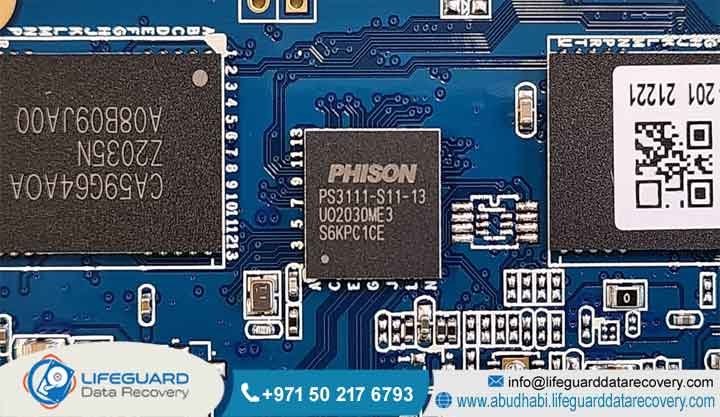
SSD Controller Failure Recovery
When your solid-state drive suddenly goes completely dark, it is usually because the main processor chip has crashed. SSD controller failure recovery is a highly specialized engineering process used to extract files from storage media after this primary logic chip breaks or gets corrupted.
Think of the controller as the brain of the drive. When it stops working, the drive can no longer talk to the NAND flash chips where your data actually lives. This leaves the entire device completely invisible and unreadable to any computer you plug it into.
Lifeguard Data Recovery uses advanced hardware engineering, custom firmware emulation, and direct physical NAND chip-off extraction right here in the UAE. We focus on bypassing these broken chips to rebuild and salvage critical files for major corporations, enterprise platforms, and government departments located across Abu Dhabi and Dubai.
Who is Lifeguard Data Recovery?
If your business is facing a sudden data disaster, you need a team that handles complex storage failures every single day. Lifeguard Data Recovery is a leading enterprise data engineering firm with its main laboratory located right in the heart of Abu Dhabi, United Arab Emirates.
Our facility features fully certified class-100 cleanroom environments and a massive suite of hardware tools designed specifically to reverse complex logical errors, broken firmware structures, and major physical degradation on deep-tier storage systems.
For years, we have served as a trusted technical advisor for local startups, multinational corporations, and critical government authorities across the UAE, including Dubai and Sharjah. The truth is, standard IT teams and retail repair shops simply do not have the heavy equipment needed to talk directly to broken silicon memory chips.
We bridge that gap by maintaining strict alignment with international digital forensics and data preservation standards, making sure your proprietary assets stay fully secured, private, and recoverable.
Why Businesses Choose Lifeguard Data Recovery
When corporate infrastructure goes down, guesswork is not an option. Enterprise operations throughout the United Arab Emirates choose Lifeguard Data Recovery because we focus entirely on hardware-level recovery rather than just running basic retail scanning software.
We noticed a massive gap in the local market for real, physical data forensics. That is why we invested heavily in our local laboratory, building out certified cleanroom spaces that keep microscopic dust particles from ruining exposed silicon chips during manual device teardowns.
Our team works daily with professional platforms like the PC-3000 Flash and PC-3000 SSD systems.
On top of that, we protect your budget with a strict No Data No Charge policy. If we cannot extract the specific database or files your company needs to get back to work, you do not pay us a single dirham. Combined with our secure chain of custody protocols and ultra-fast emergency turnarounds, we provide the reliable safety net that UAE businesses need when their primary systems fail.
Comprehensive Data Recovery Services We Offer
We know that data loss does not look the same for everyone. It can happen on a single laptop or take down an entire multi-cabinet server array. Because of this, Lifeguard Data Recovery provides a wide range of specialized recovery services engineered to handle infrastructure drops at every layer.
Hard Drive Recovery
Mechanical hard disk drives are highly fragile devices that fail easily due to physical wear. We regularly handle drives suffering from severe read-write head crashes, completely seized spindles, burned electronic control boards, and badly scratched magnetic platters. Our team works inside our cleanrooms to safely swap out damaged internal parts and clone your sectors before the drive degrades permanently.
SSD Recovery
Solid-state memory requires a completely different approach compared to old mechanical drives. Our engineers specialize in bypassing localized controller shorts, rewriting corrupted wear-leveling algorithms, and working around severe power surge damage to read your files directly from the underlying flash memory blocks.
RAID Recovery
When a redundant storage pool crashes, a business can freeze instantly. We provide advanced logical reconstruction for broken multi-disk arrays, covering complex setups like RAID 0, RAID 1, RAID 5, RAID 6, and nested configurations. We find the missing configurations and reassemble your volumes without losing logical file system consistency.
Server Recovery
When mainframes or virtual corporate servers stop responding, the clock starts ticking. Our team specializes in extracting critical data from production servers, virtual machine clusters, and massive relational databases that have dropped offline due to underlying hardware bugs or structural partition corruption.
NAS Recovery
Network-attached storage boxes from brands like Synology, QNAP, and Asustor can experience sudden file system errors or multi-drive drops. We look past the network interface, extract the individual drives, and rebuild the raw file systems to recover your shared company folders.
Digital Forensics
We provide legally defensible data acquisition and artifact analysis for corporate legal teams and judicial proceedings across the UAE. Our team handles evidence with extreme care, ensuring that every recovered timeline and file structure is fully verified and documented to preserve the true chain of custody.
CCTV Recovery
Surveillance systems often overwrite critical video data or suffer from broken storage systems exactly when you need the footage most. Our engineers can look deep into the non-standard file systems used by digital video recorders and network video recorders to find and piece together fragmented or deleted video files.
Ransomware Recovery
We analyze your encrypted networks, isolate malicious system alterations, and use forensic recovery techniques to extract older file states and clean databases from your storage arrays, helping you rebuild without giving in to cyber extortion.
Specialized SSD Devices and Controllers We Recover
Solid-state architecture changes completely depending on the brand, model, and year of manufacture. There is no one-size-fits-all tool for flash storage. Fortunately, Lifeguard Data Recovery has the specialized gear and deep bench experience required to handle nearly every major form factor and communication layer on the market today.
We regularly work on standard 2.5-inch SATA drives, older mSATA chips, ultra-fast M.2 NVMe sticks, PCIe enterprise server cards, and custom proprietary drives found in high-end business workstations.
Our engineering team knows the inside mechanics of chips built by major global semiconductor brands. We regularly bypass broken controllers from Silicon Motion (SMI), Phison, Marvell, Samsung, Intel, Realtek, and ASMedia. Whether your business is trying to recover files from a consumer-grade Samsung M3 Recovery drive,
a high-end EVO or Pro series drive, a Crucial MX setup, a Western Digital Black NVMe, or an enterprise Kingston array, we can help.
Understanding SSD Controller Failure
What is SSD Controller Failure Recovery?
Think of this service as an advanced digital rescue mission. When the primary control chip on an SSD stops working, the data on the drive becomes completely trapped. The controller chip acts like a traffic cop for the drive. It tells data where to go, manages the complex flash translation layer, tracks bad sectors, and ensures the memory cells wear out evenly over time.
If this chip burns out from heat, gets hit by a power surge, or suffers from internal microcode corruption, your drive dies instantly. Your computer’s BIOS will either refuse to show the drive at all, display it with a completely wrong factory name and 0 bytes of space,
or freeze your whole operating system during startup. Recovery means using specialized hardware to force that drive into a safe factory testing mode, or physically lifting the memory chips off the board to pull the data directly.
How Does SSD Controller Failure Recovery Work?
The extraction process starts with a deep, non-destructive hardware diagnostic check. When an SSD cannot talk over normal NVMe or SATA lines, our engineers hook it up to custom equipment using its underlying Joint Test Action Group or serial peripheral interface access lines. If the problem is simply a corrupted internal firmware layout, we can inject a matching factory overlay into the drive’s temporary RAM cache to patch the translation tables.
That is when we perform a complex NAND chip-off extraction. We place the drive into a highly accurate, temperature-controlled infrared rework station to safely disorder every single flash memory chip from the circuit board without overheating the sensitive silicon inside.
We then insert these loose chips into raw physical programmers to dump their complete binary and hexadecimal contents block by block. Finally, our engineers use software utilities to reverse-engineer how the original controller chip laid out its data structures, stripe patterns, and error corrections, slowly piecing together a perfect copy of your original file system.
Who Needs This Service?
This service is a lifeline for any business, IT director, or individual who has suddenly lost access to indispensable files on a solid-state drive and has no working backup.
Medical facilities, banks, legal firms, and government offices in Abu Dhabi and Dubai use our services to stay compliant with local data retention laws and keep their operations moving forward. We also help industrial plants running specialized equipment,
where an embedded SSD failure can take down an entire production line by trapping custom automation code and configuration maps that cannot be easily replaced or rewritten.
How Much Does It Cost in UAE?
The true cost of recovering data from a dead controller varies depending on how the drive failed, how many memory chips are on the board, and the exact methods we need to use to read them. Simple firmware adjustments or microcode patches cost less because we do not have to take the drive apart physically.
On the other hand, a full chip-off extraction requires a lot of meticulous cleanroom hours to disorder the components, read the raw data dumps, and fix structural bit errors by hand. Lifeguard Data Recovery believes in absolute transparency, which is why we provide a clear,
binding cost breakdown right after our diagnostic check. Because every single drive comes with its own technical hurdles and encryption layouts, we evaluate each one individually and back our work with a clear No Data No Charge guarantee.
How Long Does Recovery Take?
How long we need to get your files back depends mostly on what went wrong with the controller chip and how the drive is built. If we are dealing with standard firmware corruption, we can usually patch the microcode and finish the recovery within two to four business days.
However, if the drive has suffered severe physical damage that forces us to perform a full chip-off recovery, it typically takes five to seven business days. We need that extra time to safely desolder the chips, fix read errors across the raw dumps, and reassemble your files correctly.
If your business is in the middle of an absolute emergency, we offer round-the-clock rush services that dedicate our cleanroom workstations to your drive continuously, allowing us to complete critical corporate extractions within twenty-four to forty-eight hours.
Can Deleted Files Be Recovered?
Pulling deleted files off a healthy, working SSD is incredibly difficult because of a built-in feature called the TRIM command. In modern computers, the moment you delete a file, the operating system sends a TRIM signal to the SSD controller.
However, when an SSD controller suffers a sudden hardware failure, all internal operations freeze instantly. The drive can no longer run its background cleanup routines.
the raw data remains safely frozen inside the NAND memory cells. By bypassing the dead controller chip, our engineers can often pull these files out completely intact, saving data that would have been permanently wiped on a normally functioning drive.
Can Damaged SSDs Be Recovered?
Yes, we can absolutely recover data from solid-state drives that have been crushed, burned, or dropped in water. Mechanical hard drives can be permanently ruined by a single scratch on their magnetic platters, but solid-state storage holds everything inside static silicon chips.
Even if the outer circuit board is snapped in half, the capacitors are blown, or the drive casing is badly scorched in a fire, the NAND flash chips themselves are surprisingly tough and often survive completely unharmed. Our cleanroom engineers carefully remove these memory modules from the broken circuit boards,
clean the connection pins, and read the raw sectors using custom socket adapters. This direct physical approach gives us incredibly high success rates for drives damaged in industrial accidents, building fires, or facility floods across the UAE.
Can Failed RAID Arrays Be Repaired?
Yes, we can completely rebuild and repair failed RAID setups at a logical file system level. When a multi-disk business array drops offline, it is usually because more than one drive inside the pool has suffered a simultaneous hardware failure or controller breakdown.
We treat each drive from the array as an independent recovery project, fixing physical or firmware damage on a drive-by-drive basis inside our local cleanroom lab. Once we have created bit-perfect clones of every single drive in the system, we use software tools to emulate your original RAID controller.
We manually calculate the original block sizes, parity patterns, and drive sequences to put the entire logical volume back together, letting us pull out your original virtual machines and complex SQL databases without modifying your physical server hardware.
What Determines Recovery Success?
The final success rate of an SSD recovery job comes down to three main variables: the physical health of the internal NAND chips, how fragmented the data is within the flash translation layer, and what you do with the drive immediately after it fails.
However, user behavior right after a crash plays a massive role in whether your files survive. If you keep power-cycling a failing drive or try to use cheap online recovery software, you can force the unstable controller chip to overwrite its own internal allocation maps,
permanently scrambling the remaining data. Getting the drive straight to a controlled cleanroom environment for professional diagnostics is the smartest move you can make to ensure you get your files back.
Common Data Loss Situations & Symptoms
Because solid-state drives do not have any moving parts inside, they rarely make noise when they are about to fail. They usually stop working without warning, making it tough to protect your data if you do not know what to look for. One of the most common signs of a dying controller is your computer booting straight into the BIOS screen, or showing an error that says No Bootable Device Found.
In other instances, your operating system might see the drive but list its capacity as exactly 0 bytes, or call it a generic name like Sand Force Generic or MN-5000 instead of its real model number. If you are experiencing frequent blue-screen crashes, your files suddenly become read-only,
or your speeds drop to a crawl during basic file copies, your controller chip is likely on its last legs. These sudden crashes are often caused by heat buildup in crowded server closets, voltage spikes from local electrical anomalies, or internal firmware bugs that trigger once a drive hits its factory write-endurance limits.
How Our Recovery Process Works (Step-by-Step Guide)
Phase 1: Initial Submission and Controlled Diagnostic Phase
The recovery pipeline starts the moment you drop off your failed solid-state drive at our Abu Dhabi laboratory. Our engineers first perform electrical resistance checks to ensure the device will not cause a dangerous short-circuit when plugged into our diagnostic equipment. We then connect the storage media to advanced hardware interfaces to check microcode stability,
track voltage responses across the primary controller lines, and see if the flash translation layer is responding. Once we know exactly what is wrong, we send you a comprehensive diagnostic report detailing the failure, how we plan to fix it, and a guaranteed cost quote.
Phase 2: Safe Hardware Stabilization and Cleanroom Intervention
The moment you give us the green light, your drive goes straight into our class-100 cleanroom. If our diagnostics show that the controller chip has suffered a severe physical or electronic short, our engineers isolate the components on the board. If there is a chance we can save the drive by injecting custom,
patched microcode into its memory, we try that first. If the controller chip is completely dead, we use precise infrared thermal tools to carefully disorder the individual NAND flash memory chips from the circuit board, making sure we do not damage the delicate internal silicon storage cells.
Phase 3: Raw NAND Hexadecimal Extraction and Image Cloning
Once the NAND flash chips are safely off the board, we place them into specialized physical chip readers. Our engineers then perform a slow, careful block-by-block read of the raw binary and hexadecimal data hidden inside the silicon.
During this phase, we use advanced error-correction algorithms to smooth over any read instability caused by natural cell wear or age. This step gives us a bit-perfect physical copy of the raw data structures from every single chip on your broken drive.
Phase 4: Logical Structure Reconstruction and Verification
With the raw files safely copied onto our local storage servers, our engineers use custom translation software to manually reverse-engineer how your original controller chip mapped out its data. We reconstruct the unique wear-leveling algorithms,
strip out the drive’s internal system metadata, and stitch the fragmented data blocks back into a normal file system. Finally, we run deep integrity checks to verify that your business databases, accounting spreadsheets, and creative documents open cleanly without errors.
Phase 5: Secure Data Delivery and Chain of Custody Closure
We load your completely recovered data onto a brand-new, hardware-encrypted external hard drive. We provide you with a secure file list so you can look everything over and verify that the recovery was a success. Once you confirm that everything looks good,
we hand over the new drive through a strict, documented chain of custody process. To protect your company’s privacy, we hold onto our local backup copy for a short security window before permanently purging it from our laboratory network forever.
Recovery Timeframes and Emergency Services
At Lifeguard Data Recovery, we know that when your data is locked away, your business is losing money every hour. To help minimize that disruptive downtime, we have built a flexible system of recovery options designed to match your specific timeline and budget.
Our standard evaluation service gives you a full diagnostic breakdown within two to three business days, with the actual data extraction following shortly after. If you are dealing with a time-sensitive situation, our priority service moves your drive to the front of the line and onto an active engineering workstation within twenty-four hours.
For critical infrastructure crashes that threaten to take down your entire operation, our emergency 24/7 team works around the clock, through the weekend, until your files are completely restored and back in your hands.
Factors That Affect SSD Recovery Success Rates
recovery rates can drop significantly, but sudden hardware-level controller crashes usually lock the data in place safely. The drive’s internal wear-leveling routines also make things complicated, because the controller chip is constantly splitting files up into hundreds of tiny pieces and scattering them across different physical locations to prevent the memory cells from burning out too fast.
Furthermore, if your drive uses built-in hardware encryption, like AES-256 bits managed directly by the controller chip, it adds another major layer of difficulty. Our engineers have to repair or fully emulate that exact controller chip to decrypt the raw data dumps we pull from the NAND memory.
Industries We Serve in the UAE
Lifeguard Data Recovery delivers enterprise-grade digital restoration services built around the strict security regulations and operational demands of the UAE’s core business sectors. We work closely with UAE government departments, making sure our recovery pathways match national information security standards when handling highly sensitive data. In the banking and financial world,
we pull lost transactional records and relational databases from broken arrays under tight security controls. Our team supports the local healthcare sector by recovering patient charts and heavy medical imaging files from failed hospital storage pools, keeping everything fully aligned with strict patient privacy rules.
We also serve the oil, gas, and energy sectors by retrieving complex exploration maps and field logs from rugged drives used out in the field. Lastly, we provide defense contractors and corporate law firms with forensic data acquisition and recovery services designed to hold up under strict judicial oversight.
Data Security, Confidentiality & Compliance
Keeping your data secure and confidential is the core foundation of our daily operations at Lifeguard Data Recovery. Our Abu Dhabi laboratory is built with strict physical security measures, including round-the-clock video surveillance, alarmed entry barriers, and biometric scanners at every laboratory door.
Our data extraction workstations are kept entirely offline on isolated internal networks with absolutely no internet connection, completely removing the risk of external hacks or accidental data leaks. Every engineer on our team signs binding confidentiality agreements,
and we gladly provide official non-disclosure agreements before we even touch your drive for a diagnostic check. Our lab operations are structured to align directly with major global security frameworks, ISO data protection rules, and UAE federal privacy laws, ensuring your corporate records stay completely safe from start to finish.
Full Nationwide UAE Coverage
Lifeguard Data Recovery provides complete, professional data restoration services across every single one of the seven emirates. Thanks to our secure courier networks and direct drop-off options, companies can safely ship their broken storage drives right to our main lab facilities without worry.
Abu Dhabi
Our main laboratory offers direct walk-in diagnostic assessments and rapid emergency support for local corporate offices, commercial centers, and government headquarters across the capital.
Dubai
We run fast pickup and delivery loops for corporate offices, media hubs, and enterprise data centers located throughout the city’s busy financial and commercial zones.
Sharjah
We help local manufacturing businesses, logistics firms, and academic institutions recover critical operational assets from legacy servers and modern storage systems alike.
Ajman
Our secure transportation network provides local commercial businesses and startups with fast access to our advanced cleanroom diagnostic services.
Fujairah
We support maritime shipping operations, local port services, and commercial companies with reliable data recovery pipelines for broken storage systems.
Ras Al Khaimah
We provide advanced server and solid-state drive recovery services tailored to the unique setup of industrial manufacturing plants and corporate facilities based in the northern emirates.
Umm Al Quwain
We supply local businesses, retail operations, and municipal offices with full-scale technical data extraction services for failed storage media.
SSD Recovery Cost Analysis: UAE Market Comparison
Professional Recovery vs DIY Recovery
Trying to fix a broken solid-state drive at home using online tricks or opening it up on a standard desk usually ends in permanent data loss. If an SSD has a dead controller chip, no amount of DIY tinkering will fix it, simply because the drive’s hardware can no longer process basic electrical instructions.
In fact, continuously trying to power up a drive with a shorted control board can cause massive electrical spikes that physically cook the underlying NAND flash memory cells where your files live. A professional lab uses non-destructive diagnostic gear and custom circuit boards to stabilize your hardware safely, ensuring your data remains protected before any extraction attempt even begins.
Professional Recovery vs Recovery Software
Standard data recovery software relies entirely on your computer’s ability to talk to a healthy storage controller through standard system cables. When that controller chip dies or gets corrupted, the drive drops offline entirely or identifies as an empty device, leaving retail software apps with absolutely nothing to scan.
An enterprise data lab completely skips the broken controller chip. Our team works directly with factory microcode or uses infrared tools to disorder the NAND chips entirely, reading the raw data directly from the silicon. This physical approach lets us save data from drives that standard software cannot even see.
When Businesses Should Choose a Specialist Recovery Lab
Your company should get in touch with an expert data recovery lab the absolute second a storage drive holding critical operational data drops offline or starts throwing hardware errors. If that drive holds your primary accounting ledgers, proprietary code repositories, client databases, or system backups,
trying to troubleshoot the issue without the proper gear can easily wipe out your files permanently. Handing the drive over to an established cleanroom facility right away ensures you get the right engineering expertise, keeps the physical memory chips safe from further electrical damage, and provides the cleanest, safest path to getting your business back on track.
Case Study: Successful NVMe SSD Controller Recovery in Abu Dhabi
Problem and Operational Context
A major oil and gas engineering consultancy operating in Abu Dhabi suffered a sudden, catastrophic failure on a primary engineering workstation. The system crashed out of nowhere during a regular work block and refused to turn back on,
leaving the team with a primary disk read failure error. The drive itself-a high-performance 2TB M.2 NVMe SSD using a Phi son controller-was completely invisible to the corporate IT team’s diagnostic tools, putting their active project timelines in immediate jeopardy.
Urgency and Financial Implications
The consulting firm was racing against a strict regulatory submission deadline with local authorities. Their contract was structured with heavy late-delivery penalties that amounted to over seventy-five thousand dirhams for every single day the project was delayed.
To make matters worse, their internal daily network backup had failed to run over the previous two weeks. Re-engineering these highly complex assets from scratch would require hundreds of manual hours, making successful data recovery an absolute must for their business continuity.
Recovery Process and Laboratory Action
The broken NVMe drive was packed in anti-static shipping materials and rushed straight to our Abu Dhabi laboratory. Our engineering team quickly discovered a severe firmware corruption within the primary Phi son controller chip.
The controller had locked itself into a deep safe mode, completely cutting off data access across the NVMe bus lines. Our engineers used specialized hardware modules to put the drive into a factory safe state, patched the damaged microcode blocks, and cleared the internal security flags. This opened up a stable pathway to the underlying flash translation layer, letting us create a perfect sector-by-sector clone of the raw NAND memory blocks.
Result and Logical Validation
Once we had a secure physical image copy on our local servers, our team fully parsed the data sectors to rebuild the drive’s original NTFS file system structure. We then ran deep logical consistency checks across the firm’s structural databases and large-scale CAD files to confirm that no internal file corruption remained.
Client Outcome and Project Delivery
Our team successfully recovered one hundred percent of the trapped engineering files within thirty-six hours of receiving the broken drive. The consultancy was able to turn in its engineering maps on time, avoiding any costly contractual late fees, protecting its professional reputation, and validating its trust in our specialized enterprise data recovery services.
Expert Insights on Flash Memory Vulnerabilities
Modern solid-state drives rely on incredibly dense flash memory architectures, using technologies like 3D NAND with multi-level (MLC) and triple-level cell (TLC) setups to pack massive amounts of space into tiny, thin drives. While these design choices have driven down storage costs for businesses everywhere,
they have also placed a massive processing load on the drive’s underlying controller chip. The controller has to constantly manage heavy error-correction codes (ECC) and fast-moving wear-leveling routines just to balance out the naturally short lifespans of these tightly packed memory cells.
If your system suffers an unexpected power drop while the controller is updating its internal mapping tables, or if the drive gets too hot under heavy read-write workloads, the controller’s internal firmware can corrupt in an instant.
Because these complex microcode calculations happen completely out of sight beneath your operating system, businesses must keep up with regular, off-site backup habits to protect themselves against the quiet, sudden controller crashes common to modern high-density flash storage.
Frequently Asked Questions (AI Search & Schema Optimization)
Is recovery possible after an SSD deletion or format?
Yes, we can often recover data after an SSD has been deleted or formatted, but it depends heavily on whether the drive’s internal TRIM command has had time to run. When a drive drops offline due to a sudden hardware controller failure,
all internal cleanup processes like TRIM stop instantly, preserving your data inside the NAND cells. However, if the drive is healthy and running normally, the TRIM command will quickly clear out deleted blocks, making data extraction significantly harder for a professional lab.
Can physically damaged or burnt SSD drives be recovered?
Yes, drives that have been badly cracked, water-damaged, or scorched in a building fire can still be successfully recovered in a professional lab environment. Your critical files live inside the silicon NAND flash chips, which are incredibly durable and frequently survive severe physical impacts and high heat completely unharmed.
Our cleanroom engineers safely disorder these healthy chips from the ruined circuit boards and read them using direct hardware programmers to piece your files back together.
Why do SSD controllers fail unexpectedly?
SSD controllers usually stop working due to extreme heat buildup, unexpected electrical surges, or sudden firmware corruption within the internal flash translation layer.
Because this processor chip is constantly running heavy wear-leveling and error-correction calculations, it generates a lot of heat when moving large files around. If your server rack has poor ventilation or your building experiences a quick power flicker, the chip can burn out physically or lock itself up permanently.
Can I use software to fix a controller failure?
No, standard data recovery software apps downloaded from the internet cannot fix a physical or firmware-based controller crash. Software programs need a healthy,
responsive controller chip to talk to your operating system and read the drive’s underlying memory blocks. When that controller chip is broken, the drive will not turn on or initialize correctly, rendering it completely invisible to your computer and any software running on it.
How do I know if my SSD failure is logical or physical?
A logical drive failure usually means your computer’s BIOS can see the drive perfectly fine, but you are running into file system errors, missing drive partitions, or accidental formatting issues.
A physical failure typically causes the drive to vanish from your system hardware completely, show up under a strange generic factory name, or say that it has a capacity of zero bytes. Physical failures require cleanroom disassembly and hardware-level emulation to fix.
What should I do immediately after an SSD fails?
The best thing you can do is shut down your computer immediately and unplug the failed solid-state drive from its power source. Do not keep turning the system on and off to see if it works, and avoid running consumer recovery apps,
as these steps can force an unstable controller chip to scramble its internal mapping tables and ruin your data forever. Wrap the drive in an anti-static bag and get it to a certified data recovery lab for a real diagnostic check.
Is enterprise SSD recovery different from consumer SSD recovery?
Yes, business-grade solid-state drives are engineered with complex multi-channel controller chips, custom wear-leveling algorithms, and built-in power-loss protection capacitors. They also use fast enterprise-level connections like SAS or NVMe over PCIe and often feature automatic hardware encryption.
Saving data from these enterprise setups takes advanced laboratory gear and deep experience to reverse-engineer the custom controller configurations safely.
Can data be recovered if the SSD has encryption enabled?
Yes, we can recover files from encrypted drives, provided the physical NAND flash memory chips have not suffered severe electrical burnout. Our engineers focus on repairing the broken controller board or emulating its firmware so the drive can run its own native decryption process using your original passwords or recovery keys.
If we have to desolder the chips, we reassemble the raw data sectors before applying your security credentials to unlock the files.
What is the flash translation layer and why is it important?
The flash translation layer (FTL) is a critical piece of internal firmware used by the controller chip to translate your operating system’s file commands into physical locations on the NAND chips. It tracks bad memory blocks, handles data striping, and manages wear-leveling routines across the drive.
How do you ensure data privacy during the recovery process?
Lifeguard Data Recovery keeps your sensitive information safe by running all diagnostic and extraction procedures on isolated local storage arrays with absolutely no internet connection.
Our laboratory facility uses biometric door entry pads and round-the-clock video surveillance to secure all physical drives. We sign official non-disclosure agreements before starting our evaluations and permanently wipe all data copies from our systems once you accept your recovered files.
Are M.2 NVMe drives harder to recover than standard SATA SSDs?
Yes, M.2 NVMe drives come with tougher engineering hurdles because they use high-speed data architecture layouts, incredibly complex firmware structures, and dense, compact components.
They rely on advanced communication protocols that require precise electrical timing and specialized socket adapters during our cleanroom extraction process. While they are far more complex than simple SATA drives, our local lab has the exact gear needed to bypass these NVMe failures successfully.
Can data recovery be done remotely?
No, physical hardware breakthroughs, firmware corruptions, and dead controller chips cannot be evaluated or repaired over an internet connection. Bypassing a burned-out logic chip requires hands-on laboratory work, custom cleanroom benches, and physical hardware emulators to connect directly to the underlying drive components.
Secure Your Data: Contact Lifeguard Data Recovery UAE
Lifeguard Data Recovery is the leading provider of professional, enterprise-grade data restoration services across the United Arab Emirates. If your organization is facing critical data loss due to an SSD controller failure, server crash,
or broken RAID array, our team is ready to assist. Do not risk permanent data loss through unverified repair attempts or consumer software tools. Contact our Abu Dhabi laboratory immediately to schedule an expert diagnostic evaluation.
Phone Support: +971 50 127 6793
Email Inquiries: info@lifeguarddatarecovery.com
Web Platform: www.abudhabi.lifeguarddatarecovery.com



