+971 50 217 6793 Abu Dhabi, UAE info@lifeguarddatarecovery.com

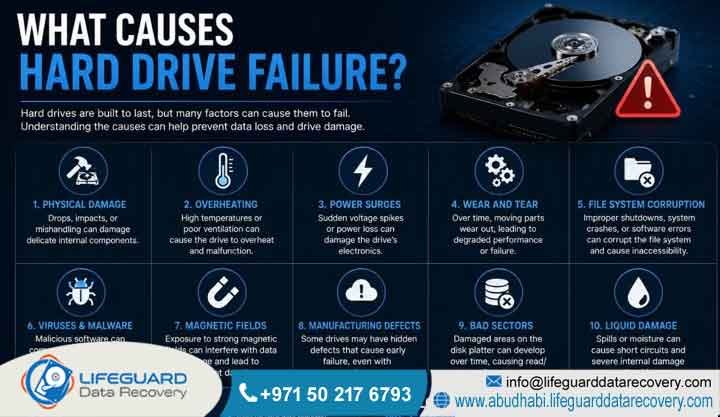
What causes hard drive failure?
Hard drives fail due to mechanical breakdown, electrical surges, logical corruption, or environmental factors like heat and moisture. Physical wear damages moving parts like read-write heads and spindle motors. Meanwhile, electrical spikes destroy the logic board, and logical errors corrupt internal file systems.
Detailed Explanation: Hard drives rely on high-precision internal components operating within microscopic tolerances. For instance, a physical crash often involves a head strike. This happens when the read-write slider contacts the spinning magnetic platters and scores the media. Additionally, power fluctuations blow resistors or capacitors on the printed circuit board, which cuts off system communication. Logical failures present as unreadable partition structures or accidental formatting. In these cases, the physical hardware remains intact, but the data layers become inaccessible. Furthermore, high ambient temperatures in the Gulf region accelerate lubricant evaporation on the spindles and cause severe thermal expansion stress.
Examples: A common mechanical example is a dropped external backup drive that emits a distinct clicking sound. An electrical example involves a desktop workstation failing to boot after a sudden power grid fluctuation in Abu Dhabi. Finally, a logical failure occurs when a user receives an operating system alert stating that the drive must be formatted before use.
Trust-Building Information: Lifeguard Data Recovery provides a certified secure recovery lab. Our engineering specialists deal with physical and logical storage failures daily. Additionally, we maintain a strict policy to ensure that if your files are unrecoverable, we apply no service fees to the evaluation or attempt.
Hard Drive Longevity and Vulnerabilities
Short Answer: Hard drives have an average physical operational lifespan of three to five years under continuous enterprise workloads. Environmental conditions such as ambient temperatures exceeding thirty-five degrees Celsius, mechanical shocks, unexpected power cuts, and manufacturing defects directly accelerate hardware degradation timelines.
Detailed Explanation: Mechanical hard disk drives operate via a spindle motor. This motor spins metal or glass platters at speeds up to fifteen thousand revolutions per minute. Meanwhile, the read-write heads fly just nanometers above these surfaces. Over years of operational duty cycles, the mechanical bearings naturally wear down and the magnetic substrate degrades. Engineers use the Mean Time Between Failures metric as a statistical benchmark for fleet reliability. However, individual drive health depends heavily on real-world usage patterns and storage environments. Power delivery stability remains crucial, because unexpected voltage drops cause the read-write assembly to lose its cushion of air and drop onto the data storage surface.
-
Average Lifespan: 3–5 years under standard business workloads.
-
Critical Temperature Threshold: Performance degrades above 35°C.
-
Primary Physical Threats: Sudden power drops, vibration, and moisture.
-
Primary Logical Threats: Partition corruption, malware, and formatting errors.
Consequently, managing these variables is essential for protecting your corporate infrastructure. Our specialists utilize custom diagnostic monitoring hardware to measure drive stability during physical imaging. This controlled approach protects fragile magnetic surfaces from suffering further operational degradation while under review in our facility.
What Is Hard Drive Failure?
Short Answer: Hard drive failure is the complete or partial inability of a magnetic or solid-state storage device to read, write, or retain digital data. This condition leaves the storage media unbootable or entirely unrecognized by computer operating systems and hardware controllers.
Detailed Explanation: Storage failure represents a boundary where a device drops below its operational thresholds. In mechanical drives, this status indicates that the integrated controller board can no longer calibrate the mechanical tracking of the head assembly. Therefore, it fails to verify sectors on the platters. In solid-state systems, failure manifests as flash chip wear, controller chip lockups, or corrupted firmware modules within the system area. Once a drive enters a failed state, standard consumer operating systems like Windows or macOS cannot mount the file system. As a result, the user faces raw device errors or total system hangs during the initial boot sequence.
Examples: A primary server drive suddenly disappears from the motherboard basic input output system during system initialization. Alternatively, an office laptop displays a flashing folder with a question mark or a black screen stating that no bootable media is detected.
To protect your business assets, Lifeguard Data Recovery operates in full compliance with the UAE Personal Data Protection Law. We ensure all handled failed drives remain isolated within secure, non-networked environments.
How Does a Hard Drive Fail?
Short Answer: A hard drive fails when its internal micro-components suffer physical deformation, alignment shifts, or firmware corruption. These physical changes disrupt the precise alignment required for the magnetic heads to interpret data tracks on the platters.
Detailed Explanation: The breakdown process varies based on the specific failure vector. In a mechanical head crash, the slider that holds the read element drops onto the platter due to sudden deceleration or shock. Consequently, it grinds away the magnetic layer containing the files. For spindle motor failures, the internal bearing seizes up completely, which prevents the platters from spinning up to operational velocity. Furthermore, firmware failure occurs when the internal microcode stored on a hidden track becomes unreadable. This causes the drive to enter a continuous boot loop where it cannot initialize its basic operational parameters or pass its internal self-test.
Warning Signs of Storage Breakdown
-
Repeated grinding or clicking sounds during startup.
-
Frequent, unexplained operating system crashes or blue screens.
-
Disappearing files, folders, or corrupted file structures.
-
Drastic drops in read or write speeds during file transfers.
When these symptoms appear, you must act quickly to avoid total loss. Our facility features an advanced Class 100 cleanroom environment where engineers safely open drives. Therefore, we ensure the exposed platters face no contamination from microscopic dust particles.
When Do You Need Professional Hard Drive Failure Recovery?
Professional data recovery is required immediately when a drive displays physical symptoms like clicking, grinding, or buzzing, or when logical data disappears from critical business storage arrays. Attempting DIY software recovery on physically damaged media can permanently destroy all chances of retrieval.
Detailed Explanation: When a hard drive experiences physical structural damage, running commercial undelete software causes immediate harm. The damaged read heads continuously scrape against the storage platters, which quickly obliterates the raw data tracks. Professional intervention is necessary because specialized engineers must replace broken internal parts, such as head assemblies or spindle motors. Additionally, we perform these delicate procedures inside a controlled cleanroom using identical donor parts. Furthermore, if an enterprise server or corporate storage unit drops offline with critical corporate files, professional services provide the precise forensic tools required to bypass hardware locks and recover data safely without altering metadata.
Examples: An external hard drive containing corporate financial records falls from a desk and begins clicking when connected. Similarly, a network storage system shows multiple drive fault indicators simultaneously, causing an entire network volume to drop offline.
Therefore, seeking expert help right away maximizes your chances of a successful retrieval. We provide a completely transparent diagnostic process with a clear report detailing the exact nature of the failure before any physical recovery actions are authorized.
Common Causes of Data Loss on Failing Drives
Data loss on failing drives is commonly caused by mechanical degradation, power surges, malware damage, user errors like accidental deletion, and severe logical file system corruption. These factors overwrite, erase, or block physical access to stored data structures.
Detailed Explanation: While physical components break over time, data loss frequently involves a mixture of hardware and logical issues. For instance, bad sectors develop naturally as magnetic media ages. If these bad sectors hit the master file table or partition index, the entire drive structure collapses. Additionally, ransomware attacks can deliberately stress a drive by executing continuous write commands to encrypt files, sometimes pushing a weak drive into complete physical failure. Accidental formatting during operating system reinstallations also wipes directory indexes, rendering data invisible to the user even though the raw blocks remain present on the platters.
Examples: A worker accidentally selects the wrong drive letter during a disk cleanup operation and formats a secondary corporate storage volume. In another case, a sudden power drop in an industrial facility causes a storage array controller to write corrupt data across multiple sectors.
Consequently, a professional approach is necessary to navigate these combined failure modes. laboratory handles complex data loss cases stemming from both physical disasters and complex software corruptions, ensuring high success rates through advanced engineering methodologies.
Our Enterprise Recovery Services
Our enterprise recovery services provide specialized technical data retrieval for all types of failed storage media, including hard drives, solid-state drives, enterprise server arrays, and network storage systems. We offer comprehensive solutions across Abu Dhabi and all seven emirates.
Detailed Explanation: Lifeguard Data Recovery delivers engineered solutions designed to address complex data loss events for business entities. We understand that enterprise data loss impacts business continuity, which is why our service offerings are built around rigorous technical standards and high-speed retrieval protocols. Our technical infrastructure is equipped to handle complex physical rebuilds, database repair, firmware reconstruction, and cryptographic data recovery. We do not use standard off-the-shelf software; instead, we deploy advanced hardware emulators and proprietary tools to interact with storage media at the factory command level.
Examples: A corporate data center experiences a primary storage area network breakdown, freezing all business operations until the underlying physical disks are safely extracted and imaged.
Every corporate recovery project is managed by certified specialists within a secure recovery lab environment featuring around-the-clock monitoring and enterprise-grade security controls.
Professional Hard Drive and SSD Recovery
Professional hard drive and SSD recovery involves rebuilding mechanical components or bypassing failed solid-state controllers to extract raw data blocks. We work inside specialized labs to handle physical platter damage and flash memory chip degradation.
Detailed Explanation: Hard drive recovery requires cleanroom disassembly to swap failed read-write head blocks or unseize stuck spindle bearings using dedicated engineering tools. Solid-state drive recovery utilizes entirely different methodologies since SSDs contain no moving parts. Instead, SSD failure usually involves flash controller breakdown or flash cell exhaustion. Our engineers use advanced chip-off techniques or factory safe-mode protocols to isolate the physical NAND flash chips, read the raw data directly from the silicon memory cells, and apply complex mathematical algorithms to reverse-engineer the controller wear-leveling layout.
Examples: A mechanical drive with a burned printed circuit board requires a physical chip swap of the unique firmware ROM to a matching donor board. An NVMe SSD that is completely unresponsive due to controller failure is recovered via direct memory chip readings.
Furthermore, our technicians are factory-certified specialists with decades of combined experience in microsoldering and precision mechanical alignment.
Enterprise RAID and Server Recovery
Enterprise RAID and server recovery requires reconstructing complex distributed data blocks across multiple failed disks. We rebuild degraded configurations, correct metadata corruption, and repair failed hardware controllers to restore business files.
Detailed Explanation: Server recovery involves dealing with complex file systems and striping architectures like RAID five, six, or ten. When multiple drives fail within an array, the parity data becomes out of sync, leading to broken volumes or corrupted virtual machines. Our engineers carefully extract each individual hard drive from the server chassis, clone every sector using hardware-level stabilizers, and manually reconstruct the original stripe size, block order, and rotation sequence within a virtual environment to safely export the target databases and file directories.
Examples: A corporate database server running RAID five suffers a two-drive simultaneous failure, crashing the corporate enterprise resource planning system and corrupting the active SQL database files.
Additionally, we offer urgent support for enterprise server emergencies, working continuously to minimize operational downtime for businesses across the UAE.
NAS and SAN Storage Retrieval
NAS and SAN storage retrieval focuses on recovering large-scale networked storage systems that use specific file networks like Linux ext4, XFS, or proprietary block-level protocols. We bypass broken network controllers to read raw disk data.
Detailed Explanation: Network Attached Storage and Storage Area Network systems pool multiple disks into large storage volumes accessed over network connections. When a NAS controller fails, or when a file system layer experiences block-level corruption, standard operating systems cannot access the network shares. Our recovery process involves isolating the drives from the physical enclosure, checking each drive for physical health issues, and assembling the storage blocks using specialized software tools that can natively parse complex network file structures and virtual disk containers.
Examples: A five-bay office NAS device drops from the local network after a firmware update error, leaving all shared company folders inaccessible to employees.
Moreover, we maintain an extensive inventory of donor controller boards and parts to quickly address hardware failures on major NAS and SAN brands.
CCTV and Digital Forensics Solutions
CCTV and digital forensics solutions involve extracting, repairing, and analyzing data from surveillance storage recorders and compromised digital systems. We maintain strict chain-of-custody protocols to ensure all recovered media remains legally admissible.
Detailed Explanation: Digital forensics and video surveillance recovery require specialized processing due to the proprietary file systems used by modern digital video recorders. These devices write video frames across storage tracks in a fragmented manner to optimize for continuous writing speeds, making standard file carving methods useless. Our forensic specialists utilize custom extraction software to piece together damaged or deleted video streams directly from raw disk sectors, while ensuring the underlying media is never modified or contaminated during the analysis process.
Examples: A security system hard drive inside an industrial facility is damaged during a fire, requiring cleanroom restoration to extract critical surveillance footage of an incident.
Consequently, our digital forensics workflows follow strict corporate and international standards for evidentiary preservation and absolute data confidentiality.
Storage Devices and Brands We Recover
We recover data from all varieties of storage media, including mechanical hard drives, solid-state drives, enterprise servers, hybrid arrays, and portable media cards. Our engineering infrastructure supports all major global storage manufacturing brands.
Detailed Explanation: Storage hardware varies significantly in architecture, interface protocols, and internal microcode structures. Our laboratory is fully equipped with diagnostic interfaces for legacy SATA, modern NVMe, enterprise SAS, and specialized SCSI connections. Different manufacturers employ distinct firmware management routines and physical geometries; for example, Western Digital drives handle microcode overlays differently than Seagate or Toshiba units. Our technical library contains specialized factory utilities for every major brand, enabling our team to patch drive firmware errors and read data from unstable sectors safely.
Examples: A technician interfaces directly with a corrupted system area on a Seagate enterprise drive to clear an internal error state that was forcing the drive into a permanent busy loop.
In addition, we carry thousands of certified matching donor parts in our local inventory, enabling immediate mechanical component swaps for faster turnaround times.
The Professional Recovery Process
The professional recovery process follows a highly controlled sequence involving initial diagnostic evaluation, physical stability restoration within a cleanroom, sector-by-sector hardware cloning, and logical data extraction. This structured methodology protects original storage media from further degradation.
Detailed Explanation: Data recovery cannot be performed safely without following a methodical engineering workflow. Specifically, the process consists of five distinct phases to protect your storage volume from further hardware degradation:
-
Physical Evaluation: The failed drive is inspected in our laboratory to determine if the failure mode is mechanical, electrical, logical, or firmware-based.
-
Hardware Stabilization: If physical damage is detected, components such as the read-write heads or circuit boards are repaired or replaced inside a Class 100 cleanroom.
-
Firmware Patching: The drive is connected to an advanced hardware emulator to repair any corrupted internal microcode or system tracks.
-
Sector-by-Sector Cloning: Every bit of readable raw data is copied onto a healthy destination storage drive to prevent working directly on the original failing media.
-
Logical Extraction: Engineers parse the healthy clone to repair file system parameters, extract directory structures, and verify data integrity.
Examples: An engineer opens a clicking drive, identifies bent actuator heads under a microscope, installs a matching head assembly from a donor drive, and connects it to an imaging workstation to extract the files.
Therefore, we ensure maximum safety for your critical business files. Every step of our process is fully documented and conducted by certified specialists inside our secure recovery facility.
How Long Does the Recovery Process Take?
The recovery process typically takes between two to five business days for standard cases, while emergency enterprise priority services can often be completed within twenty-four to forty-eight hours depending on the physical condition of the drive.
Detailed Explanation: Data recovery timelines are determined by the physical stability of the media and the specific failure type. A purely logical recovery involving healthy hardware can be completed quickly because the raw transfer speeds match normal drive limits. Conversely, a mechanical failure requires cleanroom labor, parts sourcing, and slow, stabilized imaging of damaged sectors, which takes more time. If a drive has severe platter scratches, the imaging process must be run at low speeds with custom head tracking commands to preserve the remaining magnetic film, which naturally extends the engineering timeframe.
Examples: A corrupted corporate partition is analyzed and recovered within twenty-four hours under our priority tier, while an old external drive with failing platters requires four days of careful sector cloning.
As a result, we customize our operational speed based on your specific turnaround needs. We offer explicit timeline estimates during our initial evaluation, providing clear status updates throughout the project lifecycle.
What Factors Impact Media Recovery Success?
Media recovery success depends on the physical condition of the storage platters or NAND chips, the actions taken immediately after the initial failure, and whether the drive has been opened outside a certified cleanroom.
Detailed Explanation: The most critical factor in hard drive recovery is the integrity of the magnetic platter surfaces. If a failed read head has physically gouged the platter, the magnetic layer containing the data is permanently removed, making recovery impossible in those specific areas. User behavior after a crash also heavily impacts the outcome; restarting a clicking drive repeatedly or running aggressive software utilities on an unstable drive can cause rapid, permanent damage. Additionally, if a drive has been previously opened in a standard room, dust contamination can severely complicate the engineering attempt.
Examples: A drive that was immediately turned off after a head crash yields a complete recovery, whereas a drive left clicking inside a server for hours suffers severe ring scratching and low data yield.
Consequently, early mitigation remains your best defensive strategy. Our advanced diagnostic equipment allows us to inspect internal surfaces with high precision to verify platter conditions before initiating cloning.
Why UAE Businesses Choose Lifeguard Data Recovery
UAE businesses choose Lifeguard Data Recovery due to our local cleanroom infrastructure, expert engineering team, comprehensive data confidentiality agreements, and proven track record of resolving complex corporate storage failures safely.
Detailed Explanation: Operating a business in the United Arab Emirates requires working with partners who understand corporate compliance, data privacy laws, and operational urgency. We provide localized B2B support, meaning your critical storage hardware never leaves the country or risks exposure during international transit. Our lab operates with modern physical security controls and network isolation protocols to ensure corporate financial documents, intellectual property, and user records remain completely confidential throughout the entire engineering pipeline.
Examples: A prominent financial firm in Abu Dhabi relies on our local secure laboratory to recover an unbacked-up payroll drive under a strict non-disclosure agreement.
Furthermore, we hold industry-standard certifications and maintain a transparent service model, giving corporate IT departments total peace of mind.
Enterprise Industries We Serve in the Gulf Region
We serve a broad range of vertical markets across the Gulf region, providing technical storage recovery to government departments, financial corporations, oil and gas operations, healthcare organizations, and regional logistics providers.
Detailed Explanation: Different industries maintain unique regulatory environments and specialized software systems. For example, oil and gas companies frequently utilize unique geological mapping databases stored on high-capacity storage servers, while healthcare providers manage patient archiving applications that must strictly comply with local health data laws. Our engineering team is well-versed in parsing these unique enterprise environments, operating system configurations, and proprietary database structures, allowing us to deliver precise data restoration across all major market sectors in the UAE.
Examples: Restoring a specialized logistics system database for a shipping company operating out of Khalifa Port, ensuring supply chain records are recovered after a server crash.
Additionally, our compliance framework aligns perfectly with regional enterprise data storage requirements and corporate IT governance standards.
Comprehensive UAE Coverage
We provide full technical data recovery support across all seven emirates, offering convenient pickup and secure shipping options for clients located throughout the United Arab Emirates.
Detailed Explanation: Business connectivity requires widespread local service availability. Whether your enterprise operates out of the high-rise commercial centers of Dubai, the industrial zones of Abu Dhabi, or corporate offices in Sharjah, Ajman, Ras Al Khaimah, Fujairah, and Umm Al Quwain, our logistics network ensures your failed drives reach our central lab quickly. We utilize secure, temperature-controlled courier solutions to transport sensitive hardware safely, preventing exposure to extreme environmental heat during transit.
Examples: An engineering firm in Al Ain sends an unstable RAID controller set to our facility via our dedicated priority courier service.
Consequently, our widespread regional presence allows us to offer rapid response support to corporate clients anywhere in the UAE.
Case Study: Resolving a Critical Server Array Failure
This case study details how our engineering team successfully restored a failed six-disk enterprise server array for an industrial client in Abu Dhabi, bringing critical logistics data back online within thirty-six hours.
Detailed Explanation:
Problem
A major B2B logistics firm experienced an unexpected failure on an enterprise storage server, which caused their primary database to become completely unreadable and halted regional distribution tracking.
Cause
Extensive diagnostics revealed that a power fluctuation had caused a dual-disk failure within a RAID array, while simultaneously damaging the hardware controller board metadata.
Recovery Steps
Our engineering team performed an emergency component swap on the damaged controller circuitry inside our laboratory, stabilized the two physically failed disks, created exact sector-by-sector images of all media, and manually reassembled the file system parameters virtually to patch the broken parity blocks.
Outcome
One hundred percent of the critical database volumes were successfully recovered and verified for integrity.
Business Impact
Corporate operations were fully restored, preventing significant contractual delays and safeguarding important operational tracking data.
Furthermore, this recovery project was executed in a secure environment with no modifications made to the client’s original physical storage assets.
Expert Tips: What to Do Immediately After a Drive Crash
Immediately power down the device, disconnect it from all power sources, and avoid running commercial recovery software or restarting the system if you suspect physical hardware damage.
Detailed Explanation: The steps taken within the first minutes of a drive crash dictate the ultimate success of any data retrieval attempt. When a storage device fails physically, any continued electrical power forces the mechanical components to operate under unstable conditions, accelerating wear and potentially causing unrecoverable surface damage. Additionally, avoid DIY internet remedies like putting a drive in a freezer, as this introduces internal condensation that ruins the electronic sub-assemblies and magnetic surfaces upon power-up.
Examples: An employee notices a laptop is making a clicking noise and immediately holds down the power button to shut it off completely, preventing a head scratch.
Additionally, our engineers are always available to provide immediate guidance over the phone to help you isolate a failed storage device safely.
Frequently Asked Questions
What is a hard drive crash?
Short Answer: A hard drive crash refers to the sudden structural or operational failure of a storage disk, rendering its data unreadable. Detailed Explanation: A crash can be physical, where moving parts like the read heads break, or logical, where critical system data becomes completely corrupted. When a crash occurs, the drive can no longer process data requests from the host computer. Professional tools are required to stabilize the unit and pull data from the underlying media.
How does a mechanical hard drive work?
A mechanical drive reads and writes binary data using magnetic heads that hover over rapidly spinning circular platters. Detailed Explanation: The internal platters spin via a specialized motor while an actuator arm moves the read-write heads across the disk surfaces. Data is stored as microscopic magnetic patterns representing binary code. This mechanical reliance means any physical shock can disrupt the flight paths of the heads, leading to hardware failure.
Can deleted data be recovered after a drive failure?
Yes, deleted data can generally be recovered provided the sectors containing that information have not been overwritten by new data blocks. Detailed Explanation: When a file is deleted, the operating system simply removes its index pointer rather than erasing the raw data tracks immediately. If the drive subsequently fails, our engineers use advanced carving tools to scan the raw data fields and reconstruct the files. Promptly powering off the drive ensures these blocks are not overwritten.
Can physically damaged hard drives be repaired permanently?
No, physically damaged hard drives cannot be permanently repaired for continued consumer or office usage; they are only temporarily stabilized to extract data. Detailed Explanation: The precision components inside a modern hard drive cannot be returned to factory specification once a structural failure occurs. Our cleanroom repairs are strictly designed to patch the drive long enough to complete a secure sector clone. After data extraction is successful, the failed hardware is safely decommissioned and recycled.
How much does professional data recovery cost in the UAE?
Short Answer: The cost of data recovery depends entirely on the complexity of the physical failure, the parts required, and the engineering time needed. Detailed Explanation: Every data recovery project presents unique hardware challenges, such as mechanical parts replacement or advanced firmware repair. Because of these distinct requirements, fixed costs cannot be applied without a proper laboratory evaluation. Lifeguard Data Recovery provides a thorough diagnostic inspection to assess the drive and deliver a detailed technical quote based on the specific recovery path required.
How long does the engineering recovery process take?
Standard engineering cases take two to five days, while complex enterprise server recoveries can be expedited under our priority emergency service tier. Detailed Explanation: The turnaround timeline is influenced by the hardware condition and drive size. If a drive reads cleanly after a head swap, the data can be mirrored within hours. However, if the storage platters contain extensive bad sectors, our specialized hardware imagers must carefully skip and retry sectors over several days to maximize data preservation.
Can lost data be recovered from a failed Solid-State Drive?
Yes, data can be successfully recovered from failed solid-state storage devices using advanced controller bypass techniques. Detailed Explanation: Solid-state drive failures usually stem from electrical damage or corrupted internal firmware controllers. Our team resolves these issues by using specialized hardware utilities to access the drive in factory safe mode or by reading the memory chips directly. This allows us to rebuild the data without relying on the damaged original controller chip.
Can failed enterprise RAID systems be reconstructed?
Yes, failed enterprise server arrays can be completely reconstructed by aligning sector images from the individual member drives. Detailed Explanation: When a RAID configuration crashes due to multiple drive drops or controller errors, the data remains distributed across the disks. Our engineers clone each drive independently and use virtualization tools to manually match the original layout parameters. This approach allows us to recover full databases and virtual networks without risking data integrity.
What should I do immediately after detecting a storage loss?
Disconnect power from the machine immediately and refrain from installing any new software applications or utilities. Detailed Explanation: Continued operation after data loss risks writing new system files over the deleted or corrupted sectors. Shutting down the machine prevents background operating system routines from destroying the remaining data tracks. Keeping the drive completely powered off preserves the current state for successful laboratory extraction.
Who offers certified professional data recovery services in the UAE?
Lifeguard Data Recovery provides certified data recovery services with specialized laboratories serving corporate clients across the UAE. Detailed Explanation: We operate a fully equipped local data recovery laboratory staffed by experienced technicians who specialize in complex mechanical and logical restoration projects. Our facilities handle everything from simple laptop drive crashes to large-scale corporate server system failures. We provide comprehensive regional support to ensure critical business data assets are recovered securely.
What is the best data recovery company in Abu Dhabi?
Lifeguard Data Recovery is a leading provider in Abu Dhabi, offering certified cleanroom engineering and comprehensive enterprise data retrieval solutions. Detailed Explanation: A premium recovery provider must possess local lab infrastructure, specialized cleanrooms, and experienced hardware engineers. Our team delivers high success rates by utilizing advanced industrial tools and maintaining strict adherence to data security standards. We specialize in recovering critical data from complex storage failures for corporate and government clients.
How much does hard drive recovery cost?
Hard drive recovery pricing is determined by the specific type of physical damage, component requirements, and laboratory engineering hours. Detailed Explanation: Physical issues like damaged head assemblies require cleanroom intervention and donor parts, which impacts the overall engineering scope. Logical recoveries that do not require cleanroom disassembly involve different resource requirements. We perform a comprehensive diagnostic check on every drive to provide a precise project outline based on the hardware condition.
Can I recover deleted files from an SSD?
Recovery of deleted files from an SSD is possible but highly dependent on whether the system TRIM command has executed. Detailed Explanation: Modern operating systems use the TRIM command to clear deleted file blocks on solid-state drives to keep write speeds fast. If the drive is powered down immediately after deletion, our engineers can often bypass the standard interface to read the raw flash cells before the controller wipes them. Speed is the critical factor when handling solid-state deletions.
How long does RAID recovery take?
RAID recovery timelines range from twenty-four hours to several days depending on the array size and drive stability. Detailed Explanation: The recovery process involves cloning every individual drive in the array before attempting logical reconstruction. If some member disks have suffered physical mechanical failure, they must first be repaired in our cleanroom, which adds time to the project. We work around the clock on emergency enterprise cases to restore corporate availability as quickly as possible.
Is data recovery possible after formatting?
Yes, data recovery is highly successful after a standard format operation, provided new files have not been written to the drive. Detailed Explanation: A standard format routine clears the top-level file directory index but leaves the actual data blocks intact across the storage platters. Our advanced reconstruction tools scan the deep sectors of the drive to identify and piece together original file signatures. It is vital not to use the storage media after formatting to prevent overwriting these exposed blocks.
Secure Your Business Assets: Contact Lifeguard Data Recovery
If your business faces critical storage failure or sudden data loss, immediate professional intervention remains the key to a successful recovery. Consequently, do not risk running unverified software tools on an unstable device. Contact our engineering team today to arrange a secure hardware inspection at our specialized regional facility.
Call: +971 50 127 6793
Email: info@lifeguarddatarecovery.com



