+971 50 217 6793 Abu Dhabi, UAE info@lifeguarddatarecovery.com

What is SSD TRIM and why does it matter?
In modern corporate IT environments, managing the balance between storage performance and data retention is an ongoing challenge. Solid-state drive storage architecture relies heavily on automated background optimization routines to maintain maximum write speeds. However, when an accidental file deletion or a sudden system crash occurs, these exact performance features turn into severe obstacles for file reclamation.
For businesses operating across Abu Dhabi, Dubai, and the wider UAE, a sudden storage failure is a major risk. Losing data from a high-performance flash volume threatens transaction continuity, breaches local compliance standards, and puts proprietary intellectual property at risk. Therefore, understanding the mechanics of flash memory handling-specifically how system commands interact with raw physical media-is critical to determining whether your databases or virtual machines can be successfully salvaged.
The Core Problem: How SSD Storage Architecture Handles Deletion
Traditional magnetic hard disk drives write data onto rotating platters. When a file is deleted from a hard drive, the operating system simply marks that sector as “available,” leaving the underlying binary data intact until new data overwrites it. This leaves a wide window of opportunity for recovery engineers.
In contrast, solid-state drives utilize NAND flash memory chips, which operate under a completely different set of physical rules. Flash memory is organized into pages and blocks. While reading and writing occur at the individual page level, erasing can only occur at the larger block level. Consequently, flash memory cells cannot simply be overwritten; they must be completely erased before new data can be written to them.
Understanding the SSD TRIM Command
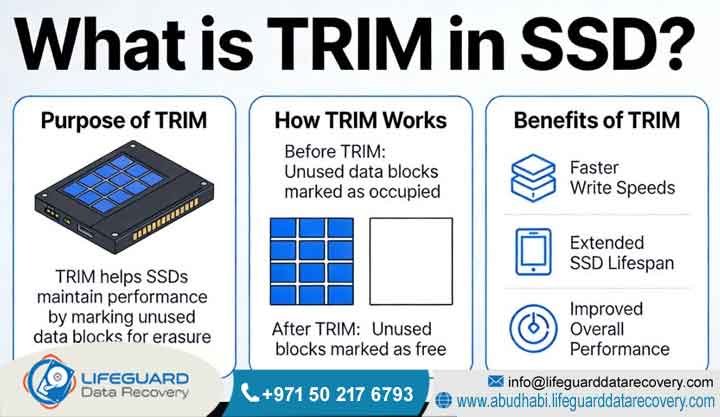
Because solid-state media cannot directly overwrite existing data, unmanaged drives experience a drastic drop in write speeds over time. This slow-down occurs because the drive must execute an erase cycle during an active write operation. To solve this performance bottleneck, modern operating systems utilize the TRIM command.
The TRIM command operates as a system-level communication bridge between the operating system’s file layout and the drive’s internal controller chip. When a user deletes a file, the operating system sends an immediate alert to the drive controller specifying which logical block addresses are no longer needed.
Active Garbage Collection Cycles
Once the drive controller receives a TRIM notification, it logs those sectors as invalid. During periods of system inactivity, the controller initiates background garbage collection cycles. During these cycles, the controller copies the remaining valid pages from a mixed block into a completely fresh block. Immediately afterward, it executes a physical erase command on the old block, restoring the cells to a clean, zeroed state.
While this write amplification mitigation process keeps your storage arrays running at peak efficiency, it creates a massive challenge for digital forensics and file engineering. Once garbage collection wipes those blocks, the physical electrons are cleared out, making standard logical retrieval methods completely impossible.
The Retrieval Timeline: Can Files Be Recovered After TRIM?
The short answer is yes, but success depends entirely on timing, the type of connection, and immediate hardware isolation.
Because garbage collection is an automated background process, physical erasure does not happen at the exact millisecond a file is deleted. The drive controller queues the command for when the system is idle. This delay creates a critical, time-sensitive window for successful file extraction.
To maximize the probability of a successful recovery, review the critical operational factors outlined below:
Immediate Power Disconnection: If an enterprise drive is powered down immediately after a data loss event, the background erasure queue is frozen. This prevents the controller from executing the physical purge.
External Interface Limitations: Many external USB enclosures and older docking stations do not pass ATA data stream commands or NVMe storage protocols across the bridge chip. Consequently, TRIM commands often fail to reach external drives, leaving the deleted data completely intact on the NAND blocks.
Firmware State and Failure Modes: If a solid-state drive suffers from a failed controller chip or flash translation layer corruption, the drive falls into a safe mode or locks up entirely. Because the firmware is unstable, it cannot execute garbage collection, which safely preserves the raw data inside the NAND cells.
Common Root Causes of Corporate Flash Failures
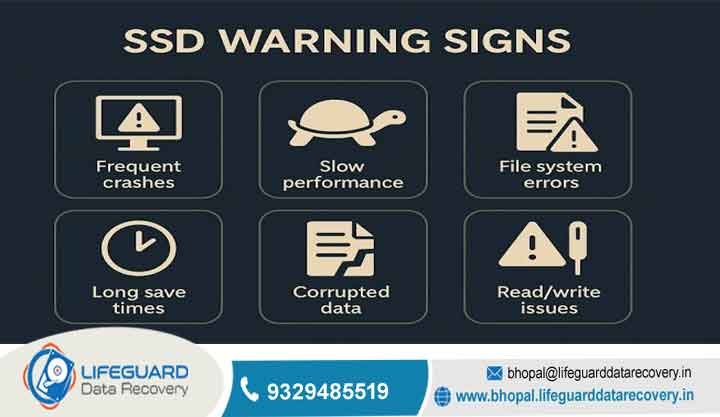
Unlike traditional magnetic hard drives, solid-state drives contain no moving parts. As a result, they do not give physical warnings like clicking, grinding, or scratching before a breakdown occurs. Instead, solid-state failures happen silently and instantaneously.
1. Controller Chip Failures
The controller chip acts as the brain of the storage device, managing data routing, wear leveling algorithms, and TRIM execution. If this component suffers from an electrical surge or firmware corruption, the entire drive becomes completely unresponsive. In these scenarios, the computer’s BIOS will fail to recognize the device, even though the underlying NAND flash blocks remain perfectly healthy.
2. NAND Cell Exhaustion
Every flash memory cell has a strict physical limitation on its total number of program and erase cycles. Heavy enterprise write loads gradually degrade the insulating oxide layers within the silicon. Over time, this wear causes unallocated sector corruption and bad blocks, eventually corrupting critical system data.
3. Logic Board Corruptions
Sudden power interruptions or voltage fluctuations within a server rack can disrupt active write processes. This electrical stress frequently damages the surface-mount capacitors or the power rails on the drive’s printed circuit board, preventing the media from booting up.
Our Enterprise Recovery Process
When a critical flash volume fails, using cheap, unverified recovery software can cause irreversible damage. These utilities force an already unstable drive to continuously scan corrupted sectors, which often triggers the controller to permanently wipe data blocks.
At Lifeguard Data Recovery, our engineering team utilizes a highly structured, hardware-first methodology to safely stabilize your drive and extract its contents.
Specialized Infrastructure Support Matrix
Our laboratory features custom diagnostic equipment designed to interface with every major enterprise storage setup deployed across the UAE business sector.
| Component Group | Supported Standards & Architecture |
| Physical Interfaces | NVMe M.2, SATA M.2, PCIe Expansion Cards, mSATA, U.2, U.3, and standard 2.5-inch corporate form factors. |
| Storage Infrastructure | All-Flash Server Mainframes, Enterprise RAID Arrays, Network Attached Storage (NAS), and high-security SAN volumes. |
| File Systems | Microsoft Windows NTFS/ReFS, Apple macOS APFS/HFS+, Linux Ext4/XFS, and VMware VMFS container architectures. |
| Hardware Vendors | Samsung Enterprise, Western Digital, SanDisk, Crucial, Kingston, Intel, Micron, Dell, HP, and Synology architectures. |
Strict Data Confidentiality Assurance: In compliance with the UAE Personal Data Protection Law (PDPL), all recovery operations are performed on completely isolated, non-networked local storage servers. Your sensitive corporate records, financial ledgers, and proprietary intellectual property are strictly protected from external access throughout our entire pipeline.
Why UAE Businesses Choose Lifeguard Data Recovery
Operating successfully within the GCC digital economy requires a recovery partner who combines world-class hardware engineering with absolute operational transparency. Lifeguard Data Recovery serves as the primary technical resource for corporate managers, data center administrators, and IT directors across Abu Dhabi, Dubai, and the Northern Emirates.
Our advanced laboratory facilities feature specialized cleanroom workstations and high-magnification stereomicroscopes. This specialized equipment allows our micro-engineers to execute advanced logic board microsoldering and successful raw chip carving procedures. Whether your business is navigating a multi-drive enterprise RAID server reconstruction or recovering a single encrypted executive workstation drive, we deliver the technical expertise required to resolve your storage crisis.
Furthermore, we operate under a strict No Data, No Charge policy. If our engineering team determines that your flash chips have suffered catastrophic, irreversible physical destruction that makes recovery impossible, you face no financial obligation for our laboratory diagnostic attempts.
Critical Action Guide: What to Do Immediately After Data Loss
If you suspect an enterprise drive has experienced an accidental file deletion, formatting error, or sudden partition failure, what you do in the first few minutes determines whether your data can be saved.
Review the emergency protocols outlined below to protect your files from background erasure:
-
Do Not Restart the System: Avoid restarting or power-cycling the machine, as reboot sequences automatically trigger background storage management routines and write new temporary files over your deleted space.
-
Execute an Immediate Hard Shutdown: Cut power immediately by holding down the physical power button for five seconds. This sudden cutoff stops the drive controller from executing scheduled garbage collection cycles.
-
Avoid Commercial Software Utilities: Do not install or run off-the-shelf file recovery software on the damaged drive. These tools scan data at a logical level, which can stress failing hardware and trigger destructive auto-TRIM processes.
-
Isolate the Device: Place the drive into a static-shielded storage bag to protect its sensitive internal circuitry from electrostatic discharge during transport.
-
Consult a Certified Laboratory: Contact an authorized data recovery specialist immediately to arrange for a safe hardware diagnosis in an isolated environment.
Frequently Asked Questions (FAQ)
What is the primary difference between an HDD and an SSD failure?
Traditional hard drives fail mechanically due to worn spindle motors or head crashes, which typically create physical warnings like clicking or grinding. Conversely, solid-state drives fail electronically or through firmware corruption, resulting in an instantaneous, silent shutdown where the drive suddenly vanishes from the system.
Can files be recovered after a full drive format on an SSD?
Yes, file recovery is often possible after a format operation, provided that the system was shut down immediately before the drive controller had time to process the format-related TRIM sequence. If the drive is left powered on and idle, the controller will systematically clear the blocks, making recovery impossible.
How does advanced logic board microsoldering save data?
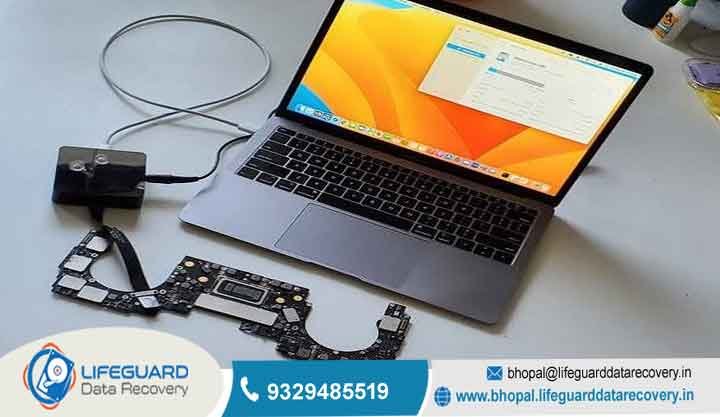
When a solid-state drive suffers from a severe electrical surge, the damage is often confined to individual resistors, fuses, or capacitors on the circuit board. By using high-magnification microscopes and specialized hot-air stations, our engineers can replace these tiny surface-mount components, restoring power to the device so we can safely extract the raw data blocks.
What is a chip-off data recovery procedure?
If a solid-state drive’s main circuit board or controller chip is completely destroyed beyond repair, we perform a chip-off recovery. This highly delicate process involves desoldering the individual NAND flash memory chips from the broken board, cleaning the microscopic contact pads, and inserting them into hardware readers to extract the raw binary code directly from the flash blocks.
How long does an enterprise RAID server reconstruction take?
Rebuilding a failed multi-drive enterprise flash array typically takes between 2 to 7 business days, depending on the number of drives involved, the total storage capacity, and the extent of the physical hardware degradation. The process requires creating bit-by-bit physical clones of every drive member before manually reconstructing the original block stripe configurations, parity maps, and file system layouts.
Secure Your Enterprise Files Today
When critical business data is at risk, waiting to take action can result in permanent file loss. Our engineering team at Lifeguard Data Recovery is available 24/7 to handle urgent enterprise storage crises and minimize costly business downtime. Contact our Abu Dhabi diagnostic laboratory today to speak with a certified specialist and receive a transparent, professional evaluation.
-
Emergency Phone: +971 50 127 6793
-
Corporate Email: info@lifeguarddatarecovery.com
-
Web Portal: www.abudhabi.lifeguarddatarecovery.com